# Overview
URL: https://docs.a-line.cloud/
> Run apps, databases and sites on your own Kubernetes clusters.
## Start here
From sign-up to a container image running on your own domain, one step a page.
Task by task: databases, storage, secrets, autoscaling, backups, static sites and more.
Organizations, environments, clusters, pools, projects and apps, and how they fit together.
Describe clusters and projects in YAML files kept in Git, checked and applied for you.
Automate every step with the v1 HTTP API and an API key.
Connect Claude, Cursor or VS Code and work with your projects from the chat.
Run GitHub Actions jobs on our runners, sized from what each job uses.
## Popular guides
- [Deploy an app from GitHub](/guides/deploy-from-github)
- [Add a custom domain](/guides/custom-domain)
- [Add a database and connect an app](/guides/managed-database)
- [Keep data with volumes and backups](/guides/volumes-and-backups)
- [Store secrets](/guides/secrets)
- [Deploy a static site](/guides/static-site)
- [Your first IaC project](/iac/first-project)
- [Connect Claude Code](/mcp/claude-code)
# Getting started
URL: https://docs.a-line.cloud/getting-started
> What A-Line.cloud is, and the steps from sign-up to an app running on your own domain.
## What A-Line.cloud is
A-Line.cloud runs your apps on Kubernetes clusters that belong to your
organization alone. You pick the provider, region and servers. A-Line.cloud
creates the cluster, keeps it running and gives you one console for
everything on it:
- **Apps** from a container image, a Git repository or a catalog template
such as PostgreSQL or Valkey.
- **Static sites** built from Git or uploaded as an archive.
- **Domains** with automatic HTTPS certificates.
- **Secrets**, **object storage**, **volumes** and **backups**.
- **GitHub Actions runners** that start on demand.
You never get `kubectl` access, and you do not need it. You work in the
console, through the [API](/api) or with files in Git
([infrastructure as code](/iac)).
Billing is prepaid: you add credit, and usage is taken from it as it happens.
See [Billing](/billing).
## Your first deploy
Follow these steps in order. Each page ends with a link to the next one.
1. [Sign up](/getting-started/sign-up): sign in, create your organization
and add credit.
2. [Create a cluster](/getting-started/create-cluster): the servers your apps
run on. This is the step where you wait: the servers take a few minutes
to start.
3. [Create a project](/getting-started/create-project): a project groups your
apps.
4. [Deploy an app](/getting-started/deploy-app): run a container image.
5. [Add a domain](/getting-started/add-domain): serve the app on your own
host name over HTTPS.
Once the cluster runs, steps 3 to 5 take about five minutes.
## Where to go next
- [Guides](/guides): task-by-task instructions, such as deploying from
GitHub or adding a database.
- [Concepts](/concepts): how organizations, clusters, projects and apps fit
together.
- [Your first IaC project](/iac/first-project): the same setup as files in
Git.
- [Your first API request](/api/first-request): script it.
# Sign up
URL: https://docs.a-line.cloud/getting-started/sign-up
> Sign in for the first time and create your organization.
## Sign in
Open the console and pick **GitHub** or **Google**. Your first sign-in with
either one creates your account.
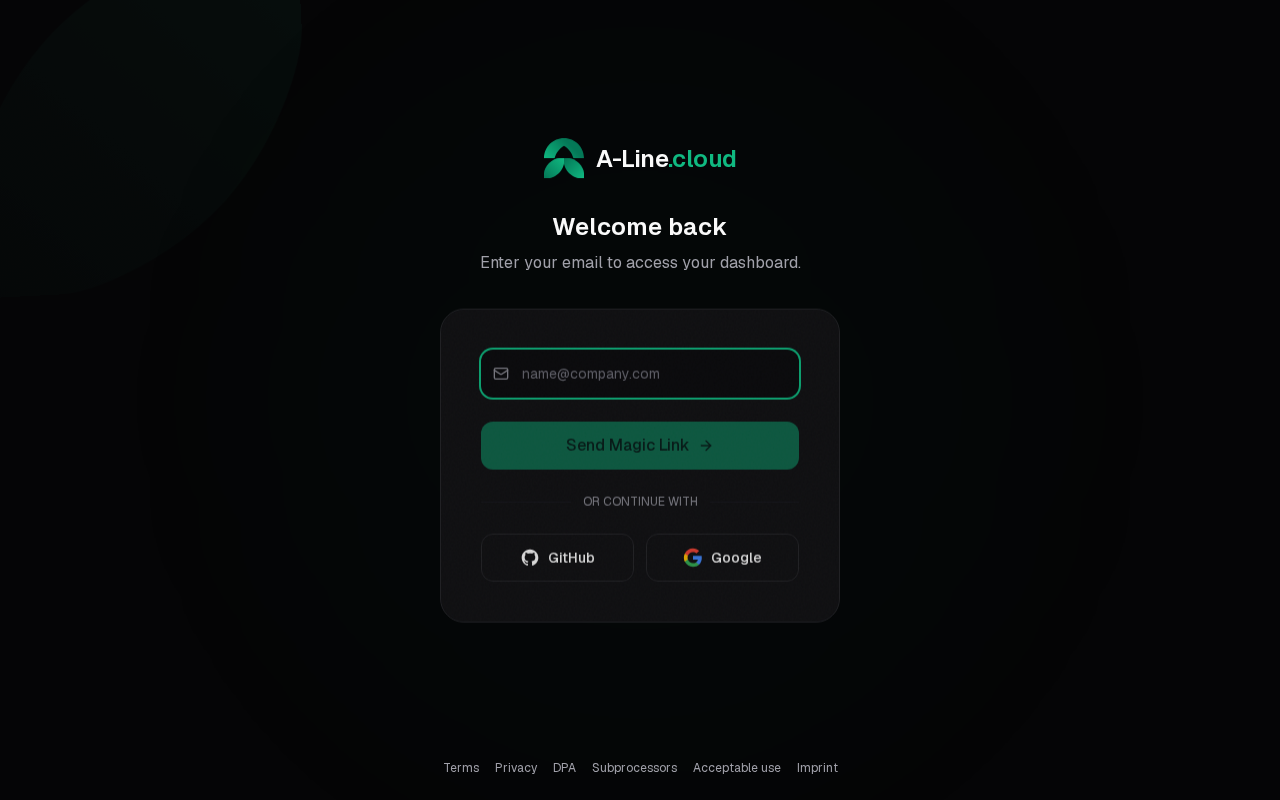
**Send Magic Link** emails a one-time sign-in link, but only to an existing
account. Use it once your account exists.
## Accept the terms and add your name
On your first sign-in you accept the terms of service and enter your name.
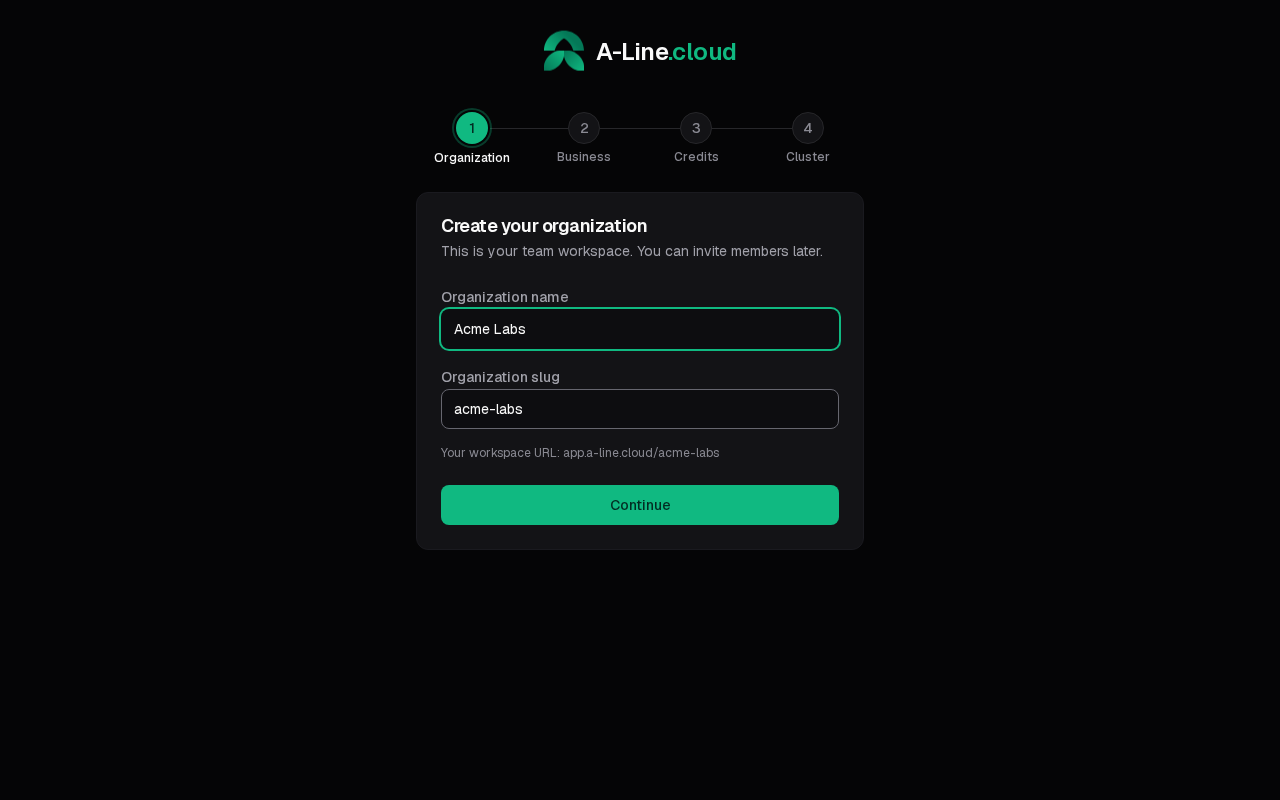
## Create your organization
Everything you run belongs to an [organization](/concepts/organizations).
Enter its name; the slug is filled in from the name and can be changed.
## Add business details and credit
The next two steps are **Business details** (for your invoices) and **Add
credits to get started**. Both are optional: select **Skip for now** to do
them later under [Billing](/billing).
You need credit before you can create a cluster, because servers are paid
from your balance. On the credit step, pick a **Credit amount**, and turn on
**Auto top-up** if you want the balance refilled when it runs low. See
[Top up credit](/billing/top-up).
The last step opens **Infrastructure**, where you create your first cluster.
Next: [create a cluster](/getting-started/create-cluster).
# Create a cluster
URL: https://docs.a-line.cloud/getting-started/create-cluster
> Create the cluster your projects and apps run on.
A [cluster](/concepts/clusters-and-pools) is a set of servers at one provider,
in one region. Your projects and apps run on it. You need credit on your
balance first: see [Sign up](/getting-started/sign-up#credit).
## Fill in the form
Open **Infrastructure** in the sidebar and select **Create Cluster** (or
**New Cluster** once you have one).
**Basics**
- **Cluster name**: for example `production`.
- **Environment**: the [environment](/concepts/organizations#environments)
the cluster belongs to. **New environment** creates one.
- **Provider** and **Region**: where the servers run, such as Hetzner in
`fsn1`.
**Node Pools**
The form starts with two pools of 3 servers each:
- `control-plane` (role **Control Plane**) runs Kubernetes itself.
- `workers` (role **Worker**) runs your apps.
Pick a **Server type** for each pool and change the **Node count** if you
want. For a first test, one control-plane server and one or two workers are
enough. A cluster needs at least one **Worker** or **Hybrid** pool.
**Load Balancers** (optional)
Add an external load balancer from the provider to receive traffic from the
internet. Inside the cluster, Traefik routes it to your apps. The form
recommends a type for your pools.
## Check the cost and create
The summary on the side shows what is **Due now** and what is billed after
that. Most server types are billed hourly. Some are rented for a fixed term,
and the summary then shows a **Commitment** with its term and total. See
[Billing](/billing).
A server type with a **Commitment** is charged for its whole term, even if
you remove the server earlier. For a first test, pick an hourly type.
Accept the provider's **Terms of Service**, then select **Create cluster**.
If your balance is too low, the summary says so, with a **Top up your
balance** link.
## Verify
The cluster appears on the **Infrastructure** canvas right away. Its state is
`provisioning` while the servers start and join, then `running`. This takes a
few minutes.
Next: [create a project](/getting-started/create-project).
To describe the cluster as a file instead, see
[Clusters and pools in IaC](/iac/clusters). For pools, autoscaling and
reserved servers, see the [dedicated clusters guide](/guides/dedicated-clusters).
# Create a project
URL: https://docs.a-line.cloud/getting-started/create-project
> Create the project that groups your apps.
A [project](/concepts/projects-and-apps) groups apps that belong together and
runs on a cluster, so [create a cluster](/getting-started/create-cluster)
first.
## Create the project
Open **Projects** in the sidebar. With no projects yet, the page shows
**Create your first project**; later, use **New Project**.
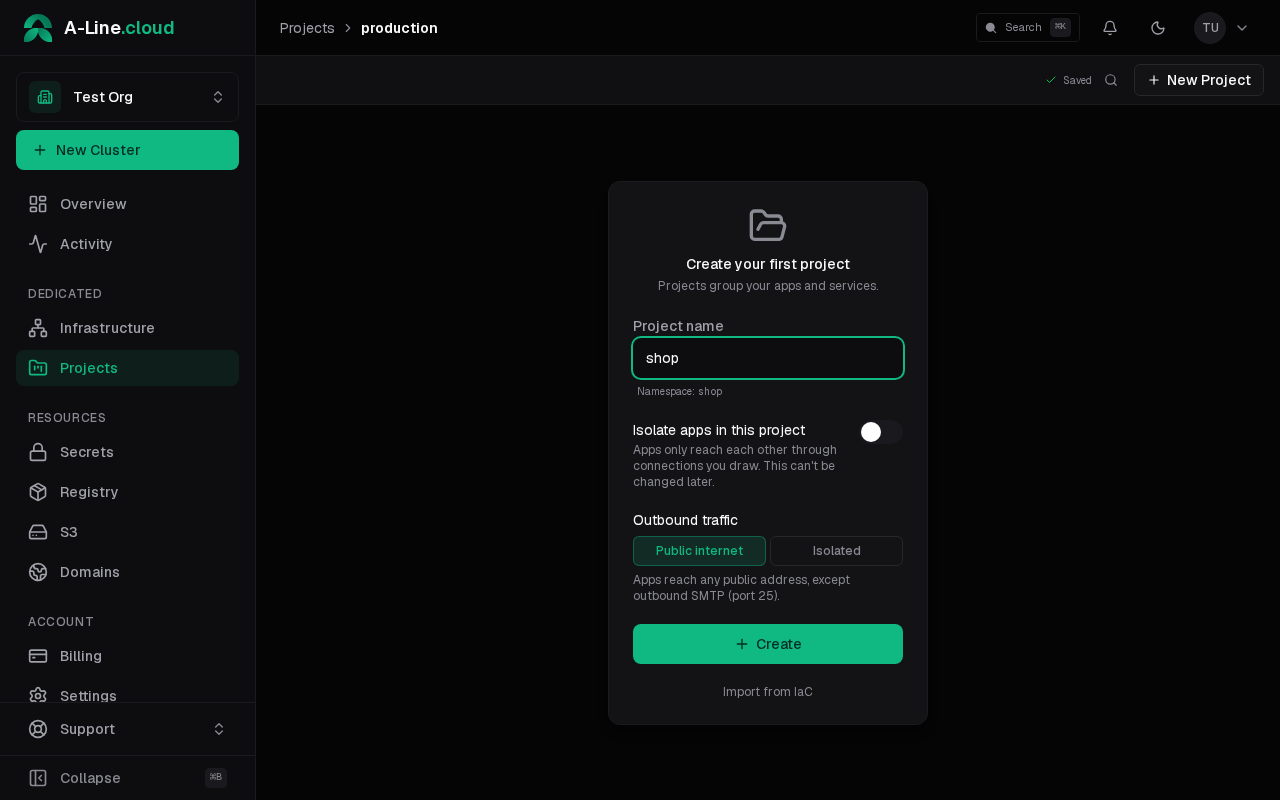
- **Project name**: the namespace the project gets is shown under the field.
- **Isolate apps in this project**: apps only reach each other through
connections you draw. You can switch it later in the project settings.
- **Outbound traffic**: **Public internet** lets apps reach any public
address except outbound SMTP (port 25); with **Isolated**, apps only
reach destinations you allow in the project settings.
Select **Create**. The project opens on its canvas.
Next: [deploy an app](/getting-started/deploy-app).
# Deploy an app
URL: https://docs.a-line.cloud/getting-started/deploy-app
> Run a container image as an app in your project.
This page runs the public `nginx:1.27` image, a web server that answers on
port 80. Use your own image the same way.
## Create the app
On the project canvas, select **Custom App** in the sidebar. The
**Custom Image** dialog opens.
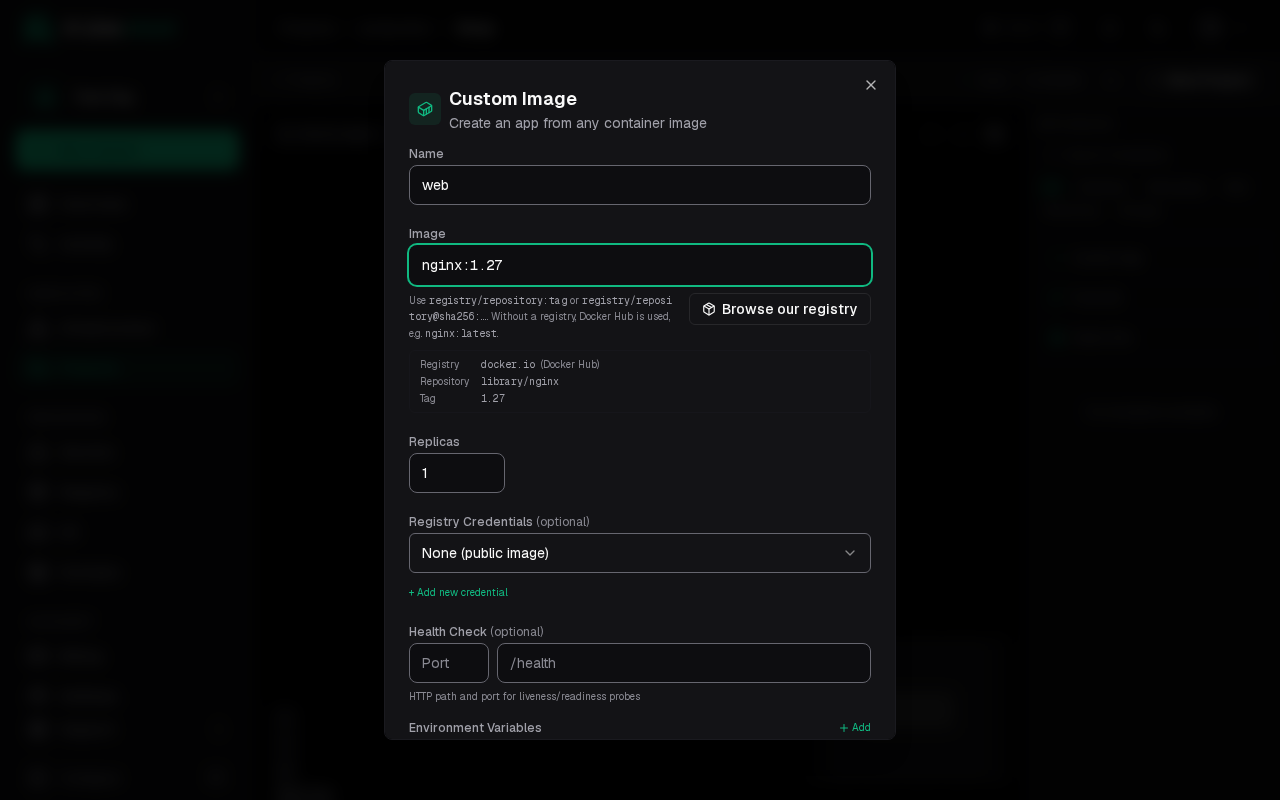
Enter `web` as the **Name** and `nginx:1.27` as the **Image**. Leave
**Replicas** at 1.
Under **Health Check**, enter port `80` and path `/`. The port is also
the port the app receives traffic on.
Select **Create & Deploy**. **Create** saves the app without starting it.
## Check that it runs
Open the app on the canvas and go to its **Deploys** tab. The deploy moves
through `pending` and `deploying` and ends as `succeeded`. The **Logs** tab
shows nginx's start-up lines.
If the deploy fails, the **Logs** tab usually says why: an image name that
does not exist, a private image without **Registry Credentials**, or an
app that does not answer on the health check port.
## The fields
- **Name**: the app's name in the project.
- **Image**: `registry/repository:tag` or `registry/repository@sha256:...`.
Without a registry, Docker Hub is used, so `nginx:1.27` is
`docker.io/library/nginx:1.27`. **Browse our registry** picks an image
from your organization's registry.
- **Replicas**: how many copies run.
- **Registry Credentials** (optional): for private images.
- **Health Check** (optional): the HTTP port and path used for liveness and
readiness probes.
- **Environment Variables**: values passed to the container.
To build from a repository instead of running an image, see
[Deploy an app from GitHub](/guides/deploy-from-github).
Next: [add a domain](/getting-started/add-domain) to open the app in a
browser.
# Add a domain
URL: https://docs.a-line.cloud/getting-started/add-domain
> Route a host on your own domain to an app and verify you own the domain.
## Add the host
Open the app on the canvas, go to the **Domain** tab and select
**Add domain**.
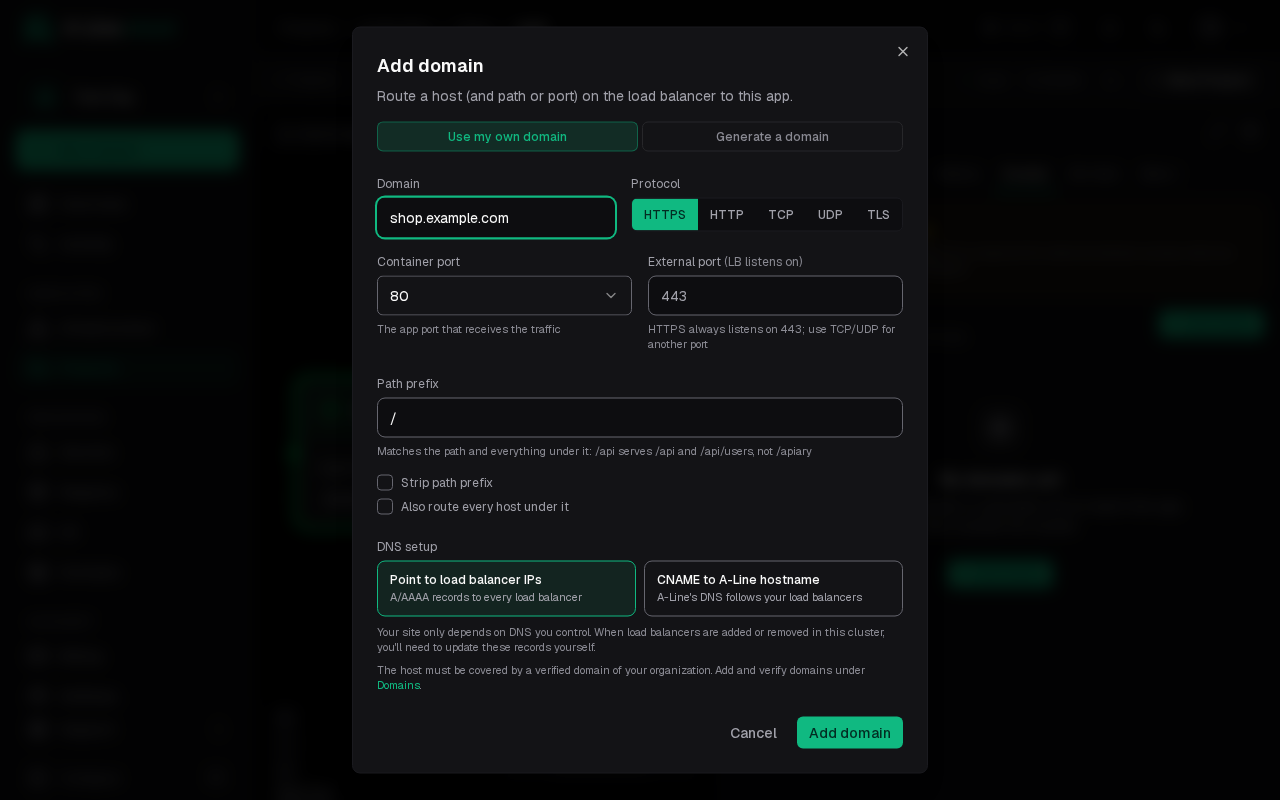
- **Domain**: the host to serve, such as `shop.example.com`. **Generate a
domain** gives you a platform host instead.
- **Protocol**: HTTPS listens on port 443; TCP and UDP can use another
external port.
- **Send the PROXY protocol header** (TCP only): each connection starts
with a PROXY protocol header carrying the client's address. Turn it on
only if the app accepts the PROXY protocol, or its connections break.
- **Container port**: the app port that receives the traffic.
- **Path prefix**: route only a path and everything under it.
- **DNS setup**: point the host at the load balancer IPs with A/AAAA
records, or CNAME it to an A-Line hostname that follows your load
balancers.
Select **Add domain**.
## Verify the domain
A host is only routed once a verified domain of your organization covers
it. If none does yet, a dialog asks what to verify: the base domain and
every subdomain under it, or only this host. Select **Start verification**.
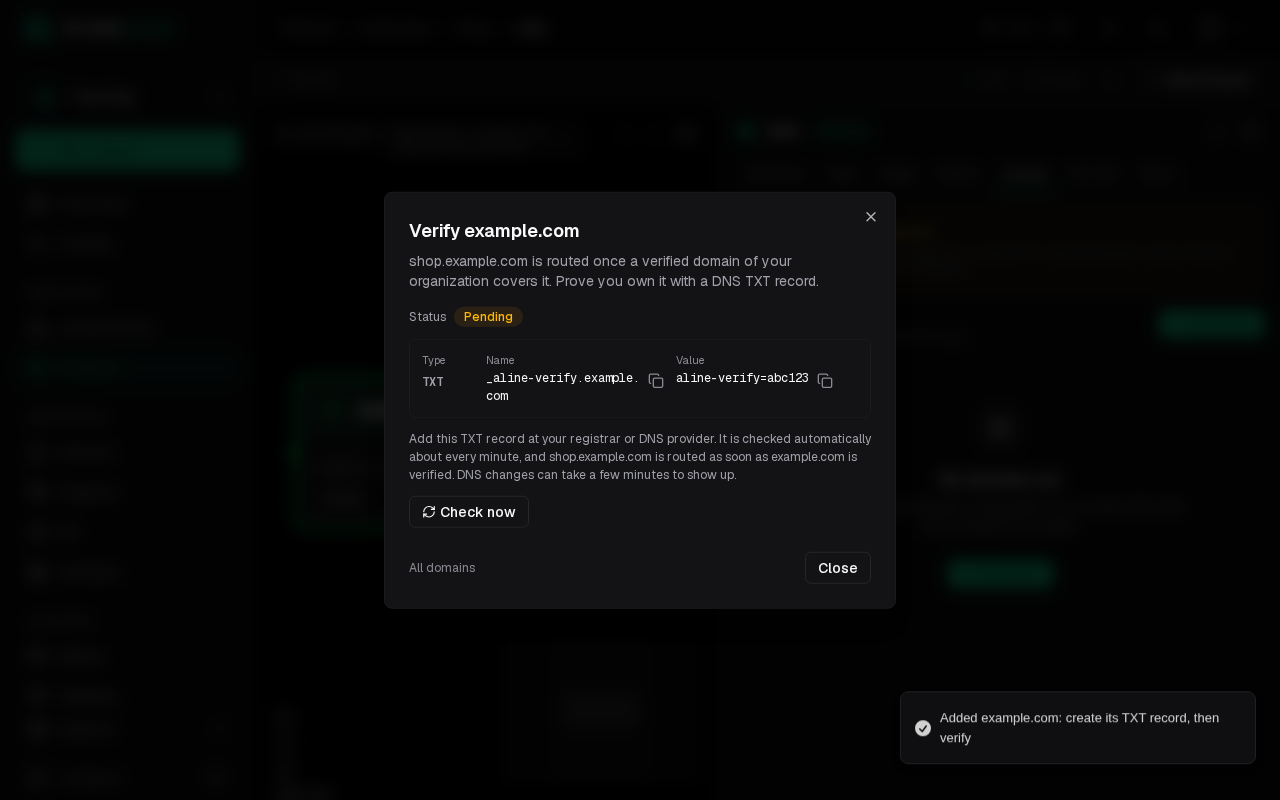
Add the TXT record it shows at your registrar or DNS provider. It is checked
about every minute; **Check now** checks right away. As soon as the domain is
verified the host is routed. DNS changes can take a few minutes to show up.
Manage verified domains under **Domains** in the sidebar. See
[domains and certificates](/concepts/domains) for how verification and
certificates work.
# Guides
URL: https://docs.a-line.cloud/guides
> Step-by-step guides for deploying apps, static sites, databases, domains, storage, scaling and CI on A-Line.cloud.
Each guide covers one task from start to finish: what you need first, the
steps in the console (and the IaC file, where there is one), how to check it
worked and what to do when it did not. New to A-Line.cloud? Start with
[Getting started](/getting-started).
## Deploy
- [Deploy an app from GitHub](/guides/deploy-from-github): build a container
from a repository and redeploy on every push.
- [Deploy a static site](/guides/static-site): from Git or an uploaded
archive, with instant rollback.
- [Add a custom domain](/guides/custom-domain): your own host name over
HTTPS.
## Data
- [Add a database and connect an app](/guides/managed-database): PostgreSQL
or Valkey with short-lived credentials.
- [Store secrets](/guides/secrets): API keys and passwords as variables or
files.
- [Use object storage](/guides/object-storage): S3-compatible buckets and
access keys.
- [Keep data with volumes and backups](/guides/volumes-and-backups):
persistent disks, backup policies and restores.
## Operate
- [Read logs and metrics](/guides/logs-and-metrics): live logs, history and
log costs.
- [Scale an app automatically](/guides/autoscaling): more replicas under load,
down to zero when idle.
- [Run apps on their own servers](/guides/dedicated-clusters): node pools,
pool autoscaling and price caps.
- [Manage a project from Git](/guides/iac-project-link): YAML files and pull
requests.
- [Run GitHub Actions jobs on A-Line.cloud](/guides/actions-runners): runner
labels and spend caps.
## Account
- [Top up and control spend](/billing/top-up): credit, alerts and spend caps.
# Deploy an app from GitHub
URL: https://docs.a-line.cloud/guides/deploy-from-github
> Build a container from a GitHub repository and redeploy it on every push.
**Goal**: an app that A-Line.cloud builds from your repository and deploys
again whenever you push to a branch.
## Before you start
- A [project](/getting-started/create-project) on a running cluster.
- A repository with a `Dockerfile`, or a Node.js project with a
`package.json` (A-Line.cloud detects a build preset for it).
- For private repositories and automatic deploys: GitHub connected under
**Settings > Integrations > Connect GitHub**. A public repository works
without it, but only deploys when you start it by hand.
## Steps
On the project canvas, select **From Git** in the sidebar. The **Deploy
from Git** dialog opens.
**Repository**. Under **Repository source**, pick **Connected repos**
(through the GitHub App) or **Public repository** (paste any public URL).
Choose the repository and the **Branch**. Leave **Deploy as** on
**Container**. If the repository looks like a static site, the dialog
marks **Static site** as **Detected**; see
[Deploy a static site](/guides/static-site) for that path. Select **Next**.
**Build**. Check the **Build Preset** (detected from `package.json`),
or set the **Dockerfile Path** and **Build Context**. Add **Build
Arguments** if your Dockerfile needs them. Select **Next**.
**Trigger** (connected repos only). Under **Automatic Deploy Trigger**,
pick **On push to branch** and enter a branch pattern such as `main` or
`release/*`. You can deploy on tags instead: **On pre-release** or **On
full release** with a tag pattern such as `v*`. Select **Next**.
**Settings**. Enter the app's **Name**, the **Port** your app listens
on, the number of **Replicas** and any **Environment Variables**.
Select **Create & Deploy**.
## Verify
Open the app and go to the **Deploys** tab. The first deploy shows its build
log, then moves through `building` and `deploying` to `succeeded`. Push a
commit to the branch: a new deploy starts on its own.
To reach the app from a browser, [add a domain](/guides/custom-domain).
## Troubleshooting
- **No GitHub connection**: connect GitHub under **Settings >
Integrations**, or switch to **Public repository**.
- **The build fails**: open the deploy on the **Deploys** tab and read the
build log. Most failures are a wrong **Dockerfile Path** or **Build
Context**, or a missing **Build Argument**.
- **A push did not start a build**: check the branch pattern of the trigger.
If the build history shows a `refused` entry, your balance is out of credit
or the monthly spend cap is reached; see
[refused builds](/concepts/builds-and-deploys#refused).
- **The deploy never becomes ready**: check that **Port** is the port the
process listens on, and read the **Logs** tab.
## Next steps
- [Add a custom domain](/guides/custom-domain)
- [Add a database and connect the app](/guides/managed-database)
- [Store secrets](/guides/secrets)
- [Builds and deploys](/concepts/builds-and-deploys): how builds, rollouts and
rollbacks work.
- [Apps in IaC](/iac/apps): the same app as a file in Git.
# Deploy a static site
URL: https://docs.a-line.cloud/guides/static-site
> Publish a static site from a Git repository or an uploaded archive, and roll back to an earlier version.
**Goal**: a static site (HTML, CSS, JavaScript and assets) served by
A-Line.cloud, built from Git or uploaded as an archive.
A static site does not need a container: A-Line.cloud runs the server for
you. Each deploy of a **Versioned** site is a new immutable version, so you can
switch back to an older one at once.
## Before you start
- A [project](/getting-started/create-project) on a running cluster.
- Either a repository that builds the site (for example `npm run build`
writing to `dist/`), or the built site as a `.zip` or `.tar.gz`.
- To build from a private repository: GitHub connected under **Settings >
Integrations**.
## Option A: build from Git
On the project canvas, select **From Git** in the sidebar.
Pick the repository and **Branch**, then set **Deploy as** to **Static
site**. The dialog marks it **Detected** when the repository looks like
a static site.
Select **Create site**. A-Line.cloud detects the framework and opens the
build settings:
- **Install command**, such as `npm ci`.
- **Build command**, such as `npm run build`.
- **Output directory**, such as `dist`.
- **Serve index.html for paths that match no file**: turn this on for a
single-page app with client-side routing.
- **Headers** and **Redirects**, if you need them.
Select **Save & build**. The first version is built and published.
Pushes to the branch build and publish a new version.
## Option B: upload an archive
On the project canvas, select **Static Site** in the sidebar.
Pick the **Mode**:
- **Versioned**: immutable versions, instant rollback. Use this unless
you have a reason not to.
- **Live**: one file tree, changes go out in place.
Select **Create site**.
Under **Upload a site archive**, drop a `.zip` or `.tar.gz` of the built
site (up to 1 GiB per version). Select **Upload later** to skip this
step for now.
## Verify
Open the site on the canvas. The **Overview** tab shows the **Active
version** and a **Temporary URL**; open it to see the site. The
**Deploys** tab lists every version with its build and publish log.
## Roll back
On the **Deploys** tab, open the menu of an older version and select **Make
live**. The switch is immediate. A versioned site keeps 20 versions by
default; change it with **Versions kept** on the **Config** tab.
## Serve it on your domain
Open the site's **Domain** tab and add a host, the same way as for an app.
See [Add a custom domain](/guides/custom-domain).
## In IaC
A site linked to Git is a file `projects//sites/.yaml`:
```yaml title="projects/web/sites/docs.yaml" iac
# yaml-language-server: $schema=https://a-line.cloud/schemas/iac/v1.json
version: 1
source:
repo: example/docs
branch: main
retain_versions: 10
settings:
install_command: npm ci
build_command: npm run build
output_dir: dist
spa_fallback: true
```
All keys are in the [site file reference](/iac/reference/site-file).
## Troubleshooting
- **The build succeeds but the site is empty or 404s**: the **Output
directory** is wrong. It must be the folder that holds `index.html` after
the build.
- **Deep links of a single-page app return 404**: turn on **Serve
index.html for paths that match no file**.
- **The upload is refused**: the archive must be a `.zip` or `.tar.gz` of
at most 1 GiB.
## Next steps
- [Add a custom domain](/guides/custom-domain)
- [HTTP settings](/iac/networking#http): HTTPS and www redirects, HSTS and compression.
- [Logs and metrics](/guides/logs-and-metrics)
# Add a custom domain
URL: https://docs.a-line.cloud/guides/custom-domain
> Serve an app on your own host name over HTTPS, with A/AAAA records or a CNAME.
**Goal**: your app answers on a host such as `shop.example.com`, with a
certificate A-Line.cloud issues and renews for you.
## Before you start
- A running app or static site.
- Access to the DNS records of your domain (at your registrar or DNS
provider).
## Pick A/AAAA or CNAME
The **DNS setup** choice decides which records you create.
| | **Point to load balancer IPs** | **CNAME to A-Line hostname** |
| --- | --- | --- |
| Records | One `A`/`AAAA` record per load balancer address | One `CNAME` to a host A-Line.cloud gives you |
| Apex (`example.com`) | Works | Does not work, unless your DNS provider offers ALIAS, ANAME or CNAME flattening |
| When load balancers change | You update the records yourself | A-Line.cloud's DNS follows them |
| Depends on | Only your DNS provider | A-Line.cloud's DNS as well, which has no availability SLA yet |
Use A/AAAA records for an apex domain, or when you want no dependency on
A-Line.cloud's DNS. Use a CNAME for a subdomain when you want the records to
follow your load balancers.
### Which records for my hostname?
An apex such as `example.com` takes `A`/`AAAA` records; a host below it such as
`shop.example.com` takes `A`/`AAAA` records or one `CNAME`. Ownership is a TXT
record at `_a-line-verify.` plus the hostname.
## Steps
Pick how you work; the choice is remembered on every page.
Open the app on the canvas, go to the **Domain** tab and select **Add
domain**.
Leave **Domain source** on **Use my own domain** and enter the host, such
as `shop.example.com`.
Keep **Protocol** on HTTPS for a website. Set the **Container port** to
the port your app listens on. Add a **Path prefix** only to route part of
the site.
Pick the **DNS setup** (see above) and select **Add domain**.
If your organization has not verified the domain yet, a dialog asks what
to verify: the base domain with every subdomain, or only this host.
Select **Start verification**.
At your DNS provider, create the TXT record the dialog shows
(`_a-line-verify.example.com`), and the A/AAAA or CNAME records listed
on the **Domain** tab.
First claim ownership with a [domain file](/iac/domains), then list the
host under the app's `domains` of a [project](/iac/apps). `dns_target`
is `a_records` or `cname`:
```yaml title="projects/shop/project.yaml" iac tree=custom-domain
# yaml-language-server: $schema=https://a-line.cloud/schemas/iac/v1.json
version: 1
name: shop
```
```yaml title="projects/shop/apps/web.yaml" iac tree=custom-domain
# yaml-language-server: $schema=https://a-line.cloud/schemas/iac/v1.json
version: 1
source:
image: ghcr.io/example/web:2.0.0
port: 3000
domains:
- domain: shop.example.com
dns_target: cname
```
The sync result lists the records to create. See
[Networking](/iac/networking#domains) for every key.
Add the host to the app. Your organization must have verified a domain
that covers it; `pending_verification: true` accepts a host whose domain is
still being verified, and it routes once that verifies:
```http api
POST /v1/clusters/{cluster_id}/apps/{app_id}/domains
Authorization: Bearer $ALC_API_KEY
Content-Type: application/json
{ "domain": "shop.example.com", "port": 3000, "dns_target": "a_records" }
```
The DNS records to create can be read back later; the
[API reference](/api/reference/domains) lists the calls.
Ask your connected client, for example: "Add shop.example.com to the web
app in production." It finds the app with `find_app` and calls
`add_domain`, which answers with the domain's status and the DNS records to
create. See [Connect an AI client](/mcp).
## Verify
The verification is checked about every minute; select **Check now** to
check right away. Once the domain is verified, the host is routed.
On the **Domain** tab, each host shows its state. **DNS resolves correctly**
means your records point at the cluster. The certificate badge moves from
**Cert pending** to **Cert issued** a short time later. Then open
`https://shop.example.com`.
## Troubleshooting
- **Not verified** or **Pending verification**: the TXT record is missing or
not visible yet. DNS changes can take a few minutes, sometimes longer at
some providers. Check the record's exact name and value.
- **Not resolving yet**: the A/AAAA or CNAME records are missing or point
elsewhere. Compare them with the records listed on the **Domain** tab.
- **Cert failed**: the certificate could not be issued. Hover the badge for
the error. The most common cause is a CDN or proxy in front of the domain
that answers the HTTP challenge itself: turn on **Behind a CDN or proxy**
and create the **Certificate challenge CNAME** it shows. See
[Use a CDN or proxy](/concepts/cdn-proxy).
- **CNAME at the apex**: not possible. Switch the **DNS setup** to **Point to
load balancer IPs**.
## Without your own domain
Pick **Generate a domain** as the **Domain source** to get a host on the
platform's domain instead. It needs no DNS records and no verification.
## Next steps
- [Domains and certificates](/concepts/domains): how verification and
certificates work.
- [Use a CDN or proxy](/concepts/cdn-proxy): Cloudflare, Fastly, Bunny and
CloudFront.
- Manage your verified domains under **Domains** in the sidebar.
# Add a database and connect an app
URL: https://docs.a-line.cloud/guides/managed-database
> Create a managed PostgreSQL or Valkey and give an app short-lived credentials for it.
**Goal**: a PostgreSQL database (or a Valkey cache) in your project, and an
app that reaches it through a `DB_URL` variable, without a password stored
anywhere.
## Before you start
- A [project](/getting-started/create-project) on a running cluster.
- The app that will use the database, or a plan for it. To deploy a template
that needs a database (for example an analytics app), you do not need this
guide: its **Dependencies** tab creates the database for you. See
[template dependencies](/concepts/template-dependencies).
## Create the database
On the project canvas, search the template list for **PostgreSQL** (or
**Valkey**) and select it. The **Deploy PostgreSQL** dialog opens.
On **General**, enter a **Name** such as `db` and pick the **Version**
(PostgreSQL 18 is the default). **Total Instances** sets how many copies
run: 2 or more keeps a standby ready if the primary fails.
On **Storage**, set the **Size** of each instance's disk.
Select **Create & Deploy**.
A Valkey app starts as **Standalone**. Its **Settings** tab switches it to
**Replicated** or **Cluster** later.
## Share access with a definition
Credentials come from a **definition**: a named set of permissions that
other apps can ask for.
Open the database app and go to its **Databases** tab (**Access** for
Valkey).
Under **Shareable Definitions**, select **New**.
Enter a **Definition Name**, such as `orders-readwrite`, and set the
**Permissions**.
Pick the **Injection Format**: a single connection string, separate
`HOST`, `PORT` and so on, or both. Set the **Default Env Prefix**, for
example `DB`.
Select **Create definition**.
## Connect the app
Open the app that needs the database and go to its **Env Vars** tab.
Select **Add from Secrets** and find the definition under **Dynamic
Credentials**.
Pick it. The tab adds `DB_URL={{dynamic:orders-readwrite}}`.
Deploy the app.
Each pod gets its own short-lived login when it starts. A-Line.cloud renews
it while the pod runs, and the password never shows up in the app's
settings.
## Verify
- The app's **Logs** show it connected, or no connection errors.
- The database's **Databases** tab lists the running credentials of the
definition.
- The database's **Overview** shows the **Service endpoints**. For
PostgreSQL, apps should use `-pooler-rw` (the pooled primary,
through PgBouncer) on port 5432.
## Troubleshooting
- **The definition is not listed in Add from Secrets**: the app and the
database must run on the same cluster. Search by the definition's name.
- **"too many connections"**: every pod holds its own connections, and a
small PostgreSQL allows 100 by default. Use fewer replicas, connect
through the pooler, or give the database more resources.
- **Permission denied on a table**: the definition's **Permissions** do not
cover it. Change the definition's permissions.
## Back it up
Database apps get a **Backups** tab. Add a policy there; see
[Volumes and backups](/guides/volumes-and-backups).
## In IaC
A database is an app file with a `template` source. Roles go in its
`databases` block (`roles` for Valkey), and the consuming app asks for a
`lease` in its `env`. See [Databases and leases](/iac/databases).
## Next steps
- [Store secrets](/guides/secrets) for values that are not database
credentials.
- [Template dependencies](/concepts/template-dependencies)
- [Volumes and backups](/guides/volumes-and-backups)
# Store secrets
URL: https://docs.a-line.cloud/guides/secrets
> Keep API keys and passwords out of your code and hand them to apps as variables or files.
**Goal**: a secret, such as a payment provider's API key, stored once and
given to one or more apps as an environment variable or a file.
## Before you start
- An [environment](/concepts/organizations#environments) with at least one
app that needs the secret.
- The secret value, or a plan to let A-Line.cloud generate one.
## Create a secret
Open **Secrets** in the sidebar. The **Managed Secrets** tab lists the
secrets of the environment.
Select **Create secret**. The **Create Environment Secret** dialog opens.
Enter a **Key**, such as `STRIPE_API_KEY`, and an optional
**Description**.
Paste the **Value**, or turn on **Generate a random value** for a
password the app creates its own account with.
Turn on **Write-only** if nobody should read the value back after you
save it. Apps still get it.
Pick the **Injection Mode**: **Env Var**, **File Mount** or **Both**. For
a file, set the **Mount Path**.
Select **Create Secret**.
IaC files hold the keys, never the values. Declare the key in a
[secret group](/iac/secrets#groups), then set its value in the console or
through the API:
```yaml title="secrets/payments.yaml" iac tree=secrets-guide
# yaml-language-server: $schema=https://a-line.cloud/schemas/iac/v1.json
version: 1
environment: production
description: Payment provider keys
keys:
STRIPE_API_KEY: {write_only: true}
```
Create the secret in the environment. The value is write-only in the API:
it is never returned.
```http api
POST /v1/environments/{environment_id}/secrets
Authorization: Bearer $ALC_API_KEY
Content-Type: application/json
{ "name": "STRIPE_API_KEY", "value": "sk_test_example", "injection_mode": "env", "write_only": true }
```
See [Secrets](/api/reference/secrets) for setting a new value later.
Ask your connected client to create the secret, for example: "Create the
secret STRIPE_API_KEY in production." Its `set_secret` tool creates it and
refuses a name that already exists, so a retry never overwrites a value.
Paste values only into clients you trust with them. See
[Connect an AI client](/mcp).
## Give it to an app
Open the app on the project canvas and go to its **Env Vars** tab.
Select **Add from Secrets** and pick the secret.
Deploy the app. The new value is used from the next deploy.
## Share secrets with a group
A **secret group** bundles secrets that belong together, such as all
credentials of one service, and links them to several apps at once.
On the **Secret Groups** tab, select **New group**, enter a name and
select **Create group**.
In the group, select **Add existing** to add secrets.
Select **Link an app...** to give every secret in the group to an app.
Changes to a group show **Restarts on next deploy** for the apps that use
it: they get the new values on their next deploy.
## Verify
- The secret is listed on the **Managed Secrets** tab. Open it to see its
versions and the apps that use it.
- After a deploy, the app's **Logs** show it starting without a missing
variable error.
## Troubleshooting
- **The app still has the old value**: values are read when a pod starts.
Deploy the app again.
- **The secret is not offered in Add from Secrets**: secrets belong to one
environment. Check that the app runs in the same environment.
- **You cannot see the value**: the secret is **Write-only**. Set a new
value instead.
## Database credentials
Do not store database passwords as secrets. Use a definition instead: each
pod then gets its own short-lived login. See
[Add a database and connect an app](/guides/managed-database). Short-lived
credentials are listed on the **Dynamic Leases** tab.
## In IaC
A secret group is a file `secrets/.yaml` that lists the keys, never
the values. Apps name the groups they use under `secrets`. See
[Secrets in IaC](/iac/secrets) and [using a group](/iac/secrets#using).
## Next steps
- [Secrets in IaC](/iac/secrets): generated and derived values, versions.
- [Add a database and connect an app](/guides/managed-database)
- [Permissions in IaC](/iac/permissions): who can read and change secrets.
# Use object storage
URL: https://docs.a-line.cloud/guides/object-storage
> Create an S3-compatible bucket, make an access key and attach the bucket to an app.
**Goal**: a bucket for uploads, exports or backups, reachable with any S3
client, and an app that gets its credentials as environment variables.
## Before you start
- An organization with credit on its balance. Storage is billed per GiB.
- An S3 client, such as the `aws` CLI or `rclone`, if you want to test from
your machine.
## Create a bucket
Open **Object storage** in the sidebar and select **Create bucket**.
Enter a **Name**, such as `shop-uploads`.
Optional: a **Description** (what the bucket is for) and a **Quota** in
GiB, to limit how large the bucket can grow.
Select **Create bucket**.
The bucket opens on its **Overview** tab. The **Connection** card shows the
**S3 API endpoint**, the **Region** and the **Bucket URL**. S3 clients use
the endpoint with path-style addressing.
## Make an access key
Go to the **Access keys** tab. The **Create access key** dialog opens
when you add a key.
Optional: a **Name**, a **Path prefix** to limit the key to part of the
bucket, and an expiry in days.
Pick the **Permission**: **Read-only** to list and read objects, or
**Read & write** to also upload and delete.
Select **Create key**. The **Save your access key** dialog shows the **Access
key ID** and the **Secret access key**. Copy them, then confirm
**I have saved the secret**.
The secret access key is shown only in this dialog. If you lose it, make a
new key.
The key only works for this bucket. The dialog also gives ready-made
snippets: **Env vars**, **aws CLI**, **rclone**, **AWS SDK** and **boto3**.
## Attach the bucket to an app
You do not need to copy keys into an app.
Open the app on the project canvas and go to its **Env Vars** tab.
Select **Attach bucket** and pick the bucket.
Choose the credentials:
- **Shared key**: all pods use one key.
- **Per-pod keys (rotated automatically)**: each pod gets its own key.
These are billed as dynamic leases.
Optional: a **Path prefix**, so the app only sees part of the bucket.
Deploy the app.
The app gets these variables, with the prefix `S3` by default:
| Variable | Value |
| --- | --- |
| `S3_ENDPOINT` | The S3 API endpoint |
| `S3_REGION` | The region |
| `S3_BUCKET` | The bucket name |
| `S3_ACCESS_KEY_ID`, `S3_SECRET_ACCESS_KEY` | The credentials |
| `S3_FORCE_PATH_STYLE` | `true`; set your client to path-style addressing |
| `S3_URL`, `S3_PREFIX` | The bucket URL and the path prefix |
## Verify
With the **Env vars** snippet from the key dialog, list the bucket from your
machine. Copy the endpoint from the **Connection** card:
```bash
export S3_ENDPOINT=
export AWS_ACCESS_KEY_ID=AKEXAMPLE0000000000
export AWS_SECRET_ACCESS_KEY=example-secret-key
aws s3 ls s3://shop-uploads --endpoint-url "$S3_ENDPOINT"
```
Open the **Objects** tab to browse what the app wrote. The **Used by** tab
lists the apps the bucket is attached to.
## Troubleshooting
- **"The specified bucket does not exist"** or wrong-host errors: the client
uses virtual-host addressing. Turn on path-style addressing.
- **Access denied**: the key is **Read-only**, has a **Path prefix** that
does not cover the object, has expired, or belongs to another bucket.
- **Uploads fail once the bucket is full**: raise the quota on the
**Settings** tab, or delete old objects.
## Public files
A bucket is private by default. **Make public** on the bucket serves its
objects to anyone with the URL; **Make private** turns it off again. The
**Domains** tab serves the bucket on your own host name.
## In IaC
A bucket is a file `buckets/.yaml`. An app reaches it through
`storage_bindings`, with a `permission`, a `key_prefix`, an `env_prefix`
and a `credential_mode` of `static` or `per_pod`. See
[Buckets in IaC](/iac/buckets) and [bucket access](/iac/data#storage-bindings).
## Next steps
- [Volumes and backups](/guides/volumes-and-backups): backups go to your
object storage.
- [Buckets in IaC](/iac/buckets)
- [Billing](/billing)
# Keep data with volumes and backups
URL: https://docs.a-line.cloud/guides/volumes-and-backups
> Give an app a persistent volume, back it up on a schedule and restore it.
**Goal**: an app whose data survives restarts and redeploys, with nightly
backups you can restore.
## Before you start
- An app on a running cluster.
- For backups: object storage in your organization. Backups are stored
there and billed as storage usage. See
[Use object storage](/guides/object-storage).
## Add a volume
A container's own disk is wiped on every restart. Write data you want to
keep to a volume.
Open the app on the project canvas and go to its **Settings** tab.
In the **Storage** section, select **Add volume**.
Pick **New volume**, or **Mount existing** to reuse a volume.
Enter a **Volume name**, a **Mount path** such as `/data`, and a **Size**
in GiB.
Save and deploy the app.
Templates such as PostgreSQL bring their own storage; you set its size when
you create them.
## Add a backup policy
Apps with volumes and stateful templates get a **Backups** tab.
Open the **Backups** tab and select **Add backup**.
Pick the **Source**, or start from one of the presets.
Set the **Schedule**, for example every night.
Pick the **Backup type**:
- **Full**: a complete copy every run.
- **Incremental**: only the changes, with a full copy every 7th run.
Pick the **Compression** and the **Destinations**. The **Primary target**
is used for restores by default.
Name the policy, such as `nightly-data`, and select **Create policy**.
Select **Run now** on a policy to take a backup at once.
Volume backups are taken while the app keeps running, so a restore looks
like the moment after a power cut. Most apps recover from that. Run a
database as a [database app](/guides/managed-database) instead of on a
volume: PostgreSQL backups can be restored to a
[point in time](/concepts/backups#restores).
## Verify
The backup history on the **Backups** tab lists every run. A run is
`running`, then `succeeded` or `failed`. Filter it by policy or target.
## Restore
In the history, select **Restore** on a backup. The **Restore backup**
dialog opens.
Pick the target under **Restore from target**. For PostgreSQL, you can also
**Restore to a point in time** between backups.
Read what the restore does, confirm **I understand** and start it.
What happens depends on the app:
| App | Restore |
| --- | --- |
| PostgreSQL | Restores into a new copy. The current database keeps running until you promote the restored copy. |
| ClickHouse | Restores in place. |
| Volumes | Stops the app, replaces the data, then starts the app again. |
## Troubleshooting
- **No Backups tab**: the app has no volume and is not a stateful template.
Add a volume first.
- **A run failed**: open it in the history for the error. Check that the
target bucket still exists and is not over its quota.
- **The app lost its files after a restart**: it writes outside the volume's
**Mount path**. Change the app or the mount path.
## Deleted apps
Deleting an app keeps its backups until their retention runs out. Select
**Restore into new app** on a kept backup to bring the data back.
## In IaC
An app file lists `volumes` (`name`, `mount_path`, `size`) and
`backup_policies` (by default every night at 02:00, kept 7 days). See
[Volumes in IaC](/iac/data#volumes) and [backups in IaC](/iac/data#backups).
## Next steps
- [Backups](/concepts/backups): runs, targets and mirrors.
- [Use object storage](/guides/object-storage)
- [Add a database and connect an app](/guides/managed-database)
# Read logs and metrics
URL: https://docs.a-line.cloud/guides/logs-and-metrics
> Follow an app's logs live, search its history and watch its CPU, memory and requests.
**Goal**: find out what an app is doing, and why it fails, from the
console.
## Before you start
- A deployed app or static site.
## Read the logs
Open the app on the project canvas and go to its **Logs** tab.
New lines stream in while the tab shows **Live**. Select it to switch to
**Paused** and read without the view moving.
Narrow the lines down:
- **Search logs** for a word or request ID.
- **Level**: only **Errors**, or **Warnings** and up.
- **Time range**: from the last 15 minutes up to 30 days, or **Custom**.
- The deploy filter, **All deploys** by default, to see one rollout.
- **Log source**: **All**, only **Requests**, or only **Server output**.
Turn on **Wrap lines** for long lines. **Copy logs** copies what you see.
## Watch the metrics
- The **Overview** tab shows **Metrics**: CPU and memory of the app.
- The **Usage** tab shows **HTTP requests**, for windows from 15 minutes to
30 days.
## Verify
Open the app's URL, then check that the request shows up on the **Logs**
tab (if the app logs requests) and in **HTTP requests** on the **Usage**
tab.
## Troubleshooting
- **No logs at all**: the app writes to a file instead of standard output.
Log to stdout and stderr.
- **Logs stop at some point this month**: the monthly log cap is reached.
See [Log costs](#costs).
- **Memory climbs until the app restarts**: the app runs out of memory and
is stopped. Give it more memory, or look for a leak.
## Log costs
Logs are billed by the GiB ingested above a monthly allowance. Under
**Billing > Usage**:
- **Log ingestion this month** shows **Within allowance**, **Near
allowance**, **Billed** or **Capped**.
- **Monthly cap (GiB)** stops billing at a size you pick. Once the cap is
reached, new lines are dropped until next month. Leave it empty for no
cap.
- **Log retention** is 30 days by default, included in the price. 60, 90,
180 or 365 days are billed per GiB-month.
- **Size window** keeps only the newest GiB you choose.
## Next steps
- [Scale an app automatically](/guides/autoscaling)
- [Builds and deploys](/concepts/builds-and-deploys): read build logs.
- [Billing](/billing)
# Scale an app automatically
URL: https://docs.a-line.cloud/guides/autoscaling
> Add and remove replicas of an app as its load changes, down to zero when it is idle.
**Goal**: an app that runs more replicas when it is busy and fewer when it
is quiet, so you pay for what it uses.
## Before you start
- A deployed app that can run as several replicas: it keeps no state in
memory or on its own disk that other replicas need.
- Enough room on the cluster for the extra replicas, or a pool that grows
with them (see [Dedicated clusters](/guides/dedicated-clusters)).
## Steps
Open the app on the project canvas and go to its **Settings** tab.
In the **Autoscaling** section, set **Min Replicas** and **Max Replicas**
(at most 100).
Select **Add** and pick a trigger:
- **CPU Utilization**: scale out above a CPU percentage (70 by default).
- **Memory Utilization**: scale out above a memory percentage (80 by
default).
- **Cron Schedule**: run more replicas during set hours, such as office
hours.
- **NATS JetStream Lag**: scale workers by the number of waiting messages.
Optional: set the **Cooldown (s)**, how long to wait before scaling in
again (300 seconds by default).
Optional: turn on **Scale to zero when idle**. This sets **Min
Replicas** to 0. The first request after an idle period waits while the
app starts.
Apply the changes and deploy the app.
Without a trigger, the app does not scale: the section shows **No triggers
configured**.
## Verify
Put load on the app. Its number of replicas rises, up to **Max Replicas**,
and falls back to **Min Replicas** after the cooldown once the load is gone.
Follow CPU and memory in the **Metrics** on the **Overview** tab.
## Troubleshooting
- **The app never scales out**: check that a trigger is configured and that
its threshold is reached.
- **New replicas stay pending**: the cluster has no room. Add servers, or
let the pool grow with [pool autoscaling](/guides/dedicated-clusters#autoscaling).
- **Replicas go up and down all the time**: raise the **Cooldown (s)**.
## In IaC
The `autoscaling` block takes `min`, `max`, `triggers`, `scale_to_zero` and
`cooldown_seconds`. See the example under [Scaling](/iac/apps#scaling).
## Next steps
- [Read logs and metrics](/guides/logs-and-metrics)
- [Dedicated clusters](/guides/dedicated-clusters): pools that add servers
when apps need them.
# Run apps on their own servers
URL: https://docs.a-line.cloud/guides/dedicated-clusters
> Add a node pool, let it grow and shrink, cap its price and reserve it for chosen apps.
**Goal**: a pool of servers in your cluster that only runs the apps you
pick, such as a database or a GPU workload, and that adds servers when they
are needed.
## Before you start
- A [running cluster](/getting-started/create-cluster).
- Credit on your balance for the extra servers. Some server types are rented
for a fixed term; the price summary shows the commitment before you
confirm. See [Billing](/billing).
## Add a pool
Open **Infrastructure** in the sidebar and select the cluster.
Select **Add pool**. The dialog walks through **General**, **Machine**,
**Placement**, **Storage**, **Extensions** and **Review**.
**General**: a **Pool name**, such as `db`, and the **Node count**.
**Machine**: the node type. Every node in the pool uses the same one.
Bare-metal and GPU servers are listed here too. Optional: **Price caps**,
the most you accept to pay per node.
**Placement**: turn on **Reserved pool** so only apps that choose this
pool run on it. Add **Node labels** if apps should find it by label.
**Storage**: the pool's role follows the storage type you pick here.
Check the price on **Review** and select **Add pool**.
The pool name and node type cannot change once the pool exists.
## Move an app onto the pool
Open the app on the project canvas and go to its **Settings** tab.
Under **Node pool**, pick the pool. **Any shared pool** is the default.
Save. The app is redeployed onto the pool.
An app that keeps data on its nodes stays on its pool; the setting is
locked for it.
## Let the pool grow and shrink
Open the pool's **Pool settings** and go to **Scaling**.
Under **Autoscaling**, set the **Minimum nodes** and **Maximum nodes**.
Set when to add a node (**Scale up CPU**, **Scale up memory**) and when
to remove one (**Scale down CPU**, **Scale down memory**). Turn off
**Allow scale down** to keep the pool from shrinking.
Select **Save autoscaling**.
## Cap the price
On the **Scaling** tab, **Price caps** set the most a new node of the pool
may cost: **Max hourly**, **Max monthly** and **Max setup fee**. Select
**Save price caps**.
## Verify
- The pool appears in the cluster with its nodes. A reserved pool shows
**Reserved**; a normal one **Shared**.
- The app's pods run on the pool's nodes after the redeploy.
## Troubleshooting
- **The app stays pending after the move**: the pool is full or has no
nodes yet. Add nodes or raise **Maximum nodes**.
- **Other apps land on the pool**: it is not reserved. Turn on **Reserved
pool** on the **Placement** tab and select **Save placement**.
- **The pool does not grow**: it is at **Maximum nodes**, the server type
is out of stock in the region, or a new node would cost more than a price
cap.
## In IaC
Pools are listed in the cluster file; `reserved: true` and `autoscaling` go
on the pool, and an app pins itself with `pool: `. See
[Pools in IaC](/iac/clusters#pools), [reserved pools](/iac/clusters#reserved)
and [pool autoscaling](/iac/clusters#autoscaling).
## Next steps
- [Clusters and pools](/concepts/clusters-and-pools)
- [OVHcloud](/concepts/ovh): bare metal and public cloud servers.
- [Scale an app automatically](/guides/autoscaling)
# Manage a project from Git
URL: https://docs.a-line.cloud/guides/iac-project-link
> Link a project to a folder in a GitHub repository, so its apps follow YAML files and changes go through pull requests.
**Goal**: a project whose apps, domains and settings live as YAML files in
your repository. A push applies them, and edits in the console become pull
requests.
## Before you start
- A project, even an empty one.
- GitHub connected under **Settings > Integrations**, with access to the
repository.
- To have console edits written back, the GitHub App needs write access to
the repository's contents and pull requests.
## Connect the repository
Open the project and select **Project settings** on the canvas.
On the **General** tab, select **Connect a Git repo**.
Pick the **Repository** and the branch, and enter a **Folder**, such as
`projects/shop`. Leave it empty for the repository root.
Select **Connect repository**.
A-Line.cloud writes the project's `project.yaml` into the folder. From then
on, the project's apps follow the files there.
If connecting fails with a **Grant write access** link, the GitHub App
cannot write to the repository yet. Follow the link, grant access, and
connect again.
## Pick how console edits are handled
The **General** tab now shows the link: **Repository**, **Branch**, **Path**,
**Status** and **Link ID**. Select **Change mode** to choose:
| Mode | A console edit |
| --- | --- |
| **Pull request** (default) | Is proposed as a pull request. It takes effect when the pull request is merged. |
| **Direct commit** | Is committed to the branch and applied on the next sync. |
| **Read-only** | Is refused. Edit the files in the repository instead. |
Only environment admins can change the mode.
## Make a change from Git
Add an app file to the folder, for example `apps/web.yaml`:
```yaml
# yaml-language-server: $schema=https://a-line.cloud/schemas/iac/v1.json
version: 1
source:
image: ghcr.io/example/web:1.0.0
port: 3000
replicas: 2
```
Open a pull request. The `A-Line / plan (/)` check
lists what the change will create, update or remove.
Merge it. The sync applies the plan.
## Verify
- The new app appears on the project canvas.
- The link's **Status** on the **General** tab shows the last sync. **Last
sync failed** means a file was refused; open the plan for the file and the
error.
## Troubleshooting
- **Connect GitHub in the Integrations settings first**: no repository is
available. Connect GitHub under **Settings > Integrations**.
- **A change is waiting and not applied**: some changes are held until
someone confirms them, such as raising a pool's node count or deleting an
app with volumes. See [held changes](/iac/gitops#held).
- **The console refuses an edit**: the link is **Read-only**. Change the
file in the repository, or switch the mode.
## Stop managing from Git
Select **Unlink repository** on the **General** tab. The apps keep running
as they are and become editable in the console again. The files stay in the
repository. See [unlinking](/iac/gitops#unlinking).
## Next steps
- [Your first project](/iac/first-project): a cluster, project and
app from scratch.
- [GitOps workflow](/iac/gitops): syncs, plans, held changes and write-back.
- [Checking changes](/iac/check): check files before you push.
- [Import](/iac/import): turn existing resources into files.
# Run GitHub Actions jobs on A-Line.cloud
URL: https://docs.a-line.cloud/guides/actions-runners
> Connect GitHub, pick a runner size with a runs-on label and cap what your CI spends.
**Goal**: GitHub Actions jobs that run on A-Line.cloud runners, billed per
vCPU-minute, with a spend cap you control.
## Before you start
- A GitHub organization or account where you can install a GitHub App.
- Credit on your balance. Jobs are paid as they run; see
[Billing](/billing).
## Connect GitHub
Open **Actions** in the sidebar and go to the **Setup** tab.
Select **Enable GitHub Actions runners** (or **Add GitHub account** for
another account). This installs the A-Line.cloud Actions app on GitHub.
Pick the repositories it may serve.
Back on the **Setup** tab, the account is listed. Jobs of these accounts
with an `a-line` label run on A-Line.cloud.
**Run jobs from fork pull requests** is off by default: fork code would run
on your runners and be billed to you. If you turn it on, set **Require
approval for all outside collaborators** in the repository or organization
Actions settings on GitHub.
## Pick a runner
On the **Setup** tab, use the runner picker: choose the vCPU and memory,
the **Image** and the disk.
Select **Copy label** and paste the **Runner label** into your workflow:
```yaml
jobs:
test:
runs-on: a-line-4vcpu
timeout-minutes: 30
steps:
- uses: actions/checkout@v4
- run: make test
```
The label reads `a-line-vcpu`, with optional parts for memory, disk, OS,
the **Full** image and ARM, in this order:
`a-line-vcpu[-gb][-gb][--][-full][-arm]`.
- Sizes go from 2 to 160 vCPU, with 4 GB of memory per vCPU by default.
- The **Full** image is close to GitHub's own runner image; use it when a
job expects tools that the **Standard** image does not have.
- 50 GB of disk is included. More is billed per GB-hour.
### Find your label
For example `a-line-8vcpu` is 8 vCPU with 32 GB of memory, and
`a-line-8vcpu-200gb-ubuntu-24.04` adds 200 GB of local disk and pins Ubuntu
24.04.
## Cap the spend
On the **Limits** tab:
- **Job duration limit (minutes)**: jobs running longer are stopped. Leave
it empty for no limit.
- **Monthly spend cap (EUR)**: covers Actions and build compute. Only
organization admins can change it. The console warns you when the cap is
near and when it is reached.
Set `timeout-minutes` on each job too. GitHub's default is 360 minutes.
## Verify
Push a commit that runs the workflow. On GitHub, the job shows it was picked
up by an A-Line.cloud runner. In the console, the job appears in the history
on the **Overview** tab. Time spent waiting in the queue is not billed.
## Troubleshooting
- **The job waits forever for a runner**: the label is wrong, or the
repository is not selected in the GitHub App. Copy the label from the
picker again and check the app's repository access on GitHub.
- **The Setup tab shows No webhook received yet**: GitHub has not sent an
event since the app was installed. Start a workflow run.
- **The account shows Suspended on GitHub**: the app was suspended in your
GitHub settings. Unsuspend it there.
- **Jobs wait with Cap reached**: new runners wait until the **Monthly spend
cap (EUR)** is raised or the month ends.
- **You need more runners at once or a larger size**: select **Request
higher limits**; see [Limits](/actions/limits).
## Next steps
- [Runner sizing](/actions/runner-sizing): size suggestions from measured
runs.
- [Actions insights](/actions/insights): flaky jobs and spend forecast.
- [Long-running jobs](/actions/long-running-jobs): jobs that run for hours.
# Concepts
URL: https://docs.a-line.cloud/concepts
> The building blocks of A-Line.cloud and how they fit together.
Everything you run lives in an **organization**. An organization has
**environments**, each environment has **clusters**, a cluster has **pools**
of servers and **projects**, and a project has **apps**.
- [Organizations and environments](/concepts/organizations)
- [Projects and apps](/concepts/projects-and-apps)
- [Template dependencies](/concepts/template-dependencies)
- [Clusters and pools](/concepts/clusters-and-pools)
- [OVHcloud](/concepts/ovh)
- [Builds and deploys](/concepts/builds-and-deploys)
- [Domains and certificates](/concepts/domains)
- [Use a CDN or proxy](/concepts/cdn-proxy)
- [Backups](/concepts/backups)
For billing, see [Billing](/billing). For step-by-step tasks, see the
[guides](/guides).
# Organizations and environments
URL: https://docs.a-line.cloud/concepts/organizations
> Who owns what, and who may change it.
## Organizations
An organization holds everything you run: environments, clusters, projects,
apps, domains, API keys and the billing balance. You create one when you
first sign in, and you can belong to several.
Members of an organization have one of three roles:
| Role | Meaning |
| -------- | ---------------------------------------------------- |
| `owner` | The one user who owns the organization. |
| `admin` | Manages the organization next to the owner. |
| `member` | Works in the environments they are added to. |
## Environments
An environment, such as `production` or `staging`, groups clusters inside an
organization. Each cluster belongs to exactly one environment, and access to
a cluster comes from your role in its environment:
| Role | Allows |
| -------- | --------------------------------------------------------- |
| `admin` | Manage members and settings, full control of clusters. |
| `member` | Deploy apps, scale, and see everything. |
| `viewer` | Read only. |
Next: [projects and apps](/concepts/projects-and-apps).
# Projects and apps
URL: https://docs.a-line.cloud/concepts/projects-and-apps
> How apps are grouped on a cluster.
## Projects
A project groups related apps on one [cluster](/concepts/clusters-and-pools).
Its `name` is also its Kubernetes namespace; `display_name` is what the
dashboard shows.
- **Isolated projects**: apps in the project cannot reach each other over the
network unless a connection allows it. You choose this when you create the
project and can switch it later; isolating an existing project blocks
traffic between apps that are not declared as connections.
- **Outbound traffic**: in `public` mode apps may reach any public address
(except TCP port 25) plus an allowlist. In `isolated` mode they only reach
the allowlist and the platform's own endpoints. Apps can override the mode.
## Apps
An app is one workload in a project. Its name is 1 to 63 lowercase letters,
digits or hyphens, unique in the project. An app runs one of:
- **An image** you name, such as `nginx:1.27`.
- **A template** from the catalog, such as a database.
- **A Git repository**: the platform [builds](/concepts/builds-and-deploys)
an image from a GitHub repository and branch, with your Dockerfile or a
build preset.
Each app has environment variables, secrets, a container port, a replica
count or autoscaling, and optional [domains](/concepts/domains).
# Template dependencies
URL: https://docs.a-line.cloud/concepts/template-dependencies
> Deploy a template app together with the database or cache it needs.
Some catalog templates need a service to run: a web analytics app needs a
PostgreSQL database, an error tracker a database and a Valkey cache. The
template declares these **dependencies**, and the deploy dialog shows a
**Dependencies** tab with one section per dependency.
## Three ways to meet a dependency
- **Create new** (the default): a new PostgreSQL or Valkey app is created in
the same project, named `-` (for example `umami-db`). It
gets the highest version the template allows, one instance and the
service template's default storage. Choose **Edit** to change the name,
version, instances or storage size.
- **Use existing**: pick a PostgreSQL or Valkey app that already runs in the
same project. Only apps whose version satisfies the template are listed
(a template asking for `>=15` does not offer a PostgreSQL 14).
- **None**: only for optional dependencies. The environment variables that
dependency would set are left out.
Services in other projects can not be picked.
## Databases and roles
For PostgreSQL, the app gets its own **logical database** inside the
service. It defaults to the app name (as a database identifier, so
`my-umami` becomes `my_umami`), and is created when it does not exist yet.
With **Use existing** you can type another name.
Apps that manage their own schema get the `admin` role on their database.
A database that already exists gets `readwrite` instead, so a new app can
not change another app's tables, unless you tick **Keep admin on an
existing database**.
Valkey has no logical databases: the app gets its own role on the server.
## Credentials
Database credentials are never stored in the app's environment. The section
lists the variables the dependency sets (such as `DATABASE_URL`); each pod
gets its own short-lived login when it starts, and the app's settings only
hold a reference to the service. This is the same lease an
[IaC app file](/iac/databases#consumers) writes by hand.
Each pod holds its own connections. An app with many replicas can reach the
connection limit of a small PostgreSQL (100 by default); give the service
more resources or use fewer replicas.
## Cost
A new service is an ordinary app: it is billed on its own, like a
PostgreSQL you deploy from the catalog. Using an existing service adds no
cost.
The app and its new services are created together or not at all. When they
do not fit the project quota, or the account can not pay for them, the
dialog shows why and nothing is created.
## Deploy order
New services are created first. The app's first deploy waits until its
services are running, so it does not start before its database exists.
## Deleting
Deleting an app keeps its services and their data, also the ones created
for it. Delete a service yourself when nothing uses it any more.
A service that an app still uses can not be deleted: the delete is refused
and names the app that uses it. The service's header shows **Used by** with
its apps, and an app's header shows **Uses** with its services. Delete or
rebind those apps first.
## Templates with dependencies
| Template | Needs | The app reads |
| --- | --- | --- |
| Umami | PostgreSQL | `DATABASE_URL` |
| GlitchTip | PostgreSQL and Valkey | `DATABASE_URL`, `VALKEY_URL` |
| Keycloak | PostgreSQL | `KC_DB_URL_HOST`, `KC_DB_URL_PORT`, `KC_DB_URL_DATABASE`, `KC_DB_USERNAME`, `KC_DB_PASSWORD` |
Each one gets the admin role on a database named after the app, because it
creates and upgrades its own tables. GlitchTip's Valkey role is admin too:
its task queue runs Lua scripts, which the read/write role does not allow.
- **Umami** starts with the login `admin` / `umami`. Change the password
right after deploying.
- **GlitchTip** runs its web server, worker and scheduler in one app. The
first account that signs up becomes its admin, and sign-up closes after
that. Emails go to the app's log until you set `EMAIL_URL`.
- **Keycloak** runs in production mode behind the platform's TLS proxy, with
a generated password for the temporary `admin` of the master realm. Create
a permanent admin, then delete the temporary one.
## Not supported yet
- Templates that build a variable from several dependency values (for
example a connection string with the host and port in it) can not be
deployed with dependencies yet; the dialog shows the reason.
- A new service is created with the service template's defaults; its own
template inputs can not be set from this dialog.
# Clusters and pools
URL: https://docs.a-line.cloud/concepts/clusters-and-pools
> The servers your apps run on.
## Clusters
A cluster is a Kubernetes cluster on servers at a provider, such as Hetzner,
in one region. It belongs to one
[environment](/concepts/organizations#environments). Its `state` shows where
it is in its life, for example `provisioning` or `running`.
You do not get direct `kubectl` access: you manage clusters through the
dashboard, the [API](/api) or [IaC](/iac).
## Pools
A pool is a group of servers of one node type in a cluster. Every cluster has:
- a **control-plane pool** (role **Control Plane**, `control_plane` in IaC)
that runs Kubernetes itself;
- at least one pool for apps (role **Worker** or **Hybrid**).
A **Storage** pool stores app data. See [pool roles](/iac/clusters#roles).
Pools can autoscale between a minimum and maximum number of servers. The node
type sets the hardware, including bare-metal and GPU servers.
## Reserved pools
A pool is shared by default: any app in the cluster can be scheduled on it.
A **reserved** pool only runs the apps that choose it (in IaC, `pool: `
on the app). Use one to keep a heavy or sensitive app on its own servers.
Changing an app's pool redeploys it.
To create a cluster, see [Create a cluster](/getting-started/create-cluster).
To add, scale or reserve pools, see
[Run apps on their own servers](/guides/dedicated-clusters).
# OVHcloud
URL: https://docs.a-line.cloud/concepts/ovh
> Run clusters on OVHcloud Public Cloud, in regions we run for you.
## How it works
OVH is a provider we run for you, like Hetzner. Pick `ovh` and a region when
you create a cluster: the servers, volumes, networks and load balancers live
in our OVHcloud accounts and are billed from your credit. You don't need an
OVHcloud account, a Public Cloud project or any OVH credentials, and you
can't connect your own.
## Regions
A cluster lives in one region. Clusters, IaC files and prices use the region
id, which maps to one OVH Public Cloud region:
| Region id | OVH region | Location |
| --- | --- | --- |
| `gravelines` | GRA11 | Gravelines, France |
| `strasbourg` | SBG5 | Strasbourg, France |
| `frankfurt` | DE1 | Frankfurt, Germany |
| `warsaw` | WAW1 | Warsaw, Poland |
| `london` | UK1 | London, United Kingdom |
In IaC files the OVH region code (`GRA11`) is accepted as an alias of the
region id and stored as the id (`gravelines`).
## Node families
Servers are OVH Public Cloud instances. The machine picker offers three
families, each in several sizes:
| Family | Use |
| --- | --- |
| B3 (general purpose) | Balanced CPU and memory, a good default. |
| C3 (compute optimized) | More CPU per GB of memory. |
| R3 (memory optimized) | More memory per CPU, for databases and caches. |
A node type id is the provider and the OVH flavor, for example `ovh-b3-8`.
Not every size is in stock in every region at every moment; when OVH has no
capacity, adding the server fails with a message saying so.
## Load balancers
Load balancers are OVH Public Cloud Load Balancers, in three sizes:
| Type | Targets | Listeners |
| --- | --- | --- |
| `small` | 25 | 5 |
| `medium` | 50 | 10 |
| `large` | 100 | 20 |
HTTP and HTTPS use two listeners; the rest are free for TCP ports. The public
address is a floating IP. OVH load balancer sizes cannot be changed in place,
so a resize creates a new load balancer of the new size and moves the address
over to it, then removes the old one. The address stays the same; expect a
short interruption while it moves.
## Billing
OVH servers, volumes and load balancers are billed hourly, from your
[prepaid credit](/billing#credit), like any other cloud server. There
is no monthly term or setup fee: removing a server stops its charges.
## In IaC
Set `provider: ovh` and a region id in the [cluster file](/iac/clusters):
```yaml title="clusters/ovh-gra11.yaml" iac tree=ovh
# yaml-language-server: $schema=https://a-line.cloud/schemas/iac/v1.json
version: 1
provider: ovh
region: gravelines
load_balancers:
- name: public
type: small
pools:
- name: control-plane
role: control_plane
node_type: ovh-b3-8
count: 3
- name: general
node_type: ovh-b3-16
count: 2
```
A load balancer `type` is the size name (`small`, `medium`, `large`). An
unknown type is refused, with the available types in the message.
# Builds and deploys
URL: https://docs.a-line.cloud/concepts/builds-and-deploys
> How a change becomes a running app.
## Builds
An app that runs from a Git repository is built by the platform. A build
checks out the configured GitHub repository and branch and builds an image,
either from your Dockerfile (path and build context are configurable) or from
a build preset for frameworks such as Next.js, Remix, SvelteKit and Nuxt.
Builds start on their own when the app's auto-deploy trigger fires: a `push`
to the branch, a `release` or `prerelease`, or a `tag` matching a pattern.
With `manual`, you start them yourself. Build logs can be read while the build runs and afterwards.
### Refused builds
A build needs compute, so it only starts while the organization can pay for
it. When a push, tag or release arrives while the billing account is out of
credit, or the monthly Actions spend cap is reached, no build starts. The
app's build history shows a `refused` entry instead, with the same reason a
manually started build would get and a link to fix it: top up the billing
account, or raise the spend cap. Further pushes while the app stays refused
update that one entry and count how many were refused, so the history does
not fill up. The organization's owners and admins also get one billing email
when automatic builds start being refused (it follows the billing
notification preference in **Settings > Notifications**). Once the organization can pay again, push again
or start the build by hand: refused builds are not retried on their own. See
[when credit runs out](/billing#low-balance).
## Deploys
A deploy rolls an app out to a new image or configuration. Its status moves
through `pending`, `building` (for Git apps), `deploying`, and ends as
`succeeded`, `failed` or `cancelled`.
Strategies:
- `rolling` (the default): new replicas replace old ones a few at a time.
- `recreate`: old replicas stop before new ones start.
A running deploy can be cancelled, and a past deploy can be rolled back to.
See [deploys in the API reference](/api/reference/apps#deploy-the-apps-current-image-again).
# Domains and certificates
URL: https://docs.a-line.cloud/concepts/domains
> Route your own host names to apps over HTTPS.
## Organization domains
Before an app can use a host name under your domain, you add the domain to
the organization and prove you own it with a DNS `TXT` record. A
verification can cover one host or the whole domain; wildcard routes need the
whole domain.
## App domains
An app domain routes a host name to a port of an app. The protocol is
`https` by default; `http`, `tcp`, `udp` and `tls` (TLS passthrough) are also
possible. HTTP routes can match a path prefix.
A TCP route can send the PROXY protocol header, so the app sees the
client's address instead of the load balancer's. The app must accept the
PROXY protocol on that port, or its connections break.
Point the host at the cluster in one of two ways. The console calls this the
**DNS setup**:
- **Point to load balancer IPs** (the default, `a_records` in IaC): `A`/`AAAA`
records to the cluster's addresses.
- **CNAME to A-Line hostname** (`cname` in IaC): a `CNAME` to a platform host
name. This does not work at the apex of a domain (`example.com` itself).
The app's domain list shows the DNS records to create. For the steps and how
to choose, see [Add a custom domain](/guides/custom-domain).
## Certificates
HTTPS certificates are issued automatically through ACME once
DNS points at the cluster. A domain's TLS state is `pending`, `issued` or
`failed`, with the error when it failed. Per-app HTTP settings control the
HTTP-to-HTTPS redirect, HSTS and security headers.
### Behind a CDN or proxy
A CDN in front of a domain (Cloudflare proxied, with "Always Use HTTPS" or
Full (strict)) answers the HTTP challenge itself, so a certificate issued
over HTTP fails. Mark the domain as behind a proxy and A-Line gives it an
ACME challenge delegation: the app's domain list shows a record to create,
```txt
_acme-challenge.shop.example.com CNAME _acme-challenge..acme.
```
and the certificate is then issued over DNS through that CNAME, which works
whatever the CDN does with HTTP. Use **Check CNAME** to see whether the
record is in place, missing or wrong. A wildcard route's certificate uses the
same kind of record, set up on the organization domain.
The CNAME is a standing grant: for as long as it exists, A-Line can get
certificates for that name. Each target is random, belongs to your
organization only and is never given to anyone again, and removing the
delegation (or the domain, or the organization) stops A-Line answering
challenges under it. Delete the `_acme-challenge` CNAME at your DNS provider
when you remove the delegation or stop using the domain with A-Line.
For the full setup per CDN (Cloudflare, Fastly, Bunny, CloudFront), the
caching defaults and troubleshooting, see [Use a CDN or proxy](/concepts/cdn-proxy).
# Use a CDN or proxy
URL: https://docs.a-line.cloud/concepts/cdn-proxy
> Put Cloudflare, Fastly, Bunny, CloudFront or another proxy in front of an app domain.
A CDN in front of an app domain caches pages near your visitors and filters
traffic before it reaches the cluster. Turn on **Behind a CDN or proxy** in
the domain's settings (`behind_proxy` in [IaC](/iac/networking)). The settings
then show a preset for your CDN, the [origin lock](/iac/networking#origin-lock)
and a live setup checklist. **Check again** re-runs every check.
## Setup steps
Work through them in this order:
1. **Verify ownership.** The organization domain needs its `TXT` record, like
any [app domain](/concepts/domains#organization-domains).
2. **Add the `_acme-challenge` CNAME.** It sends only the certificate
challenge to A-Line, so the certificate is issued over DNS whatever the
CDN does with HTTP (see [Behind a CDN or proxy](/concepts/domains#behind-a-proxy)).
3. **Wait for the certificate.** Get it issued *before* you turn the proxy
on. A CDN that checks certificates strictly gets an error from A-Line until
one exists.
4. **Point the domain at the CDN**, and the CDN at A-Line. The check fetches
`https:///` through the CDN and confirms it reached this app.
5. **Use HTTPS to the origin**, with the certificate checked. Never plain
HTTP: on Cloudflare that is the Flexible mode.
6. **Turn on the origin lock** and have the CDN send `X-Aline-Origin-Key`, so
nobody can skip the CDN by calling the load balancer directly.
7. **Optional: cache HTML at the edge** (see [what A-Line caches](#default-caching)).
## Cloudflare
1. **DNS > Records**: add the ownership `TXT` record and the
`_acme-challenge` `CNAME` from the checklist. Set the CNAME's proxy status
to **DNS only** (grey cloud).
2. Add the domain's `A`/`AAAA` (or `CNAME`) records as **DNS only** and wait
until the checklist shows the certificate as issued.
3. Switch the domain's records to **Proxied** (orange cloud).
4. **SSL/TLS > Overview > Configure**: choose **Full (strict)**. Never
Flexible: Cloudflare then talks plain HTTP to A-Line, so cookies, logins
and the origin key cross the internet unencrypted, and the site loops on
A-Line's redirect to HTTPS. A-Line always has a publicly trusted
certificate, so Full (strict) costs you nothing.
5. **Rules > Transform Rules > Modify Request Header > Create rule**: when
*Hostname equals* your domain, **Set static** header `X-Aline-Origin-Key`
to the key you got when you turned on the origin lock.
6. Set the client IP header to `CF-Connecting-IP` (the preset does this) and
save it: your app reads the visitor's address from it.
7. **Caching > Cache Rules > Create rule**: when *Hostname equals* your
domain, choose **Eligible for cache** and Edge TTL **Use cache-control
header if present**. Cloudflare caches by file extension only, so without
this rule HTML is never cached at the edge.
8. **After a deploy**, HTML at the edge refreshes within a minute on its own.
For it to change at once, use **Caching > Configuration > Purge Cache >
Custom Purge** with your page URLs (or Purge Everything).
## Fastly
- **Origins > Hosts**: add the domain's addresses from the checklist on port
443 with TLS on. Set the certificate hostname and SNI hostname to your
domain, and keep the request's `Host` header.
- **Content > Headers > Create header**: type *Request*, action *Set*,
destination `http.X-Aline-Origin-Key`, source your key in quotes.
- Client IP header: `Fastly-Client-IP`.
- Fastly follows A-Line's `Cache-Control` (`s-maxage`) without extra rules.
- Point your domain at Fastly (a `CNAME` to the service) once the certificate
is issued.
## Bunny
- **Pull zone > General > Origin**: origin URL `https://` with one of the
domain's addresses, and **Forward Host Header** on. Never an `http://`
origin.
- **Edge Rules**: action *Set Request Header*, `X-Aline-Origin-Key`, your key.
- Client IP header: Bunny's own header for the visitor's address, if your
pull zone sends one. `X-Forwarded-*` headers cannot be used.
- Set the cache expiration time to respect the origin's `Cache-Control`.
- Point your domain at the pull zone hostname once the certificate is issued.
## CloudFront
- **Origins**: origin domain is the app's A-Line hostname, protocol
**HTTPS only** on port 443. Use the **AllViewer** origin request policy so
your domain reaches A-Line as the `Host` header.
- **Origins > Add custom header**: `X-Aline-Origin-Key` with your key.
- Client IP header: `True-Client-IP`, set by a viewer-request CloudFront
Function:
```js
function handler(event) {
event.request.headers['true-client-ip'] = { value: event.viewer.ip };
return event.request;
}
```
- Use a cache policy with Minimum TTL 0, so A-Line's `Cache-Control` decides.
- Add your domain as an alternate domain name and `CNAME` it to the
distribution once the certificate is issued.
## Other proxies
Any reverse proxy works the same way: connect to the domain's addresses on
port 443 over HTTPS with the certificate checked against your domain, keep
the `Host` header, add `X-Aline-Origin-Key` to every request, and pass the
visitor's address in a header of your choice (not `X-Forwarded-*`).
## What A-Line caches by default
Static sites send these `Cache-Control` headers, which every CDN follows.
`s-maxage` applies only to shared caches such as a CDN; browsers revalidate
HTML on every visit. A site's `_headers` file overrides them per path.
Container apps send their own headers.
| Response | `Cache-Control` |
|---|---|
| HTML pages (also the single-page app fallback) | `public, max-age=0, s-maxage=60, stale-while-revalidate=86400` |
| Assets with a build fingerprint in the name | `public, max-age=31536000, immutable` |
| Service worker, web manifest | `no-cache` |
| Other assets | `public, max-age=300, s-maxage=3600` |
| 404 / 410 | `public, max-age=0, s-maxage=30` |
| 5xx | `no-store` |
| Redirects and other statuses | `no-cache` |
| Preview, version and temporary hosts | `private, no-store` |
## Troubleshooting
| You see | Why | Fix |
|---|---|---|
| 521 Web server is down | The CDN reached the address but nothing answered on 443 | Check that the origin addresses are the ones in the checklist |
| 522 Connection timed out | The CDN could not connect to the origin address | Point the origin at the checklist's addresses; nothing else is reachable |
| 525 SSL handshake failed | The CDN connected without your domain as SNI, or the app is not deployed | Send your domain as SNI, and check the domain's route is live |
| 526 Invalid SSL certificate | Full (strict) before the certificate was issued | Set the proxy to DNS only until the checklist shows the certificate issued |
| Too many redirects | Cloudflare Flexible: plain HTTP to A-Line, redirected to HTTPS | Set SSL/TLS to Full (strict) |
| 403 on every page | The origin lock is on, but the CDN does not send the key | Add the `X-Aline-Origin-Key` header rule with the current key |
| Visitor IP is the CDN's | No client IP header, or the origin lock is off | Turn on the origin lock and save the CDN's client IP header |
# Backups
URL: https://docs.a-line.cloud/concepts/backups
> Backup policies, runs, targets and what a restore does.
Apps with volumes and stateful templates, such as databases, can be backed
up. Backups are stored in your object storage and billed as storage usage.
For the steps in the console, see
[Keep data with volumes and backups](/guides/volumes-and-backups).
## Policies
A backup policy sets:
- a **schedule** (a cron expression),
- how many **days** backups are kept,
- the **backup type**: **Full** (a complete copy every run) or
**Incremental** (only the changes, with a full copy every 7th run),
- the **compression**.
Backups go to one or more targets; the primary target is used by default.
An app can have several policies, for example nightly backups kept a week and
monthly ones kept a year.
Volume backups are crash-consistent: they are taken while the app keeps
running.
## Runs
Each backup is a run, started by the schedule (`scheduled`) or by you
(`manual`). A run is `running`, then `succeeded` or `failed`. Besides
backups, a run can be a `mirror`, which copies the primary target's archive
onto a secondary target.
Start a run with `POST /v1/clusters/{cluster_id}/apps/{app_id}/backups` and
follow it at `GET /v1/clusters/{cluster_id}/apps/{app_id}/backups/runs/{run_id}`.
Deleting an app keeps its backups until their retention runs out.
## Restores
| App | Restore |
| --- | --- |
| PostgreSQL | Restores into a new copy; you can pick a point in time between backups. The current database keeps running until you promote the restored copy. |
| ClickHouse | Restores in place. |
| Volumes | Stops the app, replaces the data, then starts the app again. |
A kept backup of a deleted app can be restored into a new app.
# Infrastructure as code
URL: https://docs.a-line.cloud/iac
> Describe clusters, projects and apps in YAML files kept in Git.
A-Line.cloud reads YAML files from a Git repository and keeps your clusters,
projects and apps in line with them. The tracked branch (usually `main`) is
the source of truth: a change merged there is planned and applied, and a
change made in the dashboard to a field the repository owns is proposed back
to the repository instead of drifting from it.
## Two kinds of link
A repository directory is connected to your organization by a link:
- An **infrastructure link** points at a directory holding `clusters/`,
`environments/`, `secrets/`, `key-rings/`, `buckets/`, `storages/`,
`domains/` and `dns/`. Creating one needs an organization admin and a second-factor
check. An organization has at most ten live infrastructure links.
- A **project link** points at one project directory: `project.yaml`,
`apps/` and, optionally, `sites/`.
See [GitOps workflow](/iac/gitops) for how the two sync, how dashboard
edits are written back and which changes wait for confirmation.
## Layout
An IaC repository holds one directory per kind of file:
- `clusters/.yaml`: a cluster and its node pools.
- `environments/.yaml`: an environment.
- `secrets/.yaml`: a secret group.
- `key-rings/.yaml`: a key ring and its keys (Preview).
- `buckets/.yaml` and `storages/.yaml`: object storage.
- `domains/.yaml` and `dns/.yaml`: domain claims and DNS records.
- `projects//project.yaml`: a project.
- `projects//apps/.yaml`: an app in that project.
- `projects//sites/.yaml`: a static site in that project.
The file name (without `.yaml`) is the resource's name. Renaming a file is
read as removing one resource and adding another.
Three single-file formats exist for tools and one-off imports, not for a
linked repository: `a-line.yaml` (a manifest for `alc iac check` and
exports), `infrastructure.yaml` (one cluster) and `a-line-org.yaml` (an
organization bundle, see [import](/iac/import)).
## File kinds
Each file has a kind in the [JSON schema](/iac/reference):
- `ClusterFile`: `clusters/.yaml`.
- `EnvironmentFile`: `environments/.yaml`.
- `SecretGroupFile`: `secrets/.yaml`.
- `KeyRingFile`: `key-rings/.yaml`.
- `BucketFile`: `buckets/.yaml`.
- `StorageFile`: `storages/.yaml`.
- `ProjectFile`: `projects//project.yaml`.
- `AppFile`: `projects//apps/.yaml`.
- `SiteFile`: `projects//sites/.yaml`.
- `Manifest`, `InfrastructureFile` and `OrgBundle`: the single-file formats.
Domain and DNS files (`domains/`, `dns/`) are checked by the sync but have
no schema kind yet.
## The modeline and version
Every file starts with the schema modeline and `version: 1`:
```yaml title="environments/prod.yaml" iac
# yaml-language-server: $schema=https://a-line.cloud/schemas/iac/v1.json
version: 1
```
The modeline lets editors that use the YAML language server (such as VS
Code with the YAML extension) complete keys and flag mistakes as you type.
`version` names the schema the file is written for. Older supported
versions are upgraded when the file is read, and exports always write the
latest version.
## Next steps
- Follow [your first project](/iac/first-project).
- Read the [GitOps workflow](/iac/gitops).
- Describe [clusters and pools](/iac/clusters), [apps](/iac/apps),
[networking](/iac/networking), [databases and leases](/iac/databases),
[environments and secrets](/iac/secrets), [keys](/iac/keys), [volumes, backups and cron
jobs](/iac/data), [buckets and storages](/iac/buckets) and [domains and
DNS](/iac/domains).
- Connect resources with [references](/iac/references).
- Bring existing YAML in with [import](/iac/import).
- Copy a [recipe](/iac/recipes).
- Look up every file kind and field in the [reference](/iac/reference).
# Your first project
URL: https://docs.a-line.cloud/iac/first-project
> A cluster, a project and one app, as three YAML files.
Three files describe a cluster with one general-purpose pool, a project on it
and a web app in that project.
## The cluster
The file name is the cluster's name. A cluster needs a control-plane pool and
at least one pool for apps.
```yaml title="clusters/hetzner-fsn1.yaml" iac
# yaml-language-server: $schema=https://a-line.cloud/schemas/iac/v1.json
version: 1
provider: hetzner
region: fsn1
pools:
- name: control-plane
role: control_plane
- name: general
```
## The project
A project groups apps and names the cluster they run on.
```yaml title="projects/web/project.yaml" iac
# yaml-language-server: $schema=https://a-line.cloud/schemas/iac/v1.json
version: 1
name: web
cluster: hetzner-fsn1
```
## The app
The app runs on the `general` pool and listens on port 8080.
```yaml title="projects/web/apps/site.yaml" iac
# yaml-language-server: $schema=https://a-line.cloud/schemas/iac/v1.json
version: 1
pool: general
port: 8080
```
See the [app file reference](/iac/reference/app-file) for every field.
## Try it
Change the app file and see what the schema says, as an editor with the modeline would. Pick another
file kind to try the cluster or project file.
# GitOps workflow
URL: https://docs.a-line.cloud/iac/gitops
> How linked repositories sync, how dashboard edits are written back and which changes wait for confirmation.
Your repository is the source of truth. A-Line.cloud reads the tracked
branch, works out what differs from what is running, and applies the
difference. Changes you make in the dashboard to settings the repository owns
go back to the repository as a pull request.
## Links
A link connects a directory of a repository, reached through one of your
organization's GitHub installations, to A-Line.cloud. The branch defaults to
the repository's default branch.
| Link | Directory holds | Who can create it |
| --- | --- | --- |
| Infrastructure | `clusters/`, `environments/`, `secrets/`, `buckets/`, `storages/`, `domains/`, `dns/` | An organization admin, after a second-factor check |
| Project | `project.yaml`, `apps/`, `sites/` | A member of the project's environment |
An organization has at most ten live infrastructure links.
Linking an existing project exports its current settings into the directory,
so A-Line.cloud needs write permission on the repository. If the GitHub
installation lacks it, the link is refused with
`github_permissions_required`. Linking an existing project to a directory
that already holds a `project.yaml` marks the link broken; existing files are
never overwritten. Use **create from repository** for such a directory, or
pick another path.
### Sharing a directory
| Link | Same directory twice | What is shared |
| --- | --- | --- |
| Infrastructure | Refused: a second live link to the same repository, branch and path fails with `409 link_exists`. | Several links may point at different directories of one repository. Each cluster, environment and secret group belongs to the first link that declares it. Another link declaring the same one gets a `resource_managed_elsewhere` refusal for it; the rest of its sync still applies. |
| Project | Allowed: several projects can link the same directory. | Each project syncs on its own, and a push to the branch syncs every link on it. A project has at most one live link. An app is only removed by the link that owns it. |
Creating a second project from the same directory into the same environment
fails with `409`, because the project name is taken.
When an infrastructure link gives up a cluster, environment or secret group,
the other links of the organization sync again so one of them can claim it.
## Plan and apply
Every sync reads the files, checks them and produces a plan:
- **Changes**: what the sync will create, update or remove.
- **Refusals**: files that cannot be applied, each with the file, an error
code and a message. Fix the file and push again.
- **Held**: changes that wait for someone to confirm them (see
[held changes](#held)).
An infrastructure link syncs on a push to the tracked branch, when it is
created, when you start a sync by hand, and after a held change is confirmed.
Both kinds of link are also checked every few minutes, so a push whose
notification never arrived is still applied.
Environments are applied first, so clusters and secret groups in the same
push can name a new environment.
### Checks on GitHub
A-Line.cloud reports on the repository as GitHub check runs, one per link, so
a repository with several linked projects shows each of them:
| Check run | Posted on | For |
| --- | --- | --- |
| `A-Line / plan (/)` | A pull request's head commit | One linked project: what merging would apply |
| `A-Line / plan` | A pull request's head commit | All linked projects together (see below) |
| `A-Line / infra plan ()` | A pull request's head commit | The infrastructure link at `` |
| `A-Line / sync (/)` | Each synced commit | One linked project: whether it applied |
| `A-Line / infra sync ()` | Each synced commit | The infrastructure link at `` |
| `A-Line / release (//)` | Each commit an app builds | One app's release: build, deploy (publish for a static site), then live |
Names use the environment and project slugs, so renaming a project's display
name keeps the same check; the display name shows in the check's title.
`A-Line / plan` sums up every project's plan: it fails when any project
fails, is neutral when any project is neutral or would hold changes, and
passes otherwise. Its summary lists each project with its result and a link
to it in the console. Branch protection and rulesets match check names
exactly, so require `A-Line / plan` rather than the per-project checks: it
keeps working when you link more projects to the repository.
Each app that builds from the repository posts its own release check, so a
failed release stays red next to the ones that passed. The check follows the
commit through the whole release: "Building", "Build succeeded, deploying",
"Rolling out" ("Publishing" for a static site), then "Live" with the app's
address. A failure names the step that failed (build or rollout) and why.
Its summary lists the Build, Deploy and Live steps with how long each took,
and "Details" opens the build and deploy log. A build of a stopped app ends
neutral as "Built; not deployed", and a release a newer one overtook ends
cancelled as "Superseded".
Earlier builds posted `A-Line / build` and then
`A-Line / build (//)` checks; if a branch
protection rule or ruleset requires either name, it now stays pending, so
require the per-app `A-Line / release (//)`
checks instead.
## Fields owned by Git
Once a link applies a resource, the fields the file sets belong to the
repository. A direct write to one of them through the API fails with
`409 field_managed_in_git`. Fields a file leaves out stay editable in the
dashboard.
## Writing dashboard edits back
Project links and infrastructure links share one change mode. It decides what
happens to a dashboard edit of a field the link's files set:
| Mode | Dashboard edit | Takes effect |
| --- | --- | --- |
| **Pull request** (the default) | Collected into a draft change set, proposed as one pull request. The edited resource shows the pending pull request. | When the pull request is merged and the branch syncs. |
| **Direct commit** | Committed to the tracked branch. | On the sync that commit starts. |
| **Read-only** | Refused with `409 link_read_only`: "This project is managed in Git (read-only). Change it in `/`." The dashboard shows the resource but disables its controls. | Only through the repository. |
Edits keep the file's comments and key order; only the changed values move.
For an infrastructure link this covers its clusters, pools (count, node type,
autoscaling, storage) and environments. Auto-apply of billable changes keeps
its meaning: a write-back only changes the files, and the sync that follows
holds or applies the change as it would for any push.
In read-only mode the console also refuses to create or delete apps and
domains in the project, remove a node from a pool or cancel such a removal.
Syncs from the repository keep applying.
### The write-back GitHub App
**Pull request** and **Direct commit** need the write-back GitHub App installed
on the repository with **Contents: write** and **Pull requests: write**.
**Read-only** only reads the repository and needs no write-back App.
The import dialog, the infrastructure link form and the link settings check
the App before they save. If the App is missing, the mode shows **Needs
setup** and you can't continue. The setup step that follows links to the
App's install page for the repository. After you install it, check again.
The API checks the same thing at save time and answers
`409 github_writeback_required` (with `install_url`) or
`409 github_permissions_required`.
If the App is uninstalled later, the link shows a warning with the same fix,
and edits are refused rather than dropped.
Project links are switched by admins of the project's environment and
infrastructure links by organization admins (after a second-factor check), in
the link's settings. Infrastructure links that existed before change modes
start as **Read-only**.
An app that runs in a linked project but has no file in the repository can be
**adopted into Git**: A-Line.cloud proposes it as `apps/.yaml`.
## Held changes
Some changes are not applied by the sync alone. They are held, listed under
pending actions, and wait for someone to confirm or dismiss them:
- creating a cluster or a pool, and raising a pool's node count;
- removing the file of an app with volumes, or of one that set
`allow_delete: true` with `delete_data` (the app is held as a pending
deletion; an app without volumes is removed, its backups kept);
- removing an environment file;
- deleting a bucket, storage or domain with `delete: true`.
[Recovery](/iac/recovery) covers backing out of a removal, failed syncs and
rewritten history. [Who can do what](/iac/permissions) lists the role each
action needs.
Confirming always needs a second-factor check. Depending on the change, the
confirm dialog also asks you to:
- type the resource's name;
- acknowledge that a committed machine stays billed until the end of its
term;
- accept the terms of service (creating a cluster);
- acknowledge that cryptocurrency mining is not allowed.
Creating clusters and pools and adding nodes runs the balance and order checks
at confirm time.
A confirmed change of an infrastructure link is applied by the confirm itself.
A confirmed change of a project link is applied by the next sync.
### Billable changes without confirmation
An infrastructure link can be set to apply some billable changes without
holding them: load balancers and higher autoscaling ceilings. Cluster and
pool creation and node count increases are always held.
## Unlinking
Removing an infrastructure link supersedes its held changes and releases the
resources it owned. They keep running as they are, and become editable in the
dashboard again.
# Checking changes
URL: https://docs.a-line.cloud/iac/check
> Validate IaC files before they reach the tracked branch, locally or on every pull request.
`iac-check` runs the loaders A-Line.cloud runs when a link syncs, without
network access. It refuses what the sync would refuse: a file without the
schema modeline, an unknown key, a project naming a cluster the tree does not
define, an app pinned to a pool its cluster does not have, or a secret group
missing for the cluster's environment.
## What it checks
Point it at a directory laid out as a [link](/iac/gitops#links) reads it:
| The directory holds | Checked as |
| --- | --- |
| `clusters/`, `environments/`, `secrets/`, `buckets/`, `storages/`, `domains/`, `dns/` | An infrastructure link |
| `project.yaml`, `apps/`, `sites/` | A project link |
| `projects//` | One project link per directory |
A directory can hold an infrastructure link and projects together. Cluster
and pool references are only checked when `clusters/` is in the same
directory; without it, a project's cluster and its apps' secret groups are
warnings. `--strict` turns warnings into errors.
## Run it locally
Download `iac-check` for Linux (`x86_64` or `aarch64`) from the
[releases](https://github.com/A-Line-Services/cloud/releases), check it
against `SHA256SUMS` and run it in your repository:
```sh
sha256sum --check --ignore-missing SHA256SUMS
install -m 0755 iac-check-x86_64-unknown-linux-musl ~/.local/bin/iac-check
iac-check infra
```
Each problem is printed as `path:line: message [code]`. The exit status is 0
when every directory is valid, 1 when a file is refused and 64 on a usage
error. Pass several directories to check them in one run.
## On pull requests
The `iac-check` action downloads the binary, verifies its checksum and
annotates each problem on the changed file and line:
```yaml title=".github/workflows/iac-check.yml"
name: IaC check
on:
pull_request:
paths: ["infra/**"]
permissions:
contents: read
jobs:
check:
runs-on: ubuntu-latest
steps:
- uses: actions/checkout@v5
- uses: A-Line-Services/cloud/actions/iac-check@v1.2.3
with:
path: infra
```
| Input | Default |
| --- | --- |
| `path` | `.`, the repository root |
| `version` | The action's own release tag, else `latest` |
Pin the action to a release tag so the checks match that release.
# Import
URL: https://docs.a-line.cloud/iac/import
> Create projects and organization resources from a Git repository or a pasted document, and what an export leaves out.
The dashboard's Import dialog has two options.
## From a Git repository
Pick a repository, a branch and the directory that holds a
[`project.yaml`](/iac/reference/project-file). A-Line.cloud creates the
project, links it to that directory and runs the first apply. From then on
the repository is the project's source of truth, as described in
[GitOps](/iac/gitops).
Before creating anything, the dialog shows a preview that writes nothing.
The import is refused when the project name is taken in the environment
(`409`), when the GitHub connection can't read the repository's contents,
and when the branch or the `project.yaml` doesn't exist. Importing only
reads the repository, so write access is not needed.
Previewing and importing need the member role in the target environment.
See [who can do what](/iac/permissions) for the other link actions.
## Paste or upload a document
Paste or upload a single project file, or an organization bundle that holds
organization resources and several projects. An export of an organization
has the same shape, so you can copy resources from one organization to
another.
```yaml title="a-line-org.yaml" iac
# yaml-language-server: $schema=https://a-line.cloud/schemas/iac/v1.json
version: 1
kind: org
tenant:
buckets:
- name: assets
quota_gb: 50
storages:
- name: archive
endpoint: https://s3.example.net
region: eu-central-1
bucket: archive
domains:
- name: example.com
scope: domain
projects:
- name: shop
environment: prod
egress:
mode: public
```
| Key | Meaning |
| --- | --- |
| `kind` | Always `org`. |
| `tenant` | `buckets`, `storages`, `domains` (with `name` and `scope`) and `dns_zones`. |
| `projects` | Projects, each with the [project file](/iac/reference/project-file) keys plus `environment`, the environment to create it in. It can be left out when the organization has one environment. |
The document is at most 512 KiB, and an organization can plan at most 10
imports an hour (`import_rate_limited`).
### Plan, then apply
An import first shows a plan: one row per resource with what will happen.
Nothing is written until you confirm it.
| Row | Meaning |
| --- | --- |
| Create | The resource is created. |
| Pending verification | The domain is claimed and must be [verified](/iac/domains#verify) before it can be used. |
| Reuse | A resource with that name exists and is kept as it is. |
| Conflict | A resource with that name exists; the import is refused with `name_taken`. |
| Skip | Apps are listed but not created: add them through a link or in the dashboard. |
A name that already exists is a conflict by default. Choose to reuse
existing resources to keep them instead. Other refusals:
| Code | Why |
| --- | --- |
| `zones_unsupported` | DNS zones can't be imported yet. Create them in the dashboard or with a [zone file](/iac/domains#zones). |
| `environment_not_found`, `environment_required` | The project's environment doesn't exist, or is missing while the organization has several. |
| `no_cluster` | The environment has no cluster to create the project in. |
| `forbidden` | Organization resources and project quotas need an organization admin; projects need an environment admin. |
An import only creates. The resources it creates are not managed by a link:
a link that later declares one with the same name adopts it.
## Secrets stay out
Neither format carries credentials: a storage entry has no access keys, and
its connection waits for them to be entered in the dashboard.
## What an export leaves out
An export writes what is stored and applied, as files. Exporting a project
needs an environment admin, exporting the organization an organization admin.
Linking an existing project writes the same files to its directory: as a
commit in direct mode, or as an "Add A-Line config" pull request in
pull-request mode, with the link pending until it is merged. A read-only link
exports through the same pull request (the export needs the write-back App);
after that, the console only shows the project (see
[change modes](/iac/gitops#write-back)). Creating a project from a
repository in read-only mode writes nothing and needs no write-back App.
| Left out | Instead |
| --- | --- |
| Environment variable values | Each key is written as its reference, or as `external: true` for a plain value. |
| Secret values | Only the names of the app's secret groups are listed. |
| Storage credentials | The storage is listed without access keys. |
| Held changes that are not confirmed yet | Only applied state is written. |
| A workload namespace's on switch | It has no file form; the egress and quota keys are written. |
| Default settings | Public outbound traffic, unset quotas, `isolated: false`, no connections and an app's default DNS target are left out, so the file doesn't take ownership of them. A single HTTP port is written as `port`. |
# Recovery
URL: https://docs.a-line.cloud/iac/recovery
> Undo a change, back out of a removal, fix a failed sync and recover from a rewritten branch.
The tracked branch is the source of truth, so most mistakes are undone the
same way they were made: with a commit.
## Roll back a change
Revert the commit and push the revert to the tracked branch:
```bash
git revert
git push
```
The next sync applies the files as they are after the revert, the same as
any other push. Do not reset the branch to an older commit and force-push it:
a sync only applies commits that descend from the last commit it applied
(see [rewritten history](#rewritten-history)).
## Removing a file
Deleting a file asks for the resource to go, but most removals do not take
effect on the push alone:
- **App with volumes**: the app is marked for deletion and waits for an
environment admin to confirm it. An app whose last file set
`allow_delete: true` with `delete_data` is held the same way.
- **App without volumes**: the app is removed by the sync, like a delete in
the dashboard. Its backups are kept.
- **Environment**: held until an organization admin confirms it.
- **Bucket, storage or site**: deleted only when the file asked for it
(`delete: true` or `allow_delete: true`), and then held until someone
confirms. Otherwise the link stops managing it and it keeps running,
editable in the dashboard again.
- **Domain or DNS zone**: never deleted. The domain or zone and its
records stay, and the link stops managing it, so it is editable in the
dashboard again. See
[removing a domain file](/iac/domains#removing).
- **Project**: never removed from Git. Unlink the project and delete it in
the dashboard.
To back out of a held removal, put the file back (for example with
`git revert`) before anyone confirms. The next sync withdraws the held
change, and an app marked for deletion is restored. You can also dismiss the
held change; a later sync holds it again if the files still ask for it.
[Held changes](/iac/gitops#held) lists who can confirm what.
## A sync failed
When a sync cannot apply a commit, nothing from that commit is applied and
the link keeps the last commit it applied. The error is shown:
- on the link in the dashboard (the project's link settings, or the
infrastructure link's card under the organization's IaC settings);
- as a failing check on the commit in GitHub.
Fix the files and push again. The next commit that loads is applied as
usual. Links are also checked every few minutes, so a push whose
notification never arrived is still picked up.
## Rewritten history
A sync only applies a commit that descends from the last commit it applied.
After a force-push, a rebase of the tracked branch or a reset to an older
commit, the sync refuses with one of:
- `The branch history was rewritten: does not descend from the last applied commit `
- `... is behind the last applied commit ...`
- `The last applied commit is no longer in the repository`
The link keeps its last applied state and stays failed until it can sync
again. To recover, an admin (an environment admin for a project link, an
organization admin for an infrastructure link) selects **Accept current tip
as baseline** on the link and confirms with a second factor. The refused
commit becomes the new baseline and a sync is queued that applies it. The
commits between the old baseline and the tip are not reviewed one by one:
the sync applies the difference between the tip and the live state. API keys
cannot accept a baseline. Unlinking and linking again also works.
To avoid this, protect the tracked branch against force-pushes and roll back
with `git revert` instead.
# Who can do what
URL: https://docs.a-line.cloud/iac/permissions
> The role each IaC action needs.
Project links are governed by roles in the project's environment (viewer,
member, admin). Infrastructure links, organization exports and organization
held changes need an organization role. A second-factor check (step-up) is
asked only of users who have two-factor authentication set up.
## Project links
| Action | Who |
| --- | --- |
| See the link, its change sets and its reference grants | Environment viewer |
| Create a project from a repository, or preview it | Environment member |
| Link an existing project to a directory | Environment member; A-Line also needs write access to the repository |
| Move a link to another branch or path | Environment admin, with step-up |
| Unlink a project | Environment admin, with step-up |
| Switch between pull-request and direct mode | Environment admin |
| Write a dashboard edit back, or adopt an app into Git | Environment member |
| Grant or revoke a [reference](/iac/references) to an organization resource | Environment admin; granting needs a signed-in session, not an API key |
| Confirm a held change | Environment member, with step-up |
| Confirm a held change to an app's workload namespace | Environment admin, with step-up |
| Confirm a held change to the project's quotas | Organization admin, with step-up |
| Confirm an app's pending deletion | Environment admin; with step-up when it also deletes buckets |
| Dismiss a held change | Environment member |
Creating from a repository only reads it. Linking an existing project writes
its files to the repository, so A-Line asks for write access first
(`409 github_permissions_required`).
## Infrastructure links
| Action | Who |
| --- | --- |
| See the links and their plans | Organization member |
| Create or remove a link | Organization admin, with step-up |
| Change a link's settings (billable changes without confirmation) | Organization admin, with step-up |
| Start a sync by hand | Organization admin |
| Confirm a held change | Organization admin, with step-up |
| Dismiss a held change | Organization admin |
An infrastructure link needs the GitHub app to read the repository's
contents and write its checks.
Some held changes also ask you to type the resource's name, acknowledge a
commitment or accept terms; see [held changes](/iac/gitops#held).
## Import and export
| Action | Who |
| --- | --- |
| Preview, plan and apply an [import](/iac/import) | An admin of every environment the bundle names |
| Export the organization as a bundle | Organization admin |
| Export a project as files | Environment admin |
# Recipes
URL: https://docs.a-line.cloud/iac/recipes
> Complete examples for common setups.
Each recipe is a full set of files that you can copy into a repository and
adapt.
## Web app with Postgres
A public web app on a verified domain, reading its database credentials
from a lease.
```yaml title="clusters/hetzner-fsn1.yaml" iac tree=web-postgres
# yaml-language-server: $schema=https://a-line.cloud/schemas/iac/v1.json
version: 1
provider: hetzner
region: fsn1
pools:
- name: control-plane
role: control_plane
- name: general
```
```yaml title="projects/blog/project.yaml" iac tree=web-postgres
# yaml-language-server: $schema=https://a-line.cloud/schemas/iac/v1.json
version: 1
name: blog
cluster: hetzner-fsn1
```
```yaml title="projects/blog/apps/db.yaml" iac tree=web-postgres
# yaml-language-server: $schema=https://a-line.cloud/schemas/iac/v1.json
version: 1
source:
template: postgres
version: "16"
databases:
blog:
roles:
app:
owner: true
backup:
enabled: true
```
```yaml title="projects/blog/apps/web.yaml" iac tree=web-postgres
# yaml-language-server: $schema=https://a-line.cloud/schemas/iac/v1.json
version: 1
source:
image: ghcr.io/example/blog:1.0.0
port: 3000
domains:
- domain: blog.example.com
http:
https_redirect: true
env:
DATABASE_URL:
from: app/db
lease: blog/app
output: url
connections:
- to: db
ports:
- port: 5432
```
`blog.example.com` must be covered by a [verified domain](/iac/domains).
Making `app` the owner is [held](/iac/gitops#held) until someone confirms
it.
## Public assets in a bucket
A bucket whose `public/` folder anyone can read, with the app told where it
is.
```yaml title="clusters/hetzner-fsn1.yaml" iac tree=assets
# yaml-language-server: $schema=https://a-line.cloud/schemas/iac/v1.json
version: 1
provider: hetzner
region: fsn1
pools:
- name: control-plane
role: control_plane
- name: general
```
```yaml title="projects/media/project.yaml" iac tree=assets
# yaml-language-server: $schema=https://a-line.cloud/schemas/iac/v1.json
version: 1
name: media
cluster: hetzner-fsn1
buckets:
- name: media-assets
quota_gb: 25
public_paths:
- public/
```
```yaml title="projects/media/apps/uploader.yaml" iac tree=assets
# yaml-language-server: $schema=https://a-line.cloud/schemas/iac/v1.json
version: 1
source:
image: ghcr.io/example/uploader:2.3.0
port: 8080
env:
ASSETS_PUBLIC_URL:
from: bucket/media-assets
output: public_url
storage_bindings:
- bucket: media-assets
```
The binding gives the app the bucket's credentials as `S3_*` variables; the
reference adds its public URL. See [references](/iac/references) and
[bucket access](/iac/data#storage-bindings).
## A locked-down project
A project whose apps can only reach one outside API.
```yaml title="clusters/hetzner-fsn1.yaml" iac tree=isolated
# yaml-language-server: $schema=https://a-line.cloud/schemas/iac/v1.json
version: 1
provider: hetzner
region: fsn1
pools:
- name: control-plane
role: control_plane
- name: general
```
```yaml title="projects/billing/project.yaml" iac tree=isolated
# yaml-language-server: $schema=https://a-line.cloud/schemas/iac/v1.json
version: 1
name: billing
cluster: hetzner-fsn1
egress:
mode: isolated
rules:
- kind: fqdn
value: api.example.net
port: 443
protocol: tcp
```
```yaml title="projects/billing/apps/invoicer.yaml" iac tree=isolated
# yaml-language-server: $schema=https://a-line.cloud/schemas/iac/v1.json
version: 1
source:
image: ghcr.io/example/invoicer:1.2.0
port: 8080
```
See [outbound traffic](/iac/networking#egress).
# Clusters and pools
URL: https://docs.a-line.cloud/iac/clusters
> Describe a cluster, its node pools, load balancers and upgrade settings.
A cluster file lives in `clusters/.yaml` in an infrastructure link. The
file name is the cluster's name. `name` is optional and, when set, must match
the file name. Renaming the file creates a new cluster.
Creating a cluster or a pool, and raising a pool's node count, are
[held](/iac/gitops#held) until someone confirms them.
## A cluster
```yaml title="environments/prod.yaml" iac tree=cluster
# yaml-language-server: $schema=https://a-line.cloud/schemas/iac/v1.json
version: 1
```
```yaml title="clusters/hetzner-fsn1.yaml" iac tree=cluster
# yaml-language-server: $schema=https://a-line.cloud/schemas/iac/v1.json
version: 1
provider: hetzner
region: fsn1
environment: prod
auto_update: patch
maintenance_window:
days: [sat, sun]
start: "02:00"
duration_minutes: 120
timezone: Europe/Amsterdam
load_balancers:
- name: public
type: lb11
pools:
- name: control-plane
role: control_plane
- name: general
node_type: cx22
count: 3
```
| Key | Meaning |
| --- | --- |
| `provider`, `region` | Where the cluster runs. |
| `environment` | The environment the cluster serves. Projects on the cluster belong to it. |
| `auto_update` | Automatic Kubernetes and Talos updates: `off`, `patch` or `patch_minor`. |
| `maintenance_window` | When updates may run: `days` (`mon` to `sun`), `start` (`HH:MM`), `duration_minutes` (60 to 480) and an IANA `timezone`. |
| `load_balancers` | Load balancers by `type` (for example `lb11`). A load balancer with a `name` is resized in place when its type changes. |
| `pools` | The node pools. A cluster needs a `control_plane` pool. |
## Pools
Each pool has a `name` and a `role`: `control_plane`, `worker`, `storage` or
`hybrid`.
| Key | Meaning |
| --- | --- |
| `node_type` | The machine type, from the provider's catalog. |
| `options` | Option selections for a machine family, such as bare metal RAM or disks. Cloud types take no options. |
| `count` | The number of nodes. |
| `block_volume_gb` | An extra block volume per node, in GB. |
| `storage` | The pool's storage: `strategy` (`zfs_local`, `longhorn`, `local_path` or `none`) and its `config`. |
| `extensions` | Extra Talos system extensions. |
| `labels` | Node labels. |
| `reserved` | Only apps that name this pool run on it. |
| `public_ipv4` | Give each node a public IPv4 address. |
| `lb_target` | The cluster load balancer sends traffic to this pool's nodes. Off by default for reserved and build pools, on for the rest; see [load balancer targets](#lb-target). |
| `autoscaling` | Node autoscaling, see below. |
| `upgrade_strategy` | How nodes are upgraded: `auto`, `surge` or `in_place`. |
| `max_setup_fee`, `max_monthly_price`, `max_hourly_price` | Price caps for the pool's node type. |
`node_type`, `options` and `block_volume_gb` cannot change after the pool is
created. To change them, add a new pool, move the apps and remove the old
pool. The old `machine:` key is refused: use `node_type` plus `options`.
### Roles
| Role | Runs | Storage |
| --- | --- | --- |
| `control_plane` | The Kubernetes control plane. Every cluster needs one such pool. | |
| `worker` | Apps. Stores no app data. | `none` |
| `hybrid` | Apps, and stores app data. | A strategy other than `none` |
| `storage` | Stores app data. | A strategy other than `none` |
A role and storage that don't match are refused with
`role_storage_mismatch`. Only `worker` and `hybrid` can switch into each
other, and the storage follows: `hybrid` to `worker` drops the storage to
`none`, `worker` to `hybrid` needs a storage strategy. Any other role change
is refused with `role_change_unsupported`. Role and storage switches are
[held](/iac/gitops#held) until confirmed.
### Upgrade strategy
| Value | Upgrade |
| --- | --- |
| `auto` (default) | Surge when the pool allows it, otherwise in place. |
| `surge` | Add a temporary node, move the workloads, then remove the old node. |
| `in_place` | Upgrade each node where it stands. |
A pool allows a surge only when all of these hold:
- the node type is billed by the hour, with no setup fee and no minimum term;
- it is delivered within 10 minutes and is not bare metal;
- the pool has no active commitment;
- its storage is not `zfs_local` or `local_path`, and it has no
`block_volume_gb`;
- a control-plane pool has at least two nodes.
Longhorn pools can surge: their replicas are rebuilt before the old node is
removed. `surge` on a pool that fails a billing rule is refused, because the
temporary node would be charged a whole term or a setup fee; use `auto` or
`in_place`. On a pool that fails another rule, `surge` upgrades in place.
### Bare metal
A machine family takes its option selections in `options`. The valid keys
and values come from the node type's catalog entry; an option the type does
not offer is refused with the list of available ones.
```yaml title="clusters/hetzner-fsn1.yaml" iac tree=bare-metal
# yaml-language-server: $schema=https://a-line.cloud/schemas/iac/v1.json
version: 1
provider: hetzner
region: fsn1
pools:
- name: control-plane
role: control_plane
- name: general
- name: builds
node_type: ex44
options:
ram: 64gb
count: 1
reserved: true
```
Bare metal machines can come with a setup fee and a minimum term. A committed
machine stays billed until the end of its term, even after you remove it, and
the confirm dialog asks you to acknowledge that.
### Reserved pools
A `reserved` pool only runs apps that name it in their `pool` key. Use it to
keep builds, databases or noisy workloads apart from everything else. An app
pins itself with `pool: builds`; see [placement](/iac/apps#placement).
### Load balancer targets
The cluster load balancer sends ingress traffic to the nodes of every pool
with `lb_target` on. Pools that run no ingress, such as storage or name
server pools, should leave it off, or their nodes show as unhealthy targets.
Reserved and build pools start with it off; every other pool starts with it
on. Leave the key out to keep a pool's current value.
Changing it relabels the pool's existing nodes in place; no node is replaced,
so static addresses stay.
```yaml
pools:
- name: data
role: storage
node_type: cx33
count: 3
lb_target: false
```
### Autoscaling
```yaml title="clusters/hetzner-fsn1.yaml" iac tree=autoscaling
# yaml-language-server: $schema=https://a-line.cloud/schemas/iac/v1.json
version: 1
provider: hetzner
region: fsn1
pools:
- name: control-plane
role: control_plane
- name: general
node_type: cx32
autoscaling:
enabled: true
min: 2
max: 6
scale_up_cpu_percent: 75
scale_down_cpu_percent: 30
allow_scale_down: true
```
`min` and `max` bound the node count. The `scale_up_*` and `scale_down_*`
percentages set the CPU and memory usage at which nodes are added or removed;
`allow_scale_down: false` keeps the pool from shrinking.
Raising `max` is held like a node count increase, unless the infrastructure
link [applies billable changes without confirmation](/iac/gitops#auto-apply).
### Storage
```yaml title="clusters/hetzner-fsn1.yaml" iac tree=storage
# yaml-language-server: $schema=https://a-line.cloud/schemas/iac/v1.json
version: 1
provider: hetzner
region: fsn1
pools:
- name: control-plane
role: control_plane
- name: data
role: storage
node_type: cx42
count: 3
storage:
strategy: longhorn
```
See the [cluster file reference](/iac/reference/cluster-file) and the
[pool fields](/iac/reference/types#infrapoolspec) for every key.
# Projects and apps
URL: https://docs.a-line.cloud/iac/apps
> Describe a project, its apps, where their containers come from and how they scale and deploy.
A project link reads `project.yaml` and one file per app in `apps/`. The app
file's name is the app's name.
## The project file
```yaml title="projects/shop/project.yaml" iac
# yaml-language-server: $schema=https://a-line.cloud/schemas/iac/v1.json
version: 1
name: shop
display_name: Shop
cluster: hetzner-fsn1
quotas:
pods: 40
```
```yaml title="clusters/hetzner-fsn1.yaml" iac
# yaml-language-server: $schema=https://a-line.cloud/schemas/iac/v1.json
version: 1
provider: hetzner
region: fsn1
pools:
- name: control-plane
role: control_plane
- name: general
```
| Key | Meaning |
| --- | --- |
| `name`, `display_name` | The project's name and the name shown in the dashboard. |
| `cluster` | The cluster the project runs on. Required when the project is created, and fixed while it has apps. The project belongs to the cluster's environment. |
| `quotas` | Resource limits for the whole project. `{}` removes them all. |
| `isolated` | Isolate the project's apps from each other. Changing it switches an existing project; leaving it out keeps the current setting. |
| `network_policies`, `egress` | Traffic between projects and out of the cluster, see [networking](/iac/networking). |
See the [project file reference](/iac/reference/project-file) for every key.
## Where the container comes from
`source` takes exactly one of `image`, `git` or `template`. Creating an app
needs a source. Leaving `source` out of an existing app's file leaves its
source as it is.
A prebuilt image:
```yaml title="projects/shop/apps/api.yaml" iac
# yaml-language-server: $schema=https://a-line.cloud/schemas/iac/v1.json
version: 1
source:
image: ghcr.io/example/api:1.4.2
port: 8080
```
With `pin: release`, the image is set once when the app is created. After
that, release deploys own it: the sync neither reports drift for it nor locks
it.
```yaml title="projects/shop/apps/worker.yaml" iac
# yaml-language-server: $schema=https://a-line.cloud/schemas/iac/v1.json
version: 1
source:
image: ghcr.io/example/api:1.4.2
pin: release
port: 8080
```
A build from a GitHub repository reachable through one of your organization's
GitHub installations:
```yaml title="projects/shop/apps/web.yaml" iac
# yaml-language-server: $schema=https://a-line.cloud/schemas/iac/v1.json
version: 1
source:
git:
repo: example/shop-web
branch: main
dockerfile: Dockerfile
context: .
port: 3000
triggers:
on: push
```
A managed template, with its version:
```yaml title="projects/shop/apps/db.yaml" iac
# yaml-language-server: $schema=https://a-line.cloud/schemas/iac/v1.json
version: 1
source:
template: postgres
version: "16"
instances: 1
```
`registry_credential` names a registry credential for pulling a private image.
## What deploys the app
`triggers.on` decides which events deploy a git app:
- `push`: every push to the branch.
- `prerelease` or `release`: a matching tag or release. `tag_pattern`
narrows which tags count.
- `manual`: only deploys you start.
Without a `triggers` block a new git app deploys on `push`, like an app made in
the console: the branch head builds as soon as the app is created and on every
push after that. Set `on: manual` to deploy only when you start a deploy. A trigger
already set on the app, such as `manual` picked in the console, is kept. Static
sites follow the same default.
`github_environment` names the GitHub environment deployments are reported to.
## Ports and health checks
`port` is the app's single port. For several ports, use `ports`; the first one
is the primary port.
```yaml title="projects/shop/apps/gateway.yaml" iac
# yaml-language-server: $schema=https://a-line.cloud/schemas/iac/v1.json
version: 1
source:
image: ghcr.io/example/api:1.4.2
ports:
- port: 8080
name: http
- port: 9090
name: metrics
health_path: /healthz
health_port: 8080
```
## Scaling
- `replicas`: a fixed number of replicas.
- `autoscaling`: `min` and `max` replicas and the `triggers` that scale
between them (such as `cpu`, `memory`, `http` or `cron`). `scale_to_zero`
needs `min: 0`.
- `instances`: the instance count of a template that sizes by instances
(Postgres, Valkey, ClickHouse and others), within the template's bounds and
counted against the project quota.
- `replica_mode`: `fixed` (the default) runs `instances` as given.
`per_node` runs `instances` on every running node of the app's
[`pool`](#placement), so the total grows with the pool. An app without a
pool runs `instances` as given.
```yaml title="projects/shop/apps/storefront.yaml" iac
# yaml-language-server: $schema=https://a-line.cloud/schemas/iac/v1.json
version: 1
source:
image: ghcr.io/example/web:2.0.0
port: 3000
autoscaling:
min: 2
max: 10
triggers:
- type: cpu
```
## Rollouts
```yaml title="projects/shop/apps/checkout.yaml" iac
# yaml-language-server: $schema=https://a-line.cloud/schemas/iac/v1.json
version: 1
source:
image: ghcr.io/example/api:1.4.2
port: 8080
deploy:
strategy: rolling
max_surge: 1
max_unavailable: "25%"
rollback_on_failure: true
```
`strategy` is `rolling`, `recreate` or `safe_replace`. `max_surge` and
`max_unavailable` take a count or a percentage.
## Placement
- `pool`: the node pool the app runs on. It must be a pool of the project's
cluster, and not a control-plane pool. `pool: null` unpins the app. Apps
must name a [reserved pool](/iac/clusters#reserved) to run on it.
- `isolation`: `standard` (the default) or `sandboxed`, which runs the app
under Kata Containers where the pool offers it and gVisor otherwise.
- `require_kata: true`: require Kata, with no gVisor fallback. Implies
`sandboxed`.
- `gpu_count`: the number of GPUs the app needs.
## Environment variables and secrets
`env` maps names to values. A value is a literal, a
[reference](/iac/references) to another resource's output, a [database
lease](/iac/databases#consumers), or `{external: true}` for a value you set in
the dashboard. A sync never writes or removes an external key.
```yaml title="projects/shop/apps/orders.yaml" iac
# yaml-language-server: $schema=https://a-line.cloud/schemas/iac/v1.json
version: 1
source:
image: ghcr.io/example/api:1.4.2
port: 8080
env:
LOG_LEVEL: info
WORKERS: 4
STRIPE_KEY:
external: true
secrets:
- shop-api
```
Numbers and booleans are stored as text. `secrets` links
[secret groups](/iac/secrets) of the environment to the app; `[]` unlinks
them all.
## Sidecar and init container secrets
A sidecar or init container under `pod` can take secret groups of its own.
Their values reach that container only, as environment variables; the app
container never sees them. Use this for a key only a helper needs, such as a
download licence.
```yaml title="projects/shop/apps/catalog.yaml" iac
# yaml-language-server: $schema=https://a-line.cloud/schemas/iac/v1.json
version: 1
source:
image: ghcr.io/example/api:1.4.2
port: 8080
pod:
volumes:
- { name: data, size_limit: 1Gi }
mounts:
- { volume: data, path: /data, read_only: true }
sidecars:
- name: fetcher
image: ghcr.io/example/fetcher:2.0.0
secrets: [shop-fetcher]
mounts:
- { volume: data, path: /data }
```
The groups must exist in the app's environment; a deploy naming an unknown
group fails. Only members delivered as environment variables are passed; a
group value replaces a plain `env` entry of the same name on that container.
An init container runs to completion before the app starts, and a sidecar
keeps running next to it, so an init container that fetches a file once
plus a sidecar that refreshes it means the app starts with the file present.
## Workload namespace
An app with a workload namespace can start its own pods through the
Kubernetes API. Turning the namespace on is done in the dashboard only,
because it grants that API access. Its egress policy and quotas can be set
in the file:
```yaml title="projects/shop/apps/runner.yaml" iac
# yaml-language-server: $schema=https://a-line.cloud/schemas/iac/v1.json
version: 1
source:
image: ghcr.io/example/runner:1.0.0
workload_namespace:
egress_internet: false
egress_allow_fqdns: [api.example.com]
max_pod_seconds: 3600
quota_cpu_millis: 4000
quota_memory_mib: 8192
quota_pods: 20
isolate_pods: true
```
| Key | Meaning |
| --- | --- |
| `egress_internet` | Whether the namespace's pods may reach the public internet. Private ranges stay blocked. |
| `egress_allow_fqdns`, `egress_allow_cidrs` | Hosts and address ranges they may reach. |
| `max_pod_seconds` | The longest deadline a pod or job may set; when set, every pod and job must set one. |
| `quota_cpu_millis`, `quota_memory_mib`, `quota_pods` | The namespace's resource quotas. |
| `isolate_pods` | Block traffic between the namespace's own pods; each talks only to the app, DNS and allowed egress. |
| `enabled` | `false` turns the namespace off; `true` (or any other key) on an app whose namespace is off asks to turn it on. |
| `runtime` | The runtime workload pods run under: `kata`, or `runc` in dev environments only. |
- DNS egress is managed by the platform.
- Keys you leave out keep their current values.
- Turning the namespace on or changing its settings is never applied by the
sync alone. It is [held](/iac/gitops#held) until an environment admin
confirms it with step-up. Turning it off narrows access, so the sync
applies it directly.
- While a file sets `workload_namespace` for an app, the app's workload
namespace settings can't be edited in the console or API, including
`enabled` and `runtime` (409 `field_managed_in_git`). Change the file
instead.
## Removing an app
Deleting an app's file holds the app as a pending deletion until someone
confirms it. `delete_data.buckets: true` also deletes the app's buckets with
it. Backups are never deleted with their app.
## Other keys
- `pod`: low-level pod settings such as command, args, resources, probes,
sidecars and init containers. See
[`PodSettings`](/iac/reference/types#podsettings).
- `auto_update`: watch a public image for updates.
- `build_size`: the build machine size for a `git` source: `small`
(1 vCPU, 2 GiB), `medium` (2 vCPU, 4 GiB, the default), `large` (4 vCPU,
8 GiB), `xlarge` (8 vCPU, 16 GiB), `2xlarge` (16 vCPU, 32 GiB), `4xlarge`
(32 vCPU, 64 GiB), `8xlarge` (64 vCPU, 128 GiB), `16xlarge` (128 vCPU,
256 GiB) or `20xlarge` (160 vCPU, 320 GiB). A size that doesn't
exist or exceeds your organization's build quota is refused with
`invalid_build_size`. While the key is set, the size picker in the console
is locked. When machines of a size are busy, its builds wait in the queue
instead of failing. Leaving the key out keeps the current size.
- `http`, `domains`, `connections`, `egress`: see [networking](/iac/networking).
- `volumes`, `volume_mounts`, `backup`, `backup_policies`, `cron_jobs`: see
[volumes, backups and cron jobs](/iac/data).
- `databases`, `roles`, `lease_files`: see [databases and leases](/iac/databases).
See the [app file reference](/iac/reference/app-file) for every key.
# Networking
URL: https://docs.a-line.cloud/iac/networking
> Domains, HTTP settings, connections between apps and projects, and outbound traffic.
The examples on this page share one project, `shop`, on the cluster
`hetzner-fsn1`.
```yaml title="clusters/hetzner-fsn1.yaml" iac
# yaml-language-server: $schema=https://a-line.cloud/schemas/iac/v1.json
version: 1
provider: hetzner
region: fsn1
pools:
- name: control-plane
role: control_plane
- name: general
```
## Domains
An app's `domains` list routes hostnames to it. Each entry names either a
`domain` you own or a `generated` platform hostname.
```yaml title="projects/shop/apps/web.yaml" iac
# yaml-language-server: $schema=https://a-line.cloud/schemas/iac/v1.json
version: 1
source:
image: ghcr.io/example/web:2.0.0
port: 3000
domains:
- generated: site
- domain: shop.example.com
dns_target: cname
behind_proxy: true
- domain: shop.example.com
path_prefix: /api
strip_prefix: true
port: 8080
```
| Key | Meaning |
| --- | --- |
| `domain` | A hostname such as `shop.example.com`. The domain must be [claimed and verified](/iac/domains) by your organization. |
| `generated` | A platform hostname instead of a literal one: `site` for the app's HTTPS host, or `srv` for a TCP or UDP host (with `protocol` and `port`). |
| `port` | The app port to route to. |
| `path_prefix`, `strip_prefix` | Route only paths under a prefix, and optionally strip it before forwarding. |
| `tls` | `true` (the default), `false`, or `passthrough` when the app terminates TLS itself. |
| `wildcard` | With `tls: passthrough`, route every name one or more labels below `domain`, but not `domain` itself. |
| `dns_target` | What the domain's DNS records point at: `a_records` (A and AAAA records at the load balancer) or `cname` (a CNAME to the app's platform host). Leaving it out keeps the current choice. |
| `behind_proxy` | `true` when the domain is served through a CDN or reverse proxy (Cloudflare, Fastly, ...). The DNS check then fetches `https:///` and confirms the request reached this app, instead of matching load balancer addresses. HTTP(S) domains only. Set Cloudflare's SSL/TLS mode to Full (strict), never Flexible. It also gives the domain an ACME challenge delegation, so its certificate is issued over DNS (see [Behind a CDN or proxy](/concepts/domains#behind-a-proxy)). Leaving it out keeps the current setting. |
Don't write a platform hostname as a literal `domain`: it is refused with
`platform_suffix_literal`. Use `generated` instead.
### Origin lock
A domain `behind_proxy` can also be locked to your own CDN, so nobody can
skip its firewall or rate limits by calling the load balancer directly. Turn
on **Origin lock** in the domain's settings (or `POST .../domains/{domain_id}/origin-lock`
in the API): you get a key, shown once. Have your CDN send it on every request
in the `X-Aline-Origin-Key` header (on Cloudflare: Rules, Transform Rules,
Modify Request Header, Set static). Requests without a matching key get 403.
The header is removed before the request reaches your app.
Rotating the key gives you a new one and keeps the previous one working for
24 hours. Turning the lock off stops every key at once. Keys are not part of
the IaC file and an export never contains them; only their fingerprint
(the first 16 hex digits of `printf %s KEY | sha256sum`) is ever shown again.
While the lock is on, the client IP header you choose (`CF-Connecting-IP`,
`True-Client-IP`, `Fastly-Client-IP` or your own) is passed to the app with
the visitor's address; read the client IP from that header. Without the lock
it is removed like every other client-set header, because anyone could set
it. `X-Real-Ip` (and the last `X-Forwarded-For` entry) holds the address of
the CDN edge that connected, not the visitor's.
### TCP and UDP
```yaml title="projects/shop/apps/game.yaml" iac
# yaml-language-server: $schema=https://a-line.cloud/schemas/iac/v1.json
version: 1
source:
image: ghcr.io/example/game-server:1.0.0
ports:
- port: 25565
name: game
domains:
- generated: srv
protocol: tcp
port: 25565
```
## HTTP settings
`http` sets the app's HTTP behaviour. Only the keys you write are changed;
the others keep their current values.
```yaml title="projects/shop/apps/storefront.yaml" iac
# yaml-language-server: $schema=https://a-line.cloud/schemas/iac/v1.json
version: 1
source:
image: ghcr.io/example/storefront:3.1.0
port: 3000
http:
https_redirect: true
www_redirect: to_apex
hsts: true
hsts_max_age: 31536000
compression: true
csp_mode: enforce
csp_preset: strict
max_body_bytes: 10485760
```
| Key | Meaning |
| --- | --- |
| `https_redirect` | Redirect plain HTTP to HTTPS. |
| `www_redirect` | `off`, `to_www` or `to_apex`. |
| `hsts`, `hsts_max_age`, `hsts_include_subdomains` | Send `Strict-Transport-Security`. |
| `compression` | Compress responses. |
| `csp_mode`, `csp_preset`, `csp_policy`, `csp_report_uri` | Content-Security-Policy: mode `off`, `report_only` or `enforce`; preset `basic`, `strict` or `custom` (with your own `csp_policy`). |
| `permissions_policy`, `permissions_policy_custom` | Permissions-Policy: `off`, `basic`, `strict` or `custom`. |
| `coop` | Cross-Origin-Opener-Policy: `off`, `same_origin_allow_popups` or `same_origin`. |
| `header_frame_options`, `header_nosniff`, `header_referrer_policy` | Common security headers. |
| `custom_headers` | Extra response headers. Replaces the stored list. |
| `max_body_bytes` | The largest accepted request body. `null` resets it to unlimited. |
| `csrf_mode`, `csrf_trusted_origins`, `csrf_exempt_paths` | Cross-site request protection, see [below](#csrf). |
| `content_negotiation` | Static sites only: answer pages in Markdown, JSON, YAML or text, see [below](#content-negotiation). |
### Cross-site request protection
With `csrf_mode: enforce`, the edge refuses a state-changing request that a
browser sends from another site, with a plain `403`, before it reaches your
app. A request is refused when all of these hold:
- it is not a `GET`, `HEAD` or `OPTIONS` request, or it opens a WebSocket;
- the browser marks it as coming from another site (`Sec-Fetch-Site:
same-site` or `cross-site`), or an older browser sends an `Origin` header;
- the `Origin` is not one of the app's own domains or `csrf_trusted_origins`;
- the path is not under one of `csrf_exempt_paths`.
Requests without these browser headers, such as webhooks, CLIs and calls
from other servers, always pass. `report_only` lets every request through but
adds `X-Aline-Csrf: would-block` to the ones `enforce` would refuse, so you
can check your logs before you switch it on. The default is `off`.
```yaml title="projects/shop/apps/checkout.yaml" iac
# yaml-language-server: $schema=https://a-line.cloud/schemas/iac/v1.json
version: 1
source:
image: ghcr.io/example/checkout:1.4.0
port: 3000
http:
csrf_mode: enforce
csrf_trusted_origins:
- https://login.example.com
csrf_exempt_paths:
- /webhooks
```
- `csrf_trusted_origins`: up to 20 exact origins like
`https://login.example.com` or `https://example.com:8443`. No wildcards,
paths or trailing slashes. `http://` origins are accepted only when the app
serves plain HTTP (an `http` domain, or `https_redirect: false`).
- `csrf_exempt_paths`: up to 20 path prefixes, each at most 256 characters.
`/webhooks` exempts `/webhooks` and everything below it. `/` is refused: set
the mode to `off` instead.
Static sites only serve `GET` and `HEAD`, so they have no CSRF settings.
### Content negotiation
A static site can answer a page without an extension with a twin file when
the request's `Accept` header prefers it over HTML. With
`content_negotiation` on, `curl -H 'Accept: text/markdown' https://docs.example.com/about`
gets `about.md` instead of `about.html`. Browsers keep getting HTML: a tie,
`*/*` and the usual browser `Accept` values all answer with the page, and a
request that matches no twin gets the page too (never `406`).
```yaml title="projects/web/sites/docs.yaml" iac
# yaml-language-server: $schema=https://a-line.cloud/schemas/iac/v1.json
version: 1
source:
repo: example/docs
http:
content_negotiation:
enabled: true
types: [markdown, json]
markdown_tokens: true
```
| Key | Meaning |
| --- | --- |
| `enabled` | Serve twins. Default `false`. |
| `types` | Which twins: `markdown` (`.md`, `text/markdown`), `json` (`.json`, `application/json`), `yaml` (`.yaml` then `.yml`; `application/yaml`, `application/x-yaml` or `text/yaml`) and `text` (`.txt`, `text/plain`). Default all four. |
| `markdown_tokens` | Send `x-markdown-tokens` with a Markdown twin: a token estimate (characters / 4) counted at deploy. Default `true`. |
The twin of `/` is `index.`; `/about/` tries `about.`, then
`about/index.`; `/about` tries `about.`. A twin is sent with status
`200`, its own `Content-Type` and a `Content-Location` naming the file, and
your `_headers` rules still apply. Every answer for a page that can be
negotiated, the HTML one too, carries `Vary: Accept`, so caches keep the two
apart. The mapping replaces the stored choice: keys you leave out take their
defaults. A change applies with the next routing update, no redeploy. An app
file refuses the key.
## Connections between apps
`connections` opens traffic from this app to other apps of the same project,
on the listed ports.
```yaml title="projects/shop/apps/api.yaml" iac
# yaml-language-server: $schema=https://a-line.cloud/schemas/iac/v1.json
version: 1
source:
image: ghcr.io/example/api:1.4.2
port: 8080
connections:
- to: db
ports:
- port: 5432
protocol: tcp
```
```yaml title="projects/shop/apps/db.yaml" iac
# yaml-language-server: $schema=https://a-line.cloud/schemas/iac/v1.json
version: 1
source:
template: postgres
version: "16"
```
## Connections between projects
A project's `network_policies` allows traffic to another project of the same
cluster. `direction: both` (the default) lets both projects reach each other;
`ingress` lets only this project reach the target. `network_policies: []`
removes every policy.
```yaml title="projects/payments/project.yaml" iac
# yaml-language-server: $schema=https://a-line.cloud/schemas/iac/v1.json
version: 1
name: payments
cluster: hetzner-fsn1
```
The `shop` project below lets itself reach `payments` on port 443 and also
limits its outbound traffic.
## Outbound traffic
`egress` controls where a project or an app can connect to outside the
cluster:
- `mode: public` (a project's default): any destination.
- `mode: isolated`: only the destinations in `rules`.
Each rule has a `kind` (`fqdn` or `cidr`), a `value` (a domain, optionally
starting with `*.`, or a CIDR), an optional `port`, an optional `protocol`
(`tcp` or `udp`, which needs a port) and a `description`. In `public` mode
the rules are informational. An app without `egress.mode` follows its
project.
```yaml title="projects/shop/project.yaml" iac
# yaml-language-server: $schema=https://a-line.cloud/schemas/iac/v1.json
version: 1
name: shop
cluster: hetzner-fsn1
network_policies:
- target: payments
direction: ingress
ports:
- port: 443
egress:
mode: isolated
rules:
- kind: fqdn
value: api.example.net
port: 443
protocol: tcp
description: Payment provider
- kind: cidr
value: 203.0.113.0/24
```
See [`NetworkPolicySpec`](/iac/reference/types#networkpolicyspec) and
[`EgressSpec`](/iac/reference/types#egressspec) for every key.
### Blocked connection emails
In `isolated` mode, each blocked connection shows in the app's logs as
"blocked outbound connection to" the address. The org's owner and admins
also get an email and an in-app notification per app, with the address and
port, the domain name when known, how often it was blocked, and when it was
first and last seen. To keep the volume low:
- An app's first blocked connection is reported within about 15 minutes.
After that, each app gets at most one daily digest.
- A digest lists only destinations not reported in the last 7 days, up to
10, then "+N more".
- An org gets at most 5 of these emails a day. The rest are added to a
later digest.
To stop the emails for all apps, turn off **Blocked outbound traffic** in
**Settings > Notifications** (`/settings/notifications`); members can turn it
on there. To stop them for one
app, use the **Don't email me about this app** link in the email, or the
switch in the app's Network tab. Both choices only apply to you.
# Databases and leases
URL: https://docs.a-line.cloud/iac/databases
> Declare database roles and grants on a managed database, and give apps short-lived credentials through leases.
A managed database is an app with a database [template](/iac/apps#source).
Its roles are a block on that app file: `databases` for Postgres and
ClickHouse, `roles` for Valkey. Other apps of the project get credentials
for a role through a **lease**: a login that A-Line.cloud creates for the
app, renews and finally expires.
The examples on this page share one project, `shop`.
```yaml title="projects/shop/project.yaml" iac
# yaml-language-server: $schema=https://a-line.cloud/schemas/iac/v1.json
version: 1
name: shop
cluster: hetzner-fsn1
```
```yaml title="clusters/hetzner-fsn1.yaml" iac
# yaml-language-server: $schema=https://a-line.cloud/schemas/iac/v1.json
version: 1
provider: hetzner
region: fsn1
pools:
- name: control-plane
role: control_plane
- name: general
```
## Roles on a Postgres database
```yaml title="projects/shop/apps/db.yaml" iac
# yaml-language-server: $schema=https://a-line.cloud/schemas/iac/v1.json
version: 1
source:
template: postgres
version: "16"
databases:
shop:
groups:
shop_rw: {}
roles:
migrate:
owner: true
ttl: 72h
app:
member_of: [shop_rw]
reporting:
grants:
- schema: public
privileges: [read]
- schema: billing
table: invoices
columns: [id, total]
privileges: [read]
row_filter: "region = 'eu'"
connection_limit: 5
search_path: [public, billing]
ttl: 1h
max_ttl: 7d
on_expiry: renew
```
`databases` maps a database name to its `groups` and `roles`.
- **Groups** are roles without login that your migrations can grant to.
`bypass_rls: true` lets a group bypass row-level security.
- **Roles** are what apps lease. Each role becomes a group named
`_`; every lease is its own login in that group.
| Role key | Meaning |
| --- | --- |
| `owner` | The role owns the database and its schemas. At most one per database. |
| `grants` | Permission rules (below). Leaving it out leaves the role's grants alone; `[]` revokes them all. |
| `member_of` | Groups of this database, or `pg_read_all_data`, `pg_write_all_data` or `pg_monitor`. |
| `set_role` | The role a session switches to at login. It must be listed in `member_of`, or be the role's own group. |
| `bypass_rls` | Bypass row-level security. |
| `connection_limit` | Connections per login, 1 to 500. |
| `search_path` | The schema search path. |
| `ttl`, `max_ttl` | How long a lease lives (default `1h`) and the hard limit renewals cannot pass (default `30d`). |
| `on_expiry` | `renew` keeps the login and extends it; `reissue` creates a new login before the old one expires. |
| `pg_role` | Use this Postgres role name instead of `_`. Naming a role that already exists adopts it; privileged roles cannot be adopted. |
Making a role the owner, setting `bypass_rls` and adopting an existing role
are [held](/iac/gitops#held) until someone confirms them.
### Permission rules
Each rule needs `privileges` and narrows its scope with `schema`, `table`
and `columns`. A key you leave out widens the rule: a rule with only a
`schema` covers every table of the schema, including tables created later.
`row_filter` limits the rows the role can see. The rule's database is the
enclosing one; don't set `database` in it.
See [`RoleSpec`](/iac/reference/types#rolespec) and
[`PermissionRule`](/iac/reference/types#permissionrule) for every key.
## Roles on Valkey
A Valkey app declares `roles` directly, without databases.
```yaml title="projects/shop/apps/cache.yaml" iac
# yaml-language-server: $schema=https://a-line.cloud/schemas/iac/v1.json
version: 1
source:
template: valkey
version: "8"
roles:
sessions:
keys: ["session:*"]
commands: ["@read", "@write"]
ttl: 24h
```
A Valkey role takes key patterns (`keys`, `read_keys`, `write_keys`),
`channels`, `commands` and `deny_commands`, plus the same `ttl`, `max_ttl`
and `on_expiry` as a Postgres role. See
[`ValkeyRoleSpec`](/iac/reference/types#valkeyrolespec).
## Using a lease in an app
An app asks for a lease in an `env` value: `from` names the database app,
`lease` names the role (`/`, or just `` for Valkey),
and `output` picks the part of the credentials.
```yaml title="projects/shop/apps/api.yaml" iac
# yaml-language-server: $schema=https://a-line.cloud/schemas/iac/v1.json
version: 1
source:
image: ghcr.io/example/api:1.4.2
port: 8080
env:
DATABASE_URL:
from: app/db
lease: shop/app
output: url
REPORTING_USER:
from: app/db
lease: shop/reporting
output: user
CACHE_URL:
from: app/cache
lease: sessions
output: url
lease_files:
- from: app/db
lease: shop/app
path: /run/secrets/db
```
- `output` is `url`, `user`, `password`, `host`, `port` or `database`. The
value reaches the app as a reference to its lease secret and is never
written into the app's settings. `format` is not supported on a lease.
- An app has one lease per role, shared by every key and file that names
it.
- `lease_files` also mounts the lease as files (`url`, `user`, `password`,
`host`, `port`, `database`) in the given directory. The files are updated
when the lease changes, so use them for processes that re-read their
credentials. Env keys of a role delivered as files also get a `_FILE`
variable.
`{{dynamic:NAME}}` values from the dashboard are not supported in IaC files.
Use a lease instead.
# Environments and secrets
URL: https://docs.a-line.cloud/iac/secrets
> Declare environments and secret groups in an infrastructure link. Secret values never go in Git.
## Environments
An environment file is `environments/.yaml` in an infrastructure link.
It only needs the version: the file name is the environment's name.
```yaml title="environments/prod.yaml" iac tree=secrets
# yaml-language-server: $schema=https://a-line.cloud/schemas/iac/v1.json
version: 1
```
Clusters and secret groups name their environment, and projects belong to
their cluster's environment. Environments are applied before everything else
in a sync, so one push can add an environment and the resources that use it.
Removing an environment file is [held](/iac/gitops#held) until someone
confirms it.
## Secret groups
A secret group file is `secrets/.yaml`. It declares the group's
environment, a description and the keys, with how each key reaches the apps.
It never holds a value.
```yaml title="secrets/shop-api.yaml" iac tree=secrets
# yaml-language-server: $schema=https://a-line.cloud/schemas/iac/v1.json
version: 1
environment: prod
description: Keys for the shop API
keys:
STRIPE_SECRET_KEY: {}
SIGNING_KEY:
mount: /run/secrets/signing.pem
SMTP_PASSWORD:
mount: /run/secrets/smtp
env: true
```
| Key spec | Injected as |
| --- | --- |
| `{}` | An environment variable named after the key. |
| `mount: ` | A file at that absolute path. |
| `mount: ` plus `env: true` | Both. |
A group lists at most 128 keys. A file that contains `value`, `values` or
`data` is refused: set values in the dashboard or through the API.
### Values
A key listed in the file without a value yet is created as a placeholder.
Apps don't receive it until it has a value, and the link lists it as a key
without a value. Setting the value in the dashboard or through the API
clears the placeholder. Syncs never read or compare supplied values.
### Generated and derived values
A key can get its value from the platform instead, so internal tokens never
have to be typed in. `generate` creates a random value or a key pair on the
first sync. `derive` computes the value from other keys of the environment
and keeps it in step with them.
```yaml title="secrets/shop-core.yaml" iac tree=secrets
# yaml-language-server: $schema=https://a-line.cloud/schemas/iac/v1.json
version: 1
environment: prod
description: Internal tokens, all generated
keys:
ENCRYPTION_KEY:
generate: {encoding: base64, bytes: 32, rotate: false}
QUEUE_TOKEN:
generate: {}
QUEUE_URL:
derive: {template: 'nats://${QUEUE_TOKEN}@nats:4222'}
QUEUE_TOKEN_SHA256:
derive: {sha256: QUEUE_TOKEN}
TOKEN_KEY:
generate: {keypair: p256}
mount: /run/secrets/signing.pem
TOKEN_PUBLIC_KEY:
derive: {public_key: TOKEN_KEY}
```
| Field | Meaning |
| --- | --- |
| `generate.encoding` | `hex` (default), `base64` or `base64url`. |
| `generate.bytes` | Random bytes, 16 to 512 (default 32). |
| `generate.keypair: p256` | A P-256 private key (PKCS#8 PEM) instead of random bytes. |
| `generate.rotate: false` | Rotation is refused (use it for encryption keys). |
| `derive.sha256: KEY` | The lowercase hex sha256 of `KEY`. |
| `derive.public_key: KEY` | The public half (SPKI PEM) of the P-256 key in `KEY`. |
| `derive.template` | Text with each `${KEY}` replaced by that key's value. |
| `derive.egress_cidrs` | The public IPv4 `/32` and IPv6 `/64` of every node in the environment's clusters, plus the CIDRs in `KEY` with `{plus: KEY}`, sorted, deduplicated and comma-separated. Kept up to date as nodes come and go; a node stays listed until it is deleted. |
- A generated value is created once and stays the same on later syncs.
Rotate it from the dashboard or the API to replace it. Keys derived from
it follow, and the old values are kept as earlier versions.
- A derived key can read a key of another group in the same environment, but
not another derived key. It cannot be rotated, and a value set by hand is
recomputed on the next sync.
- A key that already has a value keeps it. Switching an existing key to
`generate` never replaces the value it holds, and a derived key is
computed from the values its sources already hold.
- A key shared by several groups must be declared the same way in each.
Changing a key's `mount` or `env` setting updates the apps that use the
group.
### Write-only keys
`write_only: true` makes a key write-only: its value can be set, replaced
or deleted, but nobody can read it back, not in the dashboard and not
through the API (it answers `403`, "this key is write-only"). Apps still
receive it. It combines with the other key options:
```yaml title="secrets/payments.yaml" iac tree=secrets
# yaml-language-server: $schema=https://a-line.cloud/schemas/iac/v1.json
version: 1
environment: prod
description: Payment provider keys nobody needs to read back
keys:
STRIPE_SECRET_KEY: {write_only: true}
WEBHOOK_SIGNING_KEY:
generate: {}
write_only: true
```
- The flag is one-way. Removing `write_only: true` from the file does not
make the key readable again: the sync reports that it stays write-only.
Delete the key and create it again to get a readable one.
- The sync reports a key becoming write-only, and the activity log records
it. Plans and reports never show values.
### Version history
Replacing a key's value (by hand, a rotation, an import or a sync) archives
the old one. The secret's **Versions** tab lists the archived versions with
their size; Members can reveal one (audited, never for a write-only key),
restore it as a new version, or destroy it. Every stored version is billed
like the current value.
`keep_versions` sets how many archived versions a key keeps, 1 to 100
(default 10). Older ones are destroyed for good, right away when you lower
it:
```yaml title="secrets/api.yaml" iac tree=secrets
# yaml-language-server: $schema=https://a-line.cloud/schemas/iac/v1.json
version: 1
environment: prod
description: API keys with a short history
keys:
API_TOKEN: {keep_versions: 3}
```
Leaving `keep_versions` out keeps whatever is set (also from the
dashboard). Two groups that set a different `keep_versions` for the same
key fail the sync.
### Using a group in an app
An app lists the groups it uses in `secrets`. The group must belong to the
environment of the app's project.
```yaml title="projects/shop/apps/api.yaml" iac tree=secrets
# yaml-language-server: $schema=https://a-line.cloud/schemas/iac/v1.json
version: 1
source:
image: ghcr.io/example/api:1.4.2
port: 8080
secrets:
- shop-api
```
```yaml title="projects/shop/project.yaml" iac tree=secrets
# yaml-language-server: $schema=https://a-line.cloud/schemas/iac/v1.json
version: 1
name: shop
cluster: hetzner-fsn1
```
```yaml title="clusters/hetzner-fsn1.yaml" iac tree=secrets
# yaml-language-server: $schema=https://a-line.cloud/schemas/iac/v1.json
version: 1
provider: hetzner
region: fsn1
environment: prod
pools:
- name: control-plane
role: control_plane
- name: general
```
`secrets: []` unlinks every group; leaving `secrets` out leaves the app's
groups as they are.
## What removing does
Removing a key from a group file removes it from the group:
- A key without a value leaves the group on the next sync.
- A key with a value waits for a confirmation in the dashboard (it needs
step-up and the key's name). Once confirmed it leaves the group, and its
value is deleted unless another group injects the same key.
- Both are recorded in the activity log.
Keys added to the group outside Git (in the dashboard or through the API)
are not removed: they keep being injected and the sync reports them as
unmanaged. Deleting a group file does not delete the group or its keys
either; the sync reports the group as not in Git.
A group file has no keys that delete: `allow_delete` and
`delete_unlisted_keys` don't exist, and like any unknown key they are
refused. Remove keys and groups in the dashboard.
See the [secret group file reference](/iac/reference/secret-group-file) and
the [environment file reference](/iac/reference/environment-file).
# Volumes, backups and cron jobs
URL: https://docs.a-line.cloud/iac/data
> Persistent volumes, sharing them between apps, backups and scheduled jobs.
The examples on this page share one project, `shop`, which also manages a
bucket for its backups.
```yaml title="projects/shop/project.yaml" iac
# yaml-language-server: $schema=https://a-line.cloud/schemas/iac/v1.json
version: 1
name: shop
cluster: hetzner-fsn1
buckets:
- name: shop-backups
quota_gb: 100
```
```yaml title="clusters/hetzner-fsn1.yaml" iac
# yaml-language-server: $schema=https://a-line.cloud/schemas/iac/v1.json
version: 1
provider: hetzner
region: fsn1
pools:
- name: control-plane
role: control_plane
- name: general
```
## Volumes
```yaml title="projects/shop/apps/media.yaml" iac
# yaml-language-server: $schema=https://a-line.cloud/schemas/iac/v1.json
version: 1
source:
image: ghcr.io/example/media:1.0.0
port: 8080
volumes:
- name: uploads
mount_path: /data/uploads
size: 20Gi
access_mode: ReadWriteMany
auto_expand:
threshold_percent: 80
increment_gb: 10
max_size_gb: 200
backup_policies:
- name: nightly-uploads
source:
volume: uploads
schedule: "0 3 * * *"
retention_count: 14
targets:
- bucket: shop-backups
primary: true
```
| Volume key | Meaning |
| --- | --- |
| `name`, `mount_path` | The volume's name and where it is mounted. |
| `size` | The size, such as `10Gi`. |
| `access_mode` | `ReadWriteOnce` (the default) for a volume used by one node, or `ReadWriteMany` to share it. |
| `auto_expand` | Grow the volume when its usage reaches `threshold_percent` (default 80), by `increment_gb` (default 5), up to `max_size_gb`. |
| `read_only` | Mount the volume read-only. |
| `storage_class` | `longhorn` or `lvm-localpath`; left out, the cluster default. A `ReadWriteMany` volume can't use `lvm-localpath`. |
| `replicas` | How many copies Longhorn keeps, 1 to 3. Only with `storage_class: longhorn`, at most the node count of the cluster's largest Longhorn pool, and fixed once the volume exists (`volume_immutable_field`). |
See [`VolumeSpec`](/iac/reference/types#volumespec) for every key.
### Sharing a volume
`volume_mounts` mounts another app's volume, read-only. `from` is
`/`, and the volume must be `ReadWriteMany`.
```yaml title="projects/shop/apps/thumbnails.yaml" iac
# yaml-language-server: $schema=https://a-line.cloud/schemas/iac/v1.json
version: 1
source:
image: ghcr.io/example/thumbnails:1.0.0
volume_mounts:
- from: media/uploads
mount_path: /data/uploads
```
## Backups
`backup_policies` backs up a volume (`source: {volume: }`) or a
database app's data (`source: database`) to one or more buckets.
| Policy key | Default |
| --- | --- |
| `schedule` | `0 2 * * *` (a cron expression) |
| `retention_count`, `retention_days` | 7 and 7 |
| `backup_type` | `full` |
| `compression` | `gzip` |
| `enabled` | `true` |
A target bucket must be managed by the same link, or be
[granted](/iac/references#grants) to it. `strategy` names a backup strategy
of your organization, also by grant.
A database template app also takes a simpler `backup` block, with
`enabled`, `schedule`, `retention_days` and `compression`:
```yaml title="projects/shop/apps/db.yaml" iac
# yaml-language-server: $schema=https://a-line.cloud/schemas/iac/v1.json
version: 1
source:
template: postgres
version: "16"
backup:
enabled: true
schedule: "0 2 * * *"
retention_days: 14
```
Backups are never deleted with their app. See
[`BackupPolicySpec`](/iac/reference/types#backuppolicyspec).
## Cron jobs
```yaml title="projects/shop/apps/reports.yaml" iac
# yaml-language-server: $schema=https://a-line.cloud/schemas/iac/v1.json
version: 1
source:
image: ghcr.io/example/reports:1.0.0
cron_jobs:
- name: daily-report
schedule: "30 6 * * *"
timezone: Europe/Amsterdam
command: ["/app/report", "--daily"]
memory_limit: 1Gi
```
A cron job runs the app's image (or `image_override`) on a cron `schedule`.
| Key | Default |
| --- | --- |
| `timezone` | `UTC` |
| `concurrency_policy` | `Forbid` |
| `cpu_limit`, `memory_limit` | `500m` and `512Mi` |
| `successful_jobs_history`, `failed_jobs_history` | 3 |
| `suspended` | `false` |
See [`CronJobSpec`](/iac/reference/types#cronjobspec).
## Bucket access
`storage_bindings` gives the app credentials for a bucket as environment
variables. The bucket must be managed by the same link, or be
[granted](/iac/references#grants) to it.
```yaml title="projects/shop/apps/exporter.yaml" iac
# yaml-language-server: $schema=https://a-line.cloud/schemas/iac/v1.json
version: 1
source:
image: ghcr.io/example/exporter:1.0.0
storage_bindings:
- bucket: shop-backups
permission: write_only
key_prefix: media/
env_prefix: BACKUP
credential_mode: per_pod
```
| Key | Meaning |
| --- | --- |
| `bucket` | The bucket's name. |
| `permission` | `read_write` (the default), `read_only` or `write_only`. |
| `key_prefix` | Limit access to object keys under this prefix. |
| `env_prefix` | Prefix of the variable names, default `S3`. Upper-case letters, digits and `_`, starting with a letter, at most 32 characters. |
| `credential_mode` | `static` (the default) or `per_pod`, see below. |
| `credential_mode` | Credentials |
| --- | --- |
| `static` | One key shared by every pod of the app. |
| `per_pod` | Each pod gets its own key through a dynamic secret lease. The key is revoked when the lease ends, when the binding is removed and when the app is deleted. |
`write_only`, `key_prefix` and `per_pod` need the A-Line S3 gateway. A
platform that serves S3 in direct mode refuses them, and an external
storage needs **Route through A-Line gateway** turned on for `per_pod`.
See [`StorageBindingSpec`](/iac/reference/types#storagebindingspec).
# Buckets and storage
URL: https://docs.a-line.cloud/iac/buckets
> Managed buckets and connections to external S3 storage, declared in an infrastructure or project link.
Buckets and external storage connections belong to your organization. You
can declare them in two places:
- An infrastructure link: one file per resource, `buckets/.yaml` or
`storages/.yaml`. The file name is the resource's name.
- A project link: the `buckets` and `storages` lists of `project.yaml`, so
an app team can manage its own buckets without an infrastructure link.
One resource is managed by one link. Declaring a resource another link
already manages is refused with `resource_managed_elsewhere`.
## Managed buckets
```yaml title="buckets/assets.yaml" iac tree=infra
# yaml-language-server: $schema=https://a-line.cloud/schemas/iac/v1.json
version: 1
quota_gb: 50
public_paths:
- images/
domains:
- assets.example.com
```
```yaml title="buckets/backups.yaml" iac tree=infra
# yaml-language-server: $schema=https://a-line.cloud/schemas/iac/v1.json
version: 1
quota_gb: 500
default_backup: true
```
| Key | Meaning |
| --- | --- |
| `quota_gb` | The quota in whole GB (1 GB = 109 bytes). Leaving it out leaves the quota as it is. |
| `public_paths` | Folders and objects anyone can read without credentials, at most 100. A present list replaces the stored one. |
| `domains` | Custom domains that serve the bucket. Each must be covered by a [verified domain](/iac/domains) of your organization. A present list replaces the stored one. |
| `default_backup` | Make this your organization's default backup bucket. Only in an infrastructure link. |
| `delete` | Delete the bucket, see [removing](#removing). |
In a project link, the same keys go in a list entry with a `name`:
```yaml title="projects/shop/project.yaml" iac tree=project
# yaml-language-server: $schema=https://a-line.cloud/schemas/iac/v1.json
version: 1
name: shop
cluster: hetzner-fsn1
buckets:
- name: shop-uploads
quota_gb: 20
```
```yaml title="clusters/hetzner-fsn1.yaml" iac tree=project
# yaml-language-server: $schema=https://a-line.cloud/schemas/iac/v1.json
version: 1
provider: hetzner
region: fsn1
pools:
- name: control-plane
role: control_plane
- name: general
```
## External storage
A storage file connects an S3-compatible bucket you host elsewhere.
```yaml title="storages/archive.yaml" iac tree=infra
# yaml-language-server: $schema=https://a-line.cloud/schemas/iac/v1.json
version: 1
endpoint: https://s3.example.net
region: eu-central-1
bucket: archive
path_prefix: shop/
force_path_style: true
provider_hint: other
```
`provider_hint` is one of `aws`, `r2`, `wasabi`, `minio`, `backblaze`,
`hetzner` or `other`.
The file never holds credentials. A new connection waits for credentials
until someone enters the access key and secret in the dashboard. Until then,
references, bindings and backup targets that use it fail with
`storage_awaiting_credentials`: set the credentials, then sync again.
## Existing resources
Declaring a bucket or storage that already exists in your organization, and
that no link manages, adopts it: the link starts managing it and applies the
file's settings.
A `quota_gb` below what a bucket already stores is refused with
`quota_below_usage`.
## Removing
- Removing the file (or the list entry) stops managing the resource. It
keeps existing, with its data. If other references in the same link still
point at it, the change is refused with `ref_orphaned` until you remove
them too.
- Keeping the file with `delete: true` deletes the resource. The deletion is
[held](/iac/gitops#held) until someone confirms it by typing its name.
```yaml title="buckets/old-assets.yaml" iac tree=infra
# yaml-language-server: $schema=https://a-line.cloud/schemas/iac/v1.json
version: 1
delete: true
```
Renaming a file stops managing the old resource and creates a new one.
See the [bucket file reference](/iac/reference/bucket-file) and the
[storage file reference](/iac/reference/storage-file).
# Domains and DNS zones
URL: https://docs.a-line.cloud/iac/domains
> Claim custom domains and host DNS zones from an infrastructure link.
Before an app or a bucket can serve a custom domain, your organization has
to claim it and prove it owns it. An infrastructure link declares claims in
two folders:
- `domains/.yaml` claims a domain whose DNS you host elsewhere.
- `dns/.yaml` hosts a whole DNS zone on A-Line.cloud, with its
records.
The file name is the domain or zone name and must be a valid DNS name.
## Domains
```yaml title="domains/example.com.yaml" iac tree=domains
# yaml-language-server: $schema=https://a-line.cloud/schemas/iac/v1.json
version: 1
scope: domain
```
```yaml title="domains/shop.example.net.yaml" iac tree=domains
# yaml-language-server: $schema=https://a-line.cloud/schemas/iac/v1.json
version: 1
scope: host
```
`scope` is `domain` (the default), which covers the name and every name
under it, or `host`, which covers exactly that name.
## Verifying a claim
A new claim is **pending**. The link's sync lists every pending claim with
the TXT record to publish: its name is `_a-line-verify.`. A pending
zone also lists the nameservers to delegate it to. Once the record is
visible, the claim is verified.
While a claim is pending, nothing uses it: app domains and bucket domains
under it are not set up, and a zone's records are stored but not
published. They take effect after verification.
A claim can be refused:
| Code | Why |
| --- | --- |
| `name_unavailable` | Another organization already holds the name. |
| `claim_rate_limited` | Your organization has too many open claims, or made too many recently. |
| `resource_managed_elsewhere` | Another link of your organization manages the claim. |
## DNS zones
```yaml title="dns/example.net.yaml" iac tree=zone
# yaml-language-server: $schema=https://a-line.cloud/schemas/iac/v1.json
version: 1
records:
- name: "@"
type: A
values: ["203.0.113.10"]
- name: www
type: CNAME
ttl: 3600
values: ["example.net."]
- name: "@"
type: MX
values: ["10 mail.example.net."]
- name: "@"
type: TXT
values: ["v=spf1 mx -all"]
```
Each record has:
| Key | Meaning |
| --- | --- |
| `name` | `@` for the zone itself, a name relative to the zone (`www`, `api.eu`), or an absolute name with a trailing dot that lies inside the zone. |
| `type` | `A`, `AAAA`, `CNAME`, `TXT`, `MX`, `NS`, `SRV`, `CAA`, `HTTPS` or `SVCB`. |
| `ttl` | Seconds, default 300. |
| `values` | 1 to 100 values. |
A zone lists at most 500 records, and one name and type appear once: put
several values in one record. Names starting with `_a-line-verify` or
`_acme-challenge` are written by the platform and are refused
(`reserved_record`).
When `records` is present it is the zone's full record list: records not in
it are removed. Leaving `records` out leaves the zone's records as they are.
Zones need platform DNS to be available. Deleting a zone from a file is not
supported (`zone_delete_unsupported`): delete it in the dashboard.
## Existing claims
Declaring a domain or zone your organization already has, and that no link
manages, adopts it.
## Deleting a domain
Keep the file with `delete: true` to delete the domain. The deletion is
[held](/iac/gitops#held) until someone confirms it. A domain the link doesn't
manage yet can't be deleted from a file (`resource_not_managed`).
```yaml title="domains/old.example.com.yaml" iac tree=delete
# yaml-language-server: $schema=https://a-line.cloud/schemas/iac/v1.json
version: 1
delete: true
```
## Removing a file
Deleting a file from `domains/` or `dns/` never deletes the domain or zone:
it and its records stay as they are. The next sync stops managing it, so it
is editable in the dashboard again, and the plan lists the release. To
delete a domain, keep its file with `delete: true` as shown above. Delete a
zone in the dashboard.
To use a verified domain, list it in an app's
[`domains`](/iac/networking#domains) or a bucket's
[`domains`](/iac/buckets#buckets).
# References
URL: https://docs.a-line.cloud/iac/references
> Fill an app's environment variables from buckets, storages, domains and other apps.
An `env` value can be a literal, or a reference to an output of another
resource. A reference keeps the value in one place: when the bucket's
endpoint or the app's host changes, the next apply updates every app that
reads it.
```yaml title="projects/shop/apps/api.yaml" iac tree=refs
# yaml-language-server: $schema=https://a-line.cloud/schemas/iac/v1.json
version: 1
source:
image: ghcr.io/example/api:1.4.2
port: 8080
env:
LOG_LEVEL: info
ASSETS_BUCKET:
from: bucket/assets
output: name
ASSETS_ENDPOINT:
from: bucket/assets
output: endpoint
PUBLIC_ORIGIN:
from: domain/example.com
output: hostname
format: "https://{}"
WORKER_URL:
from: app/worker
output: internal_url
STRIPE_WEBHOOK_SECRET:
external: true
```
```yaml title="projects/shop/apps/worker.yaml" iac tree=refs
# yaml-language-server: $schema=https://a-line.cloud/schemas/iac/v1.json
version: 1
source:
image: ghcr.io/example/worker:1.4.2
port: 9000
```
```yaml title="projects/shop/project.yaml" iac tree=refs
# yaml-language-server: $schema=https://a-line.cloud/schemas/iac/v1.json
version: 1
name: shop
cluster: hetzner-fsn1
buckets:
- name: assets
quota_gb: 50
```
```yaml title="clusters/hetzner-fsn1.yaml" iac tree=refs
# yaml-language-server: $schema=https://a-line.cloud/schemas/iac/v1.json
version: 1
provider: hetzner
region: fsn1
pools:
- name: control-plane
role: control_plane
- name: general
```
The project link manages the `assets` bucket itself, so `api` can read it
directly. The domain `example.com` is claimed by the organization's
infrastructure link, so the project link needs a [grant](#grants) for it.
## The keys
| Key | Meaning |
| --- | --- |
| `from` | `/`: `bucket/`, `storage/`, `domain/` or `app/`. |
| `output` | Which output to read (below). |
| `format` | A template with exactly one `{}`, which the output replaces. Anything else is refused with `ref_bad_format`. |
| `port` | Only for `srv_host`: which port's generated host to read. |
`external: true` marks a value that is set outside the repository, in the
dashboard or through the API. A sync never writes or removes it. It can't be
combined with the other keys.
For database credentials, use a [lease](/iac/databases#consumers) instead.
## Outputs
| Kind | Outputs |
| --- | --- |
| `bucket` | `name`, `endpoint`, `region`, `public_url` |
| `storage` | `endpoint`, `bucket`, `region` |
| `domain` | `hostname` |
| `app` | `internal_host`, `internal_url`, `port`, `url`, `hostname`, `srv_host` |
Credentials (a bucket's or storage's access keys, an app's `password` or
`connection_url`) are never written into an env var by a file: referencing
them is refused with `secret_output_not_inlinable`. Use a
[storage binding](/iac/data#storage-bindings) for bucket credentials.
An unknown output is refused with `ref_unknown_output`, and `port` on an
output other than `srv_host` with `ref_bad_port`.
An `app/` reference reads an app of the same project. Apps can reference
each other in both directions, and an app can reference itself.
## In the plan
The plan shows a reference's value when it is known. A value that only
exists after the apply, such as the host of an app the same change creates,
shows as `(known after apply)`.
If a reference can't be resolved during the apply (`ref_unresolved`), that
app keeps its previous environment and the other apps carry on.
## What a link can read
A reference can always read resources the same link manages. Everything else
needs a **grant**:
- a bucket, storage or domain managed by another link of your organization;
- one created in the dashboard, which no link manages;
- an app domain under a verified domain this link doesn't manage.
Grants are given in the dashboard, by an environment admin of the
referencing project (an organization admin for an infrastructure link). API
keys can't give grants.
A missing grant, a resource of another organization and a resource that
doesn't exist all give the same refusal, `ref_not_granted`, so a reference
never reveals what exists outside your reach.
## Removing a referenced resource
Removing a bucket, storage or domain from a link while references in the
same link still read it is refused with `ref_orphaned`. Remove or change the
references in the same change.
# IaC reference
URL: https://docs.a-line.cloud/iac/reference
> Every IaC file kind and field, generated from the JSON schema.
An IaC checkout is a directory of small YAML files, one per resource. The
path of a file says what it is:
## Directory layout
```text
projects//project.yaml # ProjectFile
projects//apps/.yaml # AppFile
clusters/.yaml # ClusterFile
buckets/.yaml # BucketFile
storages/.yaml # StorageFile
projects//sites/.yaml # SiteFile
secrets/.yaml # SecretGroupFile
environments/.yaml # EnvironmentFile
key-rings/.yaml # KeyRingFile
```
## File kinds
- [Project file](/iac/reference/project-file) (`ProjectFile`): A project (Kubernetes namespace) with its applications.
- [App file](/iac/reference/app-file) (`AppFile`): An application deployed within a project.
- [Cluster file](/iac/reference/cluster-file) (`ClusterFile`): One cluster of an infra link.
- [Bucket file](/iac/reference/bucket-file) (`BucketFile`): A managed bucket.
- [Storage file](/iac/reference/storage-file) (`StorageFile`): An external storage connection. Its credentials are entered in the UI, or read from an environment secret group when `credentials:` is set.
- [Site file](/iac/reference/site-file) (`SiteFile`): One static site of a linked project.
- [Secret group file](/iac/reference/secret-group-file) (`SecretGroupFile`): One secret group.
- [Environment file](/iac/reference/environment-file) (`EnvironmentFile`): One environment.
- [Key ring file](/iac/reference/key-ring-file) (`KeyRingFile`): A key ring and its keys.
Shared types are listed on the [types](/iac/reference/types) page.
## Try it
Edit a file below; it is checked against the JSON schema as you type, like an editor with the
schema modeline would. References to other files (a project's cluster, an app's pool) are
checked when you sync, not here.
## Advanced: other formats
Single-file formats for tools and one-off imports. Use the directory layout for a linked repository.
- [Manifest](/iac/reference/manifest) (`Manifest`): Root `a-line.yaml` manifest. Can be self-contained or reference external files for infrastructure and projects. File: `a-line.yaml`.
- [Infrastructure file](/iac/reference/infrastructure-file) (`InfrastructureFile`): Cluster infrastructure definition. File: `infrastructure.yaml`.
- [Org bundle](/iac/reference/org-bundle) (`OrgBundle`): The whole document. File: `a-line-org.yaml`.
# Manifest
URL: https://docs.a-line.cloud/iac/reference/manifest
> Root `a-line.yaml` manifest. Can be self-contained or reference external files for infrastructure and projects.
Schema definition: `Manifest`.
## Example
A minimal `a-line.yaml`:
```yaml title="a-line.yaml" iac
# yaml-language-server: $schema=https://a-line.cloud/schemas/iac/v1.json
version: 1
projects:
- name: web
```
## Fields
### `app`
Type: [`AppSpec`](/iac/reference/types#appspec), optional.
App-scoped manifest (when a-line.yaml lives in an app repo).
### `cluster`
Type: [`ClusterSpec`](/iac/reference/types#clusterspec), optional.
Inline cluster definition (single-file mode).
### `imports`
Type: list of `string`, optional.
Imports: paths to other YAML files (local or git URLs).
Resolved relative to this file's location.
### `projects`
Type: list of [`ProjectSpec`](/iac/reference/types#projectspec), optional.
Inline project definitions (single-file mode).
### `version`
Type: [`SchemaVersion`](/iac/reference/types#schemaversion), required.
Schema version of the file; older supported versions are upgraded on load.
# Infrastructure file
URL: https://docs.a-line.cloud/iac/reference/infrastructure-file
> Cluster infrastructure definition.
Schema definition: `InfrastructureFile`.
## Example
A minimal `infrastructure.yaml`:
```yaml title="infrastructure.yaml" iac
# yaml-language-server: $schema=https://a-line.cloud/schemas/iac/v1.json
version: 1
name: hetzner-fsn1
provider: hetzner
region: fsn1
```
## Fields
### `labels`
Type: map of `string`, optional.
Cluster-level labels.
### `load_balancers`
Type: list of [`LoadBalancerSpec`](/iac/reference/types#loadbalancerspec), optional.
Load balancer definitions.
### `name`
Type: `string`, required.
Cluster name (must be unique within tenant).
### `pools`
Type: list of [`PoolSpec`](/iac/reference/types#poolspec), optional, default `[]`.
Node pool definitions.
### `provider`
Type: `string`, required.
Cloud provider slug (e.g. "hetzner", "ovh", "libvirt").
### `region`
Type: `string`, required.
Region slug (e.g. "fsn1", "nbg1").
### `version`
Type: [`SchemaVersion`](/iac/reference/types#schemaversion), required.
The IaC schema version this file is written for.
# Project file
URL: https://docs.a-line.cloud/iac/reference/project-file
> A project (Kubernetes namespace) with its applications.
Schema definition: `ProjectFile`.
## Example
A minimal `projects//project.yaml`, with the file it refers to first:
```yaml title="clusters/hetzner-fsn1.yaml" iac
# yaml-language-server: $schema=https://a-line.cloud/schemas/iac/v1.json
version: 1
provider: hetzner
region: fsn1
pools:
- name: control-plane
role: control_plane
- name: general
```
```yaml title="projects/web/project.yaml" iac
# yaml-language-server: $schema=https://a-line.cloud/schemas/iac/v1.json
version: 1
name: web
cluster: hetzner-fsn1
```
## Fields
### `apps`
Type: list of [`AppSpec`](/iac/reference/types#appspec), optional, default `[]`.
Applications in this project.
### `buckets`
Type: list of [`BucketSpec`](/iac/reference/types#bucketspec), optional.
Managed buckets this project's link manages. Leaving the key out
leaves every bucket as it is; a present list is authoritative for the buckets
the link owns (an entry removed from it stops being managed).
### `cluster`
Type: `string`, optional.
The cluster the project runs on (a `clusters/.yaml` stem or a
cluster the tenant already has). Required on create when clusters
are known; fixed while the project has apps.
### `display_name`
Type: `string`, optional.
Human-readable display name.
### `egress`
Type: [`EgressSpec`](/iac/reference/types#egressspec), optional.
Outbound mode and allowlist. Leaving the key out leaves the stored
settings alone; a present mapping replaces them (no `mode` means `public`).
### `isolated`
Type: `boolean`, optional.
Whether the project's apps are isolated from each other. Leaving the
key out leaves the project as it is; a value switches it. Exported
only when `true`.
### `name`
Type: `string`, required.
Project name (becomes the k8s namespace).
### `network_policies`
Type: list of [`NetworkPolicySpec`](/iac/reference/types#networkpolicyspec), optional.
Network policies: connections from this project to other projects
of the cluster. Leaving the key out leaves the stored connections
alone; `[]` removes them all.
### `quotas`
Type: [`QuotaSettings`](/iac/reference/types#quotasettings), optional.
The project's quota limits. Leaving the key out leaves the stored
limits alone; `{}` removes them all.
### `storages`
Type: list of [`StorageSpec`](/iac/reference/types#storagespec), optional.
External storage connections this project's link manages (same
rules as `buckets`).
### `version`
Type: [`SchemaVersion`](/iac/reference/types#schemaversion), required.
The IaC schema version this file is written for.
# App file
URL: https://docs.a-line.cloud/iac/reference/app-file
> An application deployed within a project.
Schema definition: `AppFile`.
Optional fields follow one rule: leaving a key out of the file leaves
the stored value alone.
## Example
A minimal `projects//apps/.yaml`, with the files it refers to first:
```yaml title="clusters/hetzner-fsn1.yaml" iac
# yaml-language-server: $schema=https://a-line.cloud/schemas/iac/v1.json
version: 1
provider: hetzner
region: fsn1
pools:
- name: control-plane
role: control_plane
- name: general
```
```yaml title="projects/web/project.yaml" iac
# yaml-language-server: $schema=https://a-line.cloud/schemas/iac/v1.json
version: 1
name: web
cluster: hetzner-fsn1
```
```yaml title="projects/web/apps/api.yaml" iac
# yaml-language-server: $schema=https://a-line.cloud/schemas/iac/v1.json
version: 1
source:
image: ghcr.io/example/api:1.4.2
port: 8080
```
## Fields
### `allow_delete`
Type: `boolean`, optional.
Let removing this file delete the resource (held until confirmed).
### `auto_update`
Type: `boolean`, optional.
Watch a public image for updates.
### `autoscaling`
Type: [`AutoscalingSpec`](/iac/reference/types#autoscalingspec), optional.
Autoscaling configuration.
### `backup`
Type: [`BackupSpec`](/iac/reference/types#backupspec), optional.
The template (database) backup settings.
### `backup_policies`
Type: list of [`BackupPolicySpec`](/iac/reference/types#backuppolicyspec), optional.
A per-app backup policy.
### `build_size`
Type: `string`, optional.
The build size tier slug.
### `connections`
Type: list of [`ConnectionSpec`](/iac/reference/types#connectionspec), optional.
Connections from this app to other apps of the project.
### `cron_jobs`
Type: list of [`CronJobSpec`](/iac/reference/types#cronjobspec), optional.
A cron job of the app.
### `databases`
Type: map of [`DatabaseSpec`](/iac/reference/types#databasespec), optional.
Databases of a Postgres or ClickHouse app, with their groups and
lease roles.
### `delete_data`
Type: [`DeleteDataSpec`](/iac/reference/types#deletedataspec), optional.
What a removal deletes along with the item; never exported.
### `deploy`
Type: [`DeploySpec`](/iac/reference/types#deployspec), optional.
The rollout settings.
### `domains`
Type: list of [`DomainSpec`](/iac/reference/types#domainspec), optional.
Domain routing rules.
### `egress`
Type: [`EgressSpec`](/iac/reference/types#egressspec), optional.
The app's own outbound mode and allowlist; no `mode` follows the
project. Leaving the key out leaves the stored settings alone.
### `env`
Type: map of [`EnvValue`](/iac/reference/types#envvalue), optional.
Environment variables: plain values, refs to resource outputs
(`{from: bucket/uploads, output: endpoint}`) or `{external: true}`
keys whose value is set in A-Line.
### `gpu_count`
Type: `integer`, optional, format `uint32`.
The `gpu_count` key.
### `health_path`
Type: `string`, optional.
Health check path.
### `health_port`
Type: `integer`, optional, format `uint16`.
The port health checks probe, if not the primary port.
### `http`
Type: [`HttpSpec`](/iac/reference/types#httpspec), optional.
HTTP settings; a partial mapping merges over the current settings.
### `iac_path`
Type: `string`, optional.
Override path to a-line.yaml within the source repo.
### `iac_repo`
Type: `string`, optional.
Repository reference for app-scoped IaC (e.g. "github.com/org/repo").
### `instances`
Type: `integer`, optional, format `uint32`.
Instance count of a template that sizes by instances (postgres,
valkey, clickhouse, ...), within the template's bounds; counted
against the project quota. A stopped app keeps it for its next start.
### `isolation`
Type: `string`, optional.
Runtime isolation: "standard" (default) or "sandboxed" (Kata where a
pool offers it, else gVisor).
### `lease_files`
Type: list of [`LeaseFile`](/iac/reference/types#leasefile), optional.
Leased credentials mounted as files.
### `name`
Type: `string`, optional.
Optional: defaults to the file name, and must match it when set.
### `namespace_isolation`
Type: `string`, optional.
Namespace isolation: "shared" (default, the project's namespace) or
"dedicated" (a namespace of its own, whose Pod Security level follows
this app alone). A dedicated app supports a subset of features: no
template, domains, HTTP routes, workload namespace, connections,
backups, borrowed volumes or `ingress.from_apps`.
### `pod`
Type: [`PodSettings`](/iac/reference/types#podsettings), optional.
Pod-spec overrides (resources, probes, sidecars, tolerations, ...).
Leaving the key out leaves the stored value alone; only a file that sets `pod` can change it.
### `pool`
Type: `string`, optional.
The node pool the app is pinned to; `pool: null` unpins it.
### `port`
Type: `integer`, optional, format `uint16`.
Primary container port.
### `ports`
Type: list of [`PortEntry`](/iac/reference/types#portentry), optional.
Every port the app listens on; the first is the primary port.
### `registry_credential`
Type: `string`, optional.
A registry credential by name (granted to the link).
### `replica_mode`
Type: `string`, optional.
The existing `replica_mode` values.
### `replicas`
Type: `integer`, optional, format `uint32`.
Number of replicas (static).
### `require_kata`
Type: `boolean`, optional.
Require Kata (no gVisor fallback); implies "sandboxed".
### `roles`
Type: map of [`ValkeyRoleSpec`](/iac/reference/types#valkeyrolespec), optional.
Lease roles of a Valkey app.
### `secrets`
Type: list of `string`, optional.
Names of the environment's secret groups linked to the app; `[]`
unlinks them all.
### `source`
Type: [`SourceSpec`](/iac/reference/types#sourcespec), optional.
Where the container comes from: an image, a git build or a
template. Leaving it out leaves an existing app's source alone;
creating an app needs it.
### `storage_bindings`
Type: list of [`StorageBindingSpec`](/iac/reference/types#storagebindingspec), optional.
A bucket bound to the app (granted to the link).
### `triggers`
Type: [`TriggersSpec`](/iac/reference/types#triggersspec), optional.
What deploys the app.
### `version`
Type: [`SchemaVersion`](/iac/reference/types#schemaversion), required.
The IaC schema version this file is written for.
### `volume_mounts`
Type: list of [`VolumeMountSpec`](/iac/reference/types#volumemountspec), optional.
The `volume_mounts` key: volumes of other apps of the project,
mounted read-only.
### `volumes`
Type: list of [`VolumeSpec`](/iac/reference/types#volumespec), optional.
A persistent volume of the app.
### `workload_namespace`
Type: [`WorkloadNamespaceSpec`](/iac/reference/types#workloadnamespacespec), optional.
The workload namespace's egress policy and quotas.
# Cluster file
URL: https://docs.a-line.cloud/iac/reference/cluster-file
> One cluster of an infra link.
Schema definition: `ClusterFile`.
## Example
A minimal `clusters/.yaml`:
```yaml title="clusters/hetzner-fsn1.yaml" iac
# yaml-language-server: $schema=https://a-line.cloud/schemas/iac/v1.json
version: 1
provider: hetzner
region: fsn1
pools:
- name: control-plane
role: control_plane
- name: general
```
## Fields
### `auto_update`
Type: `string`, optional.
`off`, `patch` or `patch_minor`.
### `environment`
Type: `string`, optional.
The environment the cluster serves.
### `load_balancers`
Type: list of [`InfraLoadBalancerSpec`](/iac/reference/types#infraloadbalancerspec), optional.
A load balancer of the cluster.
### `maintenance_window`
Type: [`MaintenanceWindowSpec`](/iac/reference/types#maintenancewindowspec), optional.
The cluster's maintenance window.
### `name`
Type: `string`, optional.
Optional: must match the file name when set.
### `network`
Type: [`ClusterNetworkSpec`](/iac/reference/types#clusternetworkspec), optional.
The `network` key: the cluster's address ranges, fixed at create.
### `pools`
Type: list of [`InfraPoolSpec`](/iac/reference/types#infrapoolspec), optional.
A node pool of the cluster.
### `provider`
Type: `string`, optional.
The `provider` key.
### `region`
Type: `string`, optional.
The `region` key.
### `version`
Type: [`SchemaVersion`](/iac/reference/types#schemaversion), required.
The IaC schema version this file is written for.
# Bucket file
URL: https://docs.a-line.cloud/iac/reference/bucket-file
> A managed bucket.
Schema definition: `BucketFile`.
## Example
A minimal `buckets/.yaml`:
```yaml title="buckets/assets.yaml" iac
# yaml-language-server: $schema=https://a-line.cloud/schemas/iac/v1.json
version: 1
quota_gb: 10
```
## Fields
### `default_backup`
Type: `boolean`, optional.
Make this the tenant's default backup bucket (infra link only).
### `delete`
Type: `boolean`, optional.
Tombstone: delete the bucket (held until confirmed).
### `domains`
Type: list of `string`, optional.
Custom domains of the bucket; a present list is authoritative.
### `name`
Type: `string`, optional.
Optional: defaults to the file name, and must match it when set.
### `public_paths`
Type: list of `string`, optional.
Folders and objects readable without credentials; a present list is
authoritative.
### `quota_gb`
Type: `integer`, optional, format `uint64`.
Quota in whole GB (1 GB = 1e9 bytes); absent leaves it as it is.
### `version`
Type: [`SchemaVersion`](/iac/reference/types#schemaversion), required.
The IaC schema version this file is written for.
# Storage file
URL: https://docs.a-line.cloud/iac/reference/storage-file
> An external storage connection. Its credentials are entered in the UI, or read from an environment secret group when `credentials:` is set.
Schema definition: `StorageFile`.
## Example
A minimal `storages/.yaml`:
```yaml title="storages/archive.yaml" iac
# yaml-language-server: $schema=https://a-line.cloud/schemas/iac/v1.json
version: 1
endpoint: https://s3.example.net
region: eu-central-1
bucket: archive
```
## Fields
### `bucket`
Type: `string`, optional.
The provider's bucket.
### `credentials`
Type: [`StorageCredentialsSpec`](/iac/reference/types#storagecredentialsspec), optional.
Where the access key pair lives: keys of a secret group of the
project's environment (project links only). Set, the console cannot
edit the credentials; absent, they are entered in the UI.
### `delete`
Type: `boolean`, optional.
Tombstone: delete the connection (held until confirmed).
### `endpoint`
Type: `string`, optional.
The S3 endpoint URL.
### `force_path_style`
Type: `boolean`, optional.
Path-style addressing.
### `name`
Type: `string`, optional.
Optional: defaults to the file name, and must match it when set.
### `path_prefix`
Type: `string`, optional.
Key prefix inside the bucket.
### `provider_hint`
Type: `string`, optional.
The provider, for the console: one of `aws`, `r2`, `wasabi`, `minio`,
`backblaze`, `hetzner` or `other`.
### `region`
Type: `string`, optional.
The region.
### `version`
Type: [`SchemaVersion`](/iac/reference/types#schemaversion), required.
The IaC schema version this file is written for.
# Site file
URL: https://docs.a-line.cloud/iac/reference/site-file
> One static site of a linked project.
Schema definition: `SiteFile`.
## Example
A minimal `projects//sites/.yaml`:
```yaml title="projects/web/sites/docs.yaml" iac
# yaml-language-server: $schema=https://a-line.cloud/schemas/iac/v1.json
version: 1
source:
repo: example/docs
```
## Fields
### `allow_delete`
Type: `boolean`, optional.
Let removing this file delete the resource (held until confirmed).
### `autoscaling`
Type: [`AutoscalingSpec`](/iac/reference/types#autoscalingspec), optional.
Scale the site's server pods between `min` and `max` (at least 1) on
`cpu`, `memory` or `cron` triggers, like an app's `autoscaling`; a
site never scales to zero. Not together with `replicas`.
### `domains`
Type: list of [`DomainSpec`](/iac/reference/types#domainspec), optional.
Custom domains routed to the site, the same entries as an app's
`domains` without `port` (the static server's is fixed); `path_prefix`
defaults to `/`. When set, the list is the site's domains: one added
in the console but missing here is removed by the sync. Left out,
the site's domains are managed in the console.
### `http`
Type: [`HttpSpec`](/iac/reference/types#httpspec), optional.
The site's HTTP settings, the same keys as an app's `http`.
### `mode`
Type: `string`, optional.
`versioned` (the default): every deploy is a new immutable version.
`live`: one mutable file tree, revalidated on change.
### `replicas`
Type: `integer`, optional, format `uint32`.
A fixed number of server pods, at least 1 (default 1). More than one
keeps the site up through a node drain or a pod restart. Not
together with `autoscaling`; setting it turns autoscaling off.
### `retain_versions`
Type: `integer`, optional, format `uint32`.
How many versions a `versioned` site keeps, 1 to 100 (default 20).
### `settings`
Type: [`SiteSettings`](/iac/reference/types#sitesettings), optional.
Build settings (install and build command, output directory, SPA
fallback). A present mapping replaces all of them.
### `source`
Type: [`SiteSourceSpec`](/iac/reference/types#sitesourcespec), optional.
The repository the site is built from. A site is created only from
a git source.
### `version`
Type: [`SchemaVersion`](/iac/reference/types#schemaversion), required.
The IaC schema version this file is written for.
# Secret group file
URL: https://docs.a-line.cloud/iac/reference/secret-group-file
> One secret group.
Schema definition: `SecretGroupFile`.
## Example
A minimal `secrets/.yaml`:
```yaml title="secrets/mail.yaml" iac
# yaml-language-server: $schema=https://a-line.cloud/schemas/iac/v1.json
version: 1
environment: production
keys:
SMTP_PASSWORD: {}
```
## Fields
### `description`
Type: `string`, optional.
What the group is for; absent leaves the stored description.
### `environment`
Type: `string`, required.
The environment the group belongs to (e.g. "prod").
### `keys`
Type: map of [`SecretKeySpec`](/iac/reference/types#secretkeyspec), optional, default `{}`.
`KEY -> {mount, env}`: `{}` (or null) injects an env var named after
the key, `mount` makes it a file at that path, `mount` plus
`env: true` does both.
### `name`
Type: `string`, optional.
Optional: defaults to the file name, and must match it when set.
### `optional`
Type: `boolean`, optional.
`true`: the whole group may stay unfilled (its feature is off until
it is). The mgmt platform_secrets role then accepts a vault without
it, while a group that is filled stays all-or-none. For the sync it
is metadata: unfilled keys stay pending and never reach pods, and
the link does not warn about them.
### `version`
Type: [`SchemaVersion`](/iac/reference/types#schemaversion), required.
The IaC schema version this file is written for.
# Environment file
URL: https://docs.a-line.cloud/iac/reference/environment-file
> One environment.
Schema definition: `EnvironmentFile`.
## Example
A minimal `environments/.yaml`:
```yaml title="environments/production.yaml" iac
# yaml-language-server: $schema=https://a-line.cloud/schemas/iac/v1.json
version: 1
```
## Fields
### `name`
Type: `string`, optional, default `""`.
Optional: defaults to the file name, and must match it when set.
### `version`
Type: [`SchemaVersion`](/iac/reference/types#schemaversion), required.
The IaC schema version this file is written for.
# Key ring file
URL: https://docs.a-line.cloud/iac/reference/key-ring-file
> A key ring and its keys.
Schema definition: `KeyRingFile`.
## Example
A minimal `key-rings/.yaml`:
```yaml title="key-rings/payments.yaml" iac
# yaml-language-server: $schema=https://a-line.cloud/schemas/iac/v1.json
version: 1
keys:
invoices:
rotation_period: 90d
```
## Fields
### `destroy`
Type: `boolean`, optional.
Delete the ring. Needs "Allow destroy" switched on for the ring or the
organization in the console, and the ring must hold no keys (destroy
them first with `destroy: true` on each). Removing the file never
deletes the ring.
### `keys`
Type: map of [`KeySpec`](/iac/reference/types#keyspec), optional.
The ring's keys by name. A key left out of this map stays as it is
(it is reported as unmanaged), it is never destroyed.
### `name`
Type: `string`, optional.
Optional: defaults to the file name, and must match it when set.
### `version`
Type: [`SchemaVersion`](/iac/reference/types#schemaversion), required.
The IaC schema version this file is written for.
# Org bundle
URL: https://docs.a-line.cloud/iac/reference/org-bundle
> The whole document.
Schema definition: `OrgBundle`.
## Example
A minimal `a-line-org.yaml`:
```yaml title="a-line-org.yaml" iac
# yaml-language-server: $schema=https://a-line.cloud/schemas/iac/v1.json
version: 1
kind: org
projects:
- name: web
```
## Fields
### `kind`
Type: `string`, required.
Always `org`.
### `projects`
Type: list of [`ProjectEntry`](/iac/reference/types#projectentry), optional.
Projects.
### `tenant`
Type: [`TenantSection`](/iac/reference/types#tenantsection), optional, default `{}`.
Organization-level resources.
### `version`
Type: [`SchemaVersion`](/iac/reference/types#schemaversion), required.
The schema version; older supported ones are upgraded on load.
# Types
URL: https://docs.a-line.cloud/iac/reference/types
> Types shared by the IaC file kinds.
Types used by the file kinds, in name order.
## `AcmeChallengeEntry`
An ACME challenge delegation, read-only: ` CNAME `.
### `cname_target`
Type: `string`, required.
The platform name the CNAME points at.
### `name`
Type: `string`, required.
The record name (`_acme-challenge.`).
## `AppSpec`
An application deployed within a project.
Optional fields follow one rule: leaving a key out of the file leaves
the stored value alone.
### `auto_update`
Type: `boolean`, optional.
Watch a public image for updates.
### `autoscaling`
Type: [`AutoscalingSpec`](/iac/reference/types#autoscalingspec), optional.
Autoscaling configuration.
### `backup`
Type: [`BackupSpec`](/iac/reference/types#backupspec), optional.
The template (database) backup settings.
### `backup_policies`
Type: list of [`BackupPolicySpec`](/iac/reference/types#backuppolicyspec), optional.
A per-app backup policy.
### `build_size`
Type: `string`, optional.
The build size tier slug.
### `connections`
Type: list of [`ConnectionSpec`](/iac/reference/types#connectionspec), optional.
Connections from this app to other apps of the project.
### `cron_jobs`
Type: list of [`CronJobSpec`](/iac/reference/types#cronjobspec), optional.
A cron job of the app.
### `databases`
Type: map of [`DatabaseSpec`](/iac/reference/types#databasespec), optional.
Databases of a Postgres or ClickHouse app, with their groups and
lease roles.
### `delete_data`
Type: [`DeleteDataSpec`](/iac/reference/types#deletedataspec), optional.
What a removal deletes along with the item; never exported.
### `deploy`
Type: [`DeploySpec`](/iac/reference/types#deployspec), optional.
The rollout settings.
### `domains`
Type: list of [`DomainSpec`](/iac/reference/types#domainspec), optional.
Domain routing rules.
### `egress`
Type: [`EgressSpec`](/iac/reference/types#egressspec), optional.
The app's own outbound mode and allowlist; no `mode` follows the
project. Leaving the key out leaves the stored settings alone.
### `env`
Type: map of [`EnvValue`](/iac/reference/types#envvalue), optional.
Environment variables: plain values, refs to resource outputs
(`{from: bucket/uploads, output: endpoint}`) or `{external: true}`
keys whose value is set in A-Line.
### `gpu_count`
Type: `integer`, optional, format `uint32`.
The `gpu_count` key.
### `health_path`
Type: `string`, optional.
Health check path.
### `health_port`
Type: `integer`, optional, format `uint16`.
The port health checks probe, if not the primary port.
### `http`
Type: [`HttpSpec`](/iac/reference/types#httpspec), optional.
HTTP settings; a partial mapping merges over the current settings.
### `iac_path`
Type: `string`, optional.
Override path to a-line.yaml within the source repo.
### `iac_repo`
Type: `string`, optional.
Repository reference for app-scoped IaC (e.g. "github.com/org/repo").
### `instances`
Type: `integer`, optional, format `uint32`.
Instance count of a template that sizes by instances (postgres,
valkey, clickhouse, ...), within the template's bounds; counted
against the project quota. A stopped app keeps it for its next start.
### `isolation`
Type: `string`, optional.
Runtime isolation: "standard" (default) or "sandboxed" (Kata where a
pool offers it, else gVisor).
### `lease_files`
Type: list of [`LeaseFile`](/iac/reference/types#leasefile), optional.
Leased credentials mounted as files.
### `name`
Type: `string`, required.
Application name (used as k8s resource name).
### `namespace_isolation`
Type: `string`, optional.
Namespace isolation: "shared" (default, the project's namespace) or
"dedicated" (a namespace of its own, whose Pod Security level follows
this app alone). A dedicated app supports a subset of features: no
template, domains, HTTP routes, workload namespace, connections,
backups, borrowed volumes or `ingress.from_apps`.
### `pod`
Type: [`PodSettings`](/iac/reference/types#podsettings), optional.
Pod-spec overrides (resources, probes, sidecars, tolerations, ...).
Leaving the key out leaves the stored value alone; only a file that sets `pod` can change it.
### `pool`
Type: `string`, optional.
The node pool the app is pinned to; `pool: null` unpins it.
### `port`
Type: `integer`, optional, format `uint16`.
Primary container port.
### `ports`
Type: list of [`PortEntry`](/iac/reference/types#portentry), optional.
Every port the app listens on; the first is the primary port.
### `registry_credential`
Type: `string`, optional.
A registry credential by name (granted to the link).
### `replica_mode`
Type: `string`, optional.
The existing `replica_mode` values.
### `replicas`
Type: `integer`, optional, format `uint32`.
Number of replicas (static).
### `require_kata`
Type: `boolean`, optional.
Require Kata (no gVisor fallback); implies "sandboxed".
### `roles`
Type: map of [`ValkeyRoleSpec`](/iac/reference/types#valkeyrolespec), optional.
Lease roles of a Valkey app.
### `secrets`
Type: list of `string`, optional.
Names of the environment's secret groups linked to the app; `[]`
unlinks them all.
### `source`
Type: [`SourceSpec`](/iac/reference/types#sourcespec), optional.
Where the container comes from: an image, a git build or a
template. Leaving it out leaves an existing app's source alone;
creating an app needs it.
### `storage_bindings`
Type: list of [`StorageBindingSpec`](/iac/reference/types#storagebindingspec), optional.
A bucket bound to the app (granted to the link).
### `triggers`
Type: [`TriggersSpec`](/iac/reference/types#triggersspec), optional.
What deploys the app.
### `volume_mounts`
Type: list of [`VolumeMountSpec`](/iac/reference/types#volumemountspec), optional.
The `volume_mounts` key: volumes of other apps of the project,
mounted read-only.
### `volumes`
Type: list of [`VolumeSpec`](/iac/reference/types#volumespec), optional.
A persistent volume of the app.
### `workload_namespace`
Type: [`WorkloadNamespaceSpec`](/iac/reference/types#workloadnamespacespec), optional.
The workload namespace's egress policy and quotas.
## `AutoExpandSpec`
Volume auto-expansion.
### `increment_gb`
Type: `integer`, optional, format `uint32`.
GiB added per grow (default 5).
### `max_size_gb`
Type: `integer`, optional, format `uint32`.
Largest size in GiB (default unbounded).
### `threshold_percent`
Type: `integer`, optional, format `uint32`.
Usage that triggers a grow (default 80).
## `AutoscalingSpec`
Autoscaling configuration.
### `cooldown_seconds`
Type: `integer`, optional, format `uint32`.
The `cooldown_seconds` key.
### `max`
Type: `integer`, required, format `uint32`.
Maximum replicas.
### `min`
Type: `integer`, required, format `uint32`.
Minimum replicas.
### `scale_to_zero`
Type: `boolean`, optional.
Requires `min: 0`.
### `triggers`
Type: list of [`ScalingTrigger`](/iac/reference/types#scalingtrigger), optional.
Scaling triggers.
## `BackupPolicySpec`
A per-app backup policy.
### `backup_type`
Type: `string`, optional.
The `backup_type` key.
### `compression`
Type: `string`, optional.
The `compression` key.
### `enabled`
Type: `boolean`, optional.
The `enabled` key.
### `name`
Type: `string`, required.
The `name` key.
### `retention_count`
Type: `integer`, optional, format `uint32`.
The `retention_count` key.
### `retention_days`
Type: `integer`, optional, format `uint32`.
The `retention_days` key.
### `schedule`
Type: `string`, optional.
The `schedule` key.
### `source`
Type: [`BackupSource`](/iac/reference/types#backupsource), required.
What a backup policy backs up: `database` or `{volume: }`.
### `strategy`
Type: `string`, optional.
A backup strategy by name (granted to the link).
### `targets`
Type: list of [`BackupTargetSpec`](/iac/reference/types#backuptargetspec), optional.
One backup target bucket (granted to the link).
## `BackupSource`
What a backup policy backs up: `database` or `{volume: }`.
Type: `string` or `object`.
- `string`: A named source (`database`).
- `object`: A volume of the app, by name.
## `BackupSpec`
Template backup settings.
### `compression`
Type: `string`, optional.
The `compression` key.
### `enabled`
Type: `boolean`, optional.
The `enabled` key.
### `retention_days`
Type: `integer`, optional, format `uint32`.
The `retention_days` key.
### `schedule`
Type: `string`, optional.
The `schedule` key.
## `BackupTargetSpec`
One backup target bucket (granted to the link).
### `bucket`
Type: `string`, required.
The `bucket` key.
### `primary`
Type: `boolean`, optional.
The `primary` key.
## `BreakGlass`
A static emergency login of a role.
### `login`
Type: `string`, required.
The login's name (cluster-wide, like a group).
### `password_secret`
Type: `string`, required.
The environment secret holding its password; until it has a value
the login is left alone.
## `BucketSpec`
A managed bucket.
### `default_backup`
Type: `boolean`, optional.
Make this the tenant's default backup bucket (infra link only).
### `delete`
Type: `boolean`, optional.
Tombstone: delete the bucket (held until confirmed).
### `domains`
Type: list of `string`, optional.
Custom domains of the bucket; a present list is authoritative.
### `name`
Type: `string`, required.
The bucket's name (the file stem in the infra link).
### `public_paths`
Type: list of `string`, optional.
Folders and objects readable without credentials; a present list is
authoritative.
### `quota_gb`
Type: `integer`, optional, format `uint64`.
Quota in whole GB (1 GB = 1e9 bytes); absent leaves it as it is.
## `BuildSpec`
Git build configuration for source-based apps.
### `branch`
Type: `string`, optional.
Branch to build from.
### `context`
Type: `string`, optional.
Build context path.
### `dockerfile`
Type: `string`, optional.
Path to Dockerfile.
### `preset`
Type: `string`, optional.
Framework preset (e.g. "nextjs", "remix").
### `repo`
Type: `string`, optional, default `""`.
The GitHub repository, `owner/name`, reachable through one of the
tenant's GitHub App installations.
## `Capabilities`
Capabilities to add (baseline set only, and only with `ALL` dropped) and drop.
### `add`
Type: list of `string`, optional.
Capabilities to add.
### `drop`
Type: list of `string`, optional.
Capabilities to drop (`ALL` for all).
## `ChQuota`
A quota over `interval` (design 4.2).
### `errors`
Type: `integer`, optional, format `uint64`.
Failed queries per interval.
### `execution_time`
Type: `integer`, optional, format `uint64`.
Seconds of query time per interval.
### `interval`
Type: `string`, required.
The window the limits count over (`1h`, `1d`).
### `queries`
Type: `integer`, optional, format `uint64`.
Queries per interval.
### `read_rows`
Type: `integer`, optional, format `uint64`.
Rows read per interval.
### `result_rows`
Type: `integer`, optional, format `uint64`.
Result rows per interval.
## `ChSettings`
The settings allow-list (design 4.2), as a settings profile.
### `max_execution_time`
Type: `integer`, optional, format `uint64`.
Seconds one query may run.
### `max_memory_usage`
Type: `integer`, optional, format `uint64`.
Bytes one query may use.
### `max_result_rows`
Type: `integer`, optional, format `uint64`.
Rows one result may hold.
### `max_threads`
Type: `integer`, optional, format `uint64`.
Threads one query may use (1-256).
### `readonly`
Type: `integer`, optional, format `uint64`.
0 read-write, 1 read-only, 2 read-only but settings may change.
## `ClusterNetworkSpec`
The cluster's address ranges (mirrors the API's `ClusterNetworkSpec`).
Omitted ranges take the defaults at create and are not compared after.
### `node_cidr`
Type: `string`, optional.
Node network, Hetzner only: `10.X.0.0/16` (default allocated).
### `pod_cidr`
Type: `string`, optional.
Pod network, a private IPv4 CIDR (default 10.244.0.0/16).
### `service_cidr`
Type: `string`, optional.
Service network, a private IPv4 CIDR (default 10.96.0.0/12).
## `ClusterSpec`
Cluster infrastructure definition.
### `labels`
Type: map of `string`, optional.
Cluster-level labels.
### `load_balancers`
Type: list of [`LoadBalancerSpec`](/iac/reference/types#loadbalancerspec), optional.
Load balancer definitions.
### `name`
Type: `string`, required.
Cluster name (must be unique within tenant).
### `pools`
Type: list of [`PoolSpec`](/iac/reference/types#poolspec), optional, default `[]`.
Node pool definitions.
### `provider`
Type: `string`, required.
Cloud provider slug (e.g. "hetzner", "ovh", "libvirt").
### `region`
Type: `string`, required.
Region slug (e.g. "fsn1", "nbg1").
## `ConnectionPort`
One allowed port of a connection.
### `port`
Type: `integer`, required, format `uint16`.
The `port` key.
### `protocol`
Type: `string`, optional.
The `protocol` key.
## `ConnectionSpec`
A connection to another app of the same project.
### `ports`
Type: list of [`ConnectionPort`](/iac/reference/types#connectionport), optional.
One allowed port of a connection.
### `to`
Type: `string`, required.
The target app's name (same project only).
## `ContainerSecurity`
The container security-context subset users may set.
### `allow_privilege_escalation`
Type: `boolean`, optional.
Only `false` is accepted.
### `capabilities`
Type: [`Capabilities`](/iac/reference/types#capabilities), optional.
Capabilities to add and drop.
### `read_only_root_filesystem`
Type: `boolean`, optional.
Mount the image filesystem read-only.
### `run_as_group`
Type: `integer`, optional, format `int64`.
GID the process runs as.
### `run_as_non_root`
Type: `boolean`, optional.
Refuse to start as root.
### `run_as_user`
Type: `integer`, optional, format `int64`.
UID the process runs as.
### `seccomp_profile`
Type: [`SeccompProfile`](/iac/reference/types#seccompprofile), optional.
Seccomp profile.
## `ContentNegotiationSpec`
The `http.content_negotiation` mapping (omitted keys take their
defaults).
### `enabled`
Type: `boolean`, optional.
Serve twins (default `false`).
### `markdown_tokens`
Type: `boolean`, optional.
Send `x-markdown-tokens`, a token estimate made at deploy, with
Markdown twins (default `true`).
### `types`
Type: list of [`NegotiationType`](/iac/reference/types#negotiationtype), optional.
The twin types served: `markdown`, `json`, `yaml`, `text` (default
all of them).
## `Coop`
Cross-Origin-Opener-Policy.
Type: `"off"` or `"same_origin_allow_popups"` or `"same_origin"`.
- `"off"`: No COOP header.
- `"same_origin_allow_popups"`: `same-origin-allow-popups`: keeps OAuth and payment popups working.
- `"same_origin"`: `same-origin`: full isolation from cross-origin windows.
## `CountOrPercent`
A count or a percentage (`0`, `"25%"`).
Type: `integer` or `string`.
- `integer`: An absolute count.
- `string`: A percentage such as `25%`.
## `CronJobSpec`
A cron job of the app.
### `command`
Type: list of `string`, required.
The command and its arguments.
### `concurrency_policy`
Type: `string`, optional.
The `concurrency_policy` key.
### `cpu_limit`
Type: `string`, optional.
The `cpu_limit` key.
### `failed_jobs_history`
Type: `integer`, optional, format `uint32`.
The `failed_jobs_history` key.
### `image_override`
Type: `string`, optional.
The `image_override` key.
### `memory_limit`
Type: `string`, optional.
The `memory_limit` key.
### `name`
Type: `string`, required.
The `name` key.
### `schedule`
Type: `string`, required.
The `schedule` key.
### `successful_jobs_history`
Type: `integer`, optional, format `uint32`.
The `successful_jobs_history` key.
### `suspended`
Type: `boolean`, optional.
The `suspended` key.
### `timezone`
Type: `string`, optional.
The `timezone` key.
## `CspMode`
Whether the CSP is sent, and under which header.
Type: `"off"` or `"report_only"` or `"enforce"`.
- `"off"`: No CSP header.
- `"report_only"`: `Content-Security-Policy-Report-Only`: violations are reported, nothing is blocked.
- `"enforce"`: `Content-Security-Policy`: violations are blocked.
## `CspPreset`
Which CSP policy is sent.
Type: `"basic"` or `"strict"` or `"custom"`.
- `"basic"`: `CSP_BASIC`.
- `"strict"`: `CSP_STRICT`.
- `"custom"`: The app's own `csp_policy`.
## `CsrfMode`
Whether cross-site browser writes are refused.
Type: `"off"` or `"report_only"` or `"enforce"`.
- `"off"`: No check: every request reaches the app.
- `"report_only"`: Requests that would be refused reach the app marked `X-Aline-Csrf: would-block`.
- `"enforce"`: Cross-site browser writes get a plain 403.
## `DatabaseSpec`
One database of an app.
### `groups`
Type: map of [`GroupSpec`](/iac/reference/types#groupspec), optional.
NOLOGIN group roles, by Postgres name.
### `roles`
Type: map of [`RoleSpec`](/iac/reference/types#rolespec), optional.
Lease roles, by key.
## `DeleteDataSpec`
What removals delete along with the item. Backups are never deleted with
their app: they are kept until deleted explicitly.
### `buckets`
Type: `boolean`, optional.
The `buckets` key.
## `DeploySpec`
The rollout settings.
### `health_check_timeout`
Type: `integer`, optional, format `uint32`.
The `health_check_timeout` key.
### `max_surge`
Type: [`CountOrPercent`](/iac/reference/types#countorpercent), optional.
A count or a percentage (`0`, `"25%"`).
### `max_unavailable`
Type: [`CountOrPercent`](/iac/reference/types#countorpercent), optional.
A count or a percentage (`0`, `"25%"`).
### `progress_deadline`
Type: `integer`, optional, format `uint32`.
The `progress_deadline` key.
### `rollback_on_failure`
Type: `boolean`, optional.
The `rollback_on_failure` key.
### `strategy`
Type: `string`, optional.
`rolling`, `recreate` or `safe_replace`.
## `DeriveSpec`
`derive:` on a key: exactly one of the fields. Sources are key names of
the same environment (any group), never themselves derived.
### `egress_cidrs`
Type: [`EgressCidrsSpec`](/iac/reference/types#egresscidrsspec), optional.
Comma-separated CIDRs: the public address of every cluster node of
this environment (IPv4 /32, IPv6 /64) plus the ranges in `plus`;
recomputed as nodes come and go (an outbound allowlist).
### `public_key`
Type: `string`, optional.
The public half (SPKI PEM) of this key's P-256 private key.
### `sha256`
Type: `string`, optional.
Lowercase hex sha256 of this key's value.
### `template`
Type: `string`, optional.
Text with `${KEY}` references replaced by those keys' values.
## `DnsTarget`
What a custom domain's DNS records point at.
Type: `"a_records"` or `"cname"`.
- `"a_records"`: A/AAAA records at the load balancer addresses.
- `"cname"`: A CNAME to the app's platform host.
## `DomainEntry`
A custom domain claim.
### `acme_challenges`
Type: list of [`AcmeChallengeEntry`](/iac/reference/types#acmechallengeentry), optional.
For reference: the ACME challenge CNAMEs the platform handed out
under this domain (proxied hosts prove themselves over DNS-01).
Written by an export and ignored by an import, which never moves or
rotates a target: a re-import with it changes nothing.
### `name`
Type: `string`, required.
Lowercase domain name.
### `scope`
Type: `string`, required.
`domain` or `host`.
## `DomainSpec`
Domain routing rule for an application.
### `behind_proxy`
Type: `boolean`, optional.
Served through a CDN or reverse proxy (Cloudflare, Fastly, ...): the
DNS check fetches the domain end to end instead of matching load
balancer addresses. HTTP(S) custom domains only; absent leaves it as
it is.
### `dns_target`
Type: [`DnsTarget`](/iac/reference/types#dnstarget), optional.
What the domain's DNS points at; absent leaves it as it is.
### `domain`
Type: `string`, optional, default `""`.
Domain name (e.g. "api.example.com"); empty for a `generated` entry.
### `generated`
Type: [`GeneratedKind`](/iac/reference/types#generatedkind), optional.
A platform-generated hostname instead of a literal one: `site` (the
app's HTTPS host) or `srv` (a TCP/UDP host, with `protocol` and
`port`). The worker renders the name when applying.
### `path_prefix`
Type: `string`, optional.
Path prefix for path-based routing.
### `port`
Type: `integer`, optional, format `uint16`.
Backend port to route to.
### `protocol`
Type: `string`, optional.
`tcp` or `udp` for a `generated: srv` entry.
### `strip_prefix`
Type: `boolean`, optional.
Whether to strip the path prefix before forwarding.
### `tls`
Type: [`TlsMode`](/iac/reference/types#tlsmode), optional.
`true` (default), `false`, `passthrough` (the app terminates TLS),
or `secret` on a `generated: srv` TCP port.
### `tls_reload`
Type: [`TlsReload`](/iac/reference/types#tlsreload), optional.
With `tls: secret`: `restart` (default) or `live`.
### `wildcard`
Type: `boolean`, optional.
With `tls: passthrough`: route every name one or more labels below
`domain` (never `domain` itself).
## `EgressCidrsSpec`
`derive: {egress_cidrs: ...}`.
### `plus`
Type: `string`, optional.
A key holding extra comma-separated CIDR ranges to include.
## `EgressNode`
One port on the cluster's nodes the app may connect to.
### `port`
Type: `integer`, required, format `uint16`.
The node port (1-65535).
### `protocol`
Type: [`IngressProtocol`](/iac/reference/types#ingressprotocol), required.
`tcp` or `udp`.
## `EgressRuleSpec`
One allowlist entry.
### `description`
Type: `string`, optional.
Free text.
### `kind`
Type: `string`, required.
`fqdn` or `cidr`.
### `port`
Type: `integer`, optional, format `int64`.
1-65535; no port means all ports.
### `protocol`
Type: `string`, optional.
`tcp` or `udp`; needs a port. No protocol means both.
### `value`
Type: `string`, required.
The domain (optionally `*.`) or CIDR.
## `EgressSpec`
Outbound settings of a project or an app.
### `mode`
Type: `string`, optional.
`public` or `isolated`. A project without it is `public`; an app
without it follows its project.
### `rules`
Type: list of [`EgressRuleSpec`](/iac/reference/types#egressrulespec), optional.
The scope's full allowlist (in `isolated` mode, the only reachable
destinations; in `public` mode, informational).
## `EncodingSpec`
How a random value is written out.
Type: `"hex"` or `"base64"` or `"base64url"`.
- `"hex"`: Lowercase hex (the default).
- `"base64"`: Standard base64 with padding.
- `"base64url"`: URL-safe base64 without padding.
## `EnvValue`
An env value: a literal (strings, numbers and booleans are stored as text), another resource's output (`from` and `output`), a database lease (`from`, `lease`, `output`), or `external: true` for a value set outside the repository.
Type: `string` or `number` or `boolean` or `object` or `object` or `object`.
- `string` or `number` or `boolean`: A literal value.
- `object`: Another resource's output.
- `object`: A leased database credential: injected when the pod starts, never inlined.
- `object`: Set outside the repository: never written or removed by a sync.
## `EnvironmentSpec`
One environment.
### `name`
Type: `string`, optional, default `""`.
The environment's name (the file stem), e.g. "prod".
## `ExecCheck`
A command run inside the container.
### `command`
Type: list of `string`, required.
Command.
## `ExtraContainer`
An init container or sidecar.
### `args`
Type: list of `string`, optional.
Arguments.
### `command`
Type: list of `string`, optional.
Command.
### `env`
Type: map of `string`, optional.
Plain values. Secrets go in `secrets`.
### `image`
Type: `string`, required.
Image reference.
### `mounts`
Type: list of [`Mount`](/iac/reference/types#mount), optional.
Scratch volume mounts.
### `name`
Type: `string`, required.
Name.
### `probes`
Type: [`Probes`](/iac/reference/types#probes), optional.
Sidecars only: liveness and readiness, each with its own check (and
port); there is no platform default to fall back on.
### `resources`
Type: [`Resources`](/iac/reference/types#resources), optional.
Requests and limits.
### `secrets`
Type: list of `string`, optional.
Secret groups (by name, in the app's environment) whose values this
container alone gets as env; the app container never sees them. A
value wins over a plain `env` entry of the same name. A group with no
value yet adds nothing.
### `security`
Type: [`ContainerSecurity`](/iac/reference/types#containersecurity), optional.
Security context.
## `FirewallProtocol`
The protocol of a `FirewallRule`.
Type: `"tcp"` or `"udp"` or `"both"`.
- `"tcp"`: TCP only.
- `"udp"`: UDP only.
- `"both"`: TCP and UDP.
## `FirewallRule`
One opening of a pool firewall.
### `from`
Type: list of [`FirewallSource`](/iac/reference/types#firewallsource), required.
Who may connect: `anywhere`, `cluster` (the private network, the
KubeSpan mesh range, the pod network and every cluster node's
addresses) or a CIDR.
### `ports`
Type: list of `integer`, required.
Destination ports (1-65535).
### `protocol`
Type: [`FirewallProtocol`](/iac/reference/types#firewallprotocol), optional, default `"tcp"`.
`tcp` (default), `udp` or `both`.
## `FirewallSource`
`anywhere`, `cluster` (the cluster's networks and node addresses) or a CIDR such as `192.0.2.0/24`.
Type: `string`.
## `GenerateSpec`
`generate:` on a key.
### `bytes`
Type: `integer`, optional, format `uint`.
Random bytes, 16 to 512 (default 32).
### `encoding`
Type: [`EncodingSpec`](/iac/reference/types#encodingspec), optional.
Encoding of the random bytes (default `hex`).
### `keypair`
Type: [`KeypairSpec`](/iac/reference/types#keypairspec), optional.
Generate a private key of this type instead of random bytes.
### `rotate`
Type: `boolean`, optional.
`false` refuses the rotate endpoint (e.g. an encryption key whose
replacement would make stored data unreadable). Default `true`.
## `GeneratedKind`
Which platform-generated hostname a `generated:` entry asks for.
Type: `"site"` or `"srv"`.
- `"site"`: The app's HTTPS host under the temp URL domain.
- `"srv"`: A TCP/UDP host under the srv domain.
## `GroupSpec`
A NOLOGIN group role (create-only unless `adopt`).
### `adopt`
Type: `boolean`, optional.
Take over an existing unmanaged NOLOGIN role of this name instead
of refusing it (`group_exists`). Login, superuser, CREATEROLE,
CREATEDB, REPLICATION and `pg_*` roles are never adopted;
BYPASSRLS only with `bypass_rls`.
### `bypass_rls`
Type: `boolean`, optional.
`BYPASSRLS`.
## `HeaderSpec`
One custom response header.
### `name`
Type: `string`, required.
The header name.
### `value`
Type: `string`, required.
The header value.
## `Hook`
Exactly one of `exec`, `http` or `sleep_seconds`.
### `exec`
Type: [`ExecCheck`](/iac/reference/types#execcheck), optional.
Command check.
### `http`
Type: [`HttpCheck`](/iac/reference/types#httpcheck), optional.
HTTP GET check.
### `sleep_seconds`
Type: `integer`, optional, format `int64`.
Sleep this many seconds.
## `HttpCheck`
An HTTP GET; the port defaults to the app's primary port.
### `path`
Type: `string`, required.
Path.
### `port`
Type: `integer`, optional, format `int32`.
Port; defaults to the app's primary port.
## `HttpSpec`
The `http` mapping.
### `compression`
Type: `boolean`, optional.
Compress responses.
### `content_negotiation`
Type: [`ContentNegotiationSpec`](/iac/reference/types#contentnegotiationspec), optional.
Static sites only: answer extensionless pages with their Markdown,
JSON, YAML or text twin (`/about` -\> `about.md`) when the request's
`Accept` prefers it over HTML.
### `coop`
Type: [`Coop`](/iac/reference/types#coop), optional.
Cross-Origin-Opener-Policy: `off`, `same_origin_allow_popups` or
`same_origin`.
### `csp_mode`
Type: [`CspMode`](/iac/reference/types#cspmode), optional.
Content-Security-Policy: `off`, `report_only` or `enforce`.
### `csp_policy`
Type: `string`, optional.
The custom CSP (preset `custom`); empty clears it.
### `csp_preset`
Type: [`CspPreset`](/iac/reference/types#csppreset), optional.
Which CSP: `basic`, `strict` or `custom` (`csp_policy`).
### `csp_report_uri`
Type: `string`, optional.
HTTPS URL appended to the CSP as `report-uri`; empty clears it.
### `csrf_exempt_paths`
Type: list of `string`, optional.
Path prefixes (`/saml/acs`) never checked (replaces the stored list;
at most 20).
### `csrf_mode`
Type: [`CsrfMode`](/iac/reference/types#csrfmode), optional.
Cross-site request protection: `off`, `report_only` or `enforce`.
### `csrf_trusted_origins`
Type: list of `string`, optional.
Exact origins (`https://www.example.com`) whose browser writes pass
(replaces the stored list; at most 20, no wildcards).
### `custom_headers`
Type: list of [`HeaderSpec`](/iac/reference/types#headerspec), optional.
Extra response headers (replaces the stored list).
### `header_frame_options`
Type: `boolean`, optional.
`X-Frame-Options: SAMEORIGIN`.
### `header_nosniff`
Type: `boolean`, optional.
`X-Content-Type-Options: nosniff`.
### `header_referrer_policy`
Type: `boolean`, optional.
`Referrer-Policy`.
### `hsts`
Type: `boolean`, optional.
Send `Strict-Transport-Security`.
### `hsts_include_subdomains`
Type: `boolean`, optional.
HSTS `includeSubDomains`.
### `hsts_max_age`
Type: `integer`, optional, format `int64`.
HSTS `max-age`, in seconds.
### `https_redirect`
Type: `boolean`, optional.
Redirect plain HTTP to HTTPS.
### `max_body_bytes`
Type: `integer`, optional, format `int64`.
Largest accepted request body, in bytes; `null` resets it to
unlimited (the default).
### `permissions_policy`
Type: [`PermissionsPolicyMode`](/iac/reference/types#permissionspolicymode), optional.
Permissions-Policy: `off`, `basic`, `strict` or `custom`.
### `permissions_policy_custom`
Type: `string`, optional.
The custom Permissions-Policy (mode `custom`); empty clears it.
### `www_redirect`
Type: [`WwwRedirect`](/iac/reference/types#wwwredirect), optional.
`off`, `to_www` or `to_apex`.
## `InfraClusterSpec`
One cluster of an infra link.
### `auto_update`
Type: `string`, optional.
`off`, `patch` or `patch_minor`.
### `environment`
Type: `string`, optional.
The environment the cluster serves.
### `load_balancers`
Type: list of [`InfraLoadBalancerSpec`](/iac/reference/types#infraloadbalancerspec), optional.
A load balancer of the cluster.
### `maintenance_window`
Type: [`MaintenanceWindowSpec`](/iac/reference/types#maintenancewindowspec), optional.
The cluster's maintenance window.
### `network`
Type: [`ClusterNetworkSpec`](/iac/reference/types#clusternetworkspec), optional.
The `network` key: the cluster's address ranges, fixed at create.
### `pools`
Type: list of [`InfraPoolSpec`](/iac/reference/types#infrapoolspec), optional.
A node pool of the cluster.
### `provider`
Type: `string`, optional.
The `provider` key.
### `region`
Type: `string`, optional.
The `region` key.
## `InfraLoadBalancerSpec`
A load balancer of the cluster.
### `name`
Type: `string`, optional.
The `name` key: a named spec matches the LB of that name, so a type
change resizes it in place; unnamed specs match by type and count.
### `type`
Type: `string`, required.
The `type` key.
## `InfraPoolSpec`
A node pool of the cluster.
### `autoscaling`
Type: [`PoolAutoscalingSpec`](/iac/reference/types#poolautoscalingspec), optional.
Pool autoscaling. Omitted optional fields keep their stored value.
### `block_volume_gb`
Type: `integer`, optional, format `uint32`.
The `block_volume_gb` key.
### `count`
Type: `integer`, optional, format `uint32`.
The `count` key.
### `extensions`
Type: list of `string`, optional.
The `extensions` key.
### `firewall`
Type: [`PoolFirewall`](/iac/reference/types#poolfirewall), optional.
The `firewall` key: a host ingress firewall (default block plus the
listed rules and the platform-required ports). Only on reserved
non-control-plane pools. Omitted keeps the stored firewall.
### `labels`
Type: map of `string`, optional.
The `labels` key.
### `lb_target`
Type: `boolean`, optional.
The `lb_target` key: the pool's nodes take traffic from the cluster
load balancer. Defaults to off for reserved and build pools, on for
the rest; an existing pool keeps its value when the key is absent.
### `max_hourly_price`
Type: [`MoneyAmount`](/iac/reference/types#moneyamount), optional.
Highest hourly price accepted per node.
### `max_monthly_price`
Type: [`MoneyAmount`](/iac/reference/types#moneyamount), optional.
Highest monthly price (hourly x 730) accepted per node.
### `max_setup_fee`
Type: [`MoneyAmount`](/iac/reference/types#moneyamount), optional.
Highest setup fee accepted per node (credits; a number or decimal
string). Omitted: the quote when the pool is created.
### `name`
Type: `string`, required.
The `name` key.
### `node_type`
Type: `string`, optional.
The `node_type` key.
### `options`
Type: map of `string`, optional.
The `options` key: the machine family's option selections (e.g.
`ram: 64gb`); only for a `node_type` that is a machine family.
### `provider`
Type: `string`, optional.
The `provider` key: a pool at another provider than its cluster
(only an OVH VPS pool on a Hetzner cluster, running workers or
storage on `local_path`), set together with `region` and fixed after
create. Omitted: the cluster's.
### `public_dns`
Type: `boolean`, optional.
The `public_dns` key: TCP and UDP 53 open to the internet on this
pool's nodes. Only on reserved pools.
### `public_ipv4`
Type: `boolean`, optional.
The `public_ipv4` key.
### `region`
Type: `string`, optional.
The `region` key, set together with `provider`.
### `reserved`
Type: `boolean`, optional.
The `reserved` key: only pinned apps run on the pool.
### `role`
Type: `string`, optional.
The `role` key.
### `static_addresses`
Type: list of [`StaticAddressSpec`](/iac/reference/types#staticaddressspec), optional.
The `static_addresses` key (Hetzner): a named Primary IP and an
optional private IPv4 per node.
### `storage`
Type: [`PoolStorageSpec`](/iac/reference/types#poolstoragespec), optional.
The pool's storage strategy.
### `unprivileged_port_start`
Type: `integer`, optional, format `uint16`.
The `unprivileged_port_start` key: the nodes'
`net.ipv4.ip_unprivileged_port_start` (1-1024), so a non-root
host-network app may bind a lower port. Only on reserved pools.
Omitted keeps the stored value (clear it in the console).
### `upgrade_group`
Type: `string`, optional.
The `upgrade_group` key: pools sharing a group upgrade one node at a
time across the group. Omitted keeps the stored group.
### `upgrade_strategy`
Type: `string`, optional.
The `upgrade_strategy` key.
## `IngressProtocol`
The transport of an ingress rule.
Type: `"tcp"` or `"udp"`.
- `"tcp"`: TCP (the default).
- `"udp"`: UDP.
## `IngressRule`
One allowed inbound port and its sources.
### `egress_port`
Type: `integer`, optional, format `uint16`.
The app may also connect to this rule's CIDRs on this port, same
protocol (e.g. a DNS primary sending NOTIFY to its secondaries on 53):
added to the app's egress allowlist at each deploy. Needs CIDRs or
`from_nodes`.
### `from_apps`
Type: list of `string`, optional.
Apps of the same project whose pods may connect.
### `from_cidrs`
Type: list of `string`, optional.
Private CIDRs (RFC 1918 / ULA) that may connect, e.g. other servers
on the private network.
### `from_cidrs_env`
Type: `string`, optional.
An env key (plain env or a secret-group key) whose value lists more
private CIDRs or bare IPs, comma or space separated. Resolved at each
deploy, so addresses that live in an inventory (a secret group) stay
out of the app file; a missing or non-private value fails the deploy.
### `from_nodes`
Type: `boolean`, optional.
The cluster's nodes may connect (Cilium entities `host` and
`remote-node`), e.g. hostNetwork peers, which no CIDR source matches.
With `egress_port`, the app may also connect to the nodes on it.
### `port`
Type: `integer`, required, format `uint16`.
The container port.
### `protocol`
Type: [`IngressProtocol`](/iac/reference/types#ingressprotocol), optional, default `"tcp"`.
`tcp` (default) or `udp`.
## `KeyRingSpec`
A key ring and its keys.
### `destroy`
Type: `boolean`, optional.
Delete the ring. Needs "Allow destroy" switched on for the ring or the
organization in the console, and the ring must hold no keys (destroy
them first with `destroy: true` on each). Removing the file never
deletes the ring.
### `keys`
Type: map of [`KeySpec`](/iac/reference/types#keyspec), optional.
The ring's keys by name. A key left out of this map stays as it is
(it is reported as unmanaged), it is never destroyed.
### `name`
Type: `string`, required.
The ring's name (the file stem): 1-63 letters, digits, '-' or '_',
starting with a letter or digit.
## `KeySpec`
One key of a ring. A field left out is left as it is.
### `destroy`
Type: `boolean`, optional.
Schedule the whole key for destruction after `destroy_delay`. Needs
"Allow destroy" switched on for the key, its ring or the organization
in the console.
### `destroy_delay`
Type: `string`, optional.
How long until a `destroy: true` key is destroyed: `24h` to `30d`,
default `7d`. It can be cancelled in the console until then.
### `labels`
Type: map of `string`, optional.
Labels: at most 32 pairs, keys up to 63 characters, values up to 255.
A present map replaces the stored labels.
### `purpose`
Type: `string`, optional.
What the key is for: `encrypt_decrypt` (the default and only value).
### `rotation_period`
Type: `string`, optional.
Automatic rotation period such as `90d`, at least `1d` (units `d`,
`h`, `m`, `s`). Leaving it out keeps the current schedule.
## `KeypairSpec`
A keypair type.
Type: `"p256"`.
- `"p256"`: A P-256 (ECDSA) private key, PKCS#8 PEM; `derive: {public_key: ...}` gives its SPKI PEM public half.
## `LeaseFile`
One `lease_files:` entry: the role's credentials as files under `path`.
### `from`
Type: `string`, required.
The database app, as `app/` (or `app//`).
### `lease`
Type: `string`, required.
`/`, or `` for Valkey.
### `path`
Type: `string`, required.
The directory the credential files are mounted at.
## `Lifecycle`
Lifecycle hooks of the app container.
### `post_start`
Type: [`Hook`](/iac/reference/types#hook), optional.
Runs right after the container starts.
### `pre_stop`
Type: [`Hook`](/iac/reference/types#hook), optional.
Runs before the container is stopped.
## `LoadBalancerSpec`
A load balancer attached to a cluster.
### `type`
Type: `string`, required.
LB type slug (e.g. "lb11", "haproxy-small").
## `MaintenanceWindowSpec`
The cluster's maintenance window.
### `days`
Type: list of `string`, required.
Weekdays (`mon` .. `sun`).
### `duration_minutes`
Type: `integer`, required, format `uint32`.
60 to 480.
### `start`
Type: `string`, required.
Local start, `HH:MM`.
### `timezone`
Type: `string`, required.
IANA time zone the start is in.
## `Medium`
Where an emptyDir lives.
Type: `"disk"` or `"memory"`.
- `"disk"`: Node disk.
- `"memory"`: RAM (tmpfs), counted as memory.
## `MoneyAmount`
A credit amount: a number or a decimal string.
Type: `number` or `string`.
- `number`: A number.
- `string`: A decimal string.
## `Mount`
A mount of a `ScratchVolume`.
### `path`
Type: `string`, required.
Path.
### `read_only`
Type: `boolean`, optional.
Mount read-only.
### `volume`
Type: `string`, required.
Name of the scratch volume.
## `NegotiationType`
A representation a page can be negotiated into.
Type: `"markdown"` or `"json"` or `"yaml"` or `"text"`.
- `"markdown"`: `text/markdown`, from `.md`.
- `"json"`: `application/json`, from `.json`.
- `"yaml"`: `application/yaml` (also `application/x-yaml`, `text/yaml`), from `.yaml` then `.yml`.
- `"text"`: `text/plain`, from `.txt`.
## `NetworkPolicySpec`
A connection from this project to another project of the cluster.
### `direction`
Type: `string`, optional, default `"both"`.
Direction: `both`, or `ingress` (only this project reaches the target).
### `ports`
Type: list of [`PortSpec`](/iac/reference/types#portspec), optional.
Allowed ports.
### `target`
Type: `string`, required.
Target project name.
## `OnExpiry`
What happens when a lease reaches its renew cap.
Type: `"renew"` or `"reissue"`.
- `"renew"`: Extend the lease until `max_ttl`, then issue a new login.
- `"reissue"`: Issue a new login before every expiry.
## `PermissionRule`
One permission rule of a credential definition.
Unset scope fields widen the rule: no `schema` means every schema of the
database, no `table` every table of the schema, no `columns` every column.
### `columns`
Type: list of `string`, optional.
Columns the privileges are limited to (read, insert and update only).
### `database`
Type: `string`, optional.
Database (Postgres, ClickHouse). Defaults to the application's database.
### `key_pattern`
Type: `string`, optional.
Key pattern (Valkey only), e.g. `cache:*`.
### `privileges`
Type: list of [`Privilege`](/iac/reference/types#privilege), required.
Granted privileges.
### `row_filter`
Type: `string`, optional.
Row filter expression (see `row_filter` for what is allowed).
### `schema`
Type: `string`, optional.
Schema (Postgres only).
### `table`
Type: `string`, optional.
Table.
## `PermissionsPolicyMode`
Which Permissions-Policy is sent.
Type: `"off"` or `"basic"` or `"strict"` or `"custom"`.
- `"off"`: No Permissions-Policy header.
- `"basic"`: `PERMISSIONS_BASIC`.
- `"strict"`: `PERMISSIONS_STRICT`.
- `"custom"`: The app's own `permissions_policy_custom`.
## `PodSettings`
An app's pod settings. `{}` (all defaults) changes nothing.
### `annotations`
Type: map of `string`, optional.
Extra pod annotations; platform annotations win.
### `args`
Type: list of `string`, optional.
Replaces the image arguments.
### `command`
Type: list of `string`, optional.
Replaces the image entrypoint.
### `egress_nodes`
Type: list of [`EgressNode`](/iac/reference/types#egressnode), optional.
Ports on the cluster's nodes the app may connect to (Cilium entities
`host` and `remote-node`, which no egress CIDR matches), e.g.
hostNetwork nameservers.
### `fs_group`
Type: `integer`, optional, format `int64`.
Pod `fsGroup`; wins over the platform default for file secrets.
### `host_network`
Type: `boolean`, optional.
Use the node's network (hostNetwork, cluster DNS kept). Needs the
standard runtime and an app pinned to a reserved pool; the guardrails
refuse it anywhere else.
### `ingress`
Type: list of [`IngressRule`](/iac/reference/types#ingressrule), optional.
Who may reach the pods (see `ingress`); empty = the project baseline.
### `init_containers`
Type: list of [`ExtraContainer`](/iac/reference/types#extracontainer), optional.
Containers that run to completion before the app starts.
### `labels`
Type: map of `string`, optional.
Extra pod labels; platform labels win.
### `lifecycle`
Type: [`Lifecycle`](/iac/reference/types#lifecycle), optional.
Container lifecycle hooks.
### `mounts`
Type: list of [`Mount`](/iac/reference/types#mount), optional.
Mounts of `volumes` into the app container.
### `probes`
Type: [`Probes`](/iac/reference/types#probes), optional.
Probe overrides, layered on the platform defaults.
### `resources`
Type: [`Resources`](/iac/reference/types#resources), optional.
Requests and limits of the app container.
### `security`
Type: [`ContainerSecurity`](/iac/reference/types#containersecurity), optional.
Security context of the app container.
### `share_process_namespace`
Type: `boolean`, optional.
Share one process namespace between the pod's containers.
### `sidecars`
Type: list of [`ExtraContainer`](/iac/reference/types#extracontainer), optional.
Native sidecars (init containers with `restartPolicy: Always`).
### `sysctls`
Type: list of [`Sysctl`](/iac/reference/types#sysctl), optional.
Safe namespaced sysctls only (ignored under gVisor).
### `termination_grace_period_seconds`
Type: `integer`, optional, format `int64`.
Seconds between SIGTERM and SIGKILL.
### `tolerations`
Type: list of [`Toleration`](/iac/reference/types#toleration), optional.
Node-failure tolerations only (`node.kubernetes.io/not-ready|unreachable`).
### `topology_spread`
Type: list of [`TopologySpread`](/iac/reference/types#topologyspread), optional.
Spread replicas across nodes or zones.
### `volumes`
Type: list of [`ScratchVolume`](/iac/reference/types#scratchvolume), optional.
Scratch volumes (emptyDir only).
### `zfs_recordsize`
Type: `string`, optional.
ZFS `recordsize` of the app's volumes on a ZFS pool (`16K` to `128K`).
Only for the templates `template_overrides` lists, chosen before
data is written: it cannot change for data already on the volume.
## `PoolAutoscalingSpec`
Pool autoscaling. Omitted optional fields keep their stored value.
### `allow_scale_down`
Type: `boolean`, optional.
Whether autoscaling may remove nodes.
### `enabled`
Type: `boolean`, optional.
Whether autoscaling is on (default `true`).
### `max`
Type: `integer`, required, format `uint32`.
The most nodes autoscaling adds.
### `min`
Type: `integer`, required, format `uint32`.
The fewest nodes autoscaling leaves.
### `scale_down_cpu_percent`
Type: `integer`, optional, format `uint32`.
Average CPU percent below which a node may be removed.
### `scale_down_memory_percent`
Type: `integer`, optional, format `uint32`.
Average memory percent below which a node may be removed.
### `scale_up_cpu_percent`
Type: `integer`, optional, format `uint32`.
Average CPU percent above which a node is added.
### `scale_up_memory_percent`
Type: `integer`, optional, format `uint32`.
Average memory percent above which a node is added.
## `PoolFirewall`
A pool's host ingress firewall (`node_pools.firewall`).
### `ingress`
Type: list of [`FirewallRule`](/iac/reference/types#firewallrule), required.
What the nodes admit beside the platform-required ports; everything
else is dropped.
## `PoolSpec`
A node pool within a cluster.
### `count`
Type: `integer`, required, format `uint32`.
Number of nodes in this pool.
### `labels`
Type: map of `string`, optional.
Pool-level labels propagated to nodes.
### `name`
Type: `string`, required.
Pool name (unique within cluster).
### `node_type`
Type: `string`, required.
Node type slug (e.g. "cx22", "cx32").
### `reserved`
Type: `boolean`, optional.
Reserve the pool's nodes for apps bound to it (worker/storage pools).
### `role`
Type: `string`, required.
Node role: control_plane, worker, or hybrid.
### `storage_strategy`
Type: `string`, optional.
Storage strategy: zfs_local, longhorn, local_path, or none.
### `system_extensions`
Type: list of `string`, optional.
Talos system extensions to install on nodes in this pool.
## `PoolStorageSpec`
The pool's storage strategy.
### `config`
Type: any, optional.
The `config` key.
### `strategy`
Type: `string`, required.
The `strategy` key.
## `PortCheck`
A TCP or gRPC check; the port defaults to the app's primary port.
### `port`
Type: `integer`, optional, format `int32`.
Port; defaults to the app's primary port.
## `PortEntry`
One port of an app.
### `name`
Type: `string`, optional.
The `name` key.
### `port`
Type: `integer`, required, format `uint16`.
The `port` key.
### `protocol`
Type: [`IngressProtocol`](/iac/reference/types#ingressprotocol), optional.
The `protocol` key: `tcp` (the default) or `udp`.
## `PortSpec`
A port rule in a network policy.
### `end_port`
Type: `integer`, optional, format `uint16`.
End port for range (optional).
### `port`
Type: `integer`, required, format `uint16`.
Port number.
### `protocol`
Type: `string`, optional, default `"tcp"`.
Protocol: tcp or udp.
## `Privilege`
A privilege a rule grants.
Type: `"read"` or `"insert"` or `"update"` or `"delete"` or `"create"` or `"admin"`.
- `"read"`: Read rows (`SELECT`, Valkey read commands).
- `"insert"`: Insert rows (`INSERT`, Valkey write commands).
- `"update"`: Update rows (`UPDATE` / `ALTER UPDATE`, Valkey write commands).
- `"delete"`: Delete rows (`DELETE` / `ALTER DELETE`, Valkey `DEL`/`UNLINK`).
- `"create"`: Create objects (schemas/tables) in the scope.
- `"admin"`: Every privilege the engine can grant on the scope.
## `ProbeOverride`
One probe: `disabled`, or at most one check plus timings. Unset parts
keep the platform default (a startup probe has none, so it needs a check).
### `disabled`
Type: `boolean`, optional.
Turn the probe off.
### `exec`
Type: [`ExecCheck`](/iac/reference/types#execcheck), optional.
Command check.
### `failure_threshold`
Type: `integer`, optional, format `int32`.
Failures before the probe fails.
### `grpc`
Type: [`PortCheck`](/iac/reference/types#portcheck), optional.
gRPC health check.
### `http`
Type: [`HttpCheck`](/iac/reference/types#httpcheck), optional.
HTTP GET check.
### `initial_delay_seconds`
Type: `integer`, optional, format `int32`.
Seconds before the first check.
### `period_seconds`
Type: `integer`, optional, format `int32`.
Seconds between checks.
### `success_threshold`
Type: `integer`, optional, format `int32`.
Readiness only.
### `tcp`
Type: [`PortCheck`](/iac/reference/types#portcheck), optional.
TCP connect check.
### `timeout_seconds`
Type: `integer`, optional, format `int32`.
Seconds before a check times out.
## `Probes`
Probe overrides of the app container.
### `liveness`
Type: [`ProbeOverride`](/iac/reference/types#probeoverride), optional.
Restarts the container when failing.
### `readiness`
Type: [`ProbeOverride`](/iac/reference/types#probeoverride), optional.
Takes the pod out of routing when failing.
### `startup`
Type: [`ProbeOverride`](/iac/reference/types#probeoverride), optional.
Holds the other probes until it passes.
## `ProjectEntry`
A project of the bundle.
### `apps`
Type: list of [`AppSpec`](/iac/reference/types#appspec), optional, default `[]`.
Applications in this project.
### `buckets`
Type: list of [`BucketSpec`](/iac/reference/types#bucketspec), optional.
Managed buckets this project's link manages. Leaving the key out
leaves every bucket as it is; a present list is authoritative for the buckets
the link owns (an entry removed from it stops being managed).
### `cluster`
Type: `string`, optional.
The cluster the project runs on (a `clusters/.yaml` stem or a
cluster the tenant already has). Required on create when clusters
are known; fixed while the project has apps.
### `display_name`
Type: `string`, optional.
Human-readable display name.
### `egress`
Type: [`EgressSpec`](/iac/reference/types#egressspec), optional.
Outbound mode and allowlist. Leaving the key out leaves the stored
settings alone; a present mapping replaces them (no `mode` means `public`).
### `environment`
Type: `string`, optional.
The environment it lives in (by name; ignored on an environment import).
### `isolated`
Type: `boolean`, optional.
Whether the project's apps are isolated from each other. Leaving the
key out leaves the project as it is; a value switches it. Exported
only when `true`.
### `name`
Type: `string`, required.
Project name (becomes the k8s namespace).
### `network_policies`
Type: list of [`NetworkPolicySpec`](/iac/reference/types#networkpolicyspec), optional.
Network policies: connections from this project to other projects
of the cluster. Leaving the key out leaves the stored connections
alone; `[]` removes them all.
### `quotas`
Type: [`QuotaSettings`](/iac/reference/types#quotasettings), optional.
The project's quota limits. Leaving the key out leaves the stored
limits alone; `{}` removes them all.
### `storages`
Type: list of [`StorageSpec`](/iac/reference/types#storagespec), optional.
External storage connections this project's link manages (same
rules as `buckets`).
## `ProjectSpec`
A project (Kubernetes namespace) with its applications.
### `apps`
Type: list of [`AppSpec`](/iac/reference/types#appspec), optional, default `[]`.
Applications in this project.
### `buckets`
Type: list of [`BucketSpec`](/iac/reference/types#bucketspec), optional.
Managed buckets this project's link manages. Leaving the key out
leaves every bucket as it is; a present list is authoritative for the buckets
the link owns (an entry removed from it stops being managed).
### `cluster`
Type: `string`, optional.
The cluster the project runs on (a `clusters/.yaml` stem or a
cluster the tenant already has). Required on create when clusters
are known; fixed while the project has apps.
### `display_name`
Type: `string`, optional.
Human-readable display name.
### `egress`
Type: [`EgressSpec`](/iac/reference/types#egressspec), optional.
Outbound mode and allowlist. Leaving the key out leaves the stored
settings alone; a present mapping replaces them (no `mode` means `public`).
### `isolated`
Type: `boolean`, optional.
Whether the project's apps are isolated from each other. Leaving the
key out leaves the project as it is; a value switches it. Exported
only when `true`.
### `name`
Type: `string`, required.
Project name (becomes the k8s namespace).
### `network_policies`
Type: list of [`NetworkPolicySpec`](/iac/reference/types#networkpolicyspec), optional.
Network policies: connections from this project to other projects
of the cluster. Leaving the key out leaves the stored connections
alone; `[]` removes them all.
### `quotas`
Type: [`QuotaSettings`](/iac/reference/types#quotasettings), optional.
The project's quota limits. Leaving the key out leaves the stored
limits alone; `{}` removes them all.
### `storages`
Type: list of [`StorageSpec`](/iac/reference/types#storagespec), optional.
External storage connections this project's link manages (same
rules as `buckets`).
## `QuotaSettings`
A project's quota limits; leaving it out is unlimited.
### `cpu`
Type: `string`, optional.
Maximum total cpu requests, e.g. `4` or `2500m`.
### `memory`
Type: `string`, optional.
Maximum total memory requests, e.g. `8Gi`.
### `pods`
Type: `integer`, optional, format `int32`.
Maximum pods.
### `pvcs`
Type: `integer`, optional, format `int32`.
Maximum persistent volume claims.
### `storage`
Type: `string`, optional.
Maximum total claimed storage, e.g. `100Gi`.
## `RecordEntry`
One record set.
### `name`
Type: `string`, required.
Absolute owner name inside the zone.
### `ttl`
Type: `integer`, required, format `uint32`.
Time to live in seconds.
### `type`
Type: `string`, required.
Record type.
### `values`
Type: list of `string`, required.
Values in presentation form.
## `ResourceList`
Kubernetes quantities, e.g. `cpu: "500m"`, `memory: "512Mi"`.
### `cpu`
Type: `string`, optional.
CPU, e.g. `500m` or `2`.
### `ephemeral_storage`
Type: `string`, optional.
Local scratch disk, e.g. `1Gi`.
### `memory`
Type: `string`, optional.
Memory, e.g. `512Mi`.
## `Resources`
Requests and limits.
### `limits`
Type: [`ResourceList`](/iac/reference/types#resourcelist), optional.
Hard caps.
### `requests`
Type: [`ResourceList`](/iac/reference/types#resourcelist), optional.
Guaranteed amounts.
## `RoleSpec`
A lease role of one database.
### `break_glass`
Type: [`BreakGlass`](/iac/reference/types#breakglass), optional.
A static, blocked emergency login in the group (see `break_glass`).
### `bypass_rls`
Type: `boolean`, optional.
`BYPASSRLS` on the group; implies `set_role` to it.
### `connection_limit`
Type: `integer`, optional, format `int32`.
Connection limit of each login (1-500).
### `env_prefix`
Type: `string`, optional.
Env key prefix for `{{dynamic:}}` users.
### `grants`
Type: list of [`PermissionRule`](/iac/reference/types#permissionrule), optional.
Grants of the group; absent leaves them alone, `[]` revokes all.
### `inject`
Type: `string`, optional.
Env injection for `{{dynamic:}}` users: `url`, `individual` or `both`.
### `max_ttl`
Type: `string`, optional.
Renew cap from issue (default 30d).
### `member_of`
Type: list of `string`, optional.
Groups of this database or allowed predefined roles.
### `on_expiry`
Type: [`OnExpiry`](/iac/reference/types#onexpiry), optional.
Renew or reissue.
### `owner`
Type: `boolean`, optional.
The group owns the database and its `public` schema.
### `pg_role`
Type: `string`, optional.
Overrides the `_` group name (adopts an existing role).
### `quota`
Type: [`ChQuota`](/iac/reference/types#chquota), optional.
ClickHouse quota of the group.
### `reassign_owned_from`
Type: `string`, optional.
Owner roles only: an existing unmanaged role whose objects in the
database move to this role's group (`REASSIGN OWNED`), once, before
any lease of the database is issued. Superusers, `pg_*` and
platform-managed roles are refused.
### `retire_reassigned_login`
Type: `boolean`, optional.
With `reassign_owned_from`: retire that login first, in the same
apply (NOLOGIN, no SUPERUSER, CREATEDB, CREATEROLE, REPLICATION or
BYPASSRLS, its open sessions ended), so a static owner login such
as the CNPG `app` superuser can be taken over and no longer
connects. Owner-class: held for approval.
### `search_path`
Type: list of `string`, optional.
`search_path` of each login in the database.
### `set_role`
Type: `string`, optional.
The session role at login.
### `settings`
Type: [`ChSettings`](/iac/reference/types#chsettings), optional.
ClickHouse settings profile of the group.
### `static_login`
Type: [`StaticLogin`](/iac/reference/types#staticlogin), optional.
ClickHouse only: a static, usable service login in the group (see `static_login`).
### `ttl`
Type: `string`, optional.
Lease lifetime (default 1h).
### `view_definer`
Type: `string`, optional.
ClickHouse only: a login-less user in the group that the group
may name as `DEFINER` of its views, so a materialized view runs
with the definer's rights and an INSERT-only writer never needs
SELECT on the view's source (see `view_definer`).
## `ScalingTrigger`
A scaling trigger (KEDA-based).
### `type`
Type: `string`, required.
Trigger type (e.g. "http", "cpu", "memory", "cron").
## `SchemaVersion`
Schema version of this file. Older supported versions are upgraded on load; exports write the latest. Schema: https://a-line.cloud/schemas/iac/v1.json
Type: `1` or `"1"`.
## `ScratchVolume`
An emptyDir volume.
### `medium`
Type: [`Medium`](/iac/reference/types#medium), optional, default `"disk"`.
Disk or memory.
### `name`
Type: `string`, required.
Name.
### `size_limit`
Type: `string`, optional.
Size cap, e.g. `1Gi`.
## `SeccompProfile`
Seccomp profiles users may pick (PSA baseline forbids `Unconfined`).
Type: `"runtime_default"`.
- `"runtime_default"`: The container runtime default profile.
## `SecretGroupSpec`
One secret group.
### `description`
Type: `string`, optional.
What the group is for; absent leaves the stored description.
### `environment`
Type: `string`, required.
The environment the group belongs to (e.g. "prod").
### `keys`
Type: map of [`SecretKeySpec`](/iac/reference/types#secretkeyspec), optional, default `{}`.
`KEY -> {mount, env}`: `{}` (or null) injects an env var named after
the key, `mount` makes it a file at that path, `mount` plus
`env: true` does both.
### `name`
Type: `string`, optional.
The group's name (the file stem).
### `optional`
Type: `boolean`, optional.
`true`: the whole group may stay unfilled (its feature is off until
it is). The mgmt platform_secrets role then accepts a vault without
it, while a group that is filled stays all-or-none. For the sync it
is metadata: unfilled keys stay pending and never reach pods, and
the link does not warn about them.
## `SecretKeySpec`
How one key is injected.
### `derive`
Type: [`DeriveSpec`](/iac/reference/types#derivespec), optional.
The value is computed from other keys of the environment and
recomputed when they change.
### `env`
Type: `boolean`, optional.
With `mount`: also inject it as an env var (`true`).
### `generate`
Type: [`GenerateSpec`](/iac/reference/types#generatespec), optional.
The platform generates the value once, on the first apply (`{}`:
32 random bytes, hex). A stored value always wins; only the rotate
endpoint replaces it.
### `keep_versions`
Type: `integer`, optional, format `int32`.
How many replaced versions the secret keeps (1 to 100), each billed
like the current value; older ones are destroyed. Left out: the
stored setting stays (default 10).
### `mount`
Type: `string`, optional.
Mount the value as a file at this absolute path.
### `write_only`
Type: `boolean`, optional.
`true`: the value can be set, replaced or deleted but never read
back (console, API); workloads still get it. One-way: dropping the
flag from the file leaves the stored key write-only.
## `SeedSpec`
`source.seed`: exactly one of `sync: true` or `url`.
### `sync`
Type: `boolean`, optional.
Sync from the network with no seed (takes weeks).
### `url`
Type: `string`, optional.
A public S3 link to a chain database (`https://host/bucket/path`);
its keys go in the app's env (`RCLONE_ACCESS_KEY_ID`, ...).
## `SiteSettings`
The user's settings for a site. An update replaces the whole object;
unset fields fall back to detection.
### `build_command`
Type: `string`, optional.
Command building the site.
### `install_command`
Type: `string`, optional.
Command installing dependencies.
### `node_image`
Type: `string`, optional.
Image the install and build commands run in, e.g. `node:22-alpine`
(default `node:lts-alpine`).
### `output_dir`
Type: `string`, optional.
Directory holding the built site, relative to the repository root.
### `spa_fallback`
Type: `boolean`, optional.
Serve `index.html` for unknown paths.
## `SiteSourceSpec`
Where a site is built from (a repo reached through the tenant's own
installations).
### `branch`
Type: `string`, optional.
The branch to build.
### `repo`
Type: `string`, required.
`owner/name` or a GitHub repository URL.
## `SiteSpec`
One static site of a linked project.
### `autoscaling`
Type: [`AutoscalingSpec`](/iac/reference/types#autoscalingspec), optional.
Scale the site's server pods between `min` and `max` (at least 1) on
`cpu`, `memory` or `cron` triggers, like an app's `autoscaling`; a
site never scales to zero. Not together with `replicas`.
### `domains`
Type: list of [`DomainSpec`](/iac/reference/types#domainspec), optional.
Custom domains routed to the site, the same entries as an app's
`domains` without `port` (the static server's is fixed); `path_prefix`
defaults to `/`. When set, the list is the site's domains: one added
in the console but missing here is removed by the sync. Left out,
the site's domains are managed in the console.
### `http`
Type: [`HttpSpec`](/iac/reference/types#httpspec), optional.
The site's HTTP settings, the same keys as an app's `http`.
### `mode`
Type: `string`, optional.
`versioned` (the default): every deploy is a new immutable version.
`live`: one mutable file tree, revalidated on change.
### `replicas`
Type: `integer`, optional, format `uint32`.
A fixed number of server pods, at least 1 (default 1). More than one
keeps the site up through a node drain or a pod restart. Not
together with `autoscaling`; setting it turns autoscaling off.
### `retain_versions`
Type: `integer`, optional, format `uint32`.
How many versions a `versioned` site keeps, 1 to 100 (default 20).
### `settings`
Type: [`SiteSettings`](/iac/reference/types#sitesettings), optional.
Build settings (install and build command, output directory, SPA
fallback). A present mapping replaces all of them.
### `source`
Type: [`SiteSourceSpec`](/iac/reference/types#sitesourcespec), optional.
The repository the site is built from. A site is created only from
a git source.
## `SourceSpec`
Where an app's container comes from.
### `git`
Type: [`BuildSpec`](/iac/reference/types#buildspec), optional.
Build from a GitHub repository.
### `image`
Type: `string`, optional.
A prebuilt container image (e.g. "ghcr.io/org/app:1.2").
### `pin`
Type: `string`, optional.
`release`: the image is applied once at creation, then owned by the
release deploy (no drift, not locked). Only valid with `image`.
### `seed`
Type: [`SeedSpec`](/iac/reference/types#seedspec), optional.
How a `subtensor-archive` is seeded at create, unattended. Without
it the archive waits for setup in the console (the upload has no
IaC form). Ignored once the app exists.
### `template`
Type: `string`, optional.
A managed template slug (e.g. "postgres", "valkey").
### `version`
Type: `string`, optional.
The template version (e.g. "16"). Only valid with `template`.
## `StaticAddressSpec`
One static address slot of a pool (`node_pools.static_addresses[]`).
### `additional_ip`
Type: `string`, optional.
Label of the OVH Additional IP routed to the node's VPS (ovh pools).
Ordered once under this label, parked on replacement, never deleted.
### `primary_ip`
Type: `string`, optional.
Name of an existing Hetzner Primary IP the node is created with
(hetzner pools).
### `primary_ipv6`
Type: `string`, optional.
Name of a Hetzner Primary IPv6 (a /64) the node is created with
beside `primary_ip` (hetzner pools): a stable IPv6 for the AAAA glue
of a nameserver. Created on first use like `primary_ip`, never
deleted. Unset: the server gets whatever IPv6 Hetzner assigns.
### `private_ip`
Type: `string`, optional, format `ipv4`.
Fixed private IPv4 on the cluster network (RFC 1918).
## `StaticLogin`
A static service login of a role.
### `login`
Type: `string`, required.
The login's name (cluster-wide, like a group).
### `password_secret`
Type: `string`, required.
The environment secret holding its password; until it has a value
the login is left alone.
## `StorageBindingSpec`
A bucket bound to the app (granted to the link).
### `bucket`
Type: `string`, required.
The `bucket` key.
### `credential_mode`
Type: `string`, optional.
The `credential_mode` key.
### `env_prefix`
Type: `string`, optional.
The `env_prefix` key.
### `key_prefix`
Type: `string`, optional.
The `key_prefix` key.
### `permission`
Type: `string`, optional.
The `permission` key.
## `StorageCredentialsSpec`
The secret group keys holding a storage's access key pair. Only key
names: the values stay in the group and are read at apply time.
### `access_key_id`
Type: `string`, required.
The group key whose value is the access key ID.
### `secret_access_key`
Type: `string`, required.
The group key whose value is the secret access key.
### `secret_group`
Type: `string`, required.
The environment secret group (`secrets/.yaml`).
## `StorageSpec`
An external storage connection. Its credentials are entered in the UI,
or read from an environment secret group when `credentials:` is set.
### `bucket`
Type: `string`, optional.
The provider's bucket.
### `credentials`
Type: [`StorageCredentialsSpec`](/iac/reference/types#storagecredentialsspec), optional.
Where the access key pair lives: keys of a secret group of the
project's environment (project links only). Set, the console cannot
edit the credentials; absent, they are entered in the UI.
### `delete`
Type: `boolean`, optional.
Tombstone: delete the connection (held until confirmed).
### `endpoint`
Type: `string`, optional.
The S3 endpoint URL.
### `force_path_style`
Type: `boolean`, optional.
Path-style addressing.
### `name`
Type: `string`, required.
The connection's name (the file stem in the infra link).
### `path_prefix`
Type: `string`, optional.
Key prefix inside the bucket.
### `provider_hint`
Type: `string`, optional.
The provider, for the console: one of `aws`, `r2`, `wasabi`, `minio`,
`backblaze`, `hetzner` or `other`.
### `region`
Type: `string`, optional.
The region.
## `Sysctl`
One pod sysctl.
### `name`
Type: `string`, required.
Name.
### `value`
Type: `string`, required.
Value.
## `TenantSection`
Resources that belong to the organization, not to one project.
### `buckets`
Type: list of [`BucketSpec`](/iac/reference/types#bucketspec), optional.
Managed buckets.
### `dns_zones`
Type: list of [`ZoneEntry`](/iac/reference/types#zoneentry), optional.
Hosted zones.
### `domains`
Type: list of [`DomainEntry`](/iac/reference/types#domainentry), optional.
Custom domains.
### `key_rings`
Type: list of [`KeyRingSpec`](/iac/reference/types#keyringspec), optional.
Key rings and their keys: names, rotation periods and labels only.
Key material never leaves the key service, and an import never
destroys (no `destroy` here).
### `storages`
Type: list of [`StorageSpec`](/iac/reference/types#storagespec), optional.
External storage connections (no credentials).
## `TlsMode`
`true` (default): the platform terminates TLS. `false`: plain HTTP. `passthrough`: the app terminates TLS itself; the connection is routed by its SNI on 443. `secret` (generated srv TCP ports only): the platform's certificate is mounted into the app at /etc/aline/tls and the app terminates TLS itself. `catch_all`: a passthrough taking every SNI no other route of the cluster matches, except the platform's own hosts; lowest priority, PROXY protocol v2 header first; platform organization only, on its own clusters without custom-domain HTTPS routes.
Type: `boolean` or `"passthrough"` or `"secret"` or `"catch_all"`.
## `TlsReload`
How an app with a `tls: secret` port picks up a renewed certificate.
Type: `"restart"` or `"live"`.
- `"restart"`: The platform restarts the app after a renewal (the default).
- `"live"`: The app re-reads the mounted files itself.
## `Toleration`
A node-failure toleration (`operator: Exists`, `effect: NoExecute`).
### `key`
Type: `string`, required.
Key.
### `toleration_seconds`
Type: `integer`, optional, format `int64`.
Seconds to stay bound after the taint appears.
## `TopologyKey`
What to spread over.
Type: `"hostname"` or `"zone"`.
- `"hostname"`: Spread across nodes.
- `"zone"`: Spread across zones.
## `TopologySpread`
A topology spread constraint over the app's own pods.
### `key`
Type: [`TopologyKey`](/iac/reference/types#topologykey), required.
Key.
### `max_skew`
Type: `integer`, required, format `int32`.
Allowed pod-count difference (1-5).
### `when_unsatisfiable`
Type: [`WhenUnsatisfiable`](/iac/reference/types#whenunsatisfiable), required.
What to do when the spread cannot be met.
## `TriggersSpec`
What deploys the app.
### `github_environment`
Type: `string`, optional.
The `github_environment` key.
### `on`
Type: `string`, optional.
`push`, `prerelease`, `release` or `manual` (legacy `tag` reads as
`prerelease`).
### `tag_pattern`
Type: `string`, optional.
Only with a tag trigger (`prerelease` or `release`).
## `ValkeyRoleSpec`
One `roles.` entry of a Valkey app.
### `channels`
Type: list of `string`, optional.
Pub/sub channel patterns.
### `commands`
Type: list of `string`, optional.
Allowed categories and data commands.
### `deny_commands`
Type: list of `string`, optional.
Denied categories and data commands.
### `enabled`
Type: `boolean`, optional.
`false` turns every login of the role off (default on).
### `env_prefix`
Type: `string`, optional.
Env key prefix for `{{dynamic:}}` users.
### `inject`
Type: `string`, optional.
Env injection for `{{dynamic:}}` users: `url`, `individual` or `both`.
### `keys`
Type: list of `string`, optional.
Read-write key patterns.
### `max_ttl`
Type: `string`, optional.
Renew cap from issue (default 30d); past it the login is deleted.
### `on_expiry`
Type: [`OnExpiry`](/iac/reference/types#onexpiry), optional.
Renew or reissue.
### `read_keys`
Type: list of `string`, optional.
Read-only key patterns.
### `ttl`
Type: `string`, optional.
Lease lifetime (default 1h).
### `write_keys`
Type: list of `string`, optional.
Write-only key patterns.
## `VolumeMountSpec`
A volume of another app of the project, mounted read-only.
### `from`
Type: `string`, required.
`app/volume`: the owner app and its volume.
### `mount_path`
Type: `string`, required.
Where the volume appears in this app.
### `read_only`
Type: `boolean`, optional.
Borrowed volumes are read-only; `false` is refused.
## `VolumeSpec`
A persistent volume of the app.
### `access_mode`
Type: `string`, optional.
The `access_mode` key.
### `auto_expand`
Type: [`AutoExpandSpec`](/iac/reference/types#autoexpandspec), optional.
Volume auto-expansion.
### `mount_path`
Type: `string`, required.
The `mount_path` key.
### `name`
Type: `string`, required.
The `name` key.
### `per_replica`
Type: `boolean`, optional.
One volume for each replica (`--N`) instead of one shared
volume; the app runs as a StatefulSet. Single-node access only, no
`auto_expand` and no backups.
### `read_only`
Type: `boolean`, optional.
The `read_only` key.
### `rebuildable`
Type: `boolean`, optional.
The data can be rebuilt from elsewhere (a DNS secondary's zone copy,
a cache): when the node a per-replica copy lives on is gone, the
platform drops that copy and the replica starts empty on a live
node. Off by default: then the app waits and an operator is told.
### `replicas`
Type: `integer`, optional, format `uint32`.
The `replicas` key.
### `size`
Type: `string`, required.
e.g. `10Gi`.
### `storage_class`
Type: `string`, optional.
The `storage_class` key.
## `WhenUnsatisfiable`
What the scheduler does when the spread cannot be met.
Type: `"do_not_schedule"` or `"schedule_anyway"`.
- `"do_not_schedule"`: Leave pods pending.
- `"schedule_anyway"`: Schedule anyway, preferring the spread.
## `WorkloadNamespaceSpec`
The workload namespace policy. Turning it on from a file (`enabled:
true`, or settings on an app whose namespace is off) is held for an
environment admin with step-up; `enabled: false` applies directly.
### `egress_allow_cidrs`
Type: list of `string`, optional.
The `egress_allow_cidrs` key.
### `egress_allow_fqdns`
Type: list of `string`, optional.
The `egress_allow_fqdns` key.
### `egress_internet`
Type: `boolean`, optional.
The `egress_internet` key.
### `enabled`
Type: `boolean`, optional.
The `enabled` key: `false` turns the namespace off; `true` (or any
setting) on an app whose namespace is off asks to turn it on.
### `isolate_pods`
Type: `boolean`, optional.
The `isolate_pods` key.
### `max_pod_seconds`
Type: `integer`, optional, format `uint32`.
The `max_pod_seconds` key.
### `quota_cpu_millis`
Type: `integer`, optional, format `uint32`.
The `quota_cpu_millis` key: CPU quota in millicores; omitted = no limit.
### `quota_memory_mib`
Type: `integer`, optional, format `uint32`.
The `quota_memory_mib` key: Memory quota in MiB; omitted = no limit.
### `quota_pods`
Type: `integer`, optional, format `uint32`.
The `quota_pods` key: Most pods at once; omitted = no limit.
### `runtime`
Type: [`WorkloadRuntime`](/iac/reference/types#workloadruntime), optional.
The `runtime` key (`kata`, or `runc` in dev environments only).
## `WorkloadRuntime`
The runtime every pod in a workload namespace runs under.
Type: `"kata"` or `"runc"`.
- `"kata"`: Kata Containers (a VM per pod): the only runtime outside dev.
- `"runc"`: Plain runc (no runtime class), for dev clusters without Kata.
## `WwwRedirect`
Redirect between a host and its `www.` form.
Type: `"off"` or `"to_www"` or `"to_apex"`.
- `"off"`: No redirect.
- `"to_www"`: `example.com` redirects to `www.example.com`.
- `"to_apex"`: `www.example.com` redirects to `example.com`.
## `ZoneEntry`
A hosted DNS zone with its records.
### `name`
Type: `string`, required.
Lowercase zone name.
### `records`
Type: list of [`RecordEntry`](/iac/reference/types#recordentry), optional, default `[]`.
The record sets.
# API
URL: https://docs.a-line.cloud/api
> Automate A-Line.cloud with the v1 HTTP API.
The v1 API manages clusters, projects, apps, deploys, backups, domains, DNS
records, secrets and IaC links. Its base URL is:
```
https://api.a-line.cloud/v1
```
Requests and responses are JSON, and every request needs an
[API key](/api/authentication) (`alc_...`).
## Next steps
- [Create an API key](/api/authentication) and send
[your first request](/api/first-request).
- Learn the shared rules: [errors](/api/errors),
[pagination](/api/pagination), [idempotency](/api/idempotency),
[rate limits](/api/rate-limits) and [versioning](/api/versioning).
- Look up every operation in the [reference](/api/reference).
# Authentication
URL: https://docs.a-line.cloud/api/authentication
> Create an API key, pick its scope and send it as a bearer token.
The v1 API at `https://api.a-line.cloud/v1` only accepts API keys. A
signed-in dashboard session sent to `/v1` is refused with
`credential_not_accepted`.
## Create a key
1. Open **Settings → API Keys** in the dashboard.
2. Click **Create API Key**.
3. Enter a **Name** (for example `CI/CD Pipeline`) and pick a **Scope**.
4. Click **Create Key** and copy the key, then click **Done**.
The key is shown once only. Store it somewhere safe, such as your CI's
secret store; if you lose it, create a new key.
A key looks like `alc_` followed by 48 characters. Only a hash of it is
stored; the list shows the first 12 characters so you can tell keys apart.
A key belongs to the user who created it and to the organization that was
active at the time. It acts with that user's access in that organization.
You can revoke your own keys from the same page.
API keys cannot create or revoke API keys. Use a signed-in session for that.
## Expiry and lockout
- Keys created in the dashboard have no expiry date. They work until you
revoke them.
- A key that does carry an expiry date stops working once that moment
passes. It is refused like an unknown key (`401 unauthenticated`) and
stays in the list until you revoke it.
- There is no lockout for API keys. Failed attempts with a wrong key are
refused one by one and never block the real key.
- Support can pause a user's keys during an account lock
(`403 api_keys_paused`). Paused keys are not revoked.
## Scopes
| Scope | Allows |
| ------- | ---------------------------------------------------------- |
| `read` | `GET`, `HEAD` and `OPTIONS` requests only. |
| `write` | Every method, including creating, changing and deleting. |
| `admin` | Everything `write` allows. No v1 operation needs more. |
Reading secret values needs at least `write`. A request the scope does not
allow is refused with `403` and the code `api_key_scope_forbidden`.
## Send the key
Send the key in the `Authorization` header. `$ALC_API_KEY` stands for your key.
```http api
GET /v1/clusters
Authorization: Bearer $ALC_API_KEY
```
## When a key is refused
| Status | Code | Meaning |
| ------ | ------------------------- | ------------------------------------------------------- |
| `401` | `unauthenticated` | No key was sent, or the key is unknown, revoked or expired. |
| `401` | `credential_not_accepted` | A session token was sent instead of an API key. |
| `403` | `api_key_scope_forbidden` | The key's scope does not allow the request. |
| `403` | `api_keys_disabled` | The organization does not allow API keys. |
| `403` | `api_keys_paused` | Support locked the owner's account, pausing its keys. |
| `403` | `account_disabled` | The key's owner is disabled. |
If an organization turns API keys off, its existing keys stop working too.
See [errors](/api/errors) for the shape of these responses.
# Your first request
URL: https://docs.a-line.cloud/api/first-request
> List your clusters and create a project with an API key.
Every request goes to `https://api.a-line.cloud/v1` and sends an
[API key](/api/authentication) as a bearer token. Put the key in a variable
so the commands below run as they are:
```sh
export ALC_API_KEY=alc_...
```
## List clusters
```sh
curl https://api.a-line.cloud/v1/clusters \
-H "Authorization: Bearer $ALC_API_KEY"
```
The request it sends:
```http api
GET /v1/clusters
Authorization: Bearer $ALC_API_KEY
```
The answer is one [page](/api/pagination) of clusters. Copy the `id` of the
cluster the project should run on:
```json api op=list_clusters status=200
{
"data": [
{
"id": "5b1f0a52-8c4e-4d1b-9a77-2f6c3e8d1a40",
"name": "production",
"provider": "hetzner",
"region": "fsn1",
"state": "running",
"environment_id": "a3c2d9e8-1b7f-4e60-8d5a-6c4b2e1f0a93",
"created_at": "2026-10-01T09:30:00Z",
"capacity_wait": [],
"price_confirmation": []
}
],
"has_more": false,
"next_cursor": null
}
```
An empty `data` list means the key's organization has no cluster yet:
[create one](/getting-started/create-cluster) first.
## Create a project
Put the cluster ID in the path:
```sh
curl https://api.a-line.cloud/v1/clusters/5b1f0a52-8c4e-4d1b-9a77-2f6c3e8d1a40/projects \
-H "Authorization: Bearer $ALC_API_KEY" \
-H "Content-Type: application/json" \
-d '{"name": "web", "display_name": "Web"}'
```
```http api
POST /v1/clusters/{cluster_id}/projects
Authorization: Bearer $ALC_API_KEY
Content-Type: application/json
{
"name": "web",
"display_name": "Web"
}
```
A `201 Created` answer holds the new project:
```json api op=create_project status=201
{
"id": "0d6e2f4a-7c1b-4e3d-9a58-1b2c3d4e5f60",
"cluster_id": "5b1f0a52-8c4e-4d1b-9a77-2f6c3e8d1a40",
"name": "web",
"display_name": "Web",
"isolated": false,
"egress_mode": "public",
"created_at": "2026-11-15T10:00:00Z"
}
```
A second request with the same `name` fails with `409`; every failure uses
the same [error envelope](/api/errors). To retry a create safely, send an
[idempotency key](/api/idempotency).
## Next steps
- Find the operation you need in the [reference](/api/reference).
- Page through long lists with [pagination](/api/pagination).
- Read the [rate limits](/api/rate-limits) before scripting many calls.
# Errors
URL: https://docs.a-line.cloud/api/errors
> The error envelope every non-2xx v1 response uses.
Every non-2xx response has the same JSON body:
```json api op=list_clusters status=429
{
"error": {
"code": "rate_limited",
"message": "This API key made too many requests. Try again in 12 seconds.",
"request_id": "0b7e4c1e-6f0a-4a57-9d5e-3f1a2b6c8d90"
}
}
```
| Field | Meaning |
| ------------ | -------------------------------------------------------------------- |
| `code` | A stable, lowercase code. Match on this. |
| `message` | Text for people. It may change, so do not match on it. |
| `request_id` | The `x-request-id` of the request. Quote it when you contact support. |
| `details` | Extra fields about the refusal, when there are any. |
## Codes
A response uses a specific code when one applies, such as
`api_key_scope_forbidden` (see [authentication](/api/authentication#refused)).
Otherwise the code follows the status:
| Status | Code |
| ------------- | -------------------- |
| `400`, `422` | `invalid_request` |
| `401` | `unauthenticated` |
| `403` | `forbidden` |
| `404` | `not_found` |
| `405` | `method_not_allowed` |
| `409` | `conflict` |
| `413` | `payload_too_large` |
| `429` | `rate_limited` |
| `5xx` | `internal` |
A `5xx` response always has the message `Internal server error` and no
`details`. Retry it later, and quote its `request_id` if it keeps failing.
# Pagination
URL: https://docs.a-line.cloud/api/pagination
> Page through list operations with limit and cursor.
List operations return one page at a time. Two query parameters control it:
| Parameter | Meaning |
| --------- | ---------------------------------------------------------- |
| `limit` | Page size, 1 to 100. The default is 25. |
| `cursor` | The `next_cursor` of the previous page. Omit it for the first page. |
```http api
GET /v1/clusters?limit=50
Authorization: Bearer $ALC_API_KEY
```
Every page has the same shape:
```json api op=list_clusters status=200
{
"data": [
{
"id": "5b1f0a52-8c4e-4d1b-9a77-2f6c3e8d1a40",
"name": "production",
"provider": "hetzner",
"region": "fsn1",
"state": "running",
"environment_id": "a3c2d9e8-1b7f-4e60-8d5a-6c4b2e1f0a93",
"created_at": "2026-10-01T09:30:00Z",
"capacity_wait": [],
"price_confirmation": []
}
],
"has_more": true,
"next_cursor": "eyJpZCI6IjViMWYwYTUyIn0"
}
```
Pass `next_cursor` as `cursor` to get the next page. On the last page
`has_more` is `false` and `next_cursor` is `null`. Treat the cursor as opaque:
do not build or change it. A `limit` out of range or a malformed `cursor` is
refused with `400`.
# Idempotency
URL: https://docs.a-line.cloud/api/idempotency
> Retry create requests safely with the Idempotency-Key header.
Five operations accept an `Idempotency-Key` header, so a retry after a
timeout does not create a second copy:
- [create_project](/api/reference/projects#create-a-project-in-a-cluster)
- [create_app](/api/reference/apps#create-an-app-in-a-cluster-from-a-container-image-or-a-catalog-template)
- [trigger_deploy](/api/reference/apps#deploy-the-apps-current-image-again)
- [rollback_deploy](/api/reference/apps#roll-the-app-back-to-what-a-past-deploy-released)
- `trigger_backup`
The key is any string of 1 to 255 visible ASCII characters, such as a UUID
you generate per attempt. Keys are kept per API key.
```http api
POST /v1/clusters/{cluster_id}/apps/{app_id}/deploys
Authorization: Bearer $ALC_API_KEY
Idempotency-Key: 9f3c6c2e-2d4b-4b7e-a1f0-6e5d8c7b9a10
Content-Type: application/json
{ "strategy": "rolling" }
```
## How a retry is answered
| The retry | The answer |
| -------------------------------------------------- | ------------------------------------------------------------ |
| Same key and body, within 24 hours | The first response again, with `Idempotent-Replayed: true`. |
| Same key, different body | `422`. |
| Same key while the first request still runs | `409`. Wait and retry. |
| Same key after the first request failed | Runs again: a failed request does not keep its key. |
Requests without the header run normally.
# Rate limits
URL: https://docs.a-line.cloud/api/rate-limits
> The per-key request budget and its headers.
Each API key has a request budget per time window. By default that is 600
requests per 60 seconds.
Successful responses carry the budget in headers:
| Header | Meaning |
| --------------------- | ---------------------------------------- |
| `RateLimit-Limit` | Requests the key may make per window. |
| `RateLimit-Remaining` | Requests left in the current window. |
| `RateLimit-Reset` | Seconds until the current window resets. |
When the budget is spent, requests are refused with `429` and the code
`rate_limited`. The `Retry-After` header says how many seconds to wait.
```json api op=list_clusters status=429
{
"error": {
"code": "rate_limited",
"message": "This API key made too many requests. Try again in 12 seconds."
}
}
```
Spread requests out, and wait for `Retry-After` before you retry.
# Versioning
URL: https://docs.a-line.cloud/api/versioning
> What may change within v1, and how removals are announced.
Every path starts with `/v1`. Within v1 changes are additive only: new
operations, new optional fields and new response fields can appear, so ignore
fields you do not know. Fields such as a cluster's `state` or `provider` can
also gain new values.
## Deprecations
A path, operation or field is only removed or renamed after it has been
deprecated for at least six months. A deprecated operation is marked
`deprecated` in the spec and answers with these headers:
- `Deprecation: true`
- `Sunset: `, the date it stops working.
No v1 operation is deprecated today.
## The spec
The OpenAPI document of v1 is served at `/v1/openapi.json` and
`/v1/openapi.yaml`. The [reference](/api/reference) on this site is generated
from it. The interactive view at `/docs` has a version selector over every
version's spec.
# API reference
URL: https://docs.a-line.cloud/api/reference
> The v1 API: base URL, authentication, limits, errors, pagination and every operation by group.
The public A-Line.cloud API. Authenticate with `Authorization: Bearer alc_...`. Additive changes only within v1; see the deprecation policy.
## Swagger UI and the OpenAPI document
**Swagger UI: [api.a-line.cloud/docs](https://api.a-line.cloud/docs)**, the running API's own explorer.
- [Download the OpenAPI spec](/openapi/v1.json) (OpenAPI 3, JSON): every operation and schema on these pages, from the same release as the docs. Feed it to a client generator such as openapi-generator, or import it into Postman, Insomnia or Bruno to get every request ready to send.
- The running API serves its own copy at [https://api.a-line.cloud/v1/openapi.json](https://api.a-line.cloud/v1/openapi.json) (YAML at `/v1/openapi.yaml`), with the server URL filled in.
## Base URL
Every path starts with `/v1` on `https://api.a-line.cloud`: the full URL of `GET /v1/whoami` is `https://api.a-line.cloud/v1/whoami`. Bodies are JSON. See [versioning](/api/versioning) for what may change within v1.
## Rate limits
Each API key has a request budget per time window. Over it, a request gets `429` with the code `rate_limited` and a `Retry-After` header; see [rate limits](/api/rate-limits).
## Errors
Every non-2xx response has the same JSON body, with a stable `code` to branch on and a `message` for people; see [errors](/api/errors).
## Pagination
List operations return a page at a time: pass `limit` and the previous page's `next_cursor` as `cursor`; see [pagination](/api/pagination).
## Authentication
- `api_key`: HTTP bearer (alc_ API key). An A-Line.cloud API key, sent as `Authorization: Bearer alc_...`. Create keys in the dashboard; sessions are not accepted on /v1.
Each operation names the scheme it needs. See [authentication](/api/authentication).
## Operations by group
- [Actions](/api/reference/actions): 2 operations
- [Apps](/api/reference/apps): 20 operations
- [Clusters](/api/reference/clusters): 5 operations
- [Domains](/api/reference/domains): 16 operations
- [IaC](/api/reference/iac): 8 operations
- [Logs](/api/reference/logs): 2 operations
- [Pricing](/api/reference/pricing): 1 operations
- [Projects](/api/reference/projects): 8 operations
- [Secrets](/api/reference/secrets): 14 operations
- [Whoami](/api/reference/whoami): 1 operations
Each operation shows its parameters, body and responses, with curl, JavaScript and Python samples. Bodies are also listed on the [schemas](/api/reference/schemas) page.
# Actions
URL: https://docs.a-line.cloud/api/reference/actions
> The actions operations of the v1 API.
## The org cache
`GET /v1/actions/cache` (operation ID `get_actions_cache`)
The org cache: Actions cache and BuildKit cache usage, the free part, the limit and the monthly estimate. Only usage above the free part is billed.
Authentication: `api_key` ([how to authenticate](/api/authentication)).
**Responses**
- `200`: Usage, limit and cost. Body: [`V1ActionsCache`](/api/reference/schemas#v1actionscache).
- `401`: Missing, invalid or revoked API key.
- `404`: Not a member of the organization.
- `429`: This API key spent its request budget for the current window (code `rate_limited`); retry after `Retry-After` seconds. Body: [`V1Error`](/api/reference/schemas#v1error).
```bash
curl 'https://api.a-line.cloud/v1/actions/cache' \
-H 'Authorization: Bearer alc_test_EXAMPLE_not_a_real_key'
```
## Change the org cache limit
`PATCH /v1/actions/cache` (operation ID `set_actions_cache_limit`)
Lowering it evicts the oldest items at once.
Authentication: `api_key` ([how to authenticate](/api/authentication)).
**Request body**: [`V1SetActionsCacheLimit`](/api/reference/schemas#v1setactionscachelimit) (required): A new org cache limit.
**Responses**
- `200`: The cache at the new limit. Body: [`V1ActionsCache`](/api/reference/schemas#v1actionscache).
- `400`: Invalid body, below the free amount or above the max.
- `401`: Missing, invalid or revoked API key.
- `403`: The key's scope or the caller's role does not allow this, or a demo organization (DEMO_CACHE_FIXED).
- `429`: This API key spent its request budget for the current window (code `rate_limited`); retry after `Retry-After` seconds. Body: [`V1Error`](/api/reference/schemas#v1error).
```bash
curl -X PATCH 'https://api.a-line.cloud/v1/actions/cache' \
-H 'Authorization: Bearer alc_test_EXAMPLE_not_a_real_key' \
-H 'Content-Type: application/json' \
-d '{"cache_limit_gb":1}'
```
# Apps
URL: https://docs.a-line.cloud/api/reference/apps
> The apps operations of the v1 API.
## List the apps of a cluster
`GET /v1/clusters/{cluster_id}/apps` (operation ID `list_apps`)
Ordered by creation time, oldest first. Cursor paginated.
Authentication: `api_key` ([how to authenticate](/api/authentication)).
**Parameters**
- `cursor` (query, `string`): Opaque cursor from the previous page's `next_cursor`.
- `limit` (query, `integer`): Page size, 1 to 100 (default 25).
- `cluster_id` (path, required, `string`): The cluster UUID
**Responses**
- `200`: A page of apps. Body: [`V1Page_for_V1App`](/api/reference/schemas#v1page_for_v1app).
- `400`: Invalid limit or cursor, or a malformed cluster id.
- `401`: Missing, invalid or revoked API key.
- `403`: The key's user cannot read this cluster.
- `404`: Cluster not found.
- `429`: This API key spent its request budget for the current window (code `rate_limited`); retry after `Retry-After` seconds. Body: [`V1Error`](/api/reference/schemas#v1error).
```bash
curl 'https://api.a-line.cloud/v1/clusters/00000000-0000-4000-8000-000000000001/apps' \
-H 'Authorization: Bearer alc_test_EXAMPLE_not_a_real_key'
```
## Create an app in a cluster from a container image or a catalog template
`POST /v1/clusters/{cluster_id}/apps` (operation ID `create_app`)
The app is deployed right away. Send an `Idempotency-Key` to make a retry safe.
Authentication: `api_key` ([how to authenticate](/api/authentication)).
**Parameters**
- `Idempotency-Key` (header, `string`): Optional client-chosen key (1-255 visible ASCII characters). A retry with the same key and body within 24 hours replays the first response instead of creating again; the same key with a different body is a 422, and a retry while the first request still runs is a 409.
- `cluster_id` (path, required, `string`): The cluster UUID
**Request body**: [`V1CreateApp`](/api/reference/schemas#v1createapp) (required): An app to create from a container image or a catalog template.
**Responses**
- `201`: The created app. Body: [`V1App`](/api/reference/schemas#v1app).
- `400`: Invalid name, image, port or environment, or malformed JSON.
- `401`: Missing, invalid or revoked API key.
- `403`: The key is read-only, or its user is not a member of the project's environment.
- `404`: Cluster, project or template not found.
- `409`: The name is taken in the project, or a request with the same Idempotency-Key is in progress.
- `422`: Missing or unknown body fields, an invalid setting, or an Idempotency-Key reused with a different body.
- `429`: This API key spent its request budget for the current window (code `rate_limited`); retry after `Retry-After` seconds. Body: [`V1Error`](/api/reference/schemas#v1error).
```bash
curl -X POST 'https://api.a-line.cloud/v1/clusters/00000000-0000-4000-8000-000000000001/apps' \
-H 'Authorization: Bearer alc_test_EXAMPLE_not_a_real_key' \
-H 'Content-Type: application/json' \
-d '{"name":"example","project_id":"00000000-0000-4000-8000-000000000001"}'
```
## Get one app
`GET /v1/clusters/{cluster_id}/apps/{app_id}` (operation ID `get_app`)
Authentication: `api_key` ([how to authenticate](/api/authentication)).
**Parameters**
- `cluster_id` (path, required, `string`): The cluster UUID
- `app_id` (path, required, `string`): The app UUID
**Responses**
- `200`: The app. Body: [`V1App`](/api/reference/schemas#v1app).
- `400`: Malformed cluster or app id.
- `401`: Missing, invalid or revoked API key.
- `403`: The key cannot read this cluster.
- `404`: App not found.
- `429`: This API key spent its request budget for the current window (code `rate_limited`); retry after `Retry-After` seconds. Body: [`V1Error`](/api/reference/schemas#v1error).
```bash
curl 'https://api.a-line.cloud/v1/clusters/00000000-0000-4000-8000-000000000001/apps/00000000-0000-4000-8000-000000000002' \
-H 'Authorization: Bearer alc_test_EXAMPLE_not_a_real_key'
```
## Update an app's image, port or health check path
`PATCH /v1/clusters/{cluster_id}/apps/{app_id}` (operation ID `update_app`)
A new image redeploys the app.
Authentication: `api_key` ([how to authenticate](/api/authentication)).
**Parameters**
- `cluster_id` (path, required, `string`): The cluster UUID
- `app_id` (path, required, `string`): The app UUID
**Request body**: [`V1UpdateApp`](/api/reference/schemas#v1updateapp) (required): App settings to change; omitted fields stay as they are.
**Responses**
- `200`: The updated app. Body: [`V1App`](/api/reference/schemas#v1app).
- `400`: Invalid image, port or health path, or malformed JSON.
- `401`: Missing, invalid or revoked API key.
- `403`: The key is read-only, or its user is not a member of the app's environment.
- `404`: App not found.
- `409`: A field is managed in git.
- `422`: Unknown body fields, or an invalid setting.
- `423`: The cluster is suspended.
- `429`: This API key spent its request budget for the current window (code `rate_limited`); retry after `Retry-After` seconds. Body: [`V1Error`](/api/reference/schemas#v1error).
```bash
curl -X PATCH 'https://api.a-line.cloud/v1/clusters/00000000-0000-4000-8000-000000000001/apps/00000000-0000-4000-8000-000000000002' \
-H 'Authorization: Bearer alc_test_EXAMPLE_not_a_real_key' \
-H 'Content-Type: application/json' \
-d '{"batch":"example","health_path":"example","image":"example","port":1}'
```
## Delete an app
`DELETE /v1/clusters/{cluster_id}/apps/{app_id}` (operation ID `delete_app`)
Undeploys the app. Its backups are kept until their retention runs out and its buckets are kept.
Authentication: `api_key` ([how to authenticate](/api/authentication)).
**Parameters**
- `cluster_id` (path, required, `string`): The cluster UUID
- `app_id` (path, required, `string`): The app UUID
**Responses**
- `204`: App deletion started.
- `400`: Malformed cluster or app id.
- `401`: Missing, invalid or revoked API key.
- `403`: The key is read-only, or its user is not a member of the app's environment.
- `404`: App not found or already being deleted.
- `429`: This API key spent its request budget for the current window (code `rate_limited`); retry after `Retry-After` seconds. Body: [`V1Error`](/api/reference/schemas#v1error).
```bash
curl -X DELETE 'https://api.a-line.cloud/v1/clusters/00000000-0000-4000-8000-000000000001/apps/00000000-0000-4000-8000-000000000002' \
-H 'Authorization: Bearer alc_test_EXAMPLE_not_a_real_key'
```
## Run a backup of the app now
`POST /v1/clusters/{cluster_id}/apps/{app_id}/backups` (operation ID `trigger_backup`)
Backs up with the app's enabled backup policies. Send an `Idempotency-Key` to make a retry safe.
Authentication: `api_key` ([how to authenticate](/api/authentication)).
**Parameters**
- `Idempotency-Key` (header, `string`): Optional client-chosen key (1-255 visible ASCII characters). A retry with the same key and body within 24 hours replays the first response instead of creating again; the same key with a different body is a 422, and a retry while the first request still runs is a 409.
- `cluster_id` (path, required, `string`): The cluster UUID
- `app_id` (path, required, `string`): The app UUID
**Request body**: [`V1TriggerBackup`](/api/reference/schemas#v1triggerbackup): A backup to run now.
**Responses**
- `202`: The run that was queued. Body: [`V1BackupRunQueued`](/api/reference/schemas#v1backuprunqueued).
- `400`: Malformed id or JSON.
- `401`: Missing, invalid or revoked API key.
- `403`: The key is read-only, or its user is not a member of the app's environment.
- `404`: App not found.
- `409`: Backups are not enabled for the app, it has no backup target, or a request with the same Idempotency-Key is in progress.
- `422`: Unknown body fields, a target that is not the app's, or an Idempotency-Key reused with a different body.
- `429`: This API key spent its request budget for the current window (code `rate_limited`); retry after `Retry-After` seconds. Body: [`V1Error`](/api/reference/schemas#v1error).
```bash
curl -X POST 'https://api.a-line.cloud/v1/clusters/00000000-0000-4000-8000-000000000001/apps/00000000-0000-4000-8000-000000000002/backups' \
-H 'Authorization: Bearer alc_test_EXAMPLE_not_a_real_key' \
-H 'Content-Type: application/json' \
-d '{"target_ids":[]}'
```
## Get where an on-demand backup run stands
`GET /v1/clusters/{cluster_id}/apps/{app_id}/backups/runs/{run_id}` (operation ID `get_backup_run`)
`pending` until the worker records the run, then `running`, `succeeded` or `failed` (any target failing fails the run). A run that stays `pending` never started.
Authentication: `api_key` ([how to authenticate](/api/authentication)).
**Parameters**
- `cluster_id` (path, required, `string`): The cluster UUID
- `app_id` (path, required, `string`): The app UUID
- `run_id` (path, required, `string`): The run UUID
**Responses**
- `200`: The run. Body: [`RunProgress`](/api/reference/schemas#runprogress).
- `400`: Malformed id.
- `401`: Missing, invalid or revoked API key.
- `403`: The key cannot read this cluster.
- `404`: App not found.
- `429`: This API key spent its request budget for the current window (code `rate_limited`); retry after `Retry-After` seconds. Body: [`V1Error`](/api/reference/schemas#v1error).
```bash
curl 'https://api.a-line.cloud/v1/clusters/00000000-0000-4000-8000-000000000001/apps/00000000-0000-4000-8000-000000000002/backups/runs/00000000-0000-4000-8000-000000000003' \
-H 'Authorization: Bearer alc_test_EXAMPLE_not_a_real_key'
```
## List an app's deploys
`GET /v1/clusters/{cluster_id}/apps/{app_id}/deploys` (operation ID `list_deploys`)
Newest first. Cursor paginated. `status` keeps only deploys in that stored status.
Authentication: `api_key` ([how to authenticate](/api/authentication)).
**Parameters**
- `cursor` (query, `string`): Cursor from the previous page.
- `limit` (query, `integer`): Page size (1 to 100).
- `status` (query, `string`): Keep only deploys in this status, e.g. `failed`.
- `cluster_id` (path, required, `string`): The cluster UUID
- `app_id` (path, required, `string`): The app UUID
**Responses**
- `200`: A page of deploys. Body: [`V1Page_for_V1Deploy`](/api/reference/schemas#v1page_for_v1deploy).
- `400`: Invalid limit, cursor or status, or a malformed id.
- `401`: Missing, invalid or revoked API key.
- `403`: The key cannot read this cluster.
- `404`: App not found.
- `429`: This API key spent its request budget for the current window (code `rate_limited`); retry after `Retry-After` seconds. Body: [`V1Error`](/api/reference/schemas#v1error).
```bash
curl 'https://api.a-line.cloud/v1/clusters/00000000-0000-4000-8000-000000000001/apps/00000000-0000-4000-8000-000000000002/deploys' \
-H 'Authorization: Bearer alc_test_EXAMPLE_not_a_real_key'
```
## Deploy the app's current image again
`POST /v1/clusters/{cluster_id}/apps/{app_id}/deploys` (operation ID `trigger_deploy`)
Send an `Idempotency-Key` to make a retry safe.
Authentication: `api_key` ([how to authenticate](/api/authentication)).
**Parameters**
- `Idempotency-Key` (header, `string`): Optional client-chosen key (1-255 visible ASCII characters). A retry with the same key and body within 24 hours replays the first response instead of creating again; the same key with a different body is a 422, and a retry while the first request still runs is a 409.
- `cluster_id` (path, required, `string`): The cluster UUID
- `app_id` (path, required, `string`): The app UUID
**Request body**: [`V1TriggerDeploy`](/api/reference/schemas#v1triggerdeploy) (required): A deploy to start.
**Responses**
- `202`: The deploy that started. Body: [`V1Deploy`](/api/reference/schemas#v1deploy).
- `400`: Unknown strategy, or malformed JSON.
- `401`: Missing, invalid or revoked API key.
- `403`: The key is read-only, or its user is not a member of the app's environment.
- `404`: App not found.
- `409`: The app is stopped, or a request with the same Idempotency-Key is in progress.
- `422`: Unknown body fields, a strategy the app does not support, or an Idempotency-Key reused with a different body.
- `429`: This API key spent its request budget for the current window (code `rate_limited`); retry after `Retry-After` seconds. Body: [`V1Error`](/api/reference/schemas#v1error).
```bash
curl -X POST 'https://api.a-line.cloud/v1/clusters/00000000-0000-4000-8000-000000000001/apps/00000000-0000-4000-8000-000000000002/deploys' \
-H 'Authorization: Bearer alc_test_EXAMPLE_not_a_real_key' \
-H 'Content-Type: application/json' \
-d '{"strategy":"example"}'
```
## Cancel the app's running deploy
`POST /v1/clusters/{cluster_id}/apps/{app_id}/deploys/cancel` (operation ID `cancel_deploy`)
The worker stops it and rolls the app back to what ran before.
Authentication: `api_key` ([how to authenticate](/api/authentication)).
**Parameters**
- `cluster_id` (path, required, `string`): The cluster UUID
- `app_id` (path, required, `string`): The app UUID
**Responses**
- `202`: The cancelled deploy. Body: [`V1Deploy`](/api/reference/schemas#v1deploy).
- `400`: Malformed id.
- `401`: Missing, invalid or revoked API key.
- `403`: The key is read-only, or its user is not a member of the app's environment.
- `404`: App not found.
- `409`: No deploy is in progress.
- `422`: Deploys of managed templates can't be cancelled.
- `429`: This API key spent its request budget for the current window (code `rate_limited`); retry after `Retry-After` seconds. Body: [`V1Error`](/api/reference/schemas#v1error).
```bash
curl -X POST 'https://api.a-line.cloud/v1/clusters/00000000-0000-4000-8000-000000000001/apps/00000000-0000-4000-8000-000000000002/deploys/cancel' \
-H 'Authorization: Bearer alc_test_EXAMPLE_not_a_real_key'
```
## Get one deploy of an app
`GET /v1/clusters/{cluster_id}/apps/{app_id}/deploys/{deploy_id}` (operation ID `get_deploy`)
Authentication: `api_key` ([how to authenticate](/api/authentication)).
**Parameters**
- `cluster_id` (path, required, `string`): The cluster UUID
- `app_id` (path, required, `string`): The app UUID
- `deploy_id` (path, required, `string`): The deploy UUID
**Responses**
- `200`: The deploy. Body: [`V1Deploy`](/api/reference/schemas#v1deploy).
- `400`: Malformed id.
- `401`: Missing, invalid or revoked API key.
- `403`: The key cannot read this cluster.
- `404`: App or deploy not found.
- `429`: This API key spent its request budget for the current window (code `rate_limited`); retry after `Retry-After` seconds. Body: [`V1Error`](/api/reference/schemas#v1error).
```bash
curl 'https://api.a-line.cloud/v1/clusters/00000000-0000-4000-8000-000000000001/apps/00000000-0000-4000-8000-000000000002/deploys/00000000-0000-4000-8000-000000000003' \
-H 'Authorization: Bearer alc_test_EXAMPLE_not_a_real_key'
```
## Roll the app back to what a past deploy released
`POST /v1/clusters/{cluster_id}/apps/{app_id}/deploys/{deploy_id}/rollback` (operation ID `rollback_deploy`)
Redeploys that deploy's image by digest. Send an `Idempotency-Key` to make a retry safe.
Authentication: `api_key` ([how to authenticate](/api/authentication)).
**Parameters**
- `Idempotency-Key` (header, `string`): Optional client-chosen key (1-255 visible ASCII characters). A retry with the same key and body within 24 hours replays the first response instead of creating again; the same key with a different body is a 422, and a retry while the first request still runs is a 409.
- `cluster_id` (path, required, `string`): The cluster UUID
- `app_id` (path, required, `string`): The app UUID
- `deploy_id` (path, required, `string`): The past deploy UUID
**Responses**
- `202`: The rollback deploy that started. Body: [`V1Deploy`](/api/reference/schemas#v1deploy).
- `400`: Malformed id.
- `401`: Missing, invalid or revoked API key.
- `403`: The key is read-only, or its user is not a member of the app's environment.
- `404`: App or deploy not found, or the deploy released nothing to roll back to.
- `409`: The image is gone from the registry, the app is stopped or busy, or a request with the same Idempotency-Key is in progress.
- `422`: An Idempotency-Key reused with a different request.
- `429`: This API key spent its request budget for the current window (code `rate_limited`); retry after `Retry-After` seconds. Body: [`V1Error`](/api/reference/schemas#v1error).
```bash
curl -X POST 'https://api.a-line.cloud/v1/clusters/00000000-0000-4000-8000-000000000001/apps/00000000-0000-4000-8000-000000000002/deploys/00000000-0000-4000-8000-000000000003/rollback' \
-H 'Authorization: Bearer alc_test_EXAMPLE_not_a_real_key'
```
## Get an app's outbound settings
`GET /v1/clusters/{cluster_id}/apps/{app_id}/egress` (operation ID `get_app_egress`)
Get an app's outbound settings: its own mode and rules plus what it inherits from its project.
Authentication: `api_key` ([how to authenticate](/api/authentication)).
**Parameters**
- `cluster_id` (path, required, `string`): The cluster UUID
- `app_id` (path, required, `string`): The app UUID
**Responses**
- `200`: The app's outbound settings. Body: [`AppEgressResponse`](/api/reference/schemas#appegressresponse).
- `400`: Malformed cluster or app id.
- `401`: Missing, invalid or revoked API key.
- `404`: App not found.
- `429`: This API key spent its request budget for the current window (code `rate_limited`); retry after `Retry-After` seconds. Body: [`V1Error`](/api/reference/schemas#v1error).
```bash
curl 'https://api.a-line.cloud/v1/clusters/00000000-0000-4000-8000-000000000001/apps/00000000-0000-4000-8000-000000000002/egress' \
-H 'Authorization: Bearer alc_test_EXAMPLE_not_a_real_key'
```
## Replace an app's own outbound mode and rules
`PUT /v1/clusters/{cluster_id}/apps/{app_id}/egress` (operation ID `update_app_egress`)
Replace an app's own outbound mode (`null` follows the project) and rules.
Re-applies the app's network policies.
Authentication: `api_key` ([how to authenticate](/api/authentication)).
**Parameters**
- `cluster_id` (path, required, `string`): The cluster UUID
- `app_id` (path, required, `string`): The app UUID
**Request body**: [`UpdateEgressRequest`](/api/reference/schemas#updateegressrequest) (required): The whole new setting of a scope.
**Responses**
- `200`: The app's outbound settings now. Body: [`AppEgressResponse`](/api/reference/schemas#appegressresponse).
- `400`: Malformed ids or JSON.
- `401`: Missing, invalid or revoked API key.
- `403`: The key is read-only.
- `404`: App not found.
- `409`: The app's egress is managed in git.
- `422`: Invalid settings; `details.errors` lists every problem.
- `429`: This API key spent its request budget for the current window (code `rate_limited`); retry after `Retry-After` seconds. Body: [`V1Error`](/api/reference/schemas#v1error).
```bash
curl -X PUT 'https://api.a-line.cloud/v1/clusters/00000000-0000-4000-8000-000000000001/apps/00000000-0000-4000-8000-000000000002/egress' \
-H 'Authorization: Bearer alc_test_EXAMPLE_not_a_real_key' \
-H 'Content-Type: application/json' \
-d '{"mode":"example","rules":[]}'
```
## List the destinations an app's egress policy blocked in the last 24 hours
`GET /v1/clusters/{cluster_id}/apps/{app_id}/egress/blocked` (operation ID `get_app_blocked_egress`)
List the destinations an app's egress policy blocked in the last 24 hours, most recent first (at most 20).
Built from the app's blocked-connection log lines, so it follows the cluster's log retention and the app's log access.
Authentication: `api_key` ([how to authenticate](/api/authentication)).
**Parameters**
- `cluster_id` (path, required, `string`): The cluster UUID
- `app_id` (path, required, `string`): The app UUID
**Responses**
- `200`: The recently blocked destinations. Body: [`BlockedEgressResponse`](/api/reference/schemas#blockedegressresponse).
- `400`: Malformed cluster or app id.
- `401`: Missing, invalid or revoked API key.
- `404`: App not found.
- `429`: This API key spent its request budget for the current window (code `rate_limited`); retry after `Retry-After` seconds. Body: [`V1Error`](/api/reference/schemas#v1error).
```bash
curl 'https://api.a-line.cloud/v1/clusters/00000000-0000-4000-8000-000000000001/apps/00000000-0000-4000-8000-000000000002/egress/blocked' \
-H 'Authorization: Bearer alc_test_EXAMPLE_not_a_real_key'
```
## Get an app's environment variables
`GET /v1/clusters/{cluster_id}/apps/{app_id}/env` (operation ID `get_app_env`)
Authentication: `api_key` ([how to authenticate](/api/authentication)).
**Parameters**
- `cluster_id` (path, required, `string`): The cluster UUID
- `app_id` (path, required, `string`): The app UUID
**Responses**
- `200`: The app's environment variables. Body: [`V1Env`](/api/reference/schemas#v1env).
- `400`: Malformed cluster or app id.
- `401`: Missing, invalid or revoked API key.
- `403`: The key cannot read this cluster.
- `404`: App not found.
- `429`: This API key spent its request budget for the current window (code `rate_limited`); retry after `Retry-After` seconds. Body: [`V1Error`](/api/reference/schemas#v1error).
```bash
curl 'https://api.a-line.cloud/v1/clusters/00000000-0000-4000-8000-000000000001/apps/00000000-0000-4000-8000-000000000002/env' \
-H 'Authorization: Bearer alc_test_EXAMPLE_not_a_real_key'
```
## Replace an app's environment variables
`PUT /v1/clusters/{cluster_id}/apps/{app_id}/env` (operation ID `replace_app_env`)
Sets exactly the given variables (others are removed) and redeploys the app.
Authentication: `api_key` ([how to authenticate](/api/authentication)).
**Parameters**
- `cluster_id` (path, required, `string`): The cluster UUID
- `app_id` (path, required, `string`): The app UUID
**Request body**: [`V1Env`](/api/reference/schemas#v1env) (required): An app's environment variables.
**Responses**
- `200`: The app's environment variables now. Body: [`V1Env`](/api/reference/schemas#v1env).
- `400`: An invalid variable name or value, or malformed JSON.
- `401`: Missing, invalid or revoked API key.
- `403`: The key is read-only, or its user is not a member of the app's environment.
- `404`: App not found.
- `409`: The environment is managed in git.
- `422`: Missing or unknown body fields.
- `423`: The cluster is suspended.
- `429`: This API key spent its request budget for the current window (code `rate_limited`); retry after `Retry-After` seconds. Body: [`V1Error`](/api/reference/schemas#v1error).
```bash
curl -X PUT 'https://api.a-line.cloud/v1/clusters/00000000-0000-4000-8000-000000000001/apps/00000000-0000-4000-8000-000000000002/env' \
-H 'Authorization: Bearer alc_test_EXAMPLE_not_a_real_key' \
-H 'Content-Type: application/json' \
-d '{"env":{}}'
```
## Get an app's HTTP settings
`GET /v1/clusters/{cluster_id}/apps/{app_id}/http-settings` (operation ID `get_app_http_settings`)
Get an app's HTTP settings (defaults until changed).
Authentication: `api_key` ([how to authenticate](/api/authentication)).
**Parameters**
- `cluster_id` (path, required, `string`): The cluster UUID
- `app_id` (path, required, `string`): The app UUID
**Responses**
- `200`: The app's HTTP settings. Body: [`HttpSettingsResponse`](/api/reference/schemas#httpsettingsresponse).
- `400`: Malformed cluster or app id.
- `401`: Missing, invalid or revoked API key.
- `404`: App not found.
- `429`: This API key spent its request budget for the current window (code `rate_limited`); retry after `Retry-After` seconds. Body: [`V1Error`](/api/reference/schemas#v1error).
```bash
curl 'https://api.a-line.cloud/v1/clusters/00000000-0000-4000-8000-000000000001/apps/00000000-0000-4000-8000-000000000002/http-settings' \
-H 'Authorization: Bearer alc_test_EXAMPLE_not_a_real_key'
```
## Change some of an app's HTTP settings
`PATCH /v1/clusters/{cluster_id}/apps/{app_id}/http-settings` (operation ID `update_app_http_settings`)
Change some of an app's HTTP settings; omitted fields keep their value.
A deployed app's HTTP routes are re-applied right away (no redeploy).
Authentication: `api_key` ([how to authenticate](/api/authentication)).
**Parameters**
- `cluster_id` (path, required, `string`): The cluster UUID
- `app_id` (path, required, `string`): The app UUID
**Request body**: [`UpdateHttpSettingsRequest`](/api/reference/schemas#updatehttpsettingsrequest) (required): The settings to change; omitted fields keep their value.
**Responses**
- `200`: The app's HTTP settings now. Body: [`HttpSettingsResponse`](/api/reference/schemas#httpsettingsresponse).
- `400`: Malformed ids or JSON.
- `401`: Missing, invalid or revoked API key.
- `403`: The key is read-only.
- `404`: App not found.
- `422`: Invalid settings.
- `429`: This API key spent its request budget for the current window (code `rate_limited`); retry after `Retry-After` seconds. Body: [`V1Error`](/api/reference/schemas#v1error).
```bash
curl -X PATCH 'https://api.a-line.cloud/v1/clusters/00000000-0000-4000-8000-000000000001/apps/00000000-0000-4000-8000-000000000002/http-settings' \
-H 'Authorization: Bearer alc_test_EXAMPLE_not_a_real_key' \
-H 'Content-Type: application/json' \
-d '{"compression":false,"content_negotiation":{"enabled":false,"markdown_tokens":true,"types":["markdown","json","yaml","text"]},"coop":"off","csp_mode":"off","csp_policy":"example","csp_preset":"basic","csp_report_uri":"example","csrf_exempt_paths":[],"csrf_mode":"off","csrf_trusted_origins":[],"custom_headers":[],"header_frame_options":false,"header_nosniff":false,"header_referrer_policy":false,"hsts":false,"hsts_include_subdomains":false,"hsts_max_age":1,"https_redirect":false,"max_body_bytes":1,"permissions_policy":"off","permissions_policy_custom":"example","www_redirect":"off"}'
```
## Scale an app to a number of pods
`PUT /v1/clusters/{cluster_id}/apps/{app_id}/scale` (operation ID `scale_app`)
Authentication: `api_key` ([how to authenticate](/api/authentication)).
**Parameters**
- `cluster_id` (path, required, `string`): The cluster UUID
- `app_id` (path, required, `string`): The app UUID
**Request body**: [`V1Scale`](/api/reference/schemas#v1scale) (required): How many pods an app runs.
**Responses**
- `200`: The scaled app. Body: [`V1App`](/api/reference/schemas#v1app).
- `400`: Malformed JSON.
- `401`: Missing, invalid or revoked API key.
- `403`: The key is read-only, or its user is not a member of the app's environment.
- `404`: App not found.
- `409`: The scale is managed in git.
- `422`: Missing or unknown body fields, or replicas out of range.
- `423`: The cluster is suspended (it can only scale down).
- `429`: This API key spent its request budget for the current window (code `rate_limited`); retry after `Retry-After` seconds. Body: [`V1Error`](/api/reference/schemas#v1error).
```bash
curl -X PUT 'https://api.a-line.cloud/v1/clusters/00000000-0000-4000-8000-000000000001/apps/00000000-0000-4000-8000-000000000002/scale' \
-H 'Authorization: Bearer alc_test_EXAMPLE_not_a_real_key' \
-H 'Content-Type: application/json' \
-d '{"replicas":1}'
```
# Clusters
URL: https://docs.a-line.cloud/api/reference/clusters
> The clusters operations of the v1 API.
## List the clusters the key can open
`GET /v1/clusters` (operation ID `list_clusters`)
Organization owners and admins see every cluster of the organization, other members the clusters of their environments. Deleted clusters are left out. Ordered by creation time, oldest first. Cursor paginated.
Authentication: `api_key` ([how to authenticate](/api/authentication)).
**Parameters**
- `cursor` (query, `string`): Opaque cursor from the previous page's `next_cursor`.
- `limit` (query, `integer`): Page size, 1 to 100 (default 25).
**Responses**
- `200`: A page of clusters. Body: [`V1Page_for_V1Cluster`](/api/reference/schemas#v1page_for_v1cluster).
- `400`: Invalid limit or cursor.
- `401`: Missing, invalid or revoked API key.
- `429`: This API key spent its request budget for the current window (code `rate_limited`); retry after `Retry-After` seconds. Body: [`V1Error`](/api/reference/schemas#v1error).
```bash
curl 'https://api.a-line.cloud/v1/clusters' \
-H 'Authorization: Bearer alc_test_EXAMPLE_not_a_real_key'
```
## Create a cluster
`POST /v1/clusters` (operation ID `create_cluster`)
The cluster starts in `provisioning`; its servers are ordered in the background. The balance must cover the first hours of the order. Send an `Idempotency-Key` to make a retry safe.
Authentication: `api_key` ([how to authenticate](/api/authentication)).
**Parameters**
- `Idempotency-Key` (header, `string`): Optional client-chosen key (1-255 visible ASCII characters). A retry with the same key and body within 24 hours replays the first response instead of creating again; the same key with a different body is a 422, and a retry while the first request still runs is a 409.
**Request body**: [`V1CreateCluster`](/api/reference/schemas#v1createcluster) (required): A cluster to create.
**Responses**
- `201`: The created cluster. Body: [`V1Cluster`](/api/reference/schemas#v1cluster).
- `400`: Invalid name, region, provider, environment, pool or system extension, or terms of service not accepted.
- `401`: Missing, invalid or revoked API key.
- `402`: The billing account is blocked (`billing_account_blocked`: negative balance, low balance, grace period or suspended), or the balance does not cover the order.
- `403`: The key is read-only.
- `409`: The name is taken, the quoted price or availability changed, or a request with the same Idempotency-Key is in progress.
- `422`: Missing or unknown body fields, invalid storage copies, or an Idempotency-Key reused with a different body.
- `429`: This API key spent its request budget for the current window (code `rate_limited`); retry after `Retry-After` seconds. Body: [`V1Error`](/api/reference/schemas#v1error).
- `503`: The extension catalog is unreachable.
```bash
curl -X POST 'https://api.a-line.cloud/v1/clusters' \
-H 'Authorization: Bearer alc_test_EXAMPLE_not_a_real_key' \
-H 'Content-Type: application/json' \
-d '{"environment_id":"00000000-0000-4000-8000-000000000001","name":"example","pools":[],"provider":"example","region":"example"}'
```
## Get one cluster
`GET /v1/clusters/{cluster_id}` (operation ID `get_cluster`)
Authentication: `api_key` ([how to authenticate](/api/authentication)).
**Parameters**
- `cluster_id` (path, required, `string`): The cluster UUID
**Responses**
- `200`: The cluster. Body: [`V1Cluster`](/api/reference/schemas#v1cluster).
- `400`: Malformed cluster id.
- `401`: Missing, invalid or revoked API key.
- `404`: Cluster not found.
- `429`: This API key spent its request budget for the current window (code `rate_limited`); retry after `Retry-After` seconds. Body: [`V1Error`](/api/reference/schemas#v1error).
```bash
curl 'https://api.a-line.cloud/v1/clusters/00000000-0000-4000-8000-000000000001' \
-H 'Authorization: Bearer alc_test_EXAMPLE_not_a_real_key'
```
## Delete a cluster
`DELETE /v1/clusters/{cluster_id}` (operation ID `delete_cluster`)
The cluster moves to `deleting` and its servers are removed in the background; deleting a cluster already `deleting` answers the same. Deletes stay open on a blocked billing account.
Authentication: `api_key` ([how to authenticate](/api/authentication)).
**Parameters**
- `acknowledge_commitment` (query, `boolean`): Remove committed monthly machines although they stay billed to the end of their term.
- `acknowledge_iac` (query, `boolean`): Delete although a file of the infra link still defines the cluster (the link then proposes creating it again).
- `confirm` (query, `string`): The cluster's name, required when volumes go with it. Deleting volumes needs a signed-in user's step-up: an API key sending it gets 403 `step_up_unavailable`.
- `cluster_id` (path, required, `string`): The cluster UUID
**Responses**
- `202`: The cluster is being deleted. Body: [`V1DeletedCluster`](/api/reference/schemas#v1deletedcluster).
- `400`: Malformed cluster id or unknown query parameters.
- `401`: Missing, invalid or revoked API key.
- `403`: The key is read-only, its user is not an admin of the cluster's environment, or the request has `confirm` (`step_up_unavailable`: deleting volumes needs a signed-in user's step-up).
- `404`: Cluster not found.
- `409`: The cluster has volumes (delete them in the dashboard, which confirms with the cluster name), committed monthly machines (`?acknowledge_commitment=true`) or a file of the infra link defines it (`cluster_managed_in_git`; `?acknowledge_iac=true`).
- `429`: This API key spent its request budget for the current window (code `rate_limited`); retry after `Retry-After` seconds. Body: [`V1Error`](/api/reference/schemas#v1error).
```bash
curl -X DELETE 'https://api.a-line.cloud/v1/clusters/00000000-0000-4000-8000-000000000001' \
-H 'Authorization: Bearer alc_test_EXAMPLE_not_a_real_key'
```
## List a cluster's nodes
`GET /v1/clusters/{cluster_id}/nodes` (operation ID `list_cluster_nodes`)
The nodes that are not deleted, with their pool's name and addresses. Ordered by creation time, oldest first. Cursor paginated.
Authentication: `api_key` ([how to authenticate](/api/authentication)).
**Parameters**
- `cursor` (query, `string`): Opaque cursor from the previous page's `next_cursor`.
- `limit` (query, `integer`): Page size, 1 to 100 (default 25).
- `cluster_id` (path, required, `string`): The cluster UUID
**Responses**
- `200`: A page of nodes. Body: [`V1Page_for_V1Node`](/api/reference/schemas#v1page_for_v1node).
- `400`: Malformed cluster id, invalid limit or cursor.
- `401`: Missing, invalid or revoked API key.
- `404`: Cluster not found.
- `429`: This API key spent its request budget for the current window (code `rate_limited`); retry after `Retry-After` seconds. Body: [`V1Error`](/api/reference/schemas#v1error).
```bash
curl 'https://api.a-line.cloud/v1/clusters/00000000-0000-4000-8000-000000000001/nodes' \
-H 'Authorization: Bearer alc_test_EXAMPLE_not_a_real_key'
```
# Domains
URL: https://docs.a-line.cloud/api/reference/domains
> The domains operations of the v1 API.
## List an app's domains
`GET /v1/clusters/{cluster_id}/apps/{app_id}/domains` (operation ID `list_domains`)
Ordered by creation time, oldest first. Cursor paginated.
Authentication: `api_key` ([how to authenticate](/api/authentication)).
**Parameters**
- `cursor` (query, `string`): Opaque cursor from the previous page's `next_cursor`.
- `limit` (query, `integer`): Page size, 1 to 100 (default 25).
- `cluster_id` (path, required, `string`): The cluster UUID
- `app_id` (path, required, `string`): The app UUID
**Responses**
- `200`: A page of domains. Body: [`V1Page_for_V1AppDomain`](/api/reference/schemas#v1page_for_v1appdomain).
- `400`: Invalid limit or cursor.
- `401`: Missing, invalid or revoked API key.
- `403`: The key cannot read this cluster.
- `404`: App not found.
- `429`: This API key spent its request budget for the current window (code `rate_limited`); retry after `Retry-After` seconds. Body: [`V1Error`](/api/reference/schemas#v1error).
```bash
curl 'https://api.a-line.cloud/v1/clusters/00000000-0000-4000-8000-000000000001/apps/00000000-0000-4000-8000-000000000002/domains' \
-H 'Authorization: Bearer alc_test_EXAMPLE_not_a_real_key'
```
## Add a domain to an app
`POST /v1/clusters/{cluster_id}/apps/{app_id}/domains` (operation ID `add_domain`)
An organization domain must cover the host (or one being verified, with `pending_verification`).
Authentication: `api_key` ([how to authenticate](/api/authentication)).
**Parameters**
- `cluster_id` (path, required, `string`): The cluster UUID
- `app_id` (path, required, `string`): The app UUID
**Request body**: [`V1AddDomain`](/api/reference/schemas#v1adddomain) (required): A domain to add to an app.
**Responses**
- `201`: The domain was added. Body: [`V1AppDomain`](/api/reference/schemas#v1appdomain).
- `400`: Invalid input.
- `401`: Missing, invalid or revoked API key.
- `403`: The key lacks write scope.
- `404`: App not found.
- `409`: Another route in the cluster has the same host, port and path.
- `422`: Invalid host, ports, path or protocol or not covered by a verified domain (`details` names the field), malformed body or unknown field.
- `429`: This API key spent its request budget for the current window (code `rate_limited`); retry after `Retry-After` seconds. Body: [`V1Error`](/api/reference/schemas#v1error).
```bash
curl -X POST 'https://api.a-line.cloud/v1/clusters/00000000-0000-4000-8000-000000000001/apps/00000000-0000-4000-8000-000000000002/domains' \
-H 'Authorization: Bearer alc_test_EXAMPLE_not_a_real_key' \
-H 'Content-Type: application/json' \
-d '{"domain":"example","port":1}'
```
## Get one app domain, with the DNS records it needs
`GET /v1/clusters/{cluster_id}/apps/{app_id}/domains/{domain_id}` (operation ID `get_domain`)
Authentication: `api_key` ([how to authenticate](/api/authentication)).
**Parameters**
- `cluster_id` (path, required, `string`): The cluster UUID
- `app_id` (path, required, `string`): The app UUID
- `domain_id` (path, required, `string`): The domain UUID
**Responses**
- `200`: The domain. Body: [`V1AppDomain`](/api/reference/schemas#v1appdomain).
- `401`: Missing, invalid or revoked API key.
- `403`: The key cannot read this cluster.
- `404`: App or domain not found.
- `429`: This API key spent its request budget for the current window (code `rate_limited`); retry after `Retry-After` seconds. Body: [`V1Error`](/api/reference/schemas#v1error).
```bash
curl 'https://api.a-line.cloud/v1/clusters/00000000-0000-4000-8000-000000000001/apps/00000000-0000-4000-8000-000000000002/domains/00000000-0000-4000-8000-000000000003' \
-H 'Authorization: Bearer alc_test_EXAMPLE_not_a_real_key'
```
## Change an app domain
`PATCH /v1/clusters/{cluster_id}/apps/{app_id}/domains/{domain_id}` (operation ID `update_domain`)
Authentication: `api_key` ([how to authenticate](/api/authentication)).
**Parameters**
- `cluster_id` (path, required, `string`): The cluster UUID
- `app_id` (path, required, `string`): The app UUID
- `domain_id` (path, required, `string`): The domain UUID
**Request body**: [`V1UpdateDomain`](/api/reference/schemas#v1updatedomain) (required): The fields to change; a field left out keeps its value.
**Responses**
- `200`: The changed domain. Body: [`V1AppDomain`](/api/reference/schemas#v1appdomain).
- `400`: Invalid input.
- `401`: Missing, invalid or revoked API key.
- `403`: The key lacks write scope.
- `404`: App or domain not found.
- `409`: The domain is a temporary URL, or the field is managed in git.
- `422`: Behind a proxy on a route that is not HTTP or HTTPS (`details` names the field), malformed body or unknown field.
- `429`: This API key spent its request budget for the current window (code `rate_limited`); retry after `Retry-After` seconds. Body: [`V1Error`](/api/reference/schemas#v1error).
```bash
curl -X PATCH 'https://api.a-line.cloud/v1/clusters/00000000-0000-4000-8000-000000000001/apps/00000000-0000-4000-8000-000000000002/domains/00000000-0000-4000-8000-000000000003' \
-H 'Authorization: Bearer alc_test_EXAMPLE_not_a_real_key' \
-H 'Content-Type: application/json' \
-d '{"behind_proxy":false}'
```
## Remove a domain from an app
`DELETE /v1/clusters/{cluster_id}/apps/{app_id}/domains/{domain_id}` (operation ID `remove_domain`)
Authentication: `api_key` ([how to authenticate](/api/authentication)).
**Parameters**
- `cluster_id` (path, required, `string`): The cluster UUID
- `app_id` (path, required, `string`): The app UUID
- `domain_id` (path, required, `string`): The domain UUID
**Responses**
- `204`: The domain was removed.
- `401`: Missing, invalid or revoked API key.
- `403`: The key lacks write scope, or the domain is a read-only platform host.
- `404`: App or domain not found.
- `429`: This API key spent its request budget for the current window (code `rate_limited`); retry after `Retry-After` seconds. Body: [`V1Error`](/api/reference/schemas#v1error).
```bash
curl -X DELETE 'https://api.a-line.cloud/v1/clusters/00000000-0000-4000-8000-000000000001/apps/00000000-0000-4000-8000-000000000002/domains/00000000-0000-4000-8000-000000000003' \
-H 'Authorization: Bearer alc_test_EXAMPLE_not_a_real_key'
```
## Set the header a domain's proxy puts the client IP in
`PUT /v1/clusters/{cluster_id}/apps/{app_id}/domains/{domain_id}/client-ip-header` (operation ID `set_client_ip_header`)
Set the header a domain's proxy puts the client IP in; passed to the app only while the origin lock is on.
Authentication: `api_key` ([how to authenticate](/api/authentication)).
**Parameters**
- `cluster_id` (path, required, `string`): The cluster UUID
- `app_id` (path, required, `string`): The app UUID
- `domain_id` (path, required, `string`): The domain UUID
**Request body**: [`V1SetClientIpHeader`](/api/reference/schemas#v1setclientipheader) (required): The client-IP header of a domain behind a proxy.
**Responses**
- `200`: The domain with its client IP header. Body: [`V1AppDomain`](/api/reference/schemas#v1appdomain).
- `400`: An invalid header name, or a domain not behind a CDN or proxy.
- `401`: Missing, invalid or revoked API key.
- `403`: The key lacks write scope.
- `404`: App or domain not found.
- `429`: This API key spent its request budget for the current window (code `rate_limited`); retry after `Retry-After` seconds. Body: [`V1Error`](/api/reference/schemas#v1error).
```bash
curl -X PUT 'https://api.a-line.cloud/v1/clusters/00000000-0000-4000-8000-000000000001/apps/00000000-0000-4000-8000-000000000002/domains/00000000-0000-4000-8000-000000000003/client-ip-header' \
-H 'Authorization: Bearer alc_test_EXAMPLE_not_a_real_key' \
-H 'Content-Type: application/json' \
-d '{"header":"example"}'
```
## Turn on a domain's origin lock
`POST /v1/clusters/{cluster_id}/apps/{app_id}/domains/{domain_id}/origin-lock` (operation ID `enable_origin_lock`)
Requests without the key in `X-Aline-Origin-Key` are refused with 403, and the proxy's client-IP header reaches the app only while locked. The key is answered this once.
Authentication: `api_key` ([how to authenticate](/api/authentication)).
**Parameters**
- `cluster_id` (path, required, `string`): The cluster UUID
- `app_id` (path, required, `string`): The app UUID
- `domain_id` (path, required, `string`): The domain UUID
**Responses**
- `200`: The new key, shown once, and the domain. Body: [`V1OriginKey`](/api/reference/schemas#v1originkey).
- `400`: The domain is not behind a CDN or proxy.
- `401`: Missing, invalid or revoked API key.
- `403`: The key lacks write scope.
- `404`: App or domain not found.
- `409`: The lock is on already.
- `429`: This API key spent its request budget for the current window (code `rate_limited`); retry after `Retry-After` seconds. Body: [`V1Error`](/api/reference/schemas#v1error).
```bash
curl -X POST 'https://api.a-line.cloud/v1/clusters/00000000-0000-4000-8000-000000000001/apps/00000000-0000-4000-8000-000000000002/domains/00000000-0000-4000-8000-000000000003/origin-lock' \
-H 'Authorization: Bearer alc_test_EXAMPLE_not_a_real_key'
```
## Turn off a domain's origin lock
`DELETE /v1/clusters/{cluster_id}/apps/{app_id}/domains/{domain_id}/origin-lock` (operation ID `disable_origin_lock`)
Turn off a domain's origin lock; every key stops working.
Authentication: `api_key` ([how to authenticate](/api/authentication)).
**Parameters**
- `cluster_id` (path, required, `string`): The cluster UUID
- `app_id` (path, required, `string`): The app UUID
- `domain_id` (path, required, `string`): The domain UUID
**Responses**
- `200`: The domain, unlocked. Body: [`V1AppDomain`](/api/reference/schemas#v1appdomain).
- `401`: Missing, invalid or revoked API key.
- `403`: The key lacks write scope.
- `404`: App or domain not found.
- `429`: This API key spent its request budget for the current window (code `rate_limited`); retry after `Retry-After` seconds. Body: [`V1Error`](/api/reference/schemas#v1error).
```bash
curl -X DELETE 'https://api.a-line.cloud/v1/clusters/00000000-0000-4000-8000-000000000001/apps/00000000-0000-4000-8000-000000000002/domains/00000000-0000-4000-8000-000000000003/origin-lock' \
-H 'Authorization: Bearer alc_test_EXAMPLE_not_a_real_key'
```
## Rotate a domain's origin key
`POST /v1/clusters/{cluster_id}/apps/{app_id}/domains/{domain_id}/origin-lock/rotate` (operation ID `rotate_origin_lock`)
The new key is answered this once; the previous one keeps working for 24 hours.
Authentication: `api_key` ([how to authenticate](/api/authentication)).
**Parameters**
- `cluster_id` (path, required, `string`): The cluster UUID
- `app_id` (path, required, `string`): The app UUID
- `domain_id` (path, required, `string`): The domain UUID
**Responses**
- `200`: The new key, shown once, and the domain. Body: [`V1OriginKey`](/api/reference/schemas#v1originkey).
- `400`: The lock is off, or the domain is not behind a CDN or proxy.
- `401`: Missing, invalid or revoked API key.
- `403`: The key lacks write scope.
- `404`: App or domain not found.
- `429`: This API key spent its request budget for the current window (code `rate_limited`); retry after `Retry-After` seconds. Body: [`V1Error`](/api/reference/schemas#v1error).
```bash
curl -X POST 'https://api.a-line.cloud/v1/clusters/00000000-0000-4000-8000-000000000001/apps/00000000-0000-4000-8000-000000000002/domains/00000000-0000-4000-8000-000000000003/origin-lock/rotate' \
-H 'Authorization: Bearer alc_test_EXAMPLE_not_a_real_key'
```
## List the organization's domains
`GET /v1/domains` (operation ID `list_org_domains`)
Ordered by creation time, oldest first. Cursor paginated.
Authentication: `api_key` ([how to authenticate](/api/authentication)).
**Parameters**
- `cursor` (query, `string`): Opaque cursor from the previous page's `next_cursor`.
- `limit` (query, `integer`): Page size, 1 to 100 (default 25).
**Responses**
- `200`: A page of domains. Body: [`V1Page_for_V1OrgDomain`](/api/reference/schemas#v1page_for_v1orgdomain).
- `400`: Invalid limit or cursor.
- `401`: Missing, invalid or revoked API key.
- `403`: The key cannot read the organization.
- `429`: This API key spent its request budget for the current window (code `rate_limited`); retry after `Retry-After` seconds. Body: [`V1Error`](/api/reference/schemas#v1error).
```bash
curl 'https://api.a-line.cloud/v1/domains' \
-H 'Authorization: Bearer alc_test_EXAMPLE_not_a_real_key'
```
## Get one organization domain and its verification state
`GET /v1/domains/{domain_id}` (operation ID `get_org_domain`)
Authentication: `api_key` ([how to authenticate](/api/authentication)).
**Parameters**
- `domain_id` (path, required, `string`): The domain UUID
**Responses**
- `200`: The domain. Body: [`V1OrgDomain`](/api/reference/schemas#v1orgdomain).
- `401`: Missing, invalid or revoked API key.
- `403`: The key cannot read the organization.
- `404`: Domain not found.
- `429`: This API key spent its request budget for the current window (code `rate_limited`); retry after `Retry-After` seconds. Body: [`V1Error`](/api/reference/schemas#v1error).
```bash
curl 'https://api.a-line.cloud/v1/domains/00000000-0000-4000-8000-000000000001' \
-H 'Authorization: Bearer alc_test_EXAMPLE_not_a_real_key'
```
## List the organization's hosted zones
`GET /v1/hosted-zones` (operation ID `list_zones`)
Ordered by creation time, oldest first. Cursor paginated. Empty on an installation without hosted DNS.
Authentication: `api_key` ([how to authenticate](/api/authentication)).
**Parameters**
- `cursor` (query, `string`): Opaque cursor from the previous page's `next_cursor`.
- `limit` (query, `integer`): Page size, 1 to 100 (default 25).
**Responses**
- `200`: A page of zones. Body: [`V1Page_for_V1HostedZone`](/api/reference/schemas#v1page_for_v1hostedzone).
- `400`: Invalid limit or cursor.
- `401`: Missing, invalid or revoked API key.
- `403`: The key cannot read the organization.
- `429`: This API key spent its request budget for the current window (code `rate_limited`); retry after `Retry-After` seconds. Body: [`V1Error`](/api/reference/schemas#v1error).
- `502`: The DNS service failed.
```bash
curl 'https://api.a-line.cloud/v1/hosted-zones' \
-H 'Authorization: Bearer alc_test_EXAMPLE_not_a_real_key'
```
## Get one hosted zone
`GET /v1/hosted-zones/{zone_id}` (operation ID `get_zone`)
Authentication: `api_key` ([how to authenticate](/api/authentication)).
**Parameters**
- `zone_id` (path, required, `string`): The zone UUID
**Responses**
- `200`: The zone. Body: [`V1HostedZone`](/api/reference/schemas#v1hostedzone).
- `401`: Missing, invalid or revoked API key.
- `403`: The key cannot read the organization.
- `404`: Hosted zone not found.
- `429`: This API key spent its request budget for the current window (code `rate_limited`); retry after `Retry-After` seconds. Body: [`V1Error`](/api/reference/schemas#v1error).
- `502`: The DNS service failed.
```bash
curl 'https://api.a-line.cloud/v1/hosted-zones/00000000-0000-4000-8000-000000000001' \
-H 'Authorization: Bearer alc_test_EXAMPLE_not_a_real_key'
```
## List the record sets of a verified hosted zone
`GET /v1/hosted-zones/{zone_id}/records` (operation ID `list_records`)
Ordered by name, then type. Cursor paginated.
Authentication: `api_key` ([how to authenticate](/api/authentication)).
**Parameters**
- `cursor` (query, `string`): Opaque cursor from the previous page's `next_cursor`.
- `limit` (query, `integer`): Page size, 1 to 100 (default 25).
- `zone_id` (path, required, `string`): The zone UUID
**Responses**
- `200`: A page of record sets. Body: [`V1Page_for_V1RecordSet`](/api/reference/schemas#v1page_for_v1recordset).
- `400`: Invalid limit or cursor.
- `401`: Missing, invalid or revoked API key.
- `403`: The key cannot read the organization.
- `404`: Hosted zone not found.
- `409`: The zone is not verified yet.
- `429`: This API key spent its request budget for the current window (code `rate_limited`); retry after `Retry-After` seconds. Body: [`V1Error`](/api/reference/schemas#v1error).
- `502`: The DNS service failed.
```bash
curl 'https://api.a-line.cloud/v1/hosted-zones/00000000-0000-4000-8000-000000000001/records' \
-H 'Authorization: Bearer alc_test_EXAMPLE_not_a_real_key'
```
## Create or replace one record set of a verified hosted zone
`PUT /v1/hosted-zones/{zone_id}/records` (operation ID `put_record`)
Authentication: `api_key` ([how to authenticate](/api/authentication)).
**Parameters**
- `zone_id` (path, required, `string`): The zone UUID
**Request body**: [`V1RecordSet`](/api/reference/schemas#v1recordset) (required): A record set: every record of one name and type.
**Responses**
- `200`: The record set was written. Body: [`V1ZoneSerial`](/api/reference/schemas#v1zoneserial).
- `401`: Missing, invalid or revoked API key.
- `403`: The key lacks write scope, or its owner is not an organization admin.
- `404`: Hosted zone not found.
- `409`: The zone is not verified yet, or the set conflicts with another (a CNAME beside other records).
- `422`: Invalid record set, malformed body or unknown field.
- `429`: This API key spent its request budget for the current window (code `rate_limited`); retry after `Retry-After` seconds. Body: [`V1Error`](/api/reference/schemas#v1error).
- `502`: The DNS service failed.
```bash
curl -X PUT 'https://api.a-line.cloud/v1/hosted-zones/00000000-0000-4000-8000-000000000001/records' \
-H 'Authorization: Bearer alc_test_EXAMPLE_not_a_real_key' \
-H 'Content-Type: application/json' \
-d '{"name":"example","records":[],"ttl":1,"type":"example"}'
```
## Delete one record set of a verified hosted zone
`DELETE /v1/hosted-zones/{zone_id}/records` (operation ID `delete_record`)
Authentication: `api_key` ([how to authenticate](/api/authentication)).
**Parameters**
- `name` (query, required, `string`): The owner name.
- `type` (query, required, `string`): The record type.
- `zone_id` (path, required, `string`): The zone UUID
**Responses**
- `204`: The record set was deleted.
- `400`: `name` or `type` missing.
- `401`: Missing, invalid or revoked API key.
- `403`: The key lacks write scope, or its owner is not an organization admin.
- `404`: Hosted zone or record set not found.
- `409`: The zone is not verified yet.
- `422`: The record set cannot be deleted.
- `429`: This API key spent its request budget for the current window (code `rate_limited`); retry after `Retry-After` seconds. Body: [`V1Error`](/api/reference/schemas#v1error).
- `502`: The DNS service failed.
```bash
curl -X DELETE 'https://api.a-line.cloud/v1/hosted-zones/00000000-0000-4000-8000-000000000001/records?name=example&type=example' \
-H 'Authorization: Bearer alc_test_EXAMPLE_not_a_real_key'
```
# IaC
URL: https://docs.a-line.cloud/api/reference/iac
> The IaC operations of the v1 API.
## List the organization's infra links, oldest first
`GET /v1/iac/infra-links` (operation ID `list_infra_links`)
List the organization's infra links, oldest first; with `path`, only the ones reading exactly that repository directory.
Authentication: `api_key` ([how to authenticate](/api/authentication)).
**Parameters**
- `cursor` (query, `string`): Opaque cursor from the previous page's `next_cursor`.
- `limit` (query, `integer`): Page size, 1 to 100 (default 25).
- `path` (query, `string`): Only the links reading exactly this repository directory (one trailing slash ignored).
**Responses**
- `200`: The links. Body: [`V1Page_for_V1IacLink`](/api/reference/schemas#v1page_for_v1iaclink).
- `400`: Invalid path, limit or cursor.
- `401`: Missing, invalid or revoked API key.
- `422`: Unknown query parameter.
- `429`: This API key spent its request budget for the current window (code `rate_limited`); retry after `Retry-After` seconds. Body: [`V1Error`](/api/reference/schemas#v1error).
```bash
curl 'https://api.a-line.cloud/v1/iac/infra-links' \
-H 'Authorization: Bearer alc_test_EXAMPLE_not_a_real_key'
```
## Plan an infra link's clusters/\*.yaml at a commit
`POST /v1/iac/infra-links/{link_id}/plan` (operation ID `plan_infra_link`)
Plan an infra link's `clusters/*.yaml` at a commit: the changes a sync of that commit would make, computed as the sync computes them, without applying or holding anything.
Authentication: `api_key` ([how to authenticate](/api/authentication)).
**Parameters**
- `link_id` (path, required, `string`): The infra link UUID
**Request body**: [`V1IacCommit`](/api/reference/schemas#v1iaccommit) (required): The commit a plan or sync is for.
**Responses**
- `200`: The plan. Body: [`V1IacPlan`](/api/reference/schemas#v1iacplan).
- `400`: Malformed id, JSON or commit id.
- `401`: Missing, invalid or revoked API key.
- `403`: The key is read-only.
- `404`: Link not found.
- `422`: The commit cannot be applied (invalid files, or not descending from the applied commit).
- `429`: This API key spent its request budget for the current window (code `rate_limited`); retry after `Retry-After` seconds. Body: [`V1Error`](/api/reference/schemas#v1error).
- `503`: The repository or the planner is unavailable.
- `504`: Planning timed out.
```bash
curl -X POST 'https://api.a-line.cloud/v1/iac/infra-links/00000000-0000-4000-8000-000000000001/plan' \
-H 'Authorization: Bearer alc_test_EXAMPLE_not_a_real_key' \
-H 'Content-Type: application/json' \
-d '{"sha":"example"}'
```
## Report an infra link's sync state at a commit
`GET /v1/iac/infra-links/{link_id}/status` (operation ID `infra_link_status`)
Report an infra link's sync state at a commit (default: the commit synced last), and every change still held for confirmation.
Authentication: `api_key` ([how to authenticate](/api/authentication)).
**Parameters**
- `sha` (query, `string`): The commit to report on. Default: the commit synced last.
- `link_id` (path, required, `string`): The infra link UUID
**Responses**
- `200`: The link's state. Body: [`V1IacStatus`](/api/reference/schemas#v1iacstatus).
- `400`: Malformed id or commit id.
- `401`: Missing, invalid or revoked API key.
- `404`: Link not found.
- `422`: Unknown query parameter.
- `429`: This API key spent its request budget for the current window (code `rate_limited`); retry after `Retry-After` seconds. Body: [`V1Error`](/api/reference/schemas#v1error).
```bash
curl 'https://api.a-line.cloud/v1/iac/infra-links/00000000-0000-4000-8000-000000000001/status' \
-H 'Authorization: Bearer alc_test_EXAMPLE_not_a_real_key'
```
## Sync an infra link to a commit
`POST /v1/iac/infra-links/{link_id}/sync` (operation ID `sync_infra_link`)
Sync an infra link to a commit: applies `clusters/*.yaml` exactly as of that commit (never the branch tip), holding changes that need confirmation. Poll `status_url` for the outcome.
The commit must be on the linked branch and descend from the commit the link applied last, or the sync fails.
Authentication: `api_key` ([how to authenticate](/api/authentication)).
**Parameters**
- `link_id` (path, required, `string`): The infra link UUID
**Request body**: [`V1IacCommit`](/api/reference/schemas#v1iaccommit) (required): The commit a plan or sync is for.
**Responses**
- `202`: The sync is queued. Body: [`V1IacSyncQueued`](/api/reference/schemas#v1iacsyncqueued).
- `400`: Malformed id, JSON or commit id.
- `401`: Missing, invalid or revoked API key.
- `403`: The key is read-only, or its user is not a team admin.
- `404`: Link not found.
- `409`: The link is broken (its repository is gone or unreadable).
- `429`: This API key spent its request budget for the current window (code `rate_limited`); retry after `Retry-After` seconds. Body: [`V1Error`](/api/reference/schemas#v1error).
```bash
curl -X POST 'https://api.a-line.cloud/v1/iac/infra-links/00000000-0000-4000-8000-000000000001/sync' \
-H 'Authorization: Bearer alc_test_EXAMPLE_not_a_real_key' \
-H 'Content-Type: application/json' \
-d '{"sha":"example"}'
```
## List the organization's project links the key may read, oldest first
`GET /v1/iac/project-links` (operation ID `list_project_links`)
List the organization's project links the key may read, oldest first; with `path`, only the ones reading exactly that repository directory.
Authentication: `api_key` ([how to authenticate](/api/authentication)).
**Parameters**
- `cursor` (query, `string`): Opaque cursor from the previous page's `next_cursor`.
- `limit` (query, `integer`): Page size, 1 to 100 (default 25).
- `path` (query, `string`): Only the links reading exactly this repository directory (one trailing slash ignored).
**Responses**
- `200`: The links. Body: [`V1Page_for_V1IacLink`](/api/reference/schemas#v1page_for_v1iaclink).
- `400`: Invalid path, limit or cursor.
- `401`: Missing, invalid or revoked API key.
- `422`: Unknown query parameter.
- `429`: This API key spent its request budget for the current window (code `rate_limited`); retry after `Retry-After` seconds. Body: [`V1Error`](/api/reference/schemas#v1error).
```bash
curl 'https://api.a-line.cloud/v1/iac/project-links' \
-H 'Authorization: Bearer alc_test_EXAMPLE_not_a_real_key'
```
## Plan a project link's project.yaml and apps/ at a commit
`POST /v1/iac/project-links/{link_id}/plan` (operation ID `plan_project_link`)
Plan a project link's `project.yaml` and `apps/` at a commit: the changes a sync of that commit would make, computed as the sync computes them, without applying anything.
Authentication: `api_key` ([how to authenticate](/api/authentication)).
**Parameters**
- `link_id` (path, required, `string`): The project link UUID
**Request body**: [`V1IacCommit`](/api/reference/schemas#v1iaccommit) (required): The commit a plan or sync is for.
**Responses**
- `200`: The plan. Body: [`V1IacPlan`](/api/reference/schemas#v1iacplan).
- `400`: Malformed id, JSON or commit id.
- `401`: Missing, invalid or revoked API key.
- `403`: The key is read-only.
- `404`: Link not found.
- `422`: The commit cannot be applied (invalid files, or not descending from the applied commit).
- `429`: This API key spent its request budget for the current window (code `rate_limited`); retry after `Retry-After` seconds. Body: [`V1Error`](/api/reference/schemas#v1error).
- `503`: The repository or the planner is unavailable.
- `504`: Planning timed out.
```bash
curl -X POST 'https://api.a-line.cloud/v1/iac/project-links/00000000-0000-4000-8000-000000000001/plan' \
-H 'Authorization: Bearer alc_test_EXAMPLE_not_a_real_key' \
-H 'Content-Type: application/json' \
-d '{"sha":"example"}'
```
## Report a project link's sync state at a commit
`GET /v1/iac/project-links/{link_id}/status` (operation ID `project_link_status`)
Report a project link's sync state at a commit (default: the commit synced last), and every change still held for confirmation.
Authentication: `api_key` ([how to authenticate](/api/authentication)).
**Parameters**
- `sha` (query, `string`): The commit to report on. Default: the commit synced last.
- `link_id` (path, required, `string`): The project link UUID
**Responses**
- `200`: The link's state. Body: [`V1IacStatus`](/api/reference/schemas#v1iacstatus).
- `400`: Malformed id or commit id.
- `401`: Missing, invalid or revoked API key.
- `404`: Link not found.
- `422`: Unknown query parameter.
- `429`: This API key spent its request budget for the current window (code `rate_limited`); retry after `Retry-After` seconds. Body: [`V1Error`](/api/reference/schemas#v1error).
```bash
curl 'https://api.a-line.cloud/v1/iac/project-links/00000000-0000-4000-8000-000000000001/status' \
-H 'Authorization: Bearer alc_test_EXAMPLE_not_a_real_key'
```
## Sync a project link to a commit
`POST /v1/iac/project-links/{link_id}/sync` (operation ID `sync_project_link`)
Sync a project link to a commit: applies `project.yaml` and `apps/` exactly as of that commit (never the branch tip). Poll `status_url` for the outcome.
The commit must be on the linked branch and descend from the commit the link applied last, or the sync fails.
Authentication: `api_key` ([how to authenticate](/api/authentication)).
**Parameters**
- `link_id` (path, required, `string`): The project link UUID
**Request body**: [`V1IacCommit`](/api/reference/schemas#v1iaccommit) (required): The commit a plan or sync is for.
**Responses**
- `202`: The sync is queued. Body: [`V1IacSyncQueued`](/api/reference/schemas#v1iacsyncqueued).
- `400`: Malformed id, JSON or commit id.
- `401`: Missing, invalid or revoked API key.
- `403`: The key is read-only, or its user cannot deploy to the environment.
- `404`: Link not found.
- `409`: The link is broken (its repository is gone or unreadable).
- `429`: This API key spent its request budget for the current window (code `rate_limited`); retry after `Retry-After` seconds. Body: [`V1Error`](/api/reference/schemas#v1error).
```bash
curl -X POST 'https://api.a-line.cloud/v1/iac/project-links/00000000-0000-4000-8000-000000000001/sync' \
-H 'Authorization: Bearer alc_test_EXAMPLE_not_a_real_key' \
-H 'Content-Type: application/json' \
-d '{"sha":"example"}'
```
# Logs
URL: https://docs.a-line.cloud/api/reference/logs
> The logs operations of the v1 API.
## Read a build's log by line
`GET /v1/clusters/{cluster_id}/apps/{app_id}/builds/{build_id}/logs` (operation ID `get_build_logs`)
Cursor paginated: pass `next_cursor` back as `cursor` until it is null. While the build runs, `has_more` stays true and the cursor can be polled for new lines. Build log lines carry no timestamps.
Authentication: `api_key` ([how to authenticate](/api/authentication)).
**Parameters**
- `cursor` (query, `string`): `next_cursor` of the previous page.
- `limit` (query, `integer`): Lines per page, 1 to 5000 (default 500).
- `cluster_id` (path, required, `string`): The cluster UUID
- `app_id` (path, required, `string`): The application UUID
- `build_id` (path, required, `string`): The build UUID
**Responses**
- `200`: A page of build log lines. Body: [`V1BuildLogsPage`](/api/reference/schemas#v1buildlogspage).
- `400`: Invalid limit.
- `401`: Missing, invalid or revoked API key.
- `403`: The key's scope does not allow this.
- `404`: Cluster, application or build not found.
- `422`: Unknown or malformed query parameter or cursor.
- `429`: This API key spent its request budget for the current window (code `rate_limited`); retry after `Retry-After` seconds. Body: [`V1Error`](/api/reference/schemas#v1error).
```bash
curl 'https://api.a-line.cloud/v1/clusters/00000000-0000-4000-8000-000000000001/apps/00000000-0000-4000-8000-000000000002/builds/00000000-0000-4000-8000-000000000003/logs' \
-H 'Authorization: Bearer alc_test_EXAMPLE_not_a_real_key'
```
## Query an app's container logs over a time range, oldest first
`GET /v1/clusters/{cluster_id}/apps/{app_id}/logs` (operation ID `get_app_logs`)
Cursor paginated: pass `next_cursor` back as `cursor`, with the same `since` and `until`, until `has_more` is false. Lines are kept for the cluster's log retention. There is no live tail on this API.
Authentication: `api_key` ([how to authenticate](/api/authentication)).
**Parameters**
- `cursor` (query, `string`): `next_cursor` of the previous page.
- `limit` (query, `integer`): Lines per page, 1 to 1000 (default 100).
- `pod` (query, `string`): Only lines of this pod.
- `since` (query, `string`): Start of the range (RFC 3339, inclusive). Default: an hour before `until`.
- `until` (query, `string`): End of the range (RFC 3339, exclusive). Default: now. Pass it when paging, so every page reads the same range. At most 31 days after `since`.
- `cluster_id` (path, required, `string`): The cluster UUID
- `app_id` (path, required, `string`): The application UUID
**Responses**
- `200`: A page of log lines. Body: [`V1AppLogsPage`](/api/reference/schemas#v1applogspage).
- `400`: Invalid range or limit.
- `401`: Missing, invalid or revoked API key.
- `403`: The key's scope does not allow this.
- `404`: Cluster or application not found.
- `422`: Unknown or malformed query parameter or cursor.
- `429`: This API key spent its request budget for the current window (code `rate_limited`); retry after `Retry-After` seconds. Body: [`V1Error`](/api/reference/schemas#v1error).
```bash
curl 'https://api.a-line.cloud/v1/clusters/00000000-0000-4000-8000-000000000001/apps/00000000-0000-4000-8000-000000000002/logs' \
-H 'Authorization: Bearer alc_test_EXAMPLE_not_a_real_key'
```
# Pricing
URL: https://docs.a-line.cloud/api/reference/pricing
> The pricing operations of the v1 API.
## The public list prices of Actions runners, image builds and logs
`GET /v1/pricing` (operation ID `get_pricing`)
No API key: the list holds no organization data. Every amount is a decimal string in EUR, excluding VAT. Cached for a minute.
Authentication: none.
**Responses**
- `200`: The list prices in force. Body: [`V1Pricing`](/api/reference/schemas#v1pricing).
- `429`: Too many requests from this client address (code `rate_limited`); retry after `Retry-After` seconds. Body: [`V1Error`](/api/reference/schemas#v1error).
- `500`: The prices could not be read.
```bash
curl 'https://api.a-line.cloud/v1/pricing' \
-H 'Authorization: Bearer alc_test_EXAMPLE_not_a_real_key'
```
# Projects
URL: https://docs.a-line.cloud/api/reference/projects
> The projects operations of the v1 API.
## List the projects of a cluster
`GET /v1/clusters/{cluster_id}/projects` (operation ID `list_projects`)
Ordered by creation time, oldest first. Cursor paginated.
Authentication: `api_key` ([how to authenticate](/api/authentication)).
**Parameters**
- `cursor` (query, `string`): Opaque cursor from the previous page's `next_cursor`.
- `limit` (query, `integer`): Page size, 1 to 100 (default 25).
- `cluster_id` (path, required, `string`): The cluster UUID
**Responses**
- `200`: A page of projects. Body: [`V1Page_for_V1Project`](/api/reference/schemas#v1page_for_v1project).
- `400`: Invalid limit or cursor, or a malformed cluster id.
- `401`: Missing, invalid or revoked API key.
- `403`: The key's user cannot read this cluster.
- `404`: Cluster not found.
- `429`: This API key spent its request budget for the current window (code `rate_limited`); retry after `Retry-After` seconds. Body: [`V1Error`](/api/reference/schemas#v1error).
```bash
curl 'https://api.a-line.cloud/v1/clusters/00000000-0000-4000-8000-000000000001/projects' \
-H 'Authorization: Bearer alc_test_EXAMPLE_not_a_real_key'
```
## Create a project in a cluster
`POST /v1/clusters/{cluster_id}/projects` (operation ID `create_project`)
Send an `Idempotency-Key` to make a retry safe.
Authentication: `api_key` ([how to authenticate](/api/authentication)).
**Parameters**
- `Idempotency-Key` (header, `string`): Optional client-chosen key (1-255 visible ASCII characters). A retry with the same key and body within 24 hours replays the first response instead of creating again; the same key with a different body is a 422, and a retry while the first request still runs is a 409.
- `cluster_id` (path, required, `string`): The cluster UUID
**Request body**: [`V1CreateProject`](/api/reference/schemas#v1createproject) (required): A project to create.
**Responses**
- `201`: The created project. Body: [`V1Project`](/api/reference/schemas#v1project).
- `400`: Invalid or reserved name, invalid display name, or malformed JSON.
- `401`: Missing, invalid or revoked API key.
- `403`: The key is read-only, or its user is not a member of the cluster's environment.
- `404`: Cluster not found.
- `409`: The name is already taken in the cluster or its environment, or a request with the same Idempotency-Key is in progress.
- `422`: Missing or unknown body fields, or an Idempotency-Key reused with a different body.
- `429`: This API key spent its request budget for the current window (code `rate_limited`); retry after `Retry-After` seconds. Body: [`V1Error`](/api/reference/schemas#v1error).
```bash
curl -X POST 'https://api.a-line.cloud/v1/clusters/00000000-0000-4000-8000-000000000001/projects' \
-H 'Authorization: Bearer alc_test_EXAMPLE_not_a_real_key' \
-H 'Content-Type: application/json' \
-d '{"display_name":"example","name":"example"}'
```
## Get one project
`GET /v1/clusters/{cluster_id}/projects/{project_id}` (operation ID `get_project`)
Authentication: `api_key` ([how to authenticate](/api/authentication)).
**Parameters**
- `cluster_id` (path, required, `string`): The cluster UUID
- `project_id` (path, required, `string`): The project UUID
**Responses**
- `200`: The project. Body: [`V1Project`](/api/reference/schemas#v1project).
- `400`: Malformed cluster or project id.
- `401`: Missing, invalid or revoked API key.
- `403`: The key cannot read this cluster.
- `404`: Project not found.
- `429`: This API key spent its request budget for the current window (code `rate_limited`); retry after `Retry-After` seconds. Body: [`V1Error`](/api/reference/schemas#v1error).
```bash
curl 'https://api.a-line.cloud/v1/clusters/00000000-0000-4000-8000-000000000001/projects/00000000-0000-4000-8000-000000000002' \
-H 'Authorization: Bearer alc_test_EXAMPLE_not_a_real_key'
```
## Update a project's display name or isolation
`PATCH /v1/clusters/{cluster_id}/projects/{project_id}` (operation ID `update_project`)
Authentication: `api_key` ([how to authenticate](/api/authentication)).
**Parameters**
- `cluster_id` (path, required, `string`): The cluster UUID
- `project_id` (path, required, `string`): The project UUID
**Request body**: [`V1UpdateProject`](/api/reference/schemas#v1updateproject) (required): Changes to a project; at least one field. The name is fixed at creation; `isolated` switches the app network.
**Responses**
- `200`: The updated project. Body: [`V1Project`](/api/reference/schemas#v1project).
- `400`: Invalid display name, no fields, opening a hosted project, or malformed JSON.
- `401`: Missing, invalid or revoked API key.
- `403`: The key is read-only, its user is not a member of the project's environment, or the field is managed by IaC.
- `404`: Project not found.
- `422`: Unknown body fields (the name cannot change).
- `429`: This API key spent its request budget for the current window (code `rate_limited`); retry after `Retry-After` seconds. Body: [`V1Error`](/api/reference/schemas#v1error).
```bash
curl -X PATCH 'https://api.a-line.cloud/v1/clusters/00000000-0000-4000-8000-000000000001/projects/00000000-0000-4000-8000-000000000002' \
-H 'Authorization: Bearer alc_test_EXAMPLE_not_a_real_key' \
-H 'Content-Type: application/json' \
-d '{"display_name":"example","isolated":false}'
```
## Delete a project
`DELETE /v1/clusters/{cluster_id}/projects/{project_id}` (operation ID `delete_project`)
A hard delete: the project cannot be recovered.
Authentication: `api_key` ([how to authenticate](/api/authentication)).
**Parameters**
- `cluster_id` (path, required, `string`): The cluster UUID
- `project_id` (path, required, `string`): The project UUID
**Responses**
- `204`: Project deleted.
- `400`: Malformed cluster or project id.
- `401`: Missing, invalid or revoked API key.
- `403`: The key is read-only, or its user is not a member of the project's environment.
- `404`: Project not found.
- `429`: This API key spent its request budget for the current window (code `rate_limited`); retry after `Retry-After` seconds. Body: [`V1Error`](/api/reference/schemas#v1error).
```bash
curl -X DELETE 'https://api.a-line.cloud/v1/clusters/00000000-0000-4000-8000-000000000001/projects/00000000-0000-4000-8000-000000000002' \
-H 'Authorization: Bearer alc_test_EXAMPLE_not_a_real_key'
```
## Get a project's outbound mode and allowlist
`GET /v1/clusters/{cluster_id}/projects/{project_id}/egress` (operation ID `get_project_egress`)
Authentication: `api_key` ([how to authenticate](/api/authentication)).
**Parameters**
- `cluster_id` (path, required, `string`): The cluster UUID
- `project_id` (path, required, `string`): The project UUID
**Responses**
- `200`: The project's outbound settings. Body: [`ProjectEgressResponse`](/api/reference/schemas#projectegressresponse).
- `400`: Malformed cluster or project id.
- `401`: Missing, invalid or revoked API key.
- `403`: The key's user cannot read this project.
- `404`: Cluster or project not found.
- `429`: This API key spent its request budget for the current window (code `rate_limited`); retry after `Retry-After` seconds. Body: [`V1Error`](/api/reference/schemas#v1error).
```bash
curl 'https://api.a-line.cloud/v1/clusters/00000000-0000-4000-8000-000000000001/projects/00000000-0000-4000-8000-000000000002/egress' \
-H 'Authorization: Bearer alc_test_EXAMPLE_not_a_real_key'
```
## Replace a project's outbound mode and allowlist
`PUT /v1/clusters/{cluster_id}/projects/{project_id}/egress` (operation ID `update_project_egress`)
Re-applies the network policies of the project's deployed apps. API keys need the write scope; no second-factor check applies to them.
Authentication: `api_key` ([how to authenticate](/api/authentication)).
**Parameters**
- `cluster_id` (path, required, `string`): The cluster UUID
- `project_id` (path, required, `string`): The project UUID
**Request body**: [`UpdateEgressRequest`](/api/reference/schemas#updateegressrequest) (required): The whole new setting of a scope.
**Responses**
- `200`: The project's outbound settings now. Body: [`ProjectEgressResponse`](/api/reference/schemas#projectegressresponse).
- `400`: Malformed ids or JSON.
- `401`: Missing, invalid or revoked API key.
- `403`: The key is read-only, or its user is not a member of the project's environment.
- `404`: Cluster or project not found.
- `409`: The project's egress is managed in git.
- `422`: Invalid settings; `details.errors` lists every problem.
- `429`: This API key spent its request budget for the current window (code `rate_limited`); retry after `Retry-After` seconds. Body: [`V1Error`](/api/reference/schemas#v1error).
```bash
curl -X PUT 'https://api.a-line.cloud/v1/clusters/00000000-0000-4000-8000-000000000001/projects/00000000-0000-4000-8000-000000000002/egress' \
-H 'Authorization: Bearer alc_test_EXAMPLE_not_a_real_key' \
-H 'Content-Type: application/json' \
-d '{"mode":"example","rules":[]}'
```
## Get a project's quota limits and current usage
`GET /v1/clusters/{cluster_id}/projects/{project_id}/quotas` (operation ID `get_project_quotas`)
Authentication: `api_key` ([how to authenticate](/api/authentication)).
**Parameters**
- `cluster_id` (path, required, `string`): The cluster UUID
- `project_id` (path, required, `string`): The project UUID
**Responses**
- `200`: The limits and usage. Body: [`V1ProjectQuotas`](/api/reference/schemas#v1projectquotas).
- `400`: Malformed cluster or project id.
- `401`: Missing, invalid or revoked API key.
- `403`: The key's user cannot read this cluster.
- `404`: Cluster or project not found.
- `429`: This API key spent its request budget for the current window (code `rate_limited`); retry after `Retry-After` seconds. Body: [`V1Error`](/api/reference/schemas#v1error).
```bash
curl 'https://api.a-line.cloud/v1/clusters/00000000-0000-4000-8000-000000000001/projects/00000000-0000-4000-8000-000000000002/quotas' \
-H 'Authorization: Bearer alc_test_EXAMPLE_not_a_real_key'
```
# Secrets
URL: https://docs.a-line.cloud/api/reference/secrets
> The secrets operations of the v1 API.
## List a cluster's secrets
`GET /v1/clusters/{cluster_id}/secrets` (operation ID `list_cluster_secrets`)
List a cluster's secrets (metadata only, never values).
Ordered by creation time, oldest first. Cursor paginated.
Authentication: `api_key` ([how to authenticate](/api/authentication)).
**Parameters**
- `cursor` (query, `string`): Opaque cursor from the previous page's `next_cursor`.
- `limit` (query, `integer`): Page size, 1 to 100 (default 25).
- `cluster_id` (path, required, `string`): The cluster UUID
**Responses**
- `200`: A page of secrets. Body: [`V1Page_for_V1Secret`](/api/reference/schemas#v1page_for_v1secret).
- `400`: Invalid limit or cursor.
- `401`: Missing, invalid or revoked API key.
- `403`: The key's scope does not allow this.
- `404`: Cluster not found.
- `429`: This API key spent its request budget for the current window (code `rate_limited`); retry after `Retry-After` seconds. Body: [`V1Error`](/api/reference/schemas#v1error).
```bash
curl 'https://api.a-line.cloud/v1/clusters/00000000-0000-4000-8000-000000000001/secrets' \
-H 'Authorization: Bearer alc_test_EXAMPLE_not_a_real_key'
```
## Create a cluster secret
`POST /v1/clusters/{cluster_id}/secrets` (operation ID `create_cluster_secret`)
The value is write-only: it is never returned.
Authentication: `api_key` ([how to authenticate](/api/authentication)).
**Parameters**
- `cluster_id` (path, required, `string`): The cluster UUID
**Request body**: [`V1CreateSecret`](/api/reference/schemas#v1createsecret) (required): Create a secret. The value is stored encrypted and never returned.
**Responses**
- `201`: The created secret. Body: [`V1Secret`](/api/reference/schemas#v1secret).
- `400`: Invalid body or field.
- `401`: Missing, invalid or revoked API key.
- `402`: The billing account is blocked (BILLING_ACCOUNT_BLOCKED): top up to create.
- `403`: The key's scope or the caller's role does not allow this.
- `404`: Cluster not found.
- `409`: A secret with this name already exists in the cluster.
- `429`: This API key spent its request budget for the current window (code `rate_limited`); retry after `Retry-After` seconds. Body: [`V1Error`](/api/reference/schemas#v1error).
```bash
curl -X POST 'https://api.a-line.cloud/v1/clusters/00000000-0000-4000-8000-000000000001/secrets' \
-H 'Authorization: Bearer alc_test_EXAMPLE_not_a_real_key' \
-H 'Content-Type: application/json' \
-d '{"name":"example","value":"example"}'
```
## Get a cluster secret's metadata
`GET /v1/clusters/{cluster_id}/secrets/{secret_id}` (operation ID `get_cluster_secret`)
Get a cluster secret's metadata (never its value).
Authentication: `api_key` ([how to authenticate](/api/authentication)).
**Parameters**
- `cluster_id` (path, required, `string`): The cluster UUID
- `secret_id` (path, required, `string`): The secret UUID
**Responses**
- `200`: The secret. Body: [`V1Secret`](/api/reference/schemas#v1secret).
- `400`: Malformed id.
- `401`: Missing, invalid or revoked API key.
- `403`: The key's scope does not allow this.
- `404`: Cluster or secret not found.
- `429`: This API key spent its request budget for the current window (code `rate_limited`); retry after `Retry-After` seconds. Body: [`V1Error`](/api/reference/schemas#v1error).
```bash
curl 'https://api.a-line.cloud/v1/clusters/00000000-0000-4000-8000-000000000001/secrets/00000000-0000-4000-8000-000000000002' \
-H 'Authorization: Bearer alc_test_EXAMPLE_not_a_real_key'
```
## Delete a cluster secret
`DELETE /v1/clusters/{cluster_id}/secrets/{secret_id}` (operation ID `delete_cluster_secret`)
Authentication: `api_key` ([how to authenticate](/api/authentication)).
**Parameters**
- `cluster_id` (path, required, `string`): The cluster UUID
- `secret_id` (path, required, `string`): The secret UUID
**Responses**
- `204`: Deleted.
- `400`: Malformed id.
- `401`: Missing, invalid or revoked API key.
- `403`: The key's scope or the caller's role does not allow this.
- `404`: Cluster or secret not found.
- `409`: The app the secret was created from is still running.
- `429`: This API key spent its request budget for the current window (code `rate_limited`); retry after `Retry-After` seconds. Body: [`V1Error`](/api/reference/schemas#v1error).
```bash
curl -X DELETE 'https://api.a-line.cloud/v1/clusters/00000000-0000-4000-8000-000000000001/secrets/00000000-0000-4000-8000-000000000002' \
-H 'Authorization: Bearer alc_test_EXAMPLE_not_a_real_key'
```
## Set a cluster secret's value
`PUT /v1/clusters/{cluster_id}/secrets/{secret_id}/value` (operation ID `set_cluster_secret_value`)
Set a cluster secret's value: it becomes the next version. The value is write-only: it is never returned.
Authentication: `api_key` ([how to authenticate](/api/authentication)).
**Parameters**
- `cluster_id` (path, required, `string`): The cluster UUID
- `secret_id` (path, required, `string`): The secret UUID
**Request body**: [`V1SetSecretValue`](/api/reference/schemas#v1setsecretvalue) (required): A new value for a secret (write-only). It becomes the next version.
**Responses**
- `200`: The secret with its new version. Body: [`V1Secret`](/api/reference/schemas#v1secret).
- `400`: Invalid body, or the value does not fit the secret's file mounts.
- `401`: Missing, invalid or revoked API key.
- `402`: The billing account is blocked (BILLING_ACCOUNT_BLOCKED): top up to create.
- `403`: The key's scope or the caller's role does not allow this.
- `404`: Cluster or secret not found.
- `409`: The value conflicts with the secret's file mounts.
- `429`: This API key spent its request budget for the current window (code `rate_limited`); retry after `Retry-After` seconds. Body: [`V1Error`](/api/reference/schemas#v1error).
```bash
curl -X PUT 'https://api.a-line.cloud/v1/clusters/00000000-0000-4000-8000-000000000001/secrets/00000000-0000-4000-8000-000000000002/value' \
-H 'Authorization: Bearer alc_test_EXAMPLE_not_a_real_key' \
-H 'Content-Type: application/json' \
-d '{"value":"example"}'
```
## List an environment's secret groups
`GET /v1/environments/{environment_id}/secret-groups` (operation ID `list_secret_groups`)
Ordered by creation time, oldest first. Cursor paginated.
Authentication: `api_key` ([how to authenticate](/api/authentication)).
**Parameters**
- `cursor` (query, `string`): Opaque cursor from the previous page's `next_cursor`.
- `limit` (query, `integer`): Page size, 1 to 100 (default 25).
- `environment_id` (path, required, `string`): The environment UUID
**Responses**
- `200`: A page of secret groups. Body: [`V1Page_for_V1SecretGroup`](/api/reference/schemas#v1page_for_v1secretgroup).
- `400`: Invalid limit or cursor.
- `401`: Missing, invalid or revoked API key.
- `403`: The key's scope does not allow this.
- `404`: Environment not found.
- `429`: This API key spent its request budget for the current window (code `rate_limited`); retry after `Retry-After` seconds. Body: [`V1Error`](/api/reference/schemas#v1error).
```bash
curl 'https://api.a-line.cloud/v1/environments/00000000-0000-4000-8000-000000000001/secret-groups' \
-H 'Authorization: Bearer alc_test_EXAMPLE_not_a_real_key'
```
## Create an empty secret group in the environment
`POST /v1/environments/{environment_id}/secret-groups` (operation ID `create_secret_group`)
Authentication: `api_key` ([how to authenticate](/api/authentication)).
**Parameters**
- `environment_id` (path, required, `string`): The environment UUID
**Request body**: [`V1CreateSecretGroup`](/api/reference/schemas#v1createsecretgroup) (required): A new secret group (empty; add members afterwards).
**Responses**
- `201`: The created group. Body: [`V1SecretGroup`](/api/reference/schemas#v1secretgroup).
- `400`: Invalid body or name.
- `401`: Missing, invalid or revoked API key.
- `402`: The billing account is blocked (BILLING_ACCOUNT_BLOCKED): top up to create.
- `403`: The key's scope or the caller's role does not allow this.
- `404`: Environment not found.
- `409`: A group with this name already exists in the environment.
- `429`: This API key spent its request budget for the current window (code `rate_limited`); retry after `Retry-After` seconds. Body: [`V1Error`](/api/reference/schemas#v1error).
```bash
curl -X POST 'https://api.a-line.cloud/v1/environments/00000000-0000-4000-8000-000000000001/secret-groups' \
-H 'Authorization: Bearer alc_test_EXAMPLE_not_a_real_key' \
-H 'Content-Type: application/json' \
-d '{"name":"example"}'
```
## Get a secret group with its member secrets
`GET /v1/environments/{environment_id}/secret-groups/{group_id}` (operation ID `get_secret_group`)
Get a secret group with its member secrets (metadata only, never values).
Authentication: `api_key` ([how to authenticate](/api/authentication)).
**Parameters**
- `environment_id` (path, required, `string`): The environment UUID
- `group_id` (path, required, `string`): The secret group UUID
**Responses**
- `200`: The group and its members. Body: [`V1SecretGroupDetail`](/api/reference/schemas#v1secretgroupdetail).
- `400`: Malformed id.
- `401`: Missing, invalid or revoked API key.
- `403`: The key's scope does not allow this.
- `404`: Environment or group not found.
- `429`: This API key spent its request budget for the current window (code `rate_limited`); retry after `Retry-After` seconds. Body: [`V1Error`](/api/reference/schemas#v1error).
```bash
curl 'https://api.a-line.cloud/v1/environments/00000000-0000-4000-8000-000000000001/secret-groups/00000000-0000-4000-8000-000000000002' \
-H 'Authorization: Bearer alc_test_EXAMPLE_not_a_real_key'
```
## Add secrets to a group
`POST /v1/environments/{environment_id}/secret-groups/{group_id}/members` (operation ID `add_secret_group_members`)
Secrets already in the group are skipped, so the call is safe to repeat.
Authentication: `api_key` ([how to authenticate](/api/authentication)).
**Parameters**
- `environment_id` (path, required, `string`): The environment UUID
- `group_id` (path, required, `string`): The secret group UUID
**Request body**: [`V1AddGroupMembers`](/api/reference/schemas#v1addgroupmembers) (required): Secrets to add to a group. Secrets already in it are skipped.
**Responses**
- `200`: How many secrets were added. Body: [`V1GroupMembersAdded`](/api/reference/schemas#v1groupmembersadded).
- `400`: Invalid body, empty list, or a secret this environment cannot inject.
- `401`: Missing, invalid or revoked API key.
- `403`: The key's scope or the caller's role does not allow this.
- `404`: Environment or group not found.
- `409`: A linked app would get two files on one path.
- `429`: This API key spent its request budget for the current window (code `rate_limited`); retry after `Retry-After` seconds. Body: [`V1Error`](/api/reference/schemas#v1error).
```bash
curl -X POST 'https://api.a-line.cloud/v1/environments/00000000-0000-4000-8000-000000000001/secret-groups/00000000-0000-4000-8000-000000000002/members' \
-H 'Authorization: Bearer alc_test_EXAMPLE_not_a_real_key' \
-H 'Content-Type: application/json' \
-d '{"secret_ids":[]}'
```
## List an environment's secrets and those of its clusters
`GET /v1/environments/{environment_id}/secrets` (operation ID `list_environment_secrets`)
List an environment's secrets and those of its clusters (metadata only, never values).
Ordered by creation time, oldest first. Cursor paginated.
Authentication: `api_key` ([how to authenticate](/api/authentication)).
**Parameters**
- `cursor` (query, `string`): Opaque cursor from the previous page's `next_cursor`.
- `limit` (query, `integer`): Page size, 1 to 100 (default 25).
- `environment_id` (path, required, `string`): The environment UUID
**Responses**
- `200`: A page of secrets. Body: [`V1Page_for_V1Secret`](/api/reference/schemas#v1page_for_v1secret).
- `400`: Invalid limit or cursor.
- `401`: Missing, invalid or revoked API key.
- `403`: The key's scope does not allow this.
- `404`: Environment not found.
- `429`: This API key spent its request budget for the current window (code `rate_limited`); retry after `Retry-After` seconds. Body: [`V1Error`](/api/reference/schemas#v1error).
```bash
curl 'https://api.a-line.cloud/v1/environments/00000000-0000-4000-8000-000000000001/secrets' \
-H 'Authorization: Bearer alc_test_EXAMPLE_not_a_real_key'
```
## Create an environment secret
`POST /v1/environments/{environment_id}/secrets` (operation ID `create_environment_secret`)
The value is write-only: it is never returned.
Authentication: `api_key` ([how to authenticate](/api/authentication)).
**Parameters**
- `environment_id` (path, required, `string`): The environment UUID
**Request body**: [`V1CreateSecret`](/api/reference/schemas#v1createsecret) (required): Create a secret. The value is stored encrypted and never returned.
**Responses**
- `201`: The created secret. Body: [`V1Secret`](/api/reference/schemas#v1secret).
- `400`: Invalid body or field.
- `401`: Missing, invalid or revoked API key.
- `402`: The billing account is blocked (BILLING_ACCOUNT_BLOCKED): top up to create.
- `403`: The key's scope or the caller's role does not allow this.
- `404`: Environment not found.
- `409`: A secret with this name already exists in the environment.
- `429`: This API key spent its request budget for the current window (code `rate_limited`); retry after `Retry-After` seconds. Body: [`V1Error`](/api/reference/schemas#v1error).
```bash
curl -X POST 'https://api.a-line.cloud/v1/environments/00000000-0000-4000-8000-000000000001/secrets' \
-H 'Authorization: Bearer alc_test_EXAMPLE_not_a_real_key' \
-H 'Content-Type: application/json' \
-d '{"name":"example","value":"example"}'
```
## Get the metadata of an environment secret or one of its clusters' secrets
`GET /v1/environments/{environment_id}/secrets/{secret_id}` (operation ID `get_environment_secret`)
Get the metadata of an environment secret or one of its clusters' secrets (never its value).
Authentication: `api_key` ([how to authenticate](/api/authentication)).
**Parameters**
- `environment_id` (path, required, `string`): The environment UUID
- `secret_id` (path, required, `string`): The secret UUID
**Responses**
- `200`: The secret. Body: [`V1Secret`](/api/reference/schemas#v1secret).
- `400`: Malformed id.
- `401`: Missing, invalid or revoked API key.
- `403`: The key's scope does not allow this.
- `404`: Environment or secret not found.
- `429`: This API key spent its request budget for the current window (code `rate_limited`); retry after `Retry-After` seconds. Body: [`V1Error`](/api/reference/schemas#v1error).
```bash
curl 'https://api.a-line.cloud/v1/environments/00000000-0000-4000-8000-000000000001/secrets/00000000-0000-4000-8000-000000000002' \
-H 'Authorization: Bearer alc_test_EXAMPLE_not_a_real_key'
```
## Delete an environment secret
`DELETE /v1/environments/{environment_id}/secrets/{secret_id}` (operation ID `delete_environment_secret`)
Authentication: `api_key` ([how to authenticate](/api/authentication)).
**Parameters**
- `environment_id` (path, required, `string`): The environment UUID
- `secret_id` (path, required, `string`): The secret UUID
**Responses**
- `204`: Deleted.
- `400`: Malformed id.
- `401`: Missing, invalid or revoked API key.
- `403`: The key's scope or the caller's role does not allow this.
- `404`: Environment or secret not found (cluster secrets are changed through their cluster).
- `409`: The app the secret was created from is still running.
- `429`: This API key spent its request budget for the current window (code `rate_limited`); retry after `Retry-After` seconds. Body: [`V1Error`](/api/reference/schemas#v1error).
```bash
curl -X DELETE 'https://api.a-line.cloud/v1/environments/00000000-0000-4000-8000-000000000001/secrets/00000000-0000-4000-8000-000000000002' \
-H 'Authorization: Bearer alc_test_EXAMPLE_not_a_real_key'
```
## Set an environment secret's value
`PUT /v1/environments/{environment_id}/secrets/{secret_id}/value` (operation ID `set_environment_secret_value`)
Set an environment secret's value: it becomes the next version. The value is write-only: it is never returned.
Authentication: `api_key` ([how to authenticate](/api/authentication)).
**Parameters**
- `environment_id` (path, required, `string`): The environment UUID
- `secret_id` (path, required, `string`): The secret UUID
**Request body**: [`V1SetSecretValue`](/api/reference/schemas#v1setsecretvalue) (required): A new value for a secret (write-only). It becomes the next version.
**Responses**
- `200`: The secret with its new version. Body: [`V1Secret`](/api/reference/schemas#v1secret).
- `400`: Invalid body, or the value does not fit the secret's file mounts.
- `401`: Missing, invalid or revoked API key.
- `402`: The billing account is blocked (BILLING_ACCOUNT_BLOCKED): top up to create.
- `403`: The key's scope or the caller's role does not allow this.
- `404`: Environment or secret not found (cluster secrets are changed through their cluster).
- `409`: The value conflicts with the secret's file mounts.
- `429`: This API key spent its request budget for the current window (code `rate_limited`); retry after `Retry-After` seconds. Body: [`V1Error`](/api/reference/schemas#v1error).
```bash
curl -X PUT 'https://api.a-line.cloud/v1/environments/00000000-0000-4000-8000-000000000001/secrets/00000000-0000-4000-8000-000000000002/value' \
-H 'Authorization: Bearer alc_test_EXAMPLE_not_a_real_key' \
-H 'Content-Type: application/json' \
-d '{"value":"example"}'
```
# Whoami
URL: https://docs.a-line.cloud/api/reference/whoami
> The whoami operations of the v1 API.
## Describe the calling API key
`GET /v1/whoami` (operation ID `whoami`)
Describe the calling API key: its id, organization and scope.
Read-only and allowed for every scope, so automation can check that its key may write before it starts a change.
Authentication: `api_key` ([how to authenticate](/api/authentication)).
**Responses**
- `200`: The calling key. Body: [`V1Whoami`](/api/reference/schemas#v1whoami).
- `401`: Missing, invalid or revoked API key.
- `429`: This API key spent its request budget for the current window (code `rate_limited`); retry after `Retry-After` seconds. Body: [`V1Error`](/api/reference/schemas#v1error).
```bash
curl 'https://api.a-line.cloud/v1/whoami' \
-H 'Authorization: Bearer alc_test_EXAMPLE_not_a_real_key'
```
# Schemas
URL: https://docs.a-line.cloud/api/reference/schemas
> Request and response bodies of the v1 API.
Request and response bodies, in name order.
## `AppEgressResponse`
An app's outbound settings.
### `effective_mode`
Type: `string`, required.
The mode in force: `mode`, or else `inherited_mode`.
### `inherited_mode`
Type: `string`, required.
The project's mode, used while `mode` is `null`.
### `inherited_rules`
Type: list of [`RuleResponse`](/api/reference/schemas#ruleresponse), required.
The project's rules, which also apply to the app.
### `mode`
Type: `string`, optional.
`null` follows the project.
### `rules`
Type: list of [`RuleResponse`](/api/reference/schemas#ruleresponse), required.
The app's own allowlist rules.
## `AppStatus`
The derived app status.
### `desired`
Type: `integer`, optional, format `int32`.
Desired pods, when known.
### `detail`
Type: `string`, optional.
A human detail (scheduler message, deploy error).
### `kind`
Type: [`AppStatusKind`](/api/reference/schemas#appstatuskind), required.
What the app is doing.
### `ready`
Type: `integer`, optional, format `int32`.
Ready pods, when observed.
### `reason`
Type: `string`, optional.
A short machine reason, e.g. `FailedScheduling`, `CrashLoopBackOff`,
`ImagePullBackOff`, `OOMKilled`.
## `AppStatusKind`
What the app is doing, for display.
Type: `"pending"` or `"setup"` or `"building"` or `"deploying"` or `"starting"` or `"running"` or `"running_previous"` or `"failed"` or `"scaled_to_zero"` or `"stopping"` or `"stopped"` or `"deleting"`.
## `BackupRunInfo`
The last recorded backup run, for the app or for one target.
Without it "backups are on" was the only thing the platform could say:
a CronJob whose pod never started looked exactly like a healthy schedule.
### `error`
Type: `string`, optional.
Failure message when it failed.
### `finished_at`
Type: `string`, optional, format `date-time`.
When it ended, while running `null`.
### `kind`
Type: `string`, required.
`backup` or `mirror`.
### `started_at`
Type: `string`, required, format `date-time`.
When it started.
### `status`
Type: `string`, required.
`running`, `succeeded` or `failed`.
### `storage_id`
Type: `string`, optional, format `uuid`.
Target the run wrote to, when it is still known.
### `trigger`
Type: `string`, required.
`manual` or `scheduled`.
## `BlockedDestinationResponse`
A destination the app's egress policy recently blocked.
### `count`
Type: `integer`, required, format `uint64`.
Logged blocks in the last 24 hours (at most one per destination per
5 minutes per node).
### `fqdn`
Type: `string`, optional.
DNS name the app looked up for `ip`, when known.
### `ip`
Type: `string`, required.
Destination IP address.
### `last_seen`
Type: `string`, required, format `date-time`.
Last logged block.
### `port`
Type: `integer`, required, format `uint16`.
Destination port.
### `protocol`
Type: `string`, required.
`tcp` or `udp`.
## `BlockedEgressResponse`
The app's recently blocked destinations, most recent first.
### `destinations`
Type: list of [`BlockedDestinationResponse`](/api/reference/schemas#blockeddestinationresponse), required.
At most 20, from the last 24 hours.
## `ContentNegotiation`
The `http.content_negotiation` settings.
### `enabled`
Type: `boolean`, optional, default `false`.
Answer `Accept`-preferred twins of extensionless pages (default off).
### `markdown_tokens`
Type: `boolean`, optional, default `true`.
Send `x-markdown-tokens` (a token estimate made at deploy) on
Markdown twins (default on).
### `types`
Type: list of [`NegotiationType`](/api/reference/schemas#negotiationtype), optional, default `["markdown","json","yaml","text"]`.
The types served (default all of them).
## `Coop`
Cross-Origin-Opener-Policy.
Type: `"off"` or `"same_origin_allow_popups"` or `"same_origin"`.
## `CspMode`
Whether the CSP is sent, and under which header.
Type: `"off"` or `"report_only"` or `"enforce"`.
## `CspPreset`
Which CSP policy is sent.
Type: `"basic"` or `"strict"` or `"custom"`.
## `CsrfMode`
Whether cross-site browser writes are refused.
Type: `"off"` or `"report_only"` or `"enforce"`.
## `DependencyCreate`
The new service app of a `create` dependency.
### `instances`
Type: `integer`, optional, format `int32`.
Its instances (default 1).
### `name`
Type: `string`, optional.
Its name (default `-`).
### `storage_class`
Type: `string`, optional.
Its storage class (default the cluster's).
### `storage_size`
Type: `string`, optional.
Its storage size, e.g. `10Gi` (default the template's).
### `version`
Type: `string`, optional.
Its version (default the highest the dependency allows).
## `DependencyMode`
How a dependency is met.
Type: `"create"` or `"existing"` or `"none"`.
## `DependencyRequest`
One dependency of the template, as the create request meets it.
### `confirm_admin`
Type: `boolean`, optional.
Keep `admin` on a database that already exists (else `readwrite`).
### `create`
Type: [`DependencyCreate`](/api/reference/schemas#dependencycreate), optional.
`create`: the new service app's settings.
### `database`
Type: `string`, optional.
Postgres: the logical database (default the template's, else the
app name); a new one is created when missing.
### `existing_app_id`
Type: `string`, optional, format `uuid`.
`existing`: the service app (same project).
### `mode`
Type: [`DependencyMode`](/api/reference/schemas#dependencymode), required.
Create, use existing, or leave out.
### `name`
Type: `string`, required.
The template dependency's `name`.
### `role`
Type: `string`, optional.
The role preset (default the template's).
## `HeaderDto`
One custom response header.
### `name`
Type: `string`, required.
Header name: 1-64 letters, digits or `-`.
### `value`
Type: `string`, required.
Header value: up to 1024 visible ASCII characters, spaces and tabs.
## `HttpSettingsResponse`
An app's HTTP settings.
### `compression`
Type: `boolean`, required.
Compress responses (zstd, br or gzip, as the client accepts).
### `content_negotiation`
Type: [`ContentNegotiation`](/api/reference/schemas#contentnegotiation), required.
Static sites: answer extensionless pages with their Markdown, JSON,
YAML or text twin when `Accept` prefers it over HTML.
### `coop`
Type: [`Coop`](/api/reference/schemas#coop), required.
Cross-Origin-Opener-Policy.
### `csp_mode`
Type: [`CspMode`](/api/reference/schemas#cspmode), required.
Content-Security-Policy: off, report only or enforced.
### `csp_policy`
Type: `string`, optional.
The custom CSP (used with preset `custom`).
### `csp_preset`
Type: [`CspPreset`](/api/reference/schemas#csppreset), required.
Which CSP is sent: the basic or strict preset, or `csp_policy`.
### `csp_report_uri`
Type: `string`, optional.
HTTPS URL appended to the CSP as `report-uri`.
### `csrf_exempt_paths`
Type: list of `string`, required.
Path prefixes that skip the check (webhooks, SAML ACS).
### `csrf_mode`
Type: [`CsrfMode`](/api/reference/schemas#csrfmode), required.
Cross-site request protection: off, report only (marks requests
`X-Aline-Csrf: would-block`) or enforced (plain 403).
### `csrf_trusted_origins`
Type: list of `string`, required.
Exact origins whose browser writes are always let through.
### `custom_headers`
Type: list of [`HeaderDto`](/api/reference/schemas#headerdto), required.
Extra response headers, at most 32.
### `header_frame_options`
Type: `boolean`, required.
`X-Frame-Options: SAMEORIGIN`.
### `header_nosniff`
Type: `boolean`, required.
`X-Content-Type-Options: nosniff`.
### `header_referrer_policy`
Type: `boolean`, required.
`Referrer-Policy: strict-origin-when-cross-origin`.
### `hsts`
Type: `boolean`, required.
Send `Strict-Transport-Security` on HTTPS responses.
### `hsts_include_subdomains`
Type: `boolean`, required.
Add `includeSubDomains` to the HSTS header.
### `hsts_max_age`
Type: `integer`, required, format `int64`.
HSTS `max-age` in seconds.
### `https_redirect`
Type: `boolean`, required.
Redirect plain HTTP to HTTPS once a certificate is issued.
### `max_body_bytes`
Type: `integer`, optional, format `int64`.
Largest accepted request body in bytes; `null` for no limit.
### `permissions_policy`
Type: [`PermissionsPolicyMode`](/api/reference/schemas#permissionspolicymode), required.
Permissions-Policy: off, a preset or `permissions_policy_custom`.
### `permissions_policy_custom`
Type: `string`, optional.
The custom Permissions-Policy (used with mode `custom`).
### `www_redirect`
Type: [`WwwRedirectMode`](/api/reference/schemas#wwwredirectmode), required.
Redirect between a host and its `www.` form.
## `LastDeploy`
The latest deploy attempt of an app.
### `at`
Type: `string`, required, format `date-time`.
When it finished, or was created while still running.
### `build_id`
Type: `string`, required, format `uuid`.
The build behind the deploy.
### `failure_stage`
Type: `string`, optional.
Where it failed: `build`, `push` or `rollout`.
### `reason`
Type: `string`, optional.
Why it failed.
### `status`
Type: `string`, required.
The build's status, e.g. `succeeded`, `failed`.
## `NegotiationType`
A representation a page can be negotiated into.
Type: `"markdown"` or `"json"` or `"yaml"` or `"text"`.
## `PageQuery`
Query parameters every v1 list accepts.
### `cursor`
Type: `string`, optional.
Opaque cursor from the previous page's `next_cursor`.
### `limit`
Type: `integer`, optional, format `uint`.
Page size, 1 to 100 (default 25).
## `PermissionsPolicyMode`
Which Permissions-Policy is sent.
Type: `"off"` or `"basic"` or `"strict"` or `"custom"`.
## `ProjectEgressResponse`
A project's outbound settings.
### `mode`
Type: `string`, required.
`public` (any public address except TCP 25, plus the allowlist) or
`isolated` (only the allowlist and the platform endpoints).
### `rules`
Type: list of [`RuleResponse`](/api/reference/schemas#ruleresponse), required.
The project's allowlist, which also applies to every app in it.
## `RecordSetKey`
Which record set to delete.
### `name`
Type: `string`, required.
The owner name.
### `type`
Type: `string`, required.
The record type.
## `RuleRequest`
A rule as sent.
### `description`
Type: `string`, optional, default `null`.
Free text shown next to the rule, at most 200 characters.
### `kind`
Type: `string`, required.
`fqdn` or `cidr`.
### `port`
Type: `integer`, optional, default `null`, format `int64`.
1-65535; omit for all ports.
### `protocol`
Type: `string`, optional, default `null`.
`tcp` or `udp`; omit for both.
### `value`
Type: `string`, required.
Domain (`api.example.com`, `*.example.com`) or CIDR / bare IP.
## `RuleResponse`
A stored rule.
### `description`
Type: `string`, optional.
Free text set with the rule.
### `id`
Type: `string`, required, format `uuid`.
The rule's id.
### `kind`
Type: `string`, required.
`fqdn` or `cidr`.
### `port`
Type: `integer`, optional, format `int32`.
The allowed port; `null` allows all ports.
### `private`
Type: `boolean`, required.
The CIDR reaches private or otherwise non-public address space.
### `protocol`
Type: `string`, optional.
`tcp` or `udp`; `null` allows both.
### `value`
Type: `string`, required.
Domain or CIDR, as stored.
## `RunProgress`
Where a manual backup run stands.
### `error`
Type: `string`, optional.
The first failure, when it failed.
### `run_id`
Type: `string`, required, format `uuid`.
The run, as returned when it was requested.
### `runs`
Type: list of [`BackupRunInfo`](/api/reference/schemas#backupruninfo), required.
One row per object and target the run wrote to.
### `status`
Type: `string`, required.
`pending` (nothing recorded yet), `running`, `succeeded` or `failed`.
## `UpdateEgressRequest`
The whole new setting of a scope.
### `mode`
Type: `string`, optional, default `null`.
`public` or `isolated`. An app may send `null` to follow its project.
### `rules`
Type: list of [`RuleRequest`](/api/reference/schemas#rulerequest), optional.
Replaces the scope's allowlist.
## `UpdateHttpSettingsRequest`
The settings to change; omitted fields keep their value.
### `compression`
Type: `boolean`, optional.
Compress responses.
### `content_negotiation`
Type: [`ContentNegotiation`](/api/reference/schemas#contentnegotiation), optional.
Replaces the content negotiation choice (static sites); omitted
keys inside take their defaults.
### `coop`
Type: [`Coop`](/api/reference/schemas#coop), optional.
Cross-Origin-Opener-Policy.
### `csp_mode`
Type: [`CspMode`](/api/reference/schemas#cspmode), optional.
Content-Security-Policy: off, report only or enforced.
### `csp_policy`
Type: `string`, optional, default `null`.
`null` or blank clears it.
### `csp_preset`
Type: [`CspPreset`](/api/reference/schemas#csppreset), optional.
Which CSP is sent: the basic or strict preset, or `csp_policy`.
### `csp_report_uri`
Type: `string`, optional, default `null`.
`null` or blank clears it.
### `csrf_exempt_paths`
Type: list of `string`, optional.
Replaces the list: at most 20 path prefixes like `/hooks`, each up to
256 characters; `/` is refused.
### `csrf_mode`
Type: [`CsrfMode`](/api/reference/schemas#csrfmode), optional.
Cross-site request protection: off, report only or enforced.
### `csrf_trusted_origins`
Type: list of `string`, optional.
Replaces the list: at most 20 exact origins like
`https://www.example.com` (`http://` only when the app serves plain HTTP).
### `custom_headers`
Type: list of [`HeaderDto`](/api/reference/schemas#headerdto), optional.
Replaces the whole list (at most 32 headers).
### `header_frame_options`
Type: `boolean`, optional.
`X-Frame-Options: SAMEORIGIN`.
### `header_nosniff`
Type: `boolean`, optional.
`X-Content-Type-Options: nosniff`.
### `header_referrer_policy`
Type: `boolean`, optional.
`Referrer-Policy: strict-origin-when-cross-origin`.
### `hsts`
Type: `boolean`, optional.
Send `Strict-Transport-Security` on HTTPS responses.
### `hsts_include_subdomains`
Type: `boolean`, optional.
Add `includeSubDomains` to the HSTS header.
### `hsts_max_age`
Type: `integer`, optional, format `int64`.
HSTS `max-age` in seconds, 0 to 63072000 (two years).
### `https_redirect`
Type: `boolean`, optional.
Redirect plain HTTP to HTTPS once a certificate is issued.
### `max_body_bytes`
Type: `integer`, optional, default `null`, format `int64`.
`null` removes the limit.
### `permissions_policy`
Type: [`PermissionsPolicyMode`](/api/reference/schemas#permissionspolicymode), optional.
Permissions-Policy: off, a preset or `permissions_policy_custom`.
### `permissions_policy_custom`
Type: `string`, optional, default `null`.
`null` or blank clears it.
### `www_redirect`
Type: [`WwwRedirectMode`](/api/reference/schemas#wwwredirectmode), optional.
Redirect between a host and its `www.` form.
## `V1AcmeDelegation`
An app domain's ACME challenge delegation.
### `cname_target`
Type: `string`, required.
The CNAME's target.
### `domain_id`
Type: `string`, required, format `uuid`.
The organization domain it belongs to.
### `error`
Type: `string`, optional.
What the last check found.
### `id`
Type: `string`, required, format `uuid`.
The delegation's id.
### `last_checked_at`
Type: `string`, optional, format `date-time`.
When the CNAME was last checked (RFC 3339, UTC).
### `record_name`
Type: `string`, required.
The record name (`_acme-challenge.`).
### `status`
Type: `string`, required.
`verified`, `failed` (see `error`) or `pending`.
## `V1ActionsCache`
The org cache, as the public API shows it. Sizes in bytes (1 GB = 1e9),
amounts in EUR.
### `actions_bytes`
Type: `integer`, required, format `int64`.
Bytes of `actions/cache` entries.
### `build_cache_bytes`
Type: `integer`, required, format `int64`.
Bytes of the BuildKit layer cache of the org's builds.
### `custom_limit`
Type: `boolean`, required.
The org picked its own limit (otherwise the free amount).
### `demo`
Type: `boolean`, required.
A demo organization: a fixed 1 GB limit, never billed.
### `free_bytes`
Type: `integer`, required, format `int64`.
Never billed.
### `limit_bytes`
Type: `integer`, required, format `int64`.
What the cache is held to; unused for 7 days or over it, the oldest
items are removed.
### `limit_monthly_estimate`
Type: `string`, required.
EUR a month with the cache filled to the limit.
### `max_bytes`
Type: `integer`, required, format `int64`.
The highest limit the org may pick.
### `monthly_estimate`
Type: `string`, required.
EUR a month at the current usage.
### `price_per_gb_month`
Type: `string`, optional.
EUR per GB-month above the free part; absent when unpriced.
### `total_bytes`
Type: `integer`, required, format `int64`.
Both together: what the limit holds.
## `V1ActionsPricing`
GitHub Actions runners.
### `billing`
Type: [`V1Billing`](/api/reference/schemas#v1billing), required.
How a job's compute is metered.
### `cache`
Type: [`V1CachePricing`](/api/reference/schemas#v1cachepricing), required.
The cache quota and its price.
### `concurrency_tiers`
Type: list of [`V1ConcurrencyTier`](/api/reference/schemas#v1concurrencytier), required.
Per-organization caps by paid usage, lowest first.
### `custom_shapes`
Type: [`V1CustomShapes`](/api/reference/schemas#v1customshapes), optional.
Custom shape bounds; `null`: only `sizes` are served.
### `disk_add_ons`
Type: list of [`V1DiskAddOn`](/api/reference/schemas#v1diskaddon), required.
The disk add-ons on offer.
### `extra_disk_billing`
Type: [`V1Billing`](/api/reference/schemas#v1billing), required.
How the extra disk is metered.
### `extra_disk_gb_hour`
Type: `string`, required.
Price per GB-hour of extra local disk (the disk add-ons).
### `free_minutes_per_month`
Type: `integer`, optional, format `uint32`.
Free vCPU-minutes per month; `null`: none.
### `max_job_minutes`
Type: `integer`, optional, format `int32`.
The platform-wide cap on one job's billed minutes; `null`: none (an
organization may set its own limit).
### `memory_included_gb_per_vcpu`
Type: `integer`, optional, format `uint32`.
Memory each vCPU comes with, GB (the price is per vCPU only).
### `memory_supplement_gb_minute`
Type: `string`, optional.
Price per GB-minute of memory beyond the included part; `null`: no
memory supplement, memory is fixed per size.
### `sizes`
Type: list of [`V1ActionsSize`](/api/reference/schemas#v1actionssize), required.
Every size a label can ask for, smallest first.
### `vcpu_minute`
Type: `string`, required.
Price of one vCPU-minute.
## `V1ActionsSize`
One Actions runner size a `runs-on` label can ask for.
### `arch`
Type: list of `string`, required.
CPU architectures served.
### `disk_gb`
Type: `integer`, required, format `uint32`.
Local disk included in the price, GB.
### `label`
Type: `string`, required.
The `runs-on` label (`a-line-2vcpu`).
### `memory_gb`
Type: `integer`, required, format `uint32`.
Memory in GB.
### `price_per_minute`
Type: `string`, required.
Price of one minute of a job on this size (vCPUs x the vCPU-minute price).
### `vcpu`
Type: `integer`, required, format `uint32`.
vCPUs.
## `V1AddDomain`
A domain to add to an app.
### `behind_proxy`
Type: `boolean`, optional, default `false`.
Served through a CDN or reverse proxy (HTTP and HTTPS routes only).
Ownership is still proven by the TXT verification.
### `dns_target`
Type: [`V1DnsTarget`](/api/reference/schemas#v1dnstarget), optional, default `"a_records"`.
How DNS points at the cluster (default `a_records`).
### `domain`
Type: `string`, required.
The host name; an organization domain must cover it.
### `external_port`
Type: `integer`, optional, default `443`, format `int32`.
The port the load balancer listens on (default 443).
### `path_prefix`
Type: `string`, optional, default `"/"`.
The path prefix to route (default `/`).
### `pending_verification`
Type: `boolean`, optional, default `false`.
Accept a host only a domain still being verified covers; it routes once that verifies.
### `port`
Type: `integer`, required, format `int32`.
The container port to route to.
### `protocol`
Type: `string`, optional, default `"https"`.
`http`, `https` (default), `tcp`, `udp` or `tls` (TLS passthrough by SNI on 443).
### `proxy_protocol`
Type: `boolean`, optional, default `false`.
Prefix each connection with a PROXY protocol header carrying the
client address (TCP only; the app must expect the header).
### `service_name`
Type: `string`, optional, default `null`.
A Kubernetes service to target instead of the app's own.
### `strip_prefix`
Type: `boolean`, optional, default `false`.
Strip the prefix before forwarding (default false).
### `tls_enabled`
Type: `boolean`, optional, default `true`.
Terminate TLS (default true).
### `wildcard`
Type: `boolean`, optional, default `false`.
Also route every subdomain (HTTP(S) only, needs a whole-domain verification).
## `V1AddGroupMembers`
Secrets to add to a group. Secrets already in it are skipped.
### `secret_ids`
Type: list of `string`, required.
Ids of secrets this environment may inject (its own or its clusters').
## `V1Amount`
An amount in credits: a number or a decimal string (`"12.50"`), at least
0.
Type: `number` or `string`.
## `V1App`
An app, as the public API shows it.
### `cluster_id`
Type: `string`, required, format `uuid`.
The cluster the app runs on.
### `created_at`
Type: `string`, required, format `date-time`.
When the app was created (RFC 3339, UTC).
### `deploy_id`
Type: `string`, optional, format `uuid`.
The deploy a change started: set only in the response of an update
that needed a redeploy (poll `GET .../deploys/{id}`), else null.
### `expected_image`
Type: `string`, optional.
For a release-pinned app, the image its file names (the repo the
release roll fills in); null otherwise.
### `health_path`
Type: `string`, optional.
HTTP health check path.
### `id`
Type: `string`, required, format `uuid`.
The app id.
### `image`
Type: `string`, optional.
The container image it runs; null until a git app's first build.
### `image_digest`
Type: `string`, optional.
The content digest (`sha256:...`) the app's image is pinned to; null
for an image given by tag. A deploy of a pinned image is verified
by this digest once the deploy `succeeded`.
### `last_deploy`
Type: [`LastDeploy`](/api/reference/schemas#lastdeploy), optional.
The latest deploy attempt. A failed rollout while the previous
version serves keeps `state` at `running` and shows here.
### `last_deployed_at`
Type: `string`, optional, format `date-time`.
When the app was last deployed.
### `name`
Type: `string`, required.
The app's name, unique in its project.
### `port`
Type: `integer`, optional, format `int32`.
The main container port.
### `project_id`
Type: `string`, required, format `uuid`.
The project the app belongs to.
### `release_pinned`
Type: `boolean`, required.
The app's linked IaC file pins its image to the release deploy
(`source: {image, pin: release}`): a release roll sets the image, so
the app is not deployed by hand.
### `replicas`
Type: `integer`, required, format `int32`.
Desired pods.
### `running_digest`
Type: `string`, optional.
The content digest (`sha256:...`) the app's pods were last seen
running, read from the ready pods' image IDs once a rollout is ready
(also for an image given by tag). It can differ from `image_digest`:
a multi-arch pin is the index, the pods run a platform manifest. Null
before the first ready rollout or when no pod reported a digest.
### `serving_build_id`
Type: `string`, optional, format `uuid`.
The deploy whose image serves traffic; null when none does.
### `state`
Type: `string`, required.
Lifecycle state, e.g. `pending`, `deploying`, `running`, `stopped`,
`failed`. New states may be added.
### `status`
Type: [`AppStatus`](/api/reference/schemas#appstatus), required.
Whether it actually runs: `state` checked against the live pods
(ready vs desired) and the last deploy, e.g. `failed` with reason
`FailedScheduling` when a rollout left nothing ready. New kinds may
be added.
### `template_slug`
Type: `string`, optional.
The catalog template the app was created from, if any.
## `V1AppDomain`
A domain routed to an app.
### `acme_delegation`
Type: [`V1AcmeDelegation`](/api/reference/schemas#v1acmedelegation), optional.
The name's ACME challenge delegation, when it has one: with
` CNAME ` in place the certificate is
issued over DNS-01. The CNAME lets the platform get certificates for
the name while it exists: delete it once the delegation is removed.
### `app_id`
Type: `string`, required, format `uuid`.
The app it routes to.
### `behind_proxy`
Type: `boolean`, required.
Served through a CDN or reverse proxy: the DNS check fetches the
domain end to end instead of matching load balancer addresses.
### `client_ip_header`
Type: `string`, optional.
The proxy header carrying the client IP, passed to the app only while
the origin lock is on.
### `created_at`
Type: `string`, required, format `date-time`.
When the domain was added (RFC 3339, UTC).
### `dns_records`
Type: list of [`V1DnsRecord`](/api/reference/schemas#v1dnsrecord), required.
The records to create at the customer's DNS provider.
### `dns_target`
Type: [`V1DnsTarget`](/api/reference/schemas#v1dnstarget), required.
How DNS points at the cluster.
### `domain`
Type: `string`, required.
The host name.
### `external_port`
Type: `integer`, required, format `int32`.
The port the load balancer listens on.
### `id`
Type: `string`, required, format `uuid`.
The domain id.
### `origin_lock`
Type: [`V1OriginLock`](/api/reference/schemas#v1originlock), optional.
While behind a proxy: the origin lock (fingerprints only); null when off.
### `path_prefix`
Type: `string`, required.
The path prefix routed.
### `platform`
Type: `boolean`, required.
A hostname the platform issued (temporary URL or generated host).
### `port`
Type: `integer`, required, format `int32`.
The container port traffic goes to.
### `protocol`
Type: `string`, required.
`http`, `https`, `tcp`, `udp` or `tls` (TLS passthrough by SNI on 443).
### `proxy_protocol`
Type: `boolean`, required.
A TCP port whose connections start with a PROXY protocol header.
### `route_error`
Type: `string`, optional.
Why routing failed.
### `route_state`
Type: `string`, required.
Routing state: `pending`, `live`, `waiting_deploy`, `failed` or `unknown`.
### `service_name`
Type: `string`, optional.
The Kubernetes service targeted, when not the app's own.
### `strip_prefix`
Type: `boolean`, required.
Whether the prefix is stripped before forwarding.
### `tls_enabled`
Type: `boolean`, required.
Whether TLS is terminated for the host.
### `tls_error`
Type: `string`, optional.
Why the certificate failed, or a plain line about a temporary URL's
pending wildcard.
### `tls_expires_at`
Type: `string`, optional, format `date-time`.
When the certificate expires.
### `tls_reason`
Type: `string`, optional.
A temporary URL whose wildcard is pending: cert-manager's reason,
one line without URLs.
### `tls_state`
Type: `string`, optional.
Certificate state: `pending`, `issued`, `failed`, `not_applicable` or null.
### `verification`
Type: [`V1PendingVerification`](/api/reference/schemas#v1pendingverification), optional.
Set while the host waits on an organization domain to verify.
### `wildcard`
Type: `boolean`, required.
Also routes every subdomain (`*.`).
## `V1AppLogLine`
One container log line of an app.
### `container`
Type: `string`, required.
The container that logged it.
### `message`
Type: `string`, required.
The line.
### `pod`
Type: `string`, required.
The pod that logged it.
### `severity`
Type: `string`, required.
The severity detected at ingestion (e.g. `info`, `warn`, `error`).
### `timestamp`
Type: `string`, required, format `date-time`.
When the line was logged (RFC 3339, UTC, second precision).
## `V1AppLogsPage`
A page of an app's log lines, oldest first.
### `data`
Type: list of [`V1AppLogLine`](/api/reference/schemas#v1applogline), required.
The lines, oldest first.
### `has_more`
Type: `boolean`, required.
More lines in the range follow this page.
### `next_cursor`
Type: `string`, optional.
Pass as `cursor` (with the same range) for the next page; null on the last page.
### `retained_from`
Type: `string`, optional, format `date-time`.
Lines older than this were removed (by ingest time, so approximate); null when the app lost none.
### `retained_reason`
Type: [`V1LogRetainedReason`](/api/reference/schemas#v1logretainedreason), optional.
Why lines before `retained_from` are gone; null with it.
## `V1AppLogsQuery`
Query parameters of an app log query.
### `cursor`
Type: `string`, optional.
`next_cursor` of the previous page.
### `limit`
Type: `integer`, optional, format `uint32`.
Lines per page, 1 to 1000 (default 100).
### `pod`
Type: `string`, optional.
Only lines of this pod.
### `since`
Type: `string`, optional, format `date-time`.
Start of the range (RFC 3339, inclusive). Default: an hour before `until`.
### `until`
Type: `string`, optional, format `date-time`.
End of the range (RFC 3339, exclusive). Default: now. Pass it when
paging, so every page reads the same range. At most 31 days after `since`.
## `V1BackupRunQueued`
A backup run that was queued.
### `run_id`
Type: `string`, required, format `uuid`.
Follow it at `GET .../backups/runs/{run_id}`.
## `V1Billing`
How a usage line is metered and rounded, as the billing code does it.
### `rounding`
Type: `string`, required.
How a run is rounded to that unit and the charge to the cent.
### `unit`
Type: [`V1BillingUnit`](/api/reference/schemas#v1billingunit), required.
The unit time is counted in.
## `V1BillingUnit`
How a usage line is metered.
Type: `"second"` or `"minute"` or `"hour"`.
## `V1BuildLogsPage`
A page of a build's log lines, in order.
### `complete`
Type: `boolean`, required.
The build has ended, so its log is final.
### `data`
Type: list of `string`, required.
Complete lines, in order. A running build's unfinished last line is held back.
### `has_more`
Type: `boolean`, required.
More lines follow, or the build is still running (poll `next_cursor`).
### `next_cursor`
Type: `string`, optional.
Pass as `cursor` for the next page; null once the log is fully read.
## `V1BuildLogsQuery`
Query parameters of a build log query.
### `cursor`
Type: `string`, optional.
`next_cursor` of the previous page.
### `limit`
Type: `integer`, optional, format `uint32`.
Lines per page, 1 to 5000 (default 500).
## `V1BuildTier`
One image build size tier.
### `cpu_millis`
Type: `integer`, required, format `int32`.
CPU a build reserves, in millicores.
### `id`
Type: `string`, required.
Tier id (`small`, `medium`, ...).
### `is_default`
Type: `boolean`, required.
Whether apps without a choice build with this tier.
### `label`
Type: `string`, required.
Display name.
### `memory_mib`
Type: `integer`, required, format `int32`.
Memory a build reserves, in MiB.
### `price_per_minute`
Type: `string`, required.
Price of one build minute of this tier.
## `V1BuildsPricing`
Image builds.
### `billing`
Type: [`V1Billing`](/api/reference/schemas#v1billing), required.
How a build is metered.
### `tiers`
Type: list of [`V1BuildTier`](/api/reference/schemas#v1buildtier), required.
Active tiers, smallest first.
### `vcpu_minute`
Type: `string`, required.
Price of one vCPU-minute.
## `V1CachePricing`
The Actions cache (shared with the BuildKit build cache).
### `free_gb`
Type: `integer`, required, format `int64`.
GB every organization stores for free.
### `gb_month`
Type: `string`, optional.
Price per GB-month above the free part (730 hours a month, metered
hourly); `null` while no price is set and the cache is not billed.
## `V1CapacityWait`
Servers of one pool waiting for the same reason.
### `alternatives`
Type: list of `string`, required.
Machine types or locations with stock now (suggestions only).
### `checked_at`
Type: `string`, optional, format `date-time`.
When the stock was last checked; `null` before the first check.
### `count`
Type: `integer`, required, format `int64`.
How many servers wait.
### `location`
Type: `string`, required.
The provider location waited in.
### `next_check_at`
Type: `string`, optional, format `date-time`.
When the stock is checked again; `null` when no check is scheduled.
### `node_type`
Type: `string`, required.
The machine type waited for.
### `pool`
Type: `string`, required.
The pool's name.
### `role`
Type: `string`, required.
The pool's role (`control_plane`, `worker`, ...).
### `since`
Type: `string`, required, format `date-time`.
When the oldest of them started waiting (RFC 3339, UTC).
### `status`
Type: `string`, required.
`waiting_capacity`, `awaiting_delivery`, `blocked_by_control_plane` or `quota_reached`
(the provider account quota refused the type: raise it or pick another type). New values may appear.
## `V1Cluster`
A cluster, as the public API shows it.
### `capacity_wait`
Type: list of [`V1CapacityWait`](/api/reference/schemas#v1capacitywait), required.
Servers not created yet, grouped per pool and reason; empty when none wait.
### `created_at`
Type: `string`, required, format `date-time`.
When the cluster was created (RFC 3339, UTC).
### `environment_id`
Type: `string`, required, format `uuid`.
The environment the cluster belongs to.
### `id`
Type: `string`, required, format `uuid`.
The cluster id.
### `name`
Type: `string`, required.
The cluster's name.
### `price_confirmation`
Type: list of [`V1PriceConfirmation`](/api/reference/schemas#v1priceconfirmation), required.
Servers held because the price went above the pool's caps.
### `provider`
Type: `string`, required.
The provider (`hetzner`, ...). New values may appear.
### `region`
Type: `string`, required.
The provider region.
### `state`
Type: `string`, required.
The lifecycle state (`provisioning`, `running`, ...). New values may appear.
## `V1ClusterNetwork`
Custom address ranges of a new cluster, fixed for its life.
### `node_cidr`
Type: `string`, optional, default `null`.
Node network, Hetzner only: `10.X.0.0/16` (X 1-255) unused by other
clusters. Allocated when omitted.
### `pod_cidr`
Type: `string`, optional, default `null`.
Pod network: a private (RFC 1918) IPv4 CIDR, /12 to /20. Default
`10.244.0.0/16`.
### `service_cidr`
Type: `string`, optional, default `null`.
Service network: a private IPv4 CIDR, /12 to /24. Default
`10.96.0.0/12`.
## `V1ConcurrencyTier`
One trust tier of per-organization runner caps: an organization's
paid usage over the last 12 months decides which sizes it can run at
once.
### `admin_raisable`
Type: `boolean`, required.
An admin can raise an organization's caps above its tier on request.
### `max_jobs`
Type: `integer`, optional, format `int64`.
Runners at once; `null`: no per-organization cap.
### `max_vcpus`
Type: `integer`, optional, format `int64`.
vCPUs of those runners at once; `null`: no per-organization cap.
### `min_paid_eur`
Type: `string`, required.
Paid usage over the last 12 months, whole EUR, from which on the tier
applies.
## `V1CreateApp`
An app to create from a container image or a catalog template.
### `dependencies`
Type: list of [`DependencyRequest`](/api/reference/schemas#dependencyrequest), optional.
How each dependency of the template is met (a new service app, an
existing one of the project, or none for an optional one).
### `env`
Type: map of `string`, optional, default `{}`.
Environment variables.
### `health_path`
Type: `string`, optional, default `null`.
HTTP health check path.
### `image`
Type: `string`, optional, default `null`.
The container image to run. A template app without one gets the
template's catalog image.
### `name`
Type: `string`, required.
The app's name: 1-63 lowercase letters, digits or hyphens, starting
and ending with a letter or digit. Unique in the project.
### `port`
Type: `integer`, optional, default `null`, format `int32`.
The main container port.
### `project_id`
Type: `string`, required, format `uuid`.
The project to create the app in.
### `replicas`
Type: `integer`, optional, default `null`, format `int32`.
Desired pods, default 1.
### `template_slug`
Type: `string`, optional, default `null`.
A catalog template to create the app from.
## `V1CreateCluster`
A cluster to create.
### `environment_id`
Type: `string`, required, format `uuid`.
The environment the cluster belongs to.
### `load_balancers`
Type: list of `string`, optional, default `[]`.
Load balancer type ids for ingress load balancers.
### `name`
Type: `string`, required.
The cluster's name: 1-64 lowercase letters, digits or hyphens, not
reserved. Unique in the organization.
### `network`
Type: [`V1ClusterNetwork`](/api/reference/schemas#v1clusternetwork), optional, default `null`.
Custom address ranges; omitted ranges take the defaults.
### `pools`
Type: list of [`V1NewPool`](/api/reference/schemas#v1newpool), required.
The node pools; one must have the `control_plane` role.
### `provider`
Type: `string`, required.
The provider (`hetzner`, ...).
### `region`
Type: `string`, required.
The provider region (`fsn1`, ...).
### `tos_acceptance`
Type: [`V1TosAcceptance`](/api/reference/schemas#v1tosacceptance), optional, default `null`.
Acceptance of the provider's current terms of service; required on
providers with terms.
## `V1CreateProject`
A project to create.
### `display_name`
Type: `string`, required.
The name shown in the dashboard, 1-255 characters.
### `isolated`
Type: `boolean`, optional, default `false`.
Only explicit app connections may reach an app. Default false; can
be switched later. A hosted organization's projects are always
isolated.
### `name`
Type: `string`, required.
The project's name, its Kubernetes namespace: lowercase letters,
digits and hyphens, 3-63 characters. Unique in the cluster and its
environment.
## `V1CreateSecret`
Create a secret. The value is stored encrypted and never returned.
### `description`
Type: `string`, optional.
Free text.
### `injection_mode`
Type: `string`, optional.
`env` (default), `file` or `both`.
### `mount_path`
Type: `string`, optional.
Where to mount a `file`/`both` secret.
### `name`
Type: `string`, required.
The name, unique within the cluster or environment.
### `secret_type`
Type: `string`, optional.
`opaque` (default), `database`, `registry` or `tls`.
### `value`
Type: `string`, required.
The value (write-only).
### `write_only`
Type: `boolean`, optional, default `false`.
Make the key write-only: nobody can read its value back, in the
console or the API (apps still receive it). One-way.
## `V1CreateSecretGroup`
A new secret group (empty; add members afterwards).
### `description`
Type: `string`, optional.
Free text.
### `name`
Type: `string`, required.
The name, unique within the environment.
## `V1CustomShapes`
Bounds of custom runner shapes. Not offered today (always `null`): a
label must name one of `sizes` exactly.
### `max_vcpu`
Type: `integer`, required, format `uint32`.
Most vCPUs.
### `min_vcpu`
Type: `integer`, required, format `uint32`.
Fewest vCPUs.
## `V1DeleteClusterQuery`
The confirmations a cluster delete may need.
### `acknowledge_commitment`
Type: `boolean`, optional, default `false`.
Remove committed monthly machines although they stay billed to the
end of their term.
### `acknowledge_iac`
Type: `boolean`, optional, default `false`.
Delete although a file of the infra link still defines the cluster
(the link then proposes creating it again).
### `confirm`
Type: `string`, optional, default `null`.
The cluster's name, required when volumes go with it. Deleting
volumes needs a signed-in user's step-up: an API key sending it gets
403 `step_up_unavailable`.
## `V1DeletedCluster`
A cluster accepted for deletion.
### `id`
Type: `string`, required, format `uuid`.
The cluster id.
### `state`
Type: `string`, required.
Always `deleting`: the servers are removed in the background.
### `warnings`
Type: list of `string`, required.
What to know about the delete (an infra link file that still defines it, ...).
## `V1Deploy`
A deploy (or build) of an app.
### `app_id`
Type: `string`, required, format `uuid`.
The app it deploys.
### `created_at`
Type: `string`, required, format `date-time`.
When it was created (RFC 3339, UTC).
### `error`
Type: `string`, optional.
Why it failed.
### `failure_stage`
Type: `string`, optional.
Where a failed deploy stopped: `build`, `push` or `rollout`.
### `finished_at`
Type: `string`, optional, format `date-time`.
When it finished.
### `id`
Type: `string`, required, format `uuid`.
The deploy id.
### `image`
Type: `string`, optional.
The image it deploys; null while a build has not produced one.
### `image_digest`
Type: `string`, optional.
Digest of the pushed image.
### `refusal_code`
Type: `string`, optional.
For a refused build: `BILLING_ACCOUNT_BLOCKED` (top up the billing
account) or `SPEND_CAP_REACHED` (raise the spend cap).
### `rollback_reason`
Type: `string`, optional.
Why it was rolled back.
### `rolled_back_at`
Type: `string`, optional, format `date-time`.
When it was rolled back.
### `serving`
Type: `boolean`, required.
True while this deploy's image is the one serving traffic.
### `started_at`
Type: `string`, optional, format `date-time`.
When it started.
### `status`
Type: `string`, required.
e.g. `pending`, `waiting_for_capacity` (no build VM free
yet), `waiting_for_image` (the platform's build image is not
published yet), `booting` (its build VM is starting), `building`,
`pushed` (image pushed, the deploy not started yet),
`waiting_for_pool` (a deploy held until its pinned node pool has a
ready node; nothing is applied meanwhile), `deploying`,
`succeeded`, `failed`, `cancelled`, `refused` (an automatic build
the org could not pay for; see `refusal_code`). New statuses may be
added.
## `V1DeployListQuery`
Query of the deploy list.
### `cursor`
Type: `string`, optional.
Cursor from the previous page.
### `limit`
Type: `integer`, optional, format `uint`.
Page size (1 to 100).
### `status`
Type: `string`, optional.
Keep only deploys in this status, e.g. `failed`.
## `V1DiskAddOn`
The extra-storage add-on of one size: a bigger local disk.
### `disk_gb`
Type: `integer`, required, format `uint32`.
The local disk with the add-on, GB.
### `extra_gb`
Type: `integer`, required, format `uint32`.
GB over the included disk, billed at `extra_disk_gb_hour`.
### `label`
Type: `string`, required.
The `runs-on` label asking for it (`a-line-4vcpu-100gb`).
### `vcpu`
Type: `integer`, required, format `uint32`.
The size it applies to, in vCPUs.
## `V1DnsRecord`
A record to create at the customer's DNS provider.
### `name`
Type: `string`, required.
The owner name.
### `type`
Type: `string`, required.
`A`, `AAAA` or `CNAME`.
### `value`
Type: `string`, required.
The address, or the CNAME target.
## `V1DnsTarget`
How the customer's DNS points the domain at the cluster.
Type: `"a_records"` or `"cname"`.
## `V1Env`
An app's environment variables.
### `env`
Type: map of `string`, required.
Variable name to value. Replacing sets exactly these variables.
## `V1Error`
The error envelope of every non-2xx v1 response.
### `error`
Type: `object`, required.
What went wrong.
## `V1GroupMember`
A secret in a group: its metadata only.
### `has_value`
Type: `boolean`, required.
False for a key a secret-group file added that has no value yet.
### `id`
Type: `string`, required, format `uuid`.
The secret id.
### `injection_mode`
Type: `string`, required.
`env`, `file` or `both`.
### `mount_path`
Type: `string`, optional.
The file path (`file`/`both`).
### `name`
Type: `string`, required.
The secret name.
### `secret_type`
Type: `string`, required.
`opaque`, `database`, `registry` or `tls`.
## `V1GroupMembersAdded`
How many of the given secrets were not in the group yet.
### `added`
Type: `integer`, required, format `int64`.
Secrets added by this request (0 when all were members already).
## `V1HostedZone`
A hosted zone (or a claim on one still being verified).
### `created_at`
Type: `string`, required, format `date-time`.
When the claim was made (RFC 3339, UTC).
### `delegated`
Type: `boolean`, optional.
Whether the zone is delegated to them (null before the first check).
### `id`
Type: `string`, required, format `uuid`.
The zone id.
### `name`
Type: `string`, required.
The zone name (`example.com`).
### `nameservers`
Type: list of `string`, required.
The nameservers to delegate the zone to.
### `status`
Type: `string`, required.
`pending`, `verified` or `failed`.
### `txt_name`
Type: `string`, required.
The TXT record name proving ownership.
### `txt_value`
Type: `string`, required.
The TXT record value.
### `verified_at`
Type: `string`, optional, format `date-time`.
When the zone verified.
## `V1IacCommit`
The commit a plan or sync is for.
### `sha`
Type: `string`, required.
The full commit id (40 lowercase hex characters).
## `V1IacHeldAction`
A change a sync held until someone confirms it in the console.
### `console_url`
Type: `string`, required.
Where to confirm it.
### `id`
Type: `string`, required, format `uuid`.
The held action.
### `kind`
Type: `string`, required.
What it does (`infra_billable_increase`, ...). New values may appear.
### `reason`
Type: `string`, required.
Why it was held.
### `requires`
Type: list of `string`, required.
What confirming it takes (`step_up`, `confirm_name`, ...).
### `sha`
Type: `string`, required.
The commit that asked for it.
### `target`
Type: any, required.
What it acts on.
## `V1IacLink`
An IaC link as a listing shows it.
### `branch`
Type: `string`, required.
The branch it follows.
### `id`
Type: `string`, required, format `uuid`.
The link.
### `path`
Type: `string`, required.
The directory it reads, relative to the repository root.
### `repository`
Type: `string`, required.
The repository's `owner/name`.
### `status`
Type: `string`, required.
`active` or `broken`.
## `V1IacLinkQuery`
`GET /v1/iac/{infra,project}-links` query.
### `cursor`
Type: `string`, optional.
Opaque cursor from the previous page's `next_cursor`.
### `limit`
Type: `integer`, optional, format `uint`.
Page size, 1 to 100 (default 25).
### `path`
Type: `string`, optional.
Only the links reading exactly this repository directory (one
trailing slash ignored).
## `V1IacPlan`
A dry-run plan of a link's files at one commit.
### `additions`
Type: `integer`, required, format `int32`.
Resources a sync would add.
### `diff`
Type: any, required.
The changes, shaped as the console's plan view and the stored sync
diffs show them.
### `errors`
Type: list of `string`, required.
Declarations a sync would refuse (`file: message`).
### `held`
Type: `integer`, required, format `int32`.
Changes a sync would hold for confirmation in the console.
### `modifications`
Type: `integer`, required, format `int32`.
Resources a sync would change.
### `removals`
Type: `integer`, required, format `int32`.
Resources a sync would remove.
### `sha`
Type: `string`, required.
The planned commit.
### `warnings`
Type: list of `string`, required.
What a sync would apply but should be known first (`file: key: message`).
## `V1IacStatus`
A link's sync state at one commit.
### `console_url`
Type: `string`, required.
The link's page in the console.
### `held_actions`
Type: list of [`V1IacHeldAction`](/api/reference/schemas#v1iacheldaction), required.
Every change of the link still waiting for confirmation.
### `last_applied_sha`
Type: `string`, optional.
The commit the link last applied.
### `last_checked_sha`
Type: `string`, optional.
The commit the link last checked.
### `last_sync_error`
Type: `string`, optional.
Why the last sync failed.
### `last_sync_status`
Type: `string`, optional.
The last sync's outcome (`synced` or `failed`).
### `link_id`
Type: `string`, required, format `uuid`.
The link.
### `sha`
Type: `string`, optional.
The commit reported on; null before the first sync.
### `state`
Type: `string`, required.
`pending` (not synced yet), `applying`, `applied`, `failed` or `held`
(applied, with changes waiting for confirmation). New values may
appear.
## `V1IacStatusQuery`
`GET .../status` query.
### `sha`
Type: `string`, optional.
The commit to report on. Default: the commit synced last.
## `V1IacSyncQueued`
A queued sync.
### `link_id`
Type: `string`, required, format `uuid`.
The link.
### `sha`
Type: `string`, required.
The commit the sync applies.
### `status_url`
Type: `string`, required.
Poll this (`GET`) for the sync's outcome.
## `V1KeyScope`
An API key's scope: `read` allows GETs, `write` also mutations, `admin`
everything a key may do.
Type: `"read"` or `"write"` or `"admin"`.
## `V1LogRetainedReason`
Why an app's older log lines were removed.
Type: `"size"` or `"time"`.
## `V1LogsPricing`
Container logs.
### `free_gib_per_cluster_month`
Type: `string`, required.
GiB every cluster ingests for free per UTC calendar month.
### `included_retention_days`
Type: `integer`, required, format `uint32`.
Retention included in the ingest price, days.
### `ingest_gib`
Type: `string`, required.
Price per GiB ingested above the free allowance.
### `storage_gib_month`
Type: `string`, required.
Price per GiB-month of logs kept past the included retention.
## `V1MachineOrder`
A machine configuration: a catalog family and the options picked in it.
### `selections`
Type: map of `string`, optional, default `{}`.
The option value key per option group key; groups left out take
their default.
### `slug`
Type: `string`, required.
The family's slug.
## `V1ManagedInGit`
Where a group managed in git is described.
### `branch`
Type: `string`, required.
The branch.
### `file`
Type: `string`, required.
The file, relative to the repository root.
## `V1NewPool`
A node pool of a new cluster.
### `block_volume_gb`
Type: `integer`, optional, default `null`, format `int32`.
A block volume per node, in GB (VPS providers only).
### `count`
Type: `integer`, required, format `int32`.
The number of nodes (at least 1).
### `labels`
Type: map of `string`, optional, default `{}`.
Kubernetes node labels.
### `machine`
Type: [`V1MachineOrder`](/api/reference/schemas#v1machineorder), optional.
The machine configuration picked from the family `node_type_id` is
sold as; the pool is built and charged as it. Omitted: the node type.
### `max_hourly_price`
Type: [`V1Amount`](/api/reference/schemas#v1amount), optional.
The highest hourly price per node, in credits. Omitted: the node
type's current price.
### `max_monthly_price`
Type: [`V1Amount`](/api/reference/schemas#v1amount), optional.
The highest monthly price per node, in credits. Omitted: the node
type's current price.
### `max_setup_fee`
Type: [`V1Amount`](/api/reference/schemas#v1amount), optional.
The highest one-off setup fee per node, in credits. Omitted: the node
type's current fee. A node whose price goes above a cap waits for a
confirmation.
### `name`
Type: `string`, required.
The pool's name, unique in the cluster.
### `node_type_id`
Type: `string`, required.
The node type id (see the node type catalog).
### `public_ipv4`
Type: `boolean`, optional, default `false`.
Give the nodes a public IPv4 address (charged per node). Default: IPv6 only.
### `reserved`
Type: `boolean`, optional, default `false`.
Reserve the pool for apps bound to it (worker and storage pools).
### `role`
Type: [`V1PoolRole`](/api/reference/schemas#v1poolrole), required.
`control_plane`, `worker`, `storage` or `hybrid`.
### `storage_config`
Type: any, optional, default `null`.
The storage configuration; its shape depends on the strategy.
### `storage_strategy`
Type: `string`, optional, default `null`.
The storage strategy (`none`, `zfs_local`, `longhorn`, `local_path`). Default `none`.
### `system_extensions`
Type: list of `string`, optional, default `[]`.
Talos system extensions for the pool's nodes.
## `V1Node`
A node of a cluster, as the public API shows it.
### `id`
Type: `string`, required, format `uuid`.
The node id.
### `kubernetes_name`
Type: `string`, optional.
The Kubernetes node name; `null` until the node joins.
### `pool`
Type: `string`, optional.
The node pool's name; `null` when the node has no pool.
### `private_ip`
Type: `string`, optional.
The private network address; `null` until known.
### `public_ip`
Type: `string`, optional.
The public IPv4 address; `null` until the provider assigns one.
### `public_ipv6`
Type: `string`, optional.
The public IPv6 address; `null` until the provider assigns one.
### `role`
Type: `string`, required.
The node's role (`control_plane`, `worker`, ...). New values may appear.
### `state`
Type: `string`, required.
The lifecycle state (`provisioning`, `running`, ...). New values may appear.
### `static_address`
Type: `boolean`, required.
Whether the public address is one of the pool's static addresses.
## `V1OrgDomain`
An organization domain and the TXT record that proves it.
### `created_at`
Type: `string`, required, format `date-time`.
When it was added.
### `error`
Type: `string`, optional.
Why the last check failed.
### `id`
Type: `string`, required, format `uuid`.
The domain id.
### `last_checked_at`
Type: `string`, optional, format `date-time`.
When it was last checked.
### `name`
Type: `string`, required.
The domain name.
### `scope`
Type: `string`, required.
`domain` (the name and its subdomains) or `host` (the name only).
### `status`
Type: `string`, required.
`pending`, `verified` or `failed`.
### `txt_name`
Type: `string`, required.
Name of the TXT record to publish.
### `txt_value`
Type: `string`, required.
Value of that TXT record.
### `verified_at`
Type: `string`, optional, format `date-time`.
When the domain verified (RFC 3339, UTC).
## `V1OriginKey`
A new origin key, answered this once.
### `domain`
Type: [`V1AppDomain`](/api/reference/schemas#v1appdomain), required.
The domain with its lock.
### `header`
Type: `string`, required.
The request header to send it in (`X-Aline-Origin-Key`).
### `key`
Type: `string`, required.
The key for the proxy to send.
## `V1OriginLock`
A domain's origin lock: fingerprints, never a key.
### `created_at`
Type: `string`, required, format `date-time`.
When the current key was made (RFC 3339, UTC).
### `fingerprint`
Type: `string`, required.
The current key's fingerprint: the first 16 hex digits of its SHA-256.
### `previous_expires_at`
Type: `string`, optional, format `date-time`.
When the previous key stops working.
### `previous_fingerprint`
Type: `string`, optional.
After a rotation: the previous key's fingerprint, accepted until
`previous_expires_at`.
### `unlocked_hosts`
Type: list of `string`, required.
The app's platform hostnames (its temporary URLs). They are other
hosts, so they still reach the app without the key, and the CDN's
protections do not apply there.
## `V1Page_for_V1App`
One page of a v1 list.
### `data`
Type: list of [`V1App`](/api/reference/schemas#v1app), required.
The items, in the documented order.
### `has_more`
Type: `boolean`, required.
Whether more items follow this page.
### `next_cursor`
Type: `string`, optional.
Pass as `cursor` to get the next page; null on the last page.
## `V1Page_for_V1AppDomain`
One page of a v1 list.
### `data`
Type: list of [`V1AppDomain`](/api/reference/schemas#v1appdomain), required.
The items, in the documented order.
### `has_more`
Type: `boolean`, required.
Whether more items follow this page.
### `next_cursor`
Type: `string`, optional.
Pass as `cursor` to get the next page; null on the last page.
## `V1Page_for_V1Cluster`
One page of a v1 list.
### `data`
Type: list of [`V1Cluster`](/api/reference/schemas#v1cluster), required.
The items, in the documented order.
### `has_more`
Type: `boolean`, required.
Whether more items follow this page.
### `next_cursor`
Type: `string`, optional.
Pass as `cursor` to get the next page; null on the last page.
## `V1Page_for_V1Deploy`
One page of a v1 list.
### `data`
Type: list of [`V1Deploy`](/api/reference/schemas#v1deploy), required.
The items, in the documented order.
### `has_more`
Type: `boolean`, required.
Whether more items follow this page.
### `next_cursor`
Type: `string`, optional.
Pass as `cursor` to get the next page; null on the last page.
## `V1Page_for_V1HostedZone`
One page of a v1 list.
### `data`
Type: list of [`V1HostedZone`](/api/reference/schemas#v1hostedzone), required.
The items, in the documented order.
### `has_more`
Type: `boolean`, required.
Whether more items follow this page.
### `next_cursor`
Type: `string`, optional.
Pass as `cursor` to get the next page; null on the last page.
## `V1Page_for_V1IacLink`
One page of a v1 list.
### `data`
Type: list of [`V1IacLink`](/api/reference/schemas#v1iaclink), required.
The items, in the documented order.
### `has_more`
Type: `boolean`, required.
Whether more items follow this page.
### `next_cursor`
Type: `string`, optional.
Pass as `cursor` to get the next page; null on the last page.
## `V1Page_for_V1Node`
One page of a v1 list.
### `data`
Type: list of [`V1Node`](/api/reference/schemas#v1node), required.
The items, in the documented order.
### `has_more`
Type: `boolean`, required.
Whether more items follow this page.
### `next_cursor`
Type: `string`, optional.
Pass as `cursor` to get the next page; null on the last page.
## `V1Page_for_V1OrgDomain`
One page of a v1 list.
### `data`
Type: list of [`V1OrgDomain`](/api/reference/schemas#v1orgdomain), required.
The items, in the documented order.
### `has_more`
Type: `boolean`, required.
Whether more items follow this page.
### `next_cursor`
Type: `string`, optional.
Pass as `cursor` to get the next page; null on the last page.
## `V1Page_for_V1Project`
One page of a v1 list.
### `data`
Type: list of [`V1Project`](/api/reference/schemas#v1project), required.
The items, in the documented order.
### `has_more`
Type: `boolean`, required.
Whether more items follow this page.
### `next_cursor`
Type: `string`, optional.
Pass as `cursor` to get the next page; null on the last page.
## `V1Page_for_V1RecordSet`
One page of a v1 list.
### `data`
Type: list of [`V1RecordSet`](/api/reference/schemas#v1recordset), required.
The items, in the documented order.
### `has_more`
Type: `boolean`, required.
Whether more items follow this page.
### `next_cursor`
Type: `string`, optional.
Pass as `cursor` to get the next page; null on the last page.
## `V1Page_for_V1Secret`
One page of a v1 list.
### `data`
Type: list of [`V1Secret`](/api/reference/schemas#v1secret), required.
The items, in the documented order.
### `has_more`
Type: `boolean`, required.
Whether more items follow this page.
### `next_cursor`
Type: `string`, optional.
Pass as `cursor` to get the next page; null on the last page.
## `V1Page_for_V1SecretGroup`
One page of a v1 list.
### `data`
Type: list of [`V1SecretGroup`](/api/reference/schemas#v1secretgroup), required.
The items, in the documented order.
### `has_more`
Type: `boolean`, required.
Whether more items follow this page.
### `next_cursor`
Type: `string`, optional.
Pass as `cursor` to get the next page; null on the last page.
## `V1PendingVerification`
The organization domain (not verified yet) a host waits on.
### `domain_id`
Type: `string`, required, format `uuid`.
The organization domain id (see `GET /v1/domains/{domain_id}`).
### `name`
Type: `string`, required.
Its name.
### `scope`
Type: `string`, required.
`domain` or `host`.
### `status`
Type: `string`, required.
Its verification status.
## `V1PoolRole`
The role of a node pool.
Type: `"control_plane"` or `"worker"` or `"storage"` or `"hybrid"`.
## `V1PriceCaps`
A pool's price caps in credits (`null` = no cap).
### `max_hourly_price`
Type: `string`, optional.
Highest hourly price per server.
### `max_monthly_price`
Type: `string`, optional.
Highest monthly price per server.
### `max_setup_fee`
Type: `string`, optional.
Highest setup fee per server.
## `V1PriceConfirmation`
Servers of one pool held until the new price is confirmed.
### `count`
Type: `integer`, required, format `int64`.
How many servers are held.
### `location`
Type: `string`, required.
The provider location.
### `new`
Type: [`V1PriceQuote`](/api/reference/schemas#v1pricequote), required.
The current price.
### `node_type`
Type: `string`, required.
The machine type.
### `old`
Type: [`V1PriceCaps`](/api/reference/schemas#v1pricecaps), required.
The caps the price went above.
### `pool`
Type: `string`, required.
The pool's name.
### `pool_id`
Type: `string`, required, format `uuid`.
The pool's id.
### `role`
Type: `string`, required.
The pool's role.
### `since`
Type: `string`, required, format `date-time`.
When the oldest of them started waiting (RFC 3339, UTC).
## `V1PriceQuote`
A machine type's current price in credits.
### `hourly_price`
Type: `string`, required.
Hourly price per server.
### `monthly_price`
Type: `string`, required.
Monthly price per server (hourly x 730).
### `setup_fee`
Type: `string`, required.
Setup fee per server.
## `V1Pricing`
The public list prices.
### `actions`
Type: [`V1ActionsPricing`](/api/reference/schemas#v1actionspricing), required.
GitHub Actions runners.
### `builds`
Type: [`V1BuildsPricing`](/api/reference/schemas#v1buildspricing), required.
Image builds.
### `currency`
Type: `string`, required.
Currency of every price.
### `logs`
Type: [`V1LogsPricing`](/api/reference/schemas#v1logspricing), required.
Container logs.
### `updated_at`
Type: `string`, optional, format `date-time`.
When a price on this list last changed; `null` when every value is
at its built-in default.
### `vat_included`
Type: `boolean`, required.
Whether prices include VAT.
### `version`
Type: `integer`, required, format `uint32`.
Document version (1).
## `V1Project`
A project, as the public API shows it.
### `cluster_id`
Type: `string`, required, format `uuid`.
The cluster the project belongs to.
### `created_at`
Type: `string`, required, format `date-time`.
When the project was created (RFC 3339, UTC).
### `display_name`
Type: `string`, required.
The name shown in the dashboard.
### `egress_mode`
Type: `string`, required.
Outbound traffic of its apps: `public` (any public address) or
`isolated` (only the allowlist). See the project's `egress` route.
### `id`
Type: `string`, required, format `uuid`.
The project id.
### `isolated`
Type: `boolean`, required.
Whether apps in the project cannot reach each other unless connected.
### `name`
Type: `string`, required.
The project's name (its Kubernetes namespace).
## `V1ProjectQuotas`
A project's quota limits with its current usage.
### `can_edit`
Type: `boolean`, required.
Whether the key's user may change the limits (tenant owners and admins).
### `limits`
Type: [`V1QuotaLimits`](/api/reference/schemas#v1quotalimits), required.
The limits as set.
### `usage`
Type: [`V1QuotaUsage`](/api/reference/schemas#v1quotausage), required.
What the project's apps use now.
## `V1QuotaLimits`
A project's quota limits. A missing limit (null) means unlimited.
### `cpu`
Type: `string`, optional.
Maximum total CPU requests, as a Kubernetes quantity (`4`, `2500m`).
### `memory`
Type: `string`, optional.
Maximum total memory requests, as a Kubernetes quantity (`8Gi`).
### `pods`
Type: `integer`, optional, format `int32`.
Maximum pods.
### `pvcs`
Type: `integer`, optional, format `int32`.
Maximum persistent volume claims.
### `storage`
Type: `string`, optional.
Maximum total claimed storage, as a Kubernetes quantity (`100Gi`).
## `V1QuotaUsage`
What a project's apps use now.
### `cpu_millis`
Type: `integer`, required, format `uint64`.
CPU requests in millicores.
### `memory_bytes`
Type: `integer`, required, format `uint64`.
Memory requests in bytes.
### `pods`
Type: `integer`, required, format `int64`.
Pods.
### `pvcs`
Type: `integer`, required, format `int64`.
Persistent volume claims.
### `storage_bytes`
Type: `integer`, required, format `uint64`.
Claimed storage in bytes.
## `V1RecordSet`
A record set: every record of one name and type.
### `name`
Type: `string`, required.
The owner name, fully qualified without the trailing dot (`www.example.com`).
### `records`
Type: list of `string`, required.
The record values, in zone-file presentation format.
### `ttl`
Type: `integer`, required, format `uint32`.
Time to live in seconds.
### `type`
Type: `string`, required.
The record type (`A`, `AAAA`, `CNAME`, `TXT`, `MX`, ...).
## `V1Scale`
How many pods an app runs.
### `replicas`
Type: `integer`, required, format `int32`.
Desired pods.
## `V1Secret`
A secret's metadata, as the public API shows it. The value is never part of it.
### `created_at`
Type: `string`, required, format `date-time`.
When the secret was created (RFC 3339, UTC).
### `description`
Type: `string`, optional.
Free text.
### `expires_at`
Type: `string`, optional, format `date-time`.
When the value expires (RFC 3339, UTC).
### `has_value`
Type: `boolean`, required.
False for a secret declared without a value (in IaC) until one is set;
apps do not receive it until then.
### `id`
Type: `string`, required, format `uuid`.
The secret id.
### `injection_mode`
Type: `string`, required.
How apps receive it: `env`, `file` or `both`.
### `keep_versions`
Type: `integer`, optional, format `int32`.
How many replaced versions the secret keeps (1 to 100, each billed
like the current value); `null` = the default, 10. Older ones are
destroyed.
### `mount_path`
Type: `string`, optional.
Where a file secret is mounted.
### `name`
Type: `string`, required.
The name, unique within its scope (the environment variable name for env injection).
### `rotated_at`
Type: `string`, optional, format `date-time`.
When the value was last rotated (RFC 3339, UTC).
### `scope_id`
Type: `string`, required, format `uuid`.
The id of that cluster, environment, project or app.
### `scope_type`
Type: `string`, required.
What the secret belongs to: `cluster`, `environment`, `project` or `app`.
### `secret_type`
Type: `string`, required.
`opaque`, `database`, `registry` or `tls` (new values may be added).
### `updated_at`
Type: `string`, required, format `date-time`.
When the secret last changed (RFC 3339, UTC).
### `value_origin`
Type: `string`, required.
Who set the value: `user`, `generated` or `app_credential`.
### `version`
Type: `integer`, required, format `int32`.
The current version; every value change adds one.
### `write_only`
Type: `boolean`, required.
The value can be replaced or deleted but never read back by anyone
(apps still receive it). One-way.
## `V1SecretGroup`
A secret group, as the public API shows it.
### `created_at`
Type: `string`, required, format `date-time`.
When the group was created (RFC 3339, UTC).
### `description`
Type: `string`, optional.
Free text.
### `id`
Type: `string`, required, format `uuid`.
The group id.
### `member_count`
Type: `integer`, required, format `int64`.
How many secrets the group holds.
### `name`
Type: `string`, required.
The name, unique within the environment.
### `updated_at`
Type: `string`, required, format `date-time`.
When the group last changed (RFC 3339, UTC).
## `V1SecretGroupDetail`
A secret group with its members.
### `created_at`
Type: `string`, required, format `date-time`.
When the group was created (RFC 3339, UTC).
### `description`
Type: `string`, optional.
Free text.
### `id`
Type: `string`, required, format `uuid`.
The group id.
### `keys_without_value`
Type: list of `string`, required.
Member keys without a value yet.
### `managed_in_git`
Type: [`V1ManagedInGit`](/api/reference/schemas#v1managedingit), optional.
The infra link file describing the group, null when it is not
managed in git.
### `members`
Type: list of [`V1GroupMember`](/api/reference/schemas#v1groupmember), required.
The secrets in the group.
### `name`
Type: `string`, required.
The name, unique within the environment.
### `updated_at`
Type: `string`, required, format `date-time`.
When the group last changed (RFC 3339, UTC).
## `V1SetActionsCacheLimit`
A new org cache limit.
### `cache_limit_gb`
Type: `integer`, required, format `int64`.
Whole GB, at least the free amount and at most the max.
## `V1SetClientIpHeader`
The client-IP header of a domain behind a proxy.
### `header`
Type: `string`, optional, default `null`.
`CF-Connecting-IP`, `True-Client-IP`, `Fastly-Client-IP` or another
header name; null or empty clears it.
## `V1SetSecretValue`
A new value for a secret (write-only). It becomes the next version.
### `value`
Type: `string`, required.
The new value.
## `V1TosAcceptance`
The terms of service the customer accepted.
### `crypto_prohibition_acknowledged`
Type: `boolean`, optional, default `false`.
The provider's crypto prohibition was acknowledged (required on
providers that prohibit crypto).
### `tos_version`
Type: `string`, required.
The terms version accepted; must be the current one.
## `V1TriggerBackup`
A backup to run now.
### `target_ids`
Type: list of `string`, optional, default `null`.
Targets to back up to; the app's primary target when left out.
## `V1TriggerDeploy`
A deploy to start.
### `strategy`
Type: `string`, optional, default `null`.
`rolling` (default), `recreate` or `surge` (templates that support it).
## `V1UpdateApp`
App settings to change; omitted fields stay as they are.
### `batch`
Type: `string`, optional, default `null`.
Groups the redeploy with others sent under the same name (for
example a release version), so their notices arrive together.
1-64 letters, digits or `. _ - + :`.
### `health_path`
Type: `string`, optional, default `null`.
A new HTTP health check path.
### `image`
Type: `string`, optional, default `null`.
A new container image; redeploys the app.
### `port`
Type: `integer`, optional, default `null`, format `int32`.
A new main container port.
## `V1UpdateDomain`
The fields to change; a field left out keeps its value.
### `behind_proxy`
Type: `boolean`, optional, default `null`.
Served through a CDN or reverse proxy (HTTP and HTTPS routes only).
Turning it off also turns the origin lock off and clears the client
IP header.
## `V1UpdateProject`
Changes to a project; at least one field. The name is fixed at creation;
`isolated` switches the app network.
### `display_name`
Type: `string`, optional, default `null`.
The new name shown in the dashboard, 1-255 characters.
### `isolated`
Type: `boolean`, optional, default `null`.
Switch isolation. Turning it on blocks traffic between the project's
apps that are not declared as connections; the namespace's network
policies follow within a minute. A hosted organization's projects
stay isolated.
## `V1Whoami`
The calling API key.
### `key_id`
Type: `string`, optional, format `uuid`.
The key's id.
### `scope`
Type: [`V1KeyScope`](/api/reference/schemas#v1keyscope), required.
The key's scope.
### `tenant_id`
Type: `string`, optional, format `uuid`.
The organization the key acts on.
## `V1ZoneSerial`
The zone serial after a write.
### `serial`
Type: `integer`, required, format `uint32`.
The zone's SOA serial including the change.
## `WwwRedirectMode`
Redirect between a host and its `www.` form.
Type: `"off"` or `"to_www"` or `"to_apex"`.
# Connect an AI client
URL: https://docs.a-line.cloud/mcp
> Use A-Line.cloud from an AI client through MCP.
AI clients reach A-Line.cloud at `https://mcp.a-line.cloud`. You sign in from the client and choose what it may do, so no token is ever pasted into a file.
## Pick your client
- [Claude Code](/mcp/claude-code)
- [Claude Desktop](/mcp/claude-desktop)
- [Cursor](/mcp/cursor)
- [VS Code](/mcp/vscode)
- [Generic JSON](/mcp/generic)
See [Tools](/mcp/tools) for what a connected client can do.
## Search these docs from the chat
Every connection can search these docs with `search_docs` and read a page with `read_doc`, whatever you granted it. The server carries the docs of its own release, so the answers match what it runs. Ask your client to look something up in the A-Line.cloud docs, or tell it to search them before it guesses how a feature works.
Agents that do not use MCP can read [llms.txt](https://docs.a-line.cloud/llms.txt), an index of every page, or [llms-full.txt](https://docs.a-line.cloud/llms-full.txt), every page in one file. Each page is also markdown at its URL plus `.md` (or at the same URL with `Accept: text/markdown`).
## More than one environment
Give each environment its own server name, so one configuration can hold them side by side:
```json title=".mcp.json"
{
"mcpServers": {
"a-line": {
"type": "http",
"url": "https://mcp.a-line.cloud"
},
"a-line-dev": {
"type": "http",
"url": "http://127.0.0.1:8095"
}
}
}
```
# Connect Claude Code
URL: https://docs.a-line.cloud/mcp/claude-code
> Connect Claude Code to A-Line.cloud over MCP.
1. Run this command in your terminal.
2. Start Claude Code, run /mcp and choose a-line. Your browser opens to sign in and choose what the client may do.
```bash title="Terminal"
claude mcp add --transport http a-line https://mcp.a-line.cloud
```
There is nothing secret in this configuration: you sign in from the client, and you can revoke it at any time under Connected apps in your account settings.
# Connect Claude Desktop
URL: https://docs.a-line.cloud/mcp/claude-desktop
> Connect Claude Desktop to A-Line.cloud over MCP.
1. Open Settings, then Connectors, choose Add custom connector, name it a-line and enter https://mcp.a-line.cloud.
2. Without custom connectors, add this to claude_desktop_config.json and restart Claude Desktop.
3. Your browser opens to sign in and choose what the client may do.
```json title="claude_desktop_config.json"
{
"mcpServers": {
"a-line": {
"command": "npx",
"args": [
"-y",
"mcp-remote",
"https://mcp.a-line.cloud"
]
}
}
}
```
There is nothing secret in this configuration: you sign in from the client, and you can revoke it at any time under Connected apps in your account settings.
# Connect Cursor
URL: https://docs.a-line.cloud/mcp/cursor
> Connect Cursor to A-Line.cloud over MCP.
1. Add this to ~/.cursor/mcp.json, or .cursor/mcp.json in a project.
2. Open Cursor Settings, then MCP, and connect a-line. Your browser opens to sign in and choose what the client may do.
```json title="~/.cursor/mcp.json"
{
"mcpServers": {
"a-line": {
"url": "https://mcp.a-line.cloud"
}
}
}
```
There is nothing secret in this configuration: you sign in from the client, and you can revoke it at any time under Connected apps in your account settings.
# Connect VS Code
URL: https://docs.a-line.cloud/mcp/vscode
> Connect VS Code to A-Line.cloud over MCP.
1. Add this to .vscode/mcp.json in your workspace.
2. Choose Start above the a-line entry. Your browser opens to sign in and choose what the client may do.
```json title=".vscode/mcp.json"
{
"servers": {
"a-line": {
"type": "http",
"url": "https://mcp.a-line.cloud"
}
}
}
```
There is nothing secret in this configuration: you sign in from the client, and you can revoke it at any time under Connected apps in your account settings.
# Connect Generic JSON
URL: https://docs.a-line.cloud/mcp/generic
> Connect Generic JSON to A-Line.cloud over MCP.
1. Most clients that speak remote MCP over HTTP accept this shape.
2. Your browser opens to sign in and choose what the client may do.
```json title="mcp.json"
{
"mcpServers": {
"a-line": {
"type": "http",
"url": "https://mcp.a-line.cloud"
}
}
}
```
There is nothing secret in this configuration: you sign in from the client, and you can revoke it at any time under Connected apps in your account settings.
# Tools
URL: https://docs.a-line.cloud/mcp/tools
> Every tool the A-Line.cloud MCP server offers, with its scope and arguments.
Each tool acts as you, only in the organizations you granted the connection, and only inside the environments and scopes you chose. Text that comes from your resources (names, logs, build output) is returned as untrusted text with credentials redacted.
Tools that are not always listed are found with `search_tools` and run with `call_tool`.
## Read tools
### `whoami`
**Who am I.** Which A-Line.cloud environment and account this server is: environment, issuer, API base, the signed-in user, the organizations granted to this connection with their roles, scopes and environments, and admin mode. Call it first when unsure which A-Line.cloud server to use.
Scope: none, always listed.
No arguments.
### `list_orgs`
**List organizations.** The organizations granted to this connection (id, handle, name, role, scopes, environments, grant expiry), and the console link to grant more. Pass a handle or id from here as `org`.
Scope: none, always listed.
No arguments.
### `search_tools`
**Search tools.** Searches the tools this connection may call that tools/list does not show. Returns name and summary; then call describe_tool for the schema and call_tool to run one.
Scope: none, always listed.
Arguments:
- `query` (string, required): Keywords, e.g. `build log` or `domains`.
### `describe_tool`
**Describe a tool.** The title, description, input schema and scope of a tool found with search_tools.
Scope: none, always listed.
Arguments:
- `name` (string, required): The tool name.
### `call_tool`
**Call a tool.** Runs the tool `name` with `arguments` (as describe_tool shows them). Its answer is the tool's own answer.
Scope: none, always listed.
Arguments:
- `arguments` (object): The tool's arguments.
- `name` (string, required): The tool name.
### `get_platform_status`
**Platform status.** The public A-Line.cloud status page: overall state, each component's status, active incidents with their latest update, and upstream providers with active events. `include` adds `history`, `resolved` or `upstream` in full; `component` narrows to one component key.
Scope: none, always listed.
Arguments:
- `component` (string): One component key.
- `include` (string): `history`, `resolved` or `upstream`.
### `search_docs`
**Search the docs.** Searches the A-Line.cloud docs and returns the best sections: title, path, url, section and a short snippet. Search here before guessing how a feature works, which setting does what or how to write an IaC file, then read the page with read_doc. The docs match this server's release.
Scope: none, always listed.
Arguments:
- `limit` (integer 1–10): How many results (default 5, max 10).
- `query` (string, required): Keywords, e.g. `custom domain dns` or `backup policy`.
### `read_doc`
**Read a docs page.** One page of the A-Line.cloud docs as markdown, by the exact `path` search_docs returned (e.g. `/mcp/tools`). Long pages stop at 40 KiB with `truncated` and `next_offset`: call again with `offset` for the rest.
Scope: none, always listed.
Arguments:
- `offset` (integer 0–10000000): Where to continue: a `next_offset` (default 0).
- `path` (string, required): The page path from search_docs, e.g. `/guides/custom-domain`.
### `get_overview`
**Org overview.** The environments of the org this connection may see and their projects (name, environment, cluster, app count, last activity), and `notices`: the signed-in user's unread inbox notices (`unread`, `by_severity`, the `newest` three titles; null on a narrowed grant). Start here to learn what an org runs; when notices are unread, list_notifications has them.
Scope: `mcp:read`, always listed.
Arguments:
- `org` (string): The org handle or id (from list_orgs); needed when more than one org is granted.
### `find_app`
**Find an app.** Apps whose name or project name contains `query`, with their slug `//` for the other tools and their status. An empty query lists apps (capped).
Scope: `mcp:read`, always listed.
Arguments:
- `org` (string): The org handle or id (from list_orgs); needed when more than one org is granted.
- `query` (string): Part of an app or project name.
### `get_app_status`
**App status.** One app: state and status, image and running digest, replicas, source, last deploy and lifecycle error. Env var and secret reference names are listed; values are never returned.
Scope: `mcp:read`, always listed.
Arguments:
- `app` (string, required): The app slug `//` (from find_app), or its console URL.
- `org` (string): The org handle or id (from list_orgs); needed when more than one org is granted.
### `list_deploys`
**List deploys.** An app's releases, newest first: trigger, commit, image digest, status, error, actor and times. Page with `before`.
Scope: `mcp:read`.
Arguments:
- `app` (string, required): The app slug `//` (from find_app), or its console URL.
- `before` (id): Return releases older than this release id.
- `limit` (integer 1–20): How many to return (default and max 20).
- `org` (string): The org handle or id (from list_orgs); needed when more than one org is granted.
### `get_deploy`
**Get a deploy.** One release (deploy) of an app by id. A static site deploy also lists its timed publish steps (publish_steps: name, status, started_at, finished_at).
Scope: `mcp:read`.
Arguments:
- `app` (string, required): The app slug `//` (from find_app), or its console URL.
- `org` (string): The org handle or id (from list_orgs); needed when more than one org is granted.
- `release` (id, required): The release id from list_deploys.
### `list_builds`
**List builds.** An app's builds, newest first, optionally only those with one `status`: number, status, trigger, commit, digest, error and failure stage. Page with `cursor`.
Scope: `mcp:read`.
Arguments:
- `app` (string, required): The app slug `//` (from find_app), or its console URL.
- `cursor` (string): The next_cursor of the previous page.
- `limit` (integer 1–20): How many to return (default and max 20).
- `org` (string): The org handle or id (from list_orgs); needed when more than one org is granted.
- `status` (string): pending, building, pushing, deploying, succeeded, failed or cancelled.
### `get_build_log`
**Build log.** Lines of one build's log as untrusted text (credentials redacted), at most 500 per call; page with `cursor`.
Scope: `mcp:read`.
Arguments:
- `app` (string, required): The app slug `//` (from find_app), or its console URL.
- `build` (id, required): The build id from list_builds.
- `cursor` (string): The next_cursor of the previous call.
- `limit` (integer 1–500): Lines to return (default and max 500).
- `org` (string): The org handle or id (from list_orgs); needed when more than one org is granted.
### `get_app_logs`
**App logs.** An app's (or static site's) runtime log lines as the console's log pane shows them, as untrusted text with credentials redacted. Newest page first; older lines with `before`, a live tail with `after`. Build output: get_build_log.
Scope: `mcp:read`.
Arguments:
- `after` (string): A latest_cursor.
- `app` (string, required): The app slug `//` (from find_app), or its console URL.
- `before` (string): A next_before.
- `build` (id): Pods of this build.
- `level` (string): all, warn or error.
- `limit` (integer 1–500): Default 200.
- `org` (string): The org handle or id (from list_orgs); needed when more than one org is granted.
- `pod` (string): Pod name.
- `q` (string): Text to find.
- `since` (string): RFC 3339 start.
- `until` (string): RFC 3339 end.
### `get_deploy_log`
**Deploy log.** One release (deploy) of an app with its error, and the app and pod events (scheduling, restarts, crash loops, readiness) during its rollout as untrusted text, redacted. Page older events with `before`. The pods' own output: get_app_logs with `build`.
Scope: `mcp:read`.
Arguments:
- `app` (string, required): The app slug `//` (from find_app), or its console URL.
- `before` (string): The next_before of a previous call.
- `limit` (integer 1–200): Events to read per page (default 100).
- `org` (string): The org handle or id (from list_orgs); needed when more than one org is granted.
- `release` (id, required): The release id from list_deploys.
### `list_domains`
**List domains.** An app's domains: host, port, path prefix, protocol, TLS, platform domain and DNS state.
Scope: `mcp:read`.
Arguments:
- `app` (string, required): The app slug `//` (from find_app), or its console URL.
- `org` (string): The org handle or id (from list_orgs); needed when more than one org is granted.
### `list_clusters`
**List clusters.** The org's own clusters (name, region, provider, state, environment).
Scope: `mcp:read`.
Arguments:
- `org` (string): The org handle or id (from list_orgs); needed when more than one org is granted.
### `get_cluster`
**Get a cluster.** One of the org's own clusters by id, with `maintenance`: the maintenance window, when it next opens, the pending Talos/Kubernetes upgrade (from and target versions, not before, postponed until, deadline) and `dont_deploy`, the span a deploy may meet that upgrade (`until` null while it runs). Check it before a large deploy.
Scope: `mcp:read`.
Arguments:
- `cluster` (id, required): The cluster id from list_clusters.
- `org` (string): The org handle or id (from list_orgs); needed when more than one org is granted.
### `get_usage`
**Usage and spend.** The org's total spend, hourly burn, projected month and recent usage entries. Needs the owner or admin role and a grant on every environment.
Scope: `mcp:read`.
Arguments:
- `org` (string): The org handle or id (from list_orgs); needed when more than one org is granted.
### `list_secrets`
**List secrets.** The secrets an environment's apps can read: name, type, scope, version, size and injection mode. Values are never returned.
Scope: `mcp:read`.
Arguments:
- `environment` (string, required): The environment slug (from get_overview).
- `org` (string): The org handle or id (from list_orgs); needed when more than one org is granted.
### `list_notifications`
**Inbox notices.** The signed-in user's own in-app notices in the org, newest first, as the console's bell shows them: kind, severity, title, body, read state, created_at, the resource it names (`resource`: app, project, environment, cluster or job) and `console_url`. Rows of one release share `group_id`; a repeating failure carries its `incident` count. Check it when the user asks whether anything is wrong or needs attention; platform incidents and maintenance are in get_platform_status. Reading never marks a notice read: the user's badge stays. Org-wide: needs a grant on every environment.
Scope: `mcp:read`.
Arguments:
- `kind` (string): One kind: deploy, build, backup, cluster_upgrade, cluster_capacity, cluster_security, actions_rightsize, actions_job, billing, security, alert, ...
- `limit` (integer 1–200): Default 20, max 200.
- `org` (string): The org handle or id (from list_orgs); needed when more than one org is granted.
- `severity` (string): info, success, warning, error or critical.
- `since` (string): Only notices from this RFC 3339 time on.
- `unread_only` (boolean): Only notices not read yet.
### `get_iac_status`
**IaC status.** The org's IaC project links: project, repository, branch, path, mode, status and last sync.
Scope: `mcp:read`.
Arguments:
- `org` (string): The org handle or id (from list_orgs); needed when more than one org is granted.
### `get_project`
**Get a project.** One project by slug `/`: its settings, quota limits and current usage, and its egress settings.
Scope: `mcp:read`.
Arguments:
- `org` (string): The org handle or id (from list_orgs); needed when more than one org is granted.
- `project` (string, required): The project slug `/` (from get_overview).
### `get_project_network`
**Project network.** The network policies naming a project (as source or target) and its service connections, with their apply state.
Scope: `mcp:read`.
Arguments:
- `org` (string): The org handle or id (from list_orgs); needed when more than one org is granted.
- `project` (string, required): The project slug `/` (from get_overview).
### `get_app_config`
**App settings.** An app's pod settings (resources, probes, placement; no commands), HTTP settings (custom header names only), storage bindings and secret groups (secret names only).
Scope: `mcp:read`.
Arguments:
- `app` (string, required): The app slug `//` (from find_app), or its console URL.
- `org` (string): The org handle or id (from list_orgs); needed when more than one org is granted.
### `list_backups`
**List backups.** An app's backup policies (schedule, retention, last run and restore) and its kept backups.
Scope: `mcp:read`.
Arguments:
- `app` (string, required): The app slug `//` (from find_app), or its console URL.
- `org` (string): The org handle or id (from list_orgs); needed when more than one org is granted.
### `list_volumes`
**List volumes.** An app's volumes (size, state, who mounts them) and the volumes it mounts.
Scope: `mcp:read`.
Arguments:
- `app` (string, required): The app slug `//` (from find_app), or its console URL.
- `org` (string): The org handle or id (from list_orgs); needed when more than one org is granted.
### `list_dynamic_secrets`
**Dynamic secrets.** An app's dynamic secret definitions and their leases (status, expiry, consumer). Usernames and credentials are never returned.
Scope: `mcp:read`.
Arguments:
- `app` (string, required): The app slug `//` (from find_app), or its console URL.
- `leases` (string): `all` to include ended leases (default: active only).
- `org` (string): The org handle or id (from list_orgs); needed when more than one org is granted.
### `get_load_balancer`
**Get a load balancer.** One load balancer of a cluster: type and limits, public IP, ports, hostnames, backend health and capacity samples.
Scope: `mcp:read`.
Arguments:
- `cluster` (id, required): The cluster id from list_clusters.
- `lb` (id, required): The load balancer id.
- `org` (string): The org handle or id (from list_orgs); needed when more than one org is granted.
### `get_billing_summary`
**Billing summary.** The org's credit balance and burn rate, credit line, subscription, held commitments, business profile and extra invoice email recipients. `credit_line_basis` is `live`: the console's figure, counted over every org of a shared billing profile. Needs the owner or admin role and a grant on every environment.
Scope: `mcp:read`.
Arguments:
- `org` (string): The org handle or id (from list_orgs); needed when more than one org is granted.
### `get_billing_insights`
**Billing insights.** The org's spend insights. Needs the owner or admin role and a grant on every environment.
Scope: `mcp:read`.
Arguments:
- `org` (string): The org handle or id (from list_orgs); needed when more than one org is granted.
### `list_transactions`
**List transactions.** The org's credit transactions, newest first, grouped as the console shows them; page with `offset`. Needs the billing role and a grant on every environment.
Scope: `mcp:read`.
Arguments:
- `category` (string): Only this category.
- `from` (string): RFC 3339 start time.
- `limit` (integer 1–20): How many to return (default and max 20).
- `offset` (integer 0–100000): How many to skip (default 0).
- `org` (string): The org handle or id (from list_orgs); needed when more than one org is granted.
- `to` (string): RFC 3339 end time.
### `list_invoices`
**List invoices.** The org's final invoices, newest first; page with `offset`. Needs the billing role and a grant on every environment.
Scope: `mcp:read`.
Arguments:
- `limit` (integer 1–20): How many to return (default and max 20).
- `offset` (integer 0–100000): How many to skip (default 0).
- `org` (string): The org handle or id (from list_orgs); needed when more than one org is granted.
### `get_invoice`
**Get an invoice.** One final invoice: amounts, VAT, buyer details. Needs the billing role and a grant on every environment.
Scope: `mcp:read`.
Arguments:
- `invoice` (id, required): The invoice id from list_invoices.
- `org` (string): The org handle or id (from list_orgs); needed when more than one org is granted.
### `get_actions_usage`
**Actions usage.** The org's Actions usage this month and the cost per workflow over `period`. Needs the billing role and a grant on every environment.
Scope: `mcp:read`.
Arguments:
- `org` (string): The org handle or id (from list_orgs); needed when more than one org is granted.
- `period` (string): `today`, `7d` or `30d` (default).
### `list_actions_jobs`
**Actions jobs.** The org's newest Actions jobs (repository, workflow, job, runner size, region, status, conclusion, times, commit and pull request), filtered by `repo`, `head_sha` (a prefix works), `pr` or `status`. The pull request is known only when GitHub's delivery named it. Org-wide: needs a grant on every environment.
Scope: `mcp:read`.
Arguments:
- `head_sha` (string): A commit id or its first 7+ hex digits.
- `limit` (integer 1–100): Default 20, max 100.
- `org` (string): The org handle or id (from list_orgs); needed when more than one org is granted.
- `pr` (integer 1–2147483647): A pull request number.
- `repo` (string): `owner/name`.
- `status` (string): queued, in_progress, completed or rejected.
### `get_actions_insights`
**Actions insights.** The org's Actions insights over `range`: queue time (waiting for a runner, not billed) against run time (billed), medians per day and per workflow, flaky jobs (failing or passing on retry), jobs whose duration regressed, and where this month's spend is heading against the cap. Use it to find jobs worth retrying, fixing or splitting, and whether the cap will be hit. Needs the billing role and a grant on every environment.
Scope: `mcp:read`.
Arguments:
- `org` (string): The org handle or id (from list_orgs); needed when more than one org is granted.
- `range` (string): `24h`, `7d` (default) or `30d`.
### `list_actions_rightsize`
**Runner size advice.** The org's active runner size suggestions, out-of-memory first, then upsizes, then the biggest saving. Each names the repository, workflow and job, the `current_label` and `suggested_label` (the runner label to put in the job's `runs-on:`), a ready `snippet`, the reason, the runs it is based on and the estimated monthly saving; `rules` says how many runs a suggestion needs. Org-wide: needs a grant on every environment.
Scope: `mcp:read`.
Arguments:
- `org` (string): The org handle or id (from list_orgs); needed when more than one org is granted.
### `list_actions_workflow_usage`
**Actions usage per workflow.** Per repository and workflow, each job's runner label and size, its last run's and its average CPU p95, memory peak and disk peak against the runner's totals, over the job's last runs, with its size suggestion if any. Use it to judge whether a job's `runs-on:` runner is too big or too small. Org-wide: needs a grant on every environment.
Scope: `mcp:read`.
Arguments:
- `org` (string): The org handle or id (from list_orgs); needed when more than one org is granted.
### `get_actions_cache`
**Actions cache.** The org cache: bytes of `actions/cache` entries and of the BuildKit layer cache, their total against the never-billed free part and the limit (above it the oldest items are removed), the highest limit allowed, and the monthly estimate now and when full. Org-wide: needs a grant on every environment.
Scope: `mcp:read`.
Arguments:
- `org` (string): The org handle or id (from list_orgs); needed when more than one org is granted.
### `get_actions_job_usage`
**Actions job usage.** One Actions job's run: CPU p50/p95/max, memory p50/p95/peak against the runner's memory, I/O wait, disk read/write and peak, OOM kills; the means over the job's last runs; and its runner size suggestion (current and suggested `runs-on:` label) if any. `run` is empty for jobs from older runner agents. Org-wide: needs a grant on every environment.
Scope: `mcp:read`.
Arguments:
- `job` (id, required): The Actions job id from list_actions_jobs.
- `org` (string): The org handle or id (from list_orgs); needed when more than one org is granted.
### `get_actions_settings`
**Actions settings.** The org's Actions settings, read only: the job duration limit, the monthly spend cap with this month's spend and its state (`under`, `warn`, `capped`), whether runners are enabled or the balance is below the floor, the runner and vCPU caps and how they are set, and the largest build CPU and memory. Use it to explain why jobs wait or are refused. Needs the billing role and a grant on every environment.
Scope: `mcp:read`.
Arguments:
- `org` (string): The org handle or id (from list_orgs); needed when more than one org is granted.
### `list_moderation`
**Holds and cases.** Active holds on the org's resources, its moderation cases and its appeals. Org-wide: needs a grant on every environment.
Scope: `mcp:read`.
Arguments:
- `org` (string): The org handle or id (from list_orgs); needed when more than one org is granted.
### `list_activity`
**Activity log.** The org's activity log, newest first: action, outcome, source, summary, actor, target and project, as the console's activity feed shows them (an invite entry names the invitee's email). Actors are named only when they are members of the org or its API keys; anyone else shows as unknown. Org-wide: needs a grant on every environment. Page with `cursor`.
Scope: `mcp:read`.
Arguments:
- `cursor` (string): The next_cursor of the previous page.
- `limit` (integer 1–20): How many to return (default and max 20).
- `org` (string): The org handle or id (from list_orgs); needed when more than one org is granted.
### `get_proposal`
**Get a proposal.** Where a proposal from a propose_ tool stands: pending, approved, rejected, expired or failed, with its preview and, once run, its result. Only answers for proposals this connection filed.
Scope: `mcp:read`.
Arguments:
- `org` (string): The org handle or id (from list_orgs); needed when more than one org is granted.
- `proposal` (id, required): The proposal id a propose_ tool answered.
### `get_org_settings`
**Org settings.** The org's name, handle and creation time, and its policies (2FA requirement, API keys, allowed email domains).
Scope: `mcp:read`.
Arguments:
- `org` (string): The org handle or id (from list_orgs); needed when more than one org is granted.
## Write tools
Writes need their own scope, count against the per-org write budget you set on the grant, and show in the activity log.
### `deploy_app`
**Deploy an app.** Rolls out the app's current image and settings with a new release. Counts against the org's deploy budget.
Scope: `apps:deploy`, destructive.
Arguments:
- `app` (string, required): The app slug `//` (from find_app), or its console URL.
- `idempotency_key` (string): Any unique string; a retry with the same key answers the first result without acting again.
- `org` (string, required): The org handle or id (from list_orgs). Always required on a write.
### `build_app`
**Build an app from git.** Builds the app's repository at its branch head, or at `commit` (one of its earlier builds or releases), then deploys it as the console's Build button does. Apps that run a prebuilt image or an uploaded site are refused. Counts against the org's deploy budget.
Scope: `apps:deploy`, not destructive.
Arguments:
- `app` (string, required): The app slug `//` (from find_app), or its console URL.
- `commit` (string): A full commit id from list_builds or list_deploys.
- `idempotency_key` (string): Any unique string; a retry with the same key answers the first result without acting again.
- `org` (string, required): The org handle or id (from list_orgs). Always required on a write.
### `cancel_deploy`
**Cancel a deploy.** Cancels the deploy in progress for the app, if any.
Scope: `apps:deploy`, destructive.
Arguments:
- `app` (string, required): The app slug `//` (from find_app), or its console URL.
- `idempotency_key` (string): Any unique string; a retry with the same key answers the first result without acting again.
- `org` (string, required): The org handle or id (from list_orgs). Always required on a write.
### `restart_app`
**Restart an app.** Restarts the app's pods without changing its release. Counts against the org's deploy budget.
Scope: `apps:deploy`, destructive.
Arguments:
- `app` (string, required): The app slug `//` (from find_app), or its console URL.
- `idempotency_key` (string): Any unique string; a retry with the same key answers the first result without acting again.
- `org` (string, required): The org handle or id (from list_orgs). Always required on a write.
- `strategy` (string): `rolling` (default), `recreate` or `surge`.
### `redeploy_previous`
**Redeploy a previous release.** Redeploys an earlier succeeded release by digest, as a new release. Without `release`, the one before the latest succeeded release. Not for static sites, whose releases have no image.
Scope: `apps:deploy`, destructive.
Arguments:
- `app` (string, required): The app slug `//` (from find_app), or its console URL.
- `idempotency_key` (string): Any unique string; a retry with the same key answers the first result without acting again.
- `org` (string, required): The org handle or id (from list_orgs). Always required on a write.
- `release` (id): The release id from list_deploys.
### `scale_app`
**Scale an app.** Sets the app's replicas within the project quota. Never scales to 0: use stop_app. Autoscaled apps are refused.
Scope: `apps:scale`, destructive, safe to retry.
Arguments:
- `app` (string, required): The app slug `//` (from find_app), or its console URL.
- `idempotency_key` (string): Any unique string; a retry with the same key answers the first result without acting again.
- `org` (string, required): The org handle or id (from list_orgs). Always required on a write.
- `replicas` (integer 1–100, required): The replica count, at least 1.
### `set_env_vars`
**Set env vars.** Sets plain env vars, merged into the app's current ones. Secret-looking names are refused: use set_secret. Applied on the next deploy; pass `deploy` to deploy now. Values are never returned.
Scope: `apps:config:write`, destructive.
Arguments:
- `app` (string, required): The app slug `//` (from find_app), or its console URL.
- `deploy` (boolean): Deploy right after (default false).
- `idempotency_key` (string): Any unique string; a retry with the same key answers the first result without acting again.
- `org` (string, required): The org handle or id (from list_orgs). Always required on a write.
- `vars` (object, required): Variable names and their values.
### `stop_app`
**Stop an app.** Stops the app's pods; start_app brings them back.
Scope: `apps:lifecycle`, destructive, safe to retry.
Arguments:
- `app` (string, required): The app slug `//` (from find_app), or its console URL.
- `idempotency_key` (string): Any unique string; a retry with the same key answers the first result without acting again.
- `org` (string, required): The org handle or id (from list_orgs). Always required on a write.
### `start_app`
**Start an app.** Starts a stopped app with its previous replica count, within the project quota.
Scope: `apps:lifecycle`, not destructive, safe to retry.
Arguments:
- `app` (string, required): The app slug `//` (from find_app), or its console URL.
- `idempotency_key` (string): Any unique string; a retry with the same key answers the first result without acting again.
- `org` (string, required): The org handle or id (from list_orgs). Always required on a write.
### `set_secret`
**Set a secret.** Creates the environment secret `name`; refused if it already exists, so a retry never overwrites it. The value is never returned.
Scope: `secrets:write`, not destructive.
Arguments:
- `environment` (string, required): The environment slug (from get_overview).
- `name` (string, required): The secret's name.
- `org` (string, required): The org handle or id (from list_orgs). Always required on a write.
- `value` (string, required): The value; never shown again.
### `add_domain`
**Add a domain.** Adds a custom domain to the app and returns its status and the DNS records to create.
Scope: `domains:write`, not destructive.
Arguments:
- `app` (string, required): The app slug `//` (from find_app), or its console URL.
- `domain` (string, required): The host name, e.g. shop.example.com.
- `idempotency_key` (string): Any unique string; a retry with the same key answers the first result without acting again.
- `org` (string, required): The org handle or id (from list_orgs). Always required on a write.
- `port` (integer 1–65535): The app port to route to (default the app's port).
### `propose_create_app`
**Propose a new app.** Files a proposal to create an app; returns its preview and a console link. Nothing is created until a person approves it; check with get_proposal. Give `image` or `template`. The approver reads env var values, so never pass a credential.
Scope: `proposals:create`, not destructive.
Arguments:
- `idempotency_key` (string): Any unique string; a retry with the same key answers the first result without acting again.
- `image` (string): Container image.
- `name` (string, required): New app name.
- `org` (string, required): The org handle or id (from list_orgs). Always required on a write.
- `port` (integer 1–65535): Listen port.
- `project` (string, required): `/`.
- `reason` (string, required): Why, for the approver.
- `template` (string): Or a template slug.
- `vars` (object): Plain env vars, no secrets.
### `propose_delete_app`
**Propose deleting an app.** Files a proposal to delete the app and returns what would go and a console link. Nothing is deleted until a person approves it there. An approved delete keeps the app's buckets and backups.
Scope: `proposals:create`, not destructive.
Arguments:
- `app` (string, required): The app slug `//` (from find_app), or its console URL.
- `idempotency_key` (string): Any unique string; a retry with the same key answers the first result without acting again.
- `org` (string, required): The org handle or id (from list_orgs). Always required on a write.
- `reason` (string, required): Why, for the approver.
### `propose_scale_pool`
**Propose adding nodes.** Files a proposal to grow a node pool and returns the nodes it would order, their price and a console link. Nothing is ordered until a person approves it there. Only adds nodes: scaling down is done in the console.
Scope: `proposals:create`, not destructive.
Arguments:
- `cluster` (string, required): The cluster's name or id (from list_clusters).
- `count` (integer 1–100, required): The pool's wanted node count; more than it wants now.
- `idempotency_key` (string): Any unique string; a retry with the same key answers the first result without acting again.
- `org` (string, required): The org handle or id (from list_orgs). Always required on a write.
- `pool` (string, required): The node pool's name or id.
- `reason` (string, required): Why, for the approver.
### `propose_remove_domain`
**Propose removing a domain.** Files a proposal to remove a domain from the app and returns the route affected and a console link. Nothing is removed until a person approves it there.
Scope: `proposals:create`, not destructive.
Arguments:
- `app` (string, required): The app slug `//` (from find_app), or its console URL.
- `domain` (string, required): The host to remove (from list_domains).
- `idempotency_key` (string): Any unique string; a retry with the same key answers the first result without acting again.
- `org` (string, required): The org handle or id (from list_orgs). Always required on a write.
- `reason` (string, required): Why, for the approver.
### `propose_restore_backup`
**Propose a restore.** Files a proposal to restore a backup of the app and returns what it would do and a console link. Nothing is restored until a person with the admin role approves it there. `backup_name` and `target_id` come from the app's backups.
Scope: `proposals:create`, not destructive.
Arguments:
- `app` (string, required): The app slug `//` (from find_app), or its console URL.
- `backup_name` (string, required): The backup to restore.
- `idempotency_key` (string): Any unique string; a retry with the same key answers the first result without acting again.
- `org` (string, required): The org handle or id (from list_orgs). Always required on a write.
- `reason` (string, required): Why, for the approver.
- `target_id` (id, required): The backup target holding it.
### `trigger_backup`
**Start a backup.** Starts a backup of the app under its enabled backup policy. Needs a backup policy.
Scope: `backups:write`, not destructive.
Arguments:
- `app` (string, required): The app slug `//` (from find_app), or its console URL.
- `idempotency_key` (string): Any unique string; a retry with the same key answers the first result without acting again.
- `org` (string, required): The org handle or id (from list_orgs). Always required on a write.
# Actions
URL: https://docs.a-line.cloud/actions
> GitHub Actions runners on A-Line.cloud, billed per vCPU-minute.
A-Line.cloud runs your GitHub Actions jobs on its own runners. Each job runs on
its own VM, of the size its `runs-on` label asks for, and you pay per
vCPU-minute of run time. Time in the queue is not billed.
To set it up, follow [Run GitHub Actions jobs on A-Line.cloud](/guides/actions-runners).
- [Runner sizing](/actions/runner-sizing): measured runs and size suggestions.
- [Limits](/actions/limits): concurrent runners, the largest size and how to
ask for more.
- [Actions insights](/actions/insights): queue and run time, flaky jobs and
the spend forecast.
- [Long-running jobs](/actions/long-running-jobs): jobs that run for hours.
- [Billing](/billing): Actions compute and extra storage.
# Runner sizing
URL: https://docs.a-line.cloud/actions/runner-sizing
> How A-Line.cloud measures each Actions job and suggests a bigger or smaller runner.
Every GitHub Actions job that runs on an A-Line.cloud runner is measured while
it runs. From the last runs of a job at its current size, the console suggests
one size up when the job is starved, or one size down when it leaves most of
the runner idle.
## What is measured
The runner samples the whole VM every 2 seconds. One VM runs one job, so the
numbers include any Docker containers the job starts. Only numbers are kept:
- CPU use (median, p95 and max, as a share of the runner's vCPUs),
- memory in use (median, p95 and peak, against the runner's total),
- IO wait (p95) and the bytes read from and written to disk,
- out-of-memory kills.
No command lines, process names, logs or file contents are collected.
Open a job in **Actions → Overview → History** to see the numbers of that run
next to the averages of the job's last 7 runs.
## When a size is suggested
Each job keeps a window of its last 7 runs at its current size. Cancelled runs,
runs shorter than 30 seconds and runs that were moved to a bigger runner are
left out.
| Suggestion | When |
| --- | --- |
| One size up | The newest run and another of the last 7 were killed for running out of memory, or in at least 5 of the last 7 runs CPU p95 was over 85% or memory peak was over 90% (at least 3 runs needed). |
| One size down | All of the last 7 runs had CPU p95 under 25% and memory peak under 40%. |
A suggestion clears once the job's runs no longer match it, or once the job's
`runs-on:` label is changed to the suggested size. After a suggestion in one
direction, none in the other direction is made for that job for 30 days.
Suggestions stay between 2 and 64 vCPU and never above your organization's
runner size limit. If the bigger size is above that limit, the suggestion says
**At your org's limit** and links to the **Limits** tab.
A smaller size shows the estimated saving per month, from the job's runs in the
last 30 days. A bigger size costs more per minute, but CPU-bound jobs often
finish fast enough that the total is similar.
## Applying a suggestion
Suggestions are listed under **Runner size suggestions** on the Actions
Overview tab. **Copy** puts the new label on the clipboard, for example:
```yaml
runs-on: a-line-4vcpu
```
Paste it into the job in your workflow file. The job starts a fresh window at
its new size. **Show runs** filters the History to the job's workflow.
## Local disk
Every runner has a 50 GB local disk, included in the per-minute price. A job
that needs more adds a disk part to its label, after the memory:
```yaml
runs-on: a-line-4vcpu-100gb
```
The size must be the full local disk of that runner size:
| vCPU | Extra storage |
| --- | --- |
| 2 | none (50 GB only) |
| 4 | 100 GB |
| 8 | 200 GB |
| 16 and up | 400 GB |
A label with any other size is rejected, and the error lists the valid
sizes. Leaving the part out keeps the included 50 GB. The setup tab under
**Actions** has a **Disk** choice that shows the price and builds the label
for you.
Extra storage is billed as **Actions extra storage**: the GB above 50, per
started hour of the job, at 0.0002 EUR per GB-hour by default. A 4 vCPU job
with 100 GB that runs 20 minutes pays 50 GB × 1 hour, 0.01 EUR, on top of its
compute. The jobs list shows the add-on next to each job's charge.
## Notifications
When a job gets a new suggestion, the organization's owner and admins get one
notification, at most once per job every 14 days and at most five a day for your organization, with memory
suggestions first; the rest follow later. Suggestions that are at your
organization's limit send no notification. Notifications follow the **Builds** switches in your
notification settings; turn those off to stop them. Members who can operate
the organization can also **Dismiss for 30 days** on a single suggestion.
## Cost and privacy
Measuring is free: it runs inside the job you already pay for, adds no runner
time and is not metered. The usage numbers and suggestions belong to your
organization only; no other organization can see them.
# Limits
URL: https://docs.a-line.cloud/actions/limits
> How many runners and vCPUs your organization runs at once, the largest build size, and how to ask for more.
Each organization has three capacity limits, shown on the **Limits** tab of the
Actions page:
- **Concurrent jobs**: how many runners run at once.
- **Concurrent vCPUs**: how many vCPUs those runners use together. Runners get
4 GB of RAM per vCPU.
- **Max build size**: the largest vCPU and memory one build may use.
Limits grow automatically with your paid usage. Jobs above a limit wait in the
queue until a runner frees up.
## Requesting higher limits
Organization owners and admins can click **Request higher limits** on the
**Limits** tab. Pick what to raise:
- **Concurrency**: concurrent jobs and vCPUs, in whole numbers (up to 64 jobs
and 160 vCPUs). The RAM that comes with the vCPUs is shown for reference.
- **Build size**: vCPU and memory in GB per build, up to the largest build size
offered.
Add a short note on what you are running if it helps. The request must ask for
more than you have now, and one request of each kind can be open at a time.
A-Line.cloud reviews the request and either raises your limits, possibly to
different values than asked, or declines it with a reason. Owners and admins
get a notification either way, and the request's status (Pending, Raised or
Declined) stays on the **Limits** tab. After a decision you can send a new
request.
# Actions insights
URL: https://docs.a-line.cloud/actions/insights
> Queue and run time, flaky jobs, duration regressions and your spend forecast.
The **Usage** tab of the Actions page shows how your jobs behave. Pick 24 hours, 7 days or 30 days at the top of the Insights section. The forecast always covers the current month.
## Queue time and run time
**Queue time is not billed; only run time counts.** Queue time is how long a job waits for a runner. Run time is how long the job is on a runner, and it is the time you pay for.
You pay per **vCPU-minute**: a job's run time, rounded up to whole minutes, times its runner's vCPUs. The usage chart and the workflow costs table show billed vCPU-minutes, so an 8 vCPU job that runs 2 minutes counts 16 vCPU-minutes.
Both show as a median (p50) and a 95th percentile, per workflow and per job, with a daily trend.
## Flaky and failing jobs
Each job that failed in the range is listed with its failure rate and the number of runs that failed. **Passed on retry** counts the workflow runs where a failed attempt was followed by a pass, which is the usual sign of a flaky job. Cancelled and skipped runs do not count.
## Duration regressions
A job is flagged when its recent median duration jumps above its own baseline. The table shows both medians and the change.
## Spend forecast
The forecast takes this month's Actions and build spend so far and projects it to the end of the month at the same daily pace. If your organization has a monthly cap, it shows whether the projection stays under the cap and, if not, the day the cap would be reached. Once the cap is reached, new runners wait.
# Long-running jobs
URL: https://docs.a-line.cloud/actions/long-running-jobs
> How jobs that run for hours are paid as they run, when they are stopped, and the GitHub limits that apply.
A-Line.cloud runners have no duration limit of their own. A job runs for as long as your balance pays for it, up to GitHub's limits. You can set a lower limit under **Job duration limit** in the Actions settings.
## Paid as it runs
A running job is charged every few minutes for the whole minutes it has run, counted up to the runner's last heartbeat. A short hold (15 minutes of the job's price) is kept on your balance so the job always has time ahead of it. When the job ends, its bill is settled per started minute times the runner's vCPUs (vCPU-minutes) and any difference is charged or refunded.
The **Overview** tab shows each running job's **cost so far**, and the **Usage** tab shows what running jobs have cost so far next to the settled spend.
Your balance never goes below zero because of Actions.
## When the balance runs low
When your running jobs are funded for under an hour, and again under 15 minutes, the Actions page shows a banner with a **Top up** link and you get an email. A top-up made before the money runs out keeps the jobs running.
If the balance runs out, the job is stopped and the History tab shows **Stopped: balance ran out**. Reaching the organization's monthly spend cap stops running jobs the same way. New jobs wait until there is balance again.
## Platform faults
If a runner is lost to a fault on our side, such as the server disappearing or a fleet outage, the whole job is free. Anything already charged is refunded, and the History tab shows **Refunded: platform fault**. A runner that stops answering for reasons inside the job, such as a shutdown from the workflow, is billed up to its last heartbeat.
## GitHub limits
- **`timeout-minutes` defaults to 360.** A job without the setting ends after 6 hours. Set a higher value in the workflow for longer jobs.
- **5 days per job.** GitHub ends any self-hosted job after 5 days of execution.
- **`GITHUB_TOKEN` lasts 24 hours.** Steps that need the token after hour 24 fail. Use a token of your own for later steps.
```yaml
jobs:
train:
runs-on: a-line-8vcpu
timeout-minutes: 2880 # 48 hours
```
## Reminders
Jobs that run for a long time trigger reminder emails after 6, 12, 23, 48 and 96 hours, so a job that is running longer than you expected does not go unnoticed. The 23-hour reminder notes the `GITHUB_TOKEN` limit.
# Billing
URL: https://docs.a-line.cloud/billing
> Prepaid credit, usage charges and what happens when credit runs out.
## Prepaid credit
Billing is prepaid. You top up credit under **Billing**, or turn on automatic
top-ups, and usage is deducted from the balance as it happens:
- **Servers**, per node-hour.
- **Storage**, per GB-hour.
- **Network egress** above the free tier.
- **Logs** above the monthly allowance.
- **Secrets**, per KB-hour for every stored version: the current value and
each archived version a secret keeps (the last 10 by default, see
[Secrets](/iac/secrets#versions)).
- **Actions runners**, per vCPU-minute of each job's run time. A runner
includes a 50 GB local disk. A job that asks for more (a `-gb` part in
its `runs-on:` label, see [Runner sizing](/actions/runner-sizing#disk)) also
pays **Actions extra storage**: the GB above 50, per started hour of the
job, at 0.0002 EUR per GB-hour by default. It shows as its own line next to
the job's compute.
Failed jobs are billed for the time they ran, including failing tests and
timeouts. Jobs that fail because of the platform aren't: a runner that never
started costs nothing, and one lost at the provider is billed only up to its
last check-in.
Some node types are rented for a fixed monthly term. Those are charged for
the whole term, even if you remove the server earlier.
To add credit, set alerts and cap spend, see
[Top up and control spend](/billing/top-up). The billing pages also show
usage, insights, transactions and invoices. Invoices
are issued by Creem, our merchant of record, and open in the Creem
customer portal.
## Credit line
Your account can keep running for a while below zero. How far below zero is
its **credit line**, shown on the billing page ("Keeps running for up to €X
below zero").
- The line is earned: it is half (50%) of the usage you paid for in the last
12 months, up to 5,000 EUR.
- Only paid credit counts. Promotional credit and adjustments do not, and a
chargeback lowers the line again.
- A new account starts with no line: its resources are suspended as soon as
the balance reaches zero.
- Support can set a fixed line for an account; it then does not change with
usage.
## When credit runs out
1. **Low balance**: you are warned that the balance is running low.
2. **Below zero**: once the credit is spent, resources keep running within
your credit line, and a grace period starts.
3. **Suspended**: clusters are powered off. Charges for the servers keep
accruing while they are suspended.
4. **Deleted**: if the balance is still below zero, the suspended resources
are deleted.
The billing page, the banner in the console and every notice show the
projected suspension and deletion dates for your account.
Topping up at any step before deletion resumes the account.
# Top up and control spend
URL: https://docs.a-line.cloud/billing/top-up
> Add credit once, monthly or automatically, get low-balance alerts and cap what logs and Actions cost.
**Goal**: enough credit on your balance that nothing stops, and alerts and
caps so nothing costs more than you expect.
Billing is prepaid: usage is taken from your balance as it happens. See
[Billing](/billing) for what is charged and what happens when the balance
runs out.
## Before you start
- An organization role that can manage billing. Others see the billing
pages read-only.
## Buy credit once
1. Open **Billing** and go to the **Top Up** tab.
2. Under **One-Time Purchase**, pick an amount, or enter a **Custom
Amount** (minimum €25).
3. Pay at checkout. VAT is added at checkout where it applies.
Credits expire 12 months after purchase and are not refundable.
## Buy credit every month
Under **Monthly Credit Subscription**, pick a **Plan**. The credit is added
every month. **Current Subscription** shows the plan and the **Next billing
date**. A cancelled subscription runs to the end of its billing period.
## Top up automatically
Under **Auto Top-Up**:
1. Set **Top up when balance falls below**, for example €20.
2. Set the **Amount to add per top-up**, for example €50.
3. Select **Save Configuration**.
The section shows the last automatic top-up, and whether it went through.
## Pay as a business
An EU business can add its VAT number on the **Business** tab. Payments by
SEPA Direct Debit then get a 2% discount. Card payments stay available at
standard rates, without the business benefits.
## Get low-balance alerts
On the **Overview** tab, the **Billing Alerts** card sends a notice when:
- the balance falls under **Alert below (credits)**, or
- the balance lasts fewer days than **Alert under (days left)**, at your
current usage.
Select **Save thresholds**.
## Cap spend
Two kinds of usage can be capped:
- **Actions**: **Monthly spend cap (EUR)** on the **Limits** tab under
**Actions**. New runners wait once it is reached. See
[Run GitHub Actions jobs](/guides/actions-runners#limits).
- **Logs**: **Monthly cap (GiB)** under **Billing > Usage**. New log lines
are dropped once it is reached. See
[Log costs](/guides/logs-and-metrics#costs).
Servers are not capped: they run until you remove them. Use
[pool price caps](/guides/dedicated-clusters#price-caps) to limit what a new
node may cost.
## Verify
The **Overview** tab shows the new balance. The **Transactions** tab lists
each top-up, and the **Invoices** tab its invoice.
## Troubleshooting
- **The credit does not show up**: payments can take a moment to confirm.
Reload the page after a minute.
- **The last automatic top-up did not go through**: the payment method was
declined. Check the payment method, then save the auto top-up again.
- **There is no Top Up tab**: buying credit is not open for your
organization yet.
## Next steps
- [Billing](/billing): what is charged, the credit line and low balance.
- [Run GitHub Actions jobs](/guides/actions-runners)
# Keys
URL: https://docs.a-line.cloud/concepts/keys
> Encryption keys managed by the key service. Preview.
Keys is in **Preview**. It is only available where the platform runs the key
service.
A key lives in a **key ring**. You use a key to encrypt and decrypt data
through the API; the key material itself stays in the key service and can
never be exported, read or downloaded.
## Envelope encryption
To encrypt large data, ask the key service for a data key. You get the data
key in plain form and wrapped by your key. Encrypt the data locally with the
plain data key, throw it away, and store the wrapped data key next to the
data. To decrypt, send the wrapped data key back to have it unwrapped. Only
small payloads travel to the key service; your data never does.
## Rotation
A key has versions. Rotating a key adds a version and makes it the primary:
new data is encrypted with it, while data encrypted with older versions
still decrypts. A rotation period, such as `90d`, rotates the key
automatically. Re-encrypt (rewrap) old ciphertexts to move them to the
newest version.
## Destroying keys
Data encrypted with a destroyed key can never be decrypted again, so
destruction is delayed. Scheduling it marks every version of the key for
destruction after a delay of 24 hours to 30 days (7 days by default). Until then you
can cancel it in the console. Keys need **Allow destroy** switched on before
an API key or [IaC](/iac/keys) can schedule their destruction.
## No key export
There is no way to get a key's material out of the platform, not through
the API, the console nor IaC [export](/iac/keys#export). Back up the data
you encrypted, not the key.
# Keys
URL: https://docs.a-line.cloud/iac/keys
> Declare key rings and keys in an infrastructure link. Key material never goes in Git.
Keys is in **Preview** and only available where the platform runs the key
service. Without it, a plan or sync of a link that declares key rings fails
with `keys_unavailable`.
## Key rings
A key ring file is `key-rings/.yaml` in an infrastructure link. The
file name is the ring's name; its keys go under `keys:`. Only metadata is
declared: key material is made by the key service and never leaves it.
```yaml title="key-rings/payments.yaml" iac tree=keys
# yaml-language-server: $schema=https://a-line.cloud/schemas/iac/v1.json
version: 1
keys:
card-data:
rotation_period: 90d
labels:
team: billing
receipts: {}
```
| Key field | Meaning |
| --- | --- |
| `purpose` | `encrypt_decrypt`, the default and only value. |
| `rotation_period` | Automatic rotation such as `90d`, at least `1d`. Left out, the current schedule stays. |
| `labels` | At most 32 pairs. When present, they replace the key's labels. |
| `destroy` | `true` schedules the whole key for destruction (see below). |
| `destroy_delay` | How long until a `destroy: true` key is destroyed, `24h` to `30d`, default `7d`. |
An organization has at most 10 key rings. The plan lists the rings and keys
it creates and the keys whose rotation period or labels it changes.
## Removing keys
Destroy is never implicit. Removing a key from a file, or a whole ring file,
keeps the key: the plan reports it as unmanaged and IaC stops changing it.
Delete an empty ring in the console.
To destroy a key, keep it in the file with `destroy: true`. The key needs
**Allow destroy** switched on in the console, otherwise the sync refuses the
change. The key is scheduled for destruction after `destroy_delay` and can
be restored in the console until then.
```yaml title="key-rings/archive.yaml" iac tree=keys-destroy
# yaml-language-server: $schema=https://a-line.cloud/schemas/iac/v1.json
version: 1
keys:
legacy:
destroy: true
destroy_delay: 14d
```
## Export
Exported key ring files hold each key's rotation period and labels, never
key material and never `destroy`.
See [Keys](/concepts/keys) for how keys encrypt data.