ClickHouse cold storage
Move old ClickHouse data from the local disk to object storage, and what that costs.
Goal: a ClickHouse app whose old or overflowing data moves from its local disk to object storage, so the disk no longer limits how much you keep.
What moves
A ClickHouse app with Move old data to object storage on (the default for new ClickHouse apps) has two storage volumes:
default: the app's local disk (fast, the size you picked).cold: a managed bucket in your organization, named<org>-<app>-chcold-<random>, read through a local cache.
Data moves to cold in two ways:
- When the local disk runs full. Once less than the move factor of the
disk is free (10% by default, 5% to 50%), ClickHouse moves the oldest parts
to
cold. - By age, when a table says so. A table TTL moves rows older than an age you choose (see below).
Moved data stays in the same tables. You query it with the same SQL; only the reads are slower.
Tables created without a storage policy use the cold tier too. Tables can also
name the policy tiered themselves; it has the same two volumes.
Move data by age
Add a TTL to a table to move rows to cold after 30 days, and delete them
after a year:
ALTER TABLE events
    MODIFY TTL created_at + INTERVAL 30 DAY TO VOLUME 'cold',
               created_at + INTERVAL 365 DAY DELETE;
A table on another storage policy can switch to tiered first:
ALTER TABLE events MODIFY SETTING storage_policy = 'tiered';Cold read speed
Reads from cold come from object storage on first access, so they are
slower than local disk: expect tens of milliseconds of extra latency per read
and lower throughput on large scans. Repeated reads come from a local cache
(a tenth of the disk, between 64 MiB and 50 GiB). Cold storage suits data you
keep but query rarely: old logs, events and history.
Cost
The cold bucket is billed as object storage, per GB stored, like any other bucket. The local disk stays billed as volume storage.
Every replica keeps its own copy of its cold data, so the stored size is the cold data times the number of replicas. An app with 2 replicas and 100 GB of cold data stores 200 GB.
You get one email the first time data moves to the cold bucket.
Turn it off
Open the app on the canvas and go to the Advanced tab.
Under Pod settings, switch off Move old data to object storage. While it is on, Keep free on the volume sets the move factor.
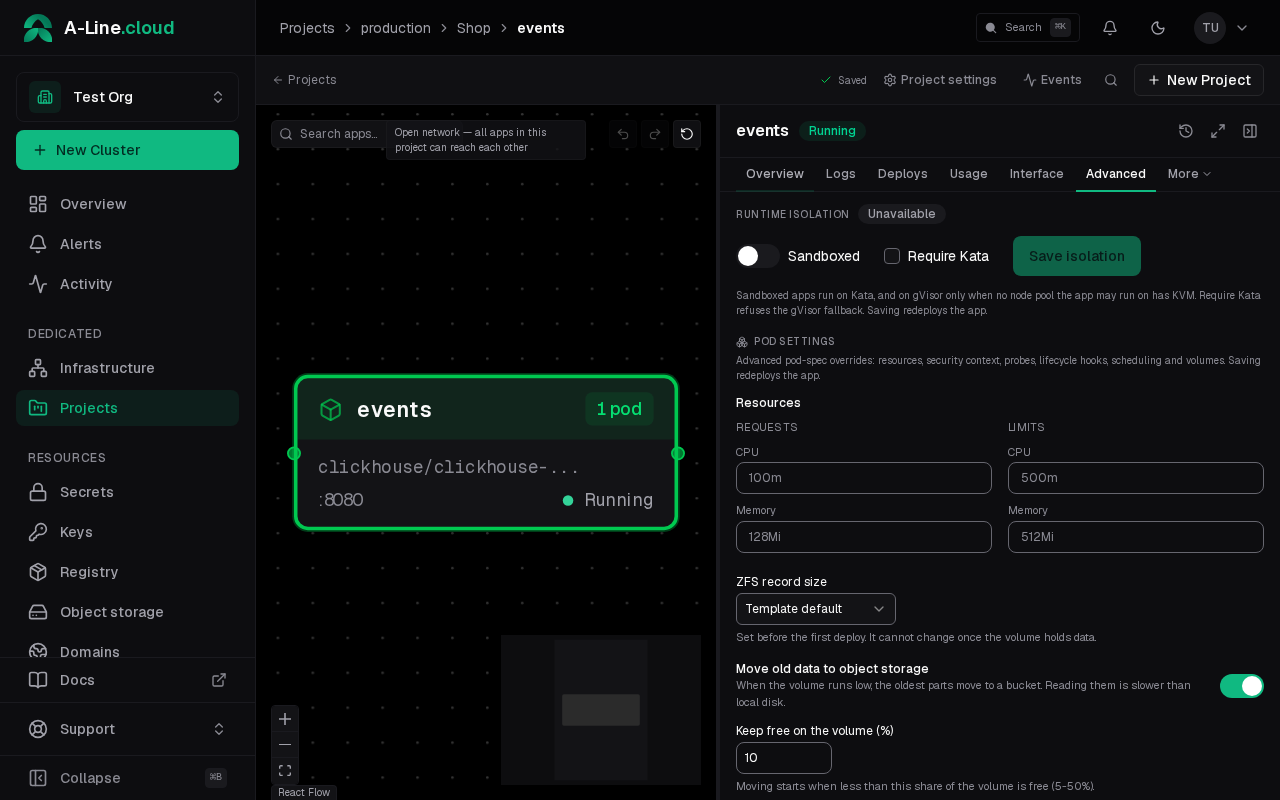
Select Save. The app redeploys.
ClickHouse then stops moving parts when the disk runs full. The bucket and
the cold volume stay, so data already moved stays readable and tables that
name tiered or a TO VOLUME 'cold' TTL keep working. TTL moves defined on
your tables keep running: remove the TTL to stop them.
In an IaC app file:
pod:
  cold_tier: { enabled: true, move_factor: 0.1 }
Delete the app
Deleting the app leaves its cold bucket in your organization as an ordinary bucket, still billed while it holds data. Delete the bucket in Storage once you no longer need the data.